Introducció
The Docooler Bone Conduction Speaker is a compact, portable audio device designed to transform various surfaces into sound-producing diaphragms. Utilizing bone conduction technology, it offers a unique audio experience with enhanced bass and volume depending on the surface it is placed upon. This manual provides essential information for the safe and effective use of your speaker.
Informació de seguretat
Please read and follow these safety guidelines to prevent damage to the device or personal injury:
- Do not expose the speaker to extreme temperatures or direct sunlight.
- Eviteu deixar caure o sotmetre el dispositiu a forts impactes.
- Keep the speaker away from water and liquids, as it is not waterproof.
- No intenteu desmuntar, reparar o modificar el dispositiu. Això anul·larà la garantia.
- Feu servir només el cable de càrrega proporcionat i un adaptador de corrent compatible.
- Eviteu escoltar música durant molt de temps a volums alts per evitar danys auditius.
Contingut del paquet
Verifiqueu que tots els elements siguin presents al vostre paquet:
- Docooler Bone Conduction Speaker (1 unit)
- Cable de càrrega USB tipus C (1 unitat)
- Manual d'usuari (aquest document)
- Adhesive Pads / Suction Cup (for mounting)
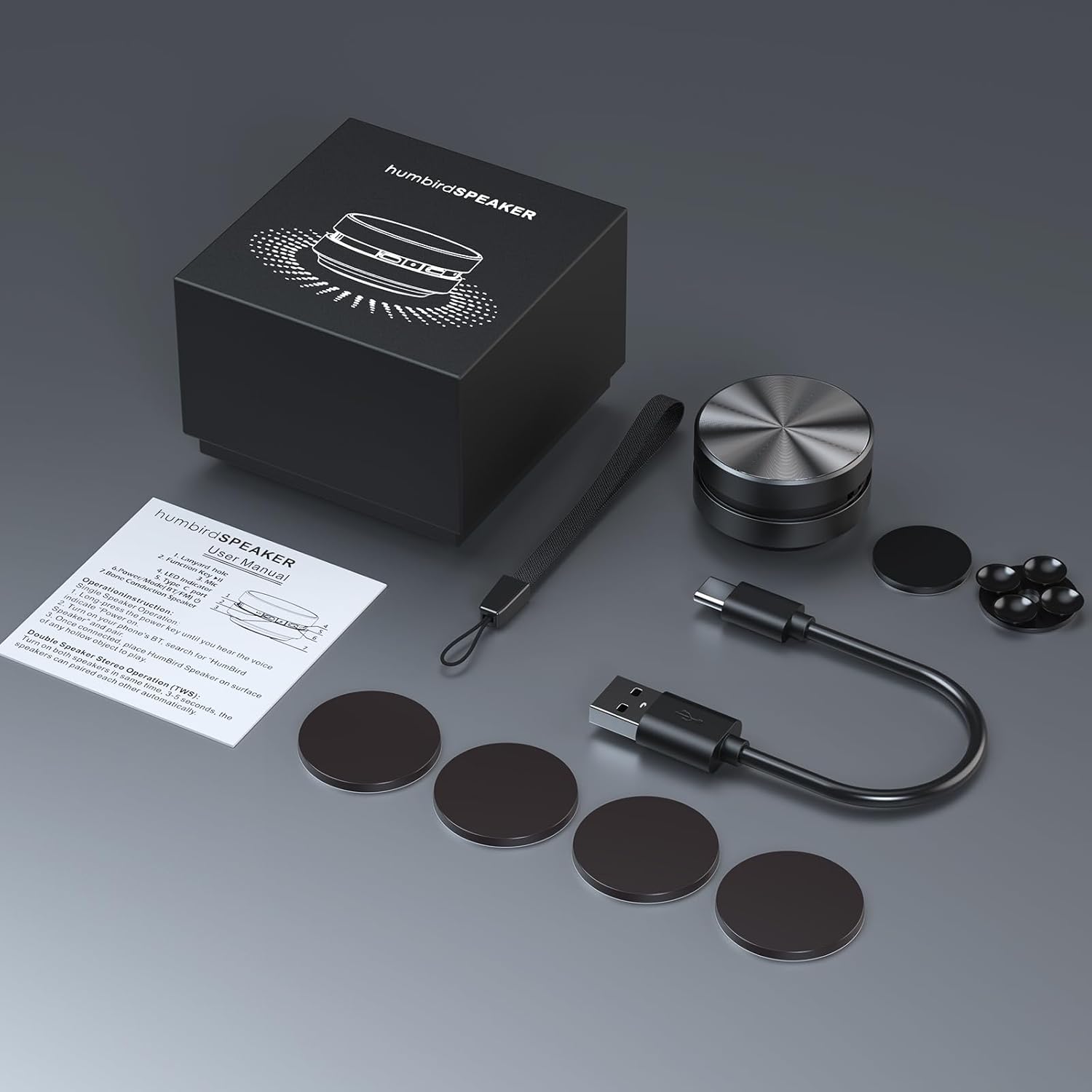
Image: Contents of the Docooler Bone Conduction Speaker package, showing the speaker, charging cable, and various adhesive pads for mounting.
Producte acabatview
The Docooler Bone Conduction Speaker is a compact device with a minimalist design. It features a durable aluminum alloy casing and a Type-C charging port. The speaker utilizes Bluetooth 5.0 for wireless connectivity and supports True Wireless Stereo (TWS) pairing for an enhanced audio experience.

Imatge: Frontal view of the Docooler Bone Conduction Speaker, highlighting its key features such as Bone Conduction technology, Bluetooth 5.0, TWS, Type-C Charging Port, Fast Charge, and Aviation Aluminum Alloy construction.
Configuració
1. Carregant l’altaveu
- Connecteu el cable USB tipus C proporcionat al port de càrrega de l'altaveu.
- Connecteu l'altre extrem del cable a una font d'alimentació USB compatible (per exemple, un adaptador de paret, un port USB de l'ordinador).
- El llum indicador mostrarà l'estat de càrrega (consulteu la secció d'indicadors LED per obtenir més informació).
- Una càrrega completa sol trigar aproximadament 1-2 hores.
2. Bluetooth Pairing (Single Speaker)
- Press and hold the power button on the speaker until the indicator light flashes, indicating pairing mode.
- Al telèfon intel·ligent o a un altre dispositiu amb Bluetooth, activeu el Bluetooth i cerqueu els dispositius disponibles.
- Select "Humbird Speaker" (or similar name) from the list of devices.
- Once connected, the indicator light will remain solid, and you will hear a confirmation tone.
3. True Wireless Stereo (TWS) Pairing (Two Speakers)
For a stereo sound experience, you can pair two Docooler Bone Conduction Speakers together:
- Assegureu-vos que els dos altaveus estiguin completament carregats i apagats.
- Power on both speakers simultaneously. They will automatically attempt to pair with each other within 3-5 seconds.
- Once successfully paired, one speaker will act as the master (left channel) and the other as the slave (right channel). The indicator lights will reflect their connected status.
- Now, connect your smartphone or Bluetooth device to the master speaker as described in the "Bluetooth Pairing (Single Speaker)" section.

Image: Two Docooler Bone Conduction Speakers positioned for True Wireless Stereo (TWS) pairing, demonstrating their ability to create a wider soundstage.
Instruccions de funcionament
1. Encendre/apagar
- Encès: Manteniu premut el botó d'engegada durant aproximadament 3 segons.
- Apagar: Manteniu premut el botó d'engegada durant aproximadament 3 segons.
2. Control de reproducció
- Reproduir/pausa: Premeu breument el botó d'encesa una vegada.
- Pista següent: Premeu dues vegades el botó d'engegada.
- Pista anterior: Triple-press the power button.
3. Ajust de volum
Volume is primarily controlled via your connected Bluetooth device (smartphone, tablet, etc.). The speaker itself does not have dedicated volume buttons.
4. Using with Different Surfaces
The unique feature of this bone conduction speaker is its ability to use various surfaces as sound amplifiers. Experiment with different materials to discover unique sound profiles:
- Hollow Objects: Cardboard boxes, plastic containers, or hollow wooden surfaces often produce a fuller sound with enhanced bass.
- Superfícies de vidre: Windows or glass tables can create a clear, crisp sound.
- Superfícies de fusta: Desks, guitars, or wooden panels can offer a warm, resonant tone.
- Car Dashboards: Can provide an immersive in-car audio experience.
Use the included adhesive pads or suction cup to securely attach the speaker to your chosen surface. The sound quality will vary significantly based on the material, size, and hollowness of the surface.

Image: The bone conduction speaker demonstrated on different surfaces, including a guitar, a kitchen countertop, a mirror, and a car dashboard, illustrating its versatility in sound production.
Manteniment
To ensure the longevity and optimal performance of your Docooler Bone Conduction Speaker, follow these maintenance tips:
- Neteja: Wipe the speaker with a soft, dry cloth. Do not use abrasive cleaners, alcohol, or solvents.
- Emmagatzematge: Guardeu l'altaveu en un lloc fresc i sec, allunyat de la llum solar directa i de temperatures extremes quan no l'utilitzeu.
- Cura de la bateria: For best battery life, avoid fully discharging the speaker frequently. Charge it regularly, even if not used for extended periods.
Resolució de problemes
| Problema | Possible solució |
|---|---|
| L'altaveu no s'encén. | Assegureu-vos que l'altaveu estigui completament carregat. Connecteu-lo a una font d'alimentació i torneu-ho a provar. |
| No es pot emparellar per Bluetooth. | Make sure the speaker is in pairing mode (flashing indicator light). Turn off and on Bluetooth on your device. Ensure the speaker is within range (up to 10 meters). |
| Sense so o amb un volum baix. | Increase the volume on your connected device. Ensure the speaker is placed on a suitable surface. Try a different surface. Check if the speaker is properly connected. |
| L'emparellament TWS ha fallat. | Ensure both speakers are powered off before attempting TWS pairing. Power them on simultaneously and wait for automatic pairing. Disconnect any existing Bluetooth connections before TWS pairing. |
| La qualitat del so és deficient. | Experiment with different surfaces. Hollow and resonant surfaces generally yield better results. Ensure the speaker is securely attached to the surface. |
Especificacions
| Característica | Detall |
|---|---|
| Nom del model | Altaveu de conducció òssia |
| Número de model | RM |
| Marca | Docooler |
| Material | Alumini |
| Dimensions del producte | 2.76 "P x 2.76" W x 1.97" H |
| Pes de l'article | 4.6 unces (0.13 quilograms) |
| Tecnologia de connectivitat | Bluetooth |
| Interval Bluetooth | 10 metres |
| Mode de sortida d'àudio | Estèreo (amb emparellament TWS) |
| Potència de sortida màxima dels altaveus | 3 watts |
| Resposta de freqüència | 20 kHz |
| Ràtio senyal / soroll | 70 dB |
| Font d'alimentació | Funciona amb bateria |
| Capacitat de la bateria | 400 milionsamp Hores |
| Mètode de control | App (implied by product data, but primary control is physical buttons) |
| És impermeable | FALSA |
Garantia i Suport
The Docooler Bone Conduction Speaker comes with a limited warranty. For specific warranty details, please refer to the documentation included with your purchase or contact Docooler customer service.
If you encounter any issues or have questions not covered in this manual, please contact Docooler customer support through their official channels. Contact information can typically be found on the product packaging or the official Docooler weblloc.


