1. Introducció
Thank you for choosing the KSIX Phoenix Smart Sunglasses. These innovative sunglasses combine stylish eye protection with integrated wireless audio technology, designed for active lifestyles. Please read this manual carefully to ensure proper use and maintenance of your device.

Image: KSIX Phoenix Smart Sunglasses with interchangeable dark and clear lenses.
Característiques principals:
- Dual Microphone System: Enhanced audio quality for calls and music with ambient noise cancellation.
- Controls tàctils intuïtius: Easy management of calls, music playback, and voice assistant activation.
- Sport-Optimized Design: Durable and comfortable for various sports, featuring Category 3 lenses.
- Resistència a l'aigua IPX5: Protected against sweat and light rain, ideal for outdoor activities.
- Lents intercanviables: Includes UV400 (grey) and UV320 (transparent) lenses for different light conditions.
- Ajust ajustable: Three sizes of nose pads for personalized comfort.
- Durada de la bateria ampliada: Fins a 6.5 hores de reproducció d'àudio amb una sola càrrega.
2. Contingut del paquet
Si us plau, verifiqueu que tots els elements siguin presents al vostre paquet:
- KSIX Phoenix Smart Sunglasses
- Grey UV400 Lens (pre-installed or separate)
- Transparent UV320 Lens
- Cable de càrrega magnètica
- 3 Pairs of Nose Pads (Small, Medium, Large)
- Manual d'usuari (aquest document)
3. Configuració i primer ús
3.1 Charging the Sunglasses
Before first use, fully charge your KSIX Phoenix Smart Sunglasses.
- Connect the magnetic charging cable to the charging port located on the right temple of the sunglasses.
- Connecteu l'altre extrem del cable a una font d'alimentació USB (per exemple, un port USB de l'ordinador o un adaptador de paret USB).
- L'indicador lluminós de càrrega s'il·luminarà. Una càrrega completa triga aproximadament 1.5 hores.
- Un cop estigui completament carregat, desconnecteu el cable.

Image: Illustration of the magnetic charging port and battery specifications (6.5h playback, 1.5h charge time, 100mAh battery).
3.2 Engegada/apagada
The KSIX Phoenix Smart Sunglasses feature an automatic power on/off function.
- Per encendre: Gently open the right temple of the sunglasses. You will hear an audible confirmation.
- Per apagar: Gently close the right temple of the sunglasses. You will hear an audible confirmation.

Image: Visual guide for automatic power on/off by adjusting the right temple.
3.3 Vinculació Bluetooth
To connect your sunglasses to a smartphone or other Bluetooth-enabled device:
- Ensure the sunglasses are powered on.
- Al telèfon intel·ligent, activeu el Bluetooth i cerqueu els dispositius disponibles.
- Select "KSIX Phoenix" from the list of devices.
- Once paired, you will hear an audible confirmation.
3.4 Ajust de les coixinetes nasals
For optimal comfort and fit, select the appropriate nose pad size.
- The package includes three sizes: Small, Medium, and Large.
- Gently remove the pre-installed nose pads and replace them with the size that best fits your nose bridge.
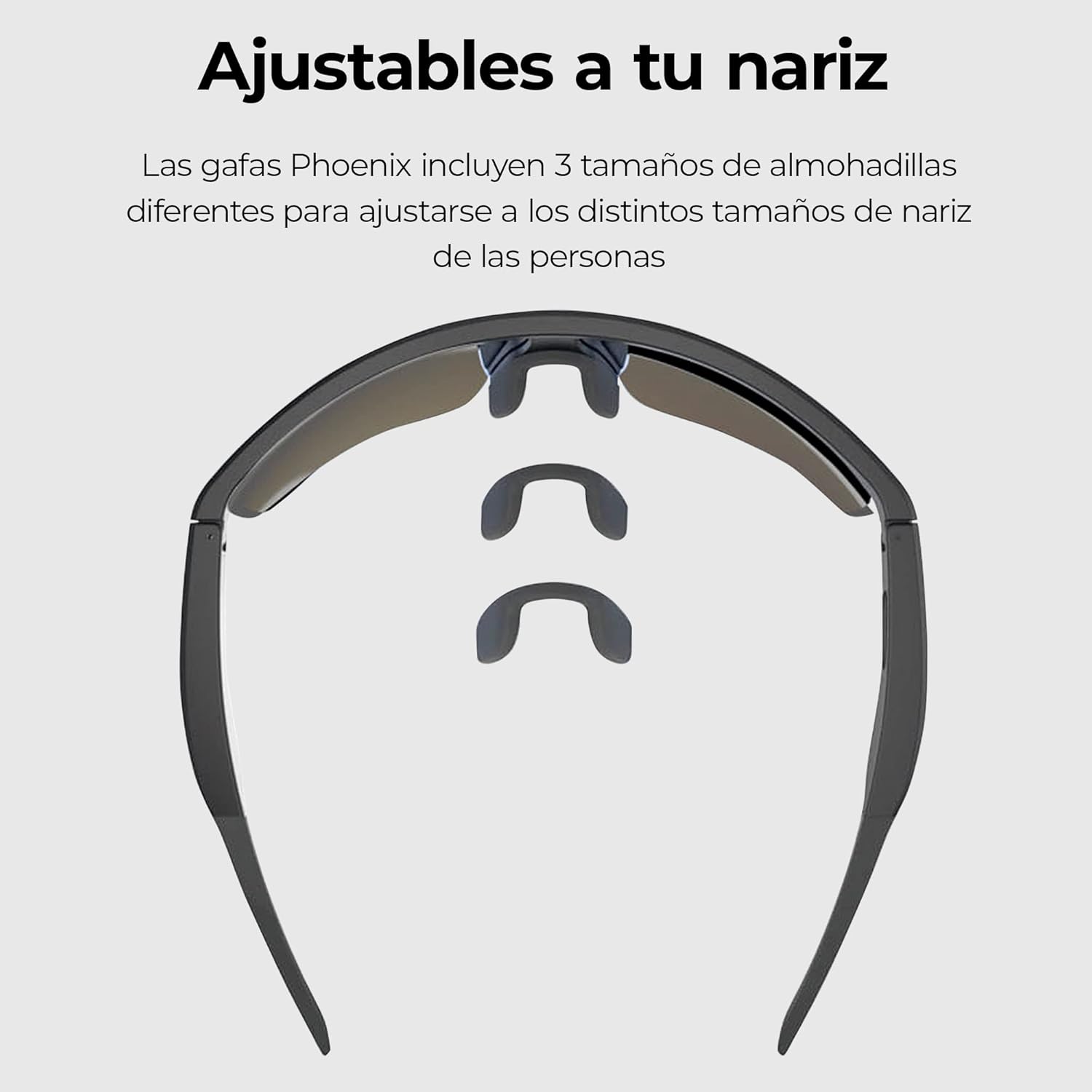
Image: Three interchangeable nose pad sizes (S, M, L) for customized fit.
4. Instruccions de funcionament
4.1 Controls tàctils
The KSIX Phoenix Smart Sunglasses feature intuitive touch controls on the temples for various functions. The high sensitivity allows use even with sports gloves.

Image: Visual guide to touch control gestures on the sunglasses temple.
| Acció | Funció |
|---|---|
| Un sol clic | Answer / End Call, Play / Pause Music |
| Manteniu premut (2 segons) | Rebutja la trucada, activa l'assistent de veu |
| Fes doble clic | Següent Cançó |
| Triple clic | Cançó anterior |
4.2 Fer i rebre trucades
The integrated dual microphones ensure clear communication.
- Respondre una trucada: When a call comes in, single-click the touch sensor on either temple.
- Finalització d'una trucada: During a call, single-click the touch sensor on either temple.
- Rebutjar una trucada: When a call comes in, press and hold the touch sensor for 2 seconds.
- Assistent de veu: Press and hold the touch sensor for 2 seconds to activate your device's voice assistant (e.g., Siri, Google Assistant).

Image: Depiction of the ambient noise-cancelling microphone and the hands-free call microphone.
4.3 Reproducció de música
Control your music directly from your sunglasses.
- Reproduir/pausa: Single-click the touch sensor.
- Pista següent: Double-click the touch sensor.
- Pista anterior: Triple-click the touch sensor.
4.4 Changing Lenses
The KSIX Phoenix Smart Sunglasses come with interchangeable lenses to adapt to different lighting conditions.
- Grey UV400 Lens: Ideal for bright conditions, offering Category 3 sun protection.
- Transparent UV320 Lens: Suitable for low-light conditions or indoor use, providing basic UV protection.
- To change lenses, carefully detach the current lens from the frame and snap the desired lens into place. Ensure it is securely fastened.

Image: Comparison of the dark and clear interchangeable lenses.
5. Manteniment i cura
To ensure the longevity and optimal performance of your KSIX Phoenix Smart Sunglasses, follow these care instructions:
- Neteja de lents: Use a soft, clean microfiber cloth to wipe the lenses. For stubborn smudges, use a lens cleaning spray specifically designed for eyewear. Avoid abrasive materials or harsh chemicals.
- Marc de neteja: Netegeu el marc amb un drap suauamp tela.
- Resistència a l'aigua (IPX5): The sunglasses are rated IPX5, meaning they are protected against low-pressure water jets from any direction. This makes them resistant to sweat and light rain. Do not submerge the sunglasses in water or expose them to high-pressure water.
- Emmagatzematge: When not in use, store the sunglasses in their protective case to prevent scratches and damage.
- Temperatura: Avoid exposing the sunglasses to extreme temperatures (hot or cold) for extended periods, as this can affect battery life and electronic components.

Image: KSIX Phoenix Smart Sunglasses demonstrating IPX5 water resistance against splashes.
6. Solució De Problemes
If you encounter any issues with your KSIX Phoenix Smart Sunglasses, please refer to the following common problems and solutions:
| Problema | Causa possible | Solució |
|---|---|---|
| Sunglasses do not power on. | Low battery. Right temple not fully opened. | Charge the sunglasses fully. Ensure the right temple is fully opened to activate. |
| No es pot emparellar per Bluetooth. | Sunglasses not in pairing mode. Bluetooth off on device. Interference. | Ensure sunglasses are powered on. Turn Bluetooth off and on again on your device. Move closer to the device. |
| No hi ha àudio o hi ha mala qualitat d'àudio. | Volume too low. Not properly paired. Obstruction. | Increase volume on both sunglasses and connected device. Re-pair the device. Ensure nothing is blocking the speakers. |
| Els controls tàctils no responen. | Dirty sensor. Software glitch. | Clean the touch sensor area. Power off and on the sunglasses. |
| La bateria s'esgota ràpidament. | High volume usage. Old battery. | Reduce volume. Ensure sunglasses are powered off when not in use. |
7. Especificacions
| Característica | Detall |
|---|---|
| Número de model | BXBGS01 |
| Marca | KSIX intel·ligent per a la teva tecnologia |
| Bateria | Polímer de liti de 100 mAh |
| Durada de la bateria | Fins a 6.5 hores (amb un 50% de volum) |
| Temps de càrrega | Aprox. 1.5 hores |
| Resistència a l'aigua | IPX5 (Resistant to sweat and light rain) |
| Lens Protection (Grey) | UV400, Category 3 |
| Lens Protection (Transparent) | UV320 |
| Micròfons | Dual (Ambient Noise Cancellation, Call Microphone) |
| Connectivitat | Sense fil (Bluetooth) |
| País d'origen | Xina |
8. Informació de la garantia
KSIX products are designed and manufactured to the highest quality standards. This product is covered by a limited warranty from the date of purchase. Please retain your proof of purchase for warranty claims. The warranty covers manufacturing defects but does not cover damage caused by misuse, accidents, unauthorized modifications, or normal wear and tear. For specific warranty terms and conditions, please refer to the warranty card included with your product or visit the official KSIX weblloc.
9. Suport i contacte
If you require further assistance or have questions not covered in this manual, please contact KSIX customer support:
- Weblloc: Visit the official KSIX weblloc web per a preguntes freqüents, registre de productes i recursos d'assistència.
- Correu electrònic: Refer to your product packaging or the KSIX weblloc web per a adreces de correu electrònic d'atenció al client.
- Telèfon: Contact details for regional support may be available on the KSIX weblloc.
Please have your product model number (BXBGS01) and proof of purchase ready when contacting support.


