1. Introducció
This user manual provides comprehensive instructions for the installation, operation, and maintenance of your DDPAI N3 Pro Dual Dash Cam. Designed to enhance your driving safety and provide reliable evidence in case of incidents, this dual dash camera system captures high-quality video from both the front and rear of your vehicle.
Please read this manual thoroughly before using the product to ensure proper functionality and to maximize its features. Keep this manual for future reference.
2. Contingut del paquet
Verifiqueu que tots els elements que s'enumeren a continuació s'inclouen al vostre paquet:
- 1x 2.5K N3P Dash Cam (Front)
- 1x 1080P In-car Rear Camera
- 1 carregador de cotxes
- 1x 9.84ft Dash Cam Front Power Cable
- 1x 18ft Rear Car Camera Cable
- 1x Dash Cam Bracket
- 1 x manual d'usuari
- 1 adhesiu 3M
- 1x Eina d'instal·lació
3. Producte acabatview
The DDPAI N3 Pro Dual Dash Cam system consists of a main front camera unit and a compact rear camera. Below are the key components and their functions:
3.1. Main Front Camera
The front camera captures 2.5K (1600P) video and houses the main processing unit, GPS module, Wi-Fi module, and control buttons.
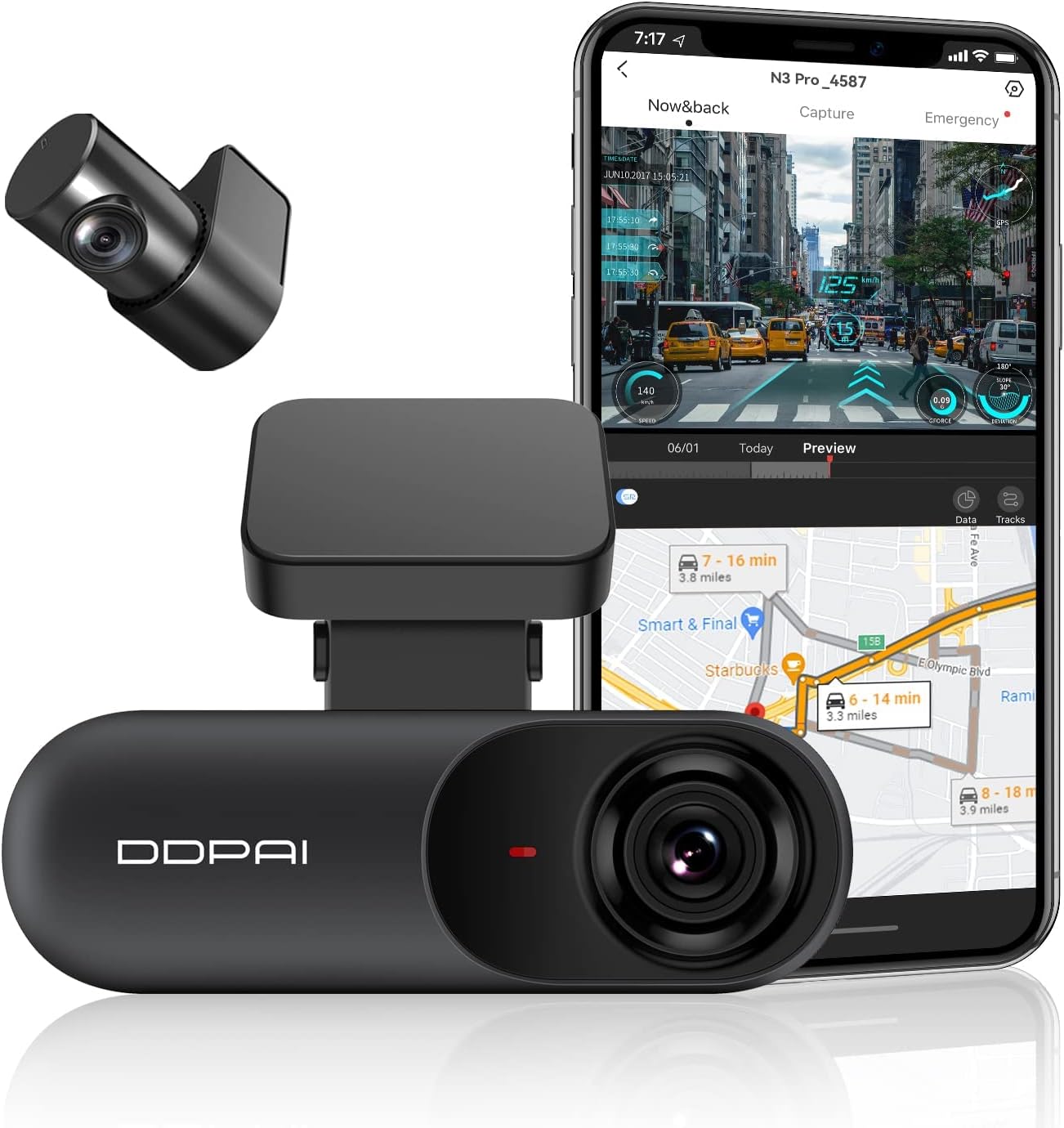
Figure 3.1: DDPAI N3 Pro Dual Dash Cam (Front and Rear) with App Interface.
This image displays the main DDPAI N3 Pro dash cam unit, the smaller rear camera, and a smartphone screen showing the accompanying mobile application interface with live view and map data.
3.2. Càmera posterior
The rear camera records 1080P video and connects to the main unit via a dedicated cable. It is designed for discreet installation on the rear windshield.
3.3. Foldable Design and Dimensions
The dash cam features a compact and foldable design, allowing for flexible positioning and minimal obstruction of your view.

Figure 3.2: Foldable Design and Dimensions of the Dash Cam.
This diagram illustrates the compact, foldable design of the dash cam, highlighting its adjustable angle and built-in GPS module. It also shows options for capturing inside or outside the vehicle.
4. Configuració
Before permanent installation, it is recommended to perform an initial setup to ensure all components are functioning correctly.
4.1. Inserció de la targeta MicroSD
The DDPAI N3 Pro supports MicroSD cards up to 256GB (Class 10 or higher recommended, not included). Ensure the dash cam is powered off before inserting or removing the card.
- Locate the MicroSD card slot on the side of the main dash cam unit.
- Introduïu la targeta MicroSD amb els contactes daurats mirant cap a la part posterior de la càmera fins que encaixi al seu lloc.
- To remove, gently push the card inward until it clicks, then release to eject.
4.2. Initial Power-On Check
Connect the front dash cam to the car charger using the provided power cable. Plug the car charger into your vehicle's cigarette lighter socket. The dash cam should power on automatically and indicate recording status.
Video 4.1: DDPAI N3 PRO 2K Dash Cam Front and Rear Camera Overview.
Aquest vídeo ofereix un finalview of the DDPAI N3 Pro dash cam, including its components and initial setup steps. It demonstrates connecting the camera and preparing for installation.
5. Instal·lació
Follow these steps for optimal installation of your DDPAI N3 Pro Dual Dash Cam.
5.1. Instal·lació de la càmera frontal
- Clean the area on your windshield where you intend to mount the dash cam. Ensure it is free of dust and grease.
- Attach the dash cam bracket to the main unit.
- Remove the protective film from the 3M adhesive on the bracket and firmly press it onto the chosen spot on the windshield, ideally behind the rearview mirall per evitar obstruir-vos view.
- Route the front power cable along the edge of the windshield and down to your car's cigarette lighter socket. Use the provided installation tool to tuck the cable neatly under the trim.
5.2. Instal·lació de la càmera posterior
- Clean the rear windshield area where the rear camera will be mounted.
- Attach the rear camera to its bracket.
- Remove the protective film from the 3M adhesive on the rear camera bracket and stick it to the middle of the rear windshield.
- Connect the rear camera cable to the rear camera and route it along the headliner and side pillars to the front dash cam unit. Plug the rear camera cable into the designated port on the front dash cam.

Figure 5.1: Hidden and Discreet Installation.
This image illustrates the recommended hidden cable routing for both the front and rear dash cameras, ensuring a clean and unobtrusive installation within the vehicle's interior.
Video 5.2: DDPAI 2.5K Dual Car Dash Cam Front and Rear Installation.
This video demonstrates the step-by-step installation process for the DDPAI 2.5K Dual Dash Cam, covering both front and rear camera placement and cable management.
6. DDPAI App Usage
The DDPAI App allows you to control your dash cam, view viu footage, download videos, and manage settings directly from your smartphone.
6.1. Descàrrega de l'aplicació
Scan the QR code in the user manual or search for "DDPAI" on the Google Play Store (Android) or Apple App Store (iOS) to download the official DDPAI App.

Figure 6.1: DDPAI App Download Options.
This image shows a smartphone displaying a QR code for the DDPAI app, along with icons for downloading from Google Play and the App Store, emphasizing easy access to the application.
6.2. Connecting to the Dash Cam
- Ensure your dash cam is powered on.
- Activa el Bluetooth al teu telèfon intel·ligent.
- Open the DDPAI App and tap "Add a device". The app will scan for nearby Bluetooth devices.
- Select your dash cam's device name (e.g., "DDPAI_N3Pro_XXXX") from the list.
- Follow the on-screen prompts to authorize the connection by pressing the function button on the dash cam.
- For Wi-Fi connection (required for live view i file transfer), the app will guide you to your phone's Wi-Fi settings. Select the dash cam's Wi-Fi network (e.g., "DDPAI_N3Pro_XXXX") and enter the default password (usually "1234567890").
6.3. Funcions de l'aplicació
Once connected, you can access various features:
- Pre Liveview: View foo en temps realtage from both front and rear cameras.
- Device Album: Browse and download recorded videos and photos to your phone.
- Configuració del dispositiu: Adjust camera settings such as recording resolution, G-sensor sensitivity, parking mode, and more.
- Actualització del firmware: Update the dash cam's firmware over-the-air (OTA) through the app.
Video 6.2: DDPAI App Tutorial.
This tutorial video guides users through the features and functionalities of the DDPAI mobile application, including device connection, live view, file management, and settings adjustment.
7. Instruccions de funcionament
The DDPAI N3 Pro is designed for automatic operation once powered on. Here's how its core features work:
7.1. Dual Recording (2.5K Front + 1080P Rear)
The dash cam simultaneously records high-definition video from both the front (1600P) and rear (1080P) cameras, providing comprehensive coverage of your driving environment. This enhances clarity for details like license plates and road signs.
Figure 7.1: 2.5K Front and 1080P Rear Dual Recording.
This image demonstrates the high-definition recording capabilities of the DDPAI N3 Pro, showcasinmenjar clartage from both the 2.5K front camera and the 1080P rear camera, even at a distance.
7.2. Super Night Vision 2.0
Equipped with an advanced CMOS sensor, Night Vision 2.0, a large F1.8 aperture, and a 5-layer lens, the dash cam delivers enhanced clarity in low-light conditions. WDR (Wide Dynamic Range) technology further optimizes image quality, ensuring critical details are captured day and night.
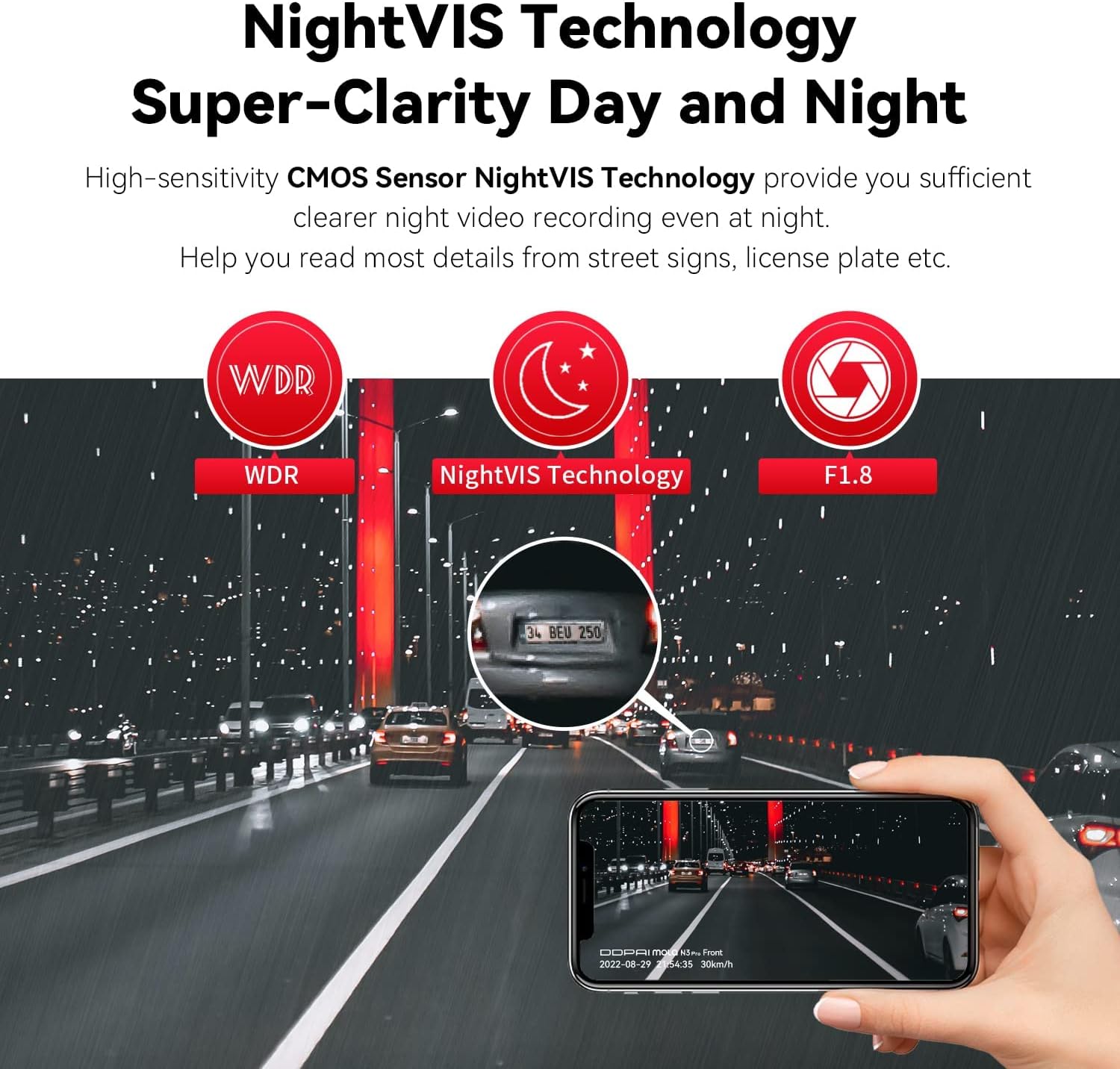
Figure 7.2: NightVIS Technology for Super-Clarity Day and Night.
This graphic highlights the key technologies contributing to the dash cam's superior night vision, including WDR, NightVIS, and a wide F1.8 aperture, which improve clarity and detail capture in challenging light conditions.
7.3. Built-in GPS and SR2.0 Technology
The integrated GPS module records your driving route, speed, and location data. The SR2.0 technology, accessible via the DDPAI app, provides real-time driving data such as acceleration, distance to vehicles ahead, and lane deviation alerts, enriching your driving experience.

Figure 7.3: Built-in GPS & Virtual and Reality Features.
This image illustrates the advanced features of the DDPAI app, including real-time driving data display (speed, G-force, deviation) and GPS tracking, providing a comprehensive overview of driving metrics.
7.4. 24-Hour Parking Mode & Collision Lock (G-Sensor)
The dash cam features a built-in G-sensor that automatically detects sudden shakes or collisions while driving or parked. In parking mode, it records critical footage to protect your vehicle. For 24-hour parking monitoring, an additional hardwire kit (ASIN: B0D12D7HSC) is required and sold separately.

Figure 7.4: Essential Witness for Accidents.
This graphic highlights the dash cam's role as an essential witness, featuring 24-hour parking monitoring and emergency lock functions that automatically save footage during collisions or suspicious activities.
7.5. Enregistrament en bucle
Loop recording ensures continuous recording by automatically overwriting the oldest unlocked files when the MicroSD card is full. This guarantees that you always have the most recent footagDisponible
8. Manteniment
Un manteniment adequat garanteix la longevitat i el rendiment òptim de la càmera del salpicader.
8.1. Formatting the MicroSD Card
It is recommended to format the MicroSD card regularly (e.g., once a month) to prevent data corruption and ensure smooth recording. This can typically be done through the DDPAI App's device settings.
8.2. Neteja de les lents
Use a soft, lint-free cloth to gently wipe the front and rear camera lenses. Avoid using abrasive cleaners or solvents that could damage the lens coating.
8.3. Actualitzacions de firmware
Regularly check for firmware updates via the DDPAI App. Firmware updates often include performance improvements, bug fixes, and new features. Follow the app's instructions for a safe update process.
8.4. Super Capacitor Technology
The DDPAI N3 Pro utilizes a built-in super capacitor instead of a traditional lithium battery. This technology offers enhanced durability and safety, especially in extreme temperatures ranging from -4°F to 158°F, preventing issues like battery bulging or overheating.

Figure 8.1: Super Performance Capacitor Benefits.
This image highlights the advantages of the built-in Super Capacitor, such as resistance to extreme temperatures (-4°F to 158°F), increased safety, heat resistance, and longer lifespan, contrasting it with the potential hazards of lithium batteries.
9. Solució De Problemes
If you encounter issues with your DDPAI N3 Pro, refer to the following common problems and solutions:
| Problema | Possible causa/solució |
|---|---|
| La càmera del salpicader no s'encén. |
|
| Cannot connect to the DDPAI App. |
|
| Problemes d'enregistrament (per exemple, corrupció files, stops recording). |
|
| El GPS no funciona o és inexacte. |
|
10. Especificacions
| Característica | Detall |
|---|---|
| Dimensions del producte | 2.05 x 8.85 x 5.91 polzades |
| Pes de l'article | 12.3 unces |
| Número de model | N3 PRO GPS |
| Bateries | 1 AA batteries required (for remote, if applicable, not for main unit) |
| Resolució de captura de vídeo | Davant: 1600P (2.5K), Posterior: 1080P |
| Gran Angular | Davant: 140°, Darrere: 125° |
| Tecnologia de connectivitat | Wi-Fi |
| Característiques especials | Built-In WiFi, G-Sensor, Night Vision, Built-In GPS, 24H Parking Monitor (requires hardwire kit) |
| Suport d'emmagatzematge | Up to 256GB MicroSD (Class 10 or higher) |
| Temperatura de funcionament | -4°F to 158°F (with Super Capacitor) |
11. Garantia i Suport
11.1. Informació de la garantia
The DDPAI N3 Pro Dash Cam comes with an 18 mesos de garantia des de la data de compra, que cobreix els defectes de fabricació. Conserveu el comprovant de compra per a reclamacions de garantia.
11.2. Atenció al client
For any questions, technical support, or warranty inquiries, please contact DDPAI customer support:
- Correu electrònic: servicecenter@ddpai.com
- Manual d'usuari (PDF): Descarrega el manual d'usuari en PDF
DDPAI offers quick 24/7 live email customer support.


