1. Introducció
This instruction manual provides detailed guidance for the assembly, operation, and maintenance of your BONTEC Mobile TV Cart. Designed for versatility and durability, this rolling TV stand is compatible with a wide range of flat and curved screen TVs, offering adjustable height and convenient features for various environments.

Figure 1: BONTEC Mobile TV Cart with TV and media shelf.
2. Característiques del producte
- Compatibilitat universal: Fits most 23-60 inch LCD/LED/OLED flat and curved screen TVs with VESA patterns up to 400x400mm.
- Mobile & Versatile Use: Effortlessly roll your TV cart from room to room with lockable wheels. Ideal for home, office, schools, or trade shows.
- Altura ajustable: Personalitza el teu viewing experience with height-adjustable settings for both the TV mount and media shelf.
- Construcció resistent i duradora: Built with high-quality steel, supporting up to 88 lbs. Includes additional safety screws for stability.
- Convenient Media Shelf & Cable Management: Includes an adjustable shelf for devices and integrated cable management for a tidy setup.
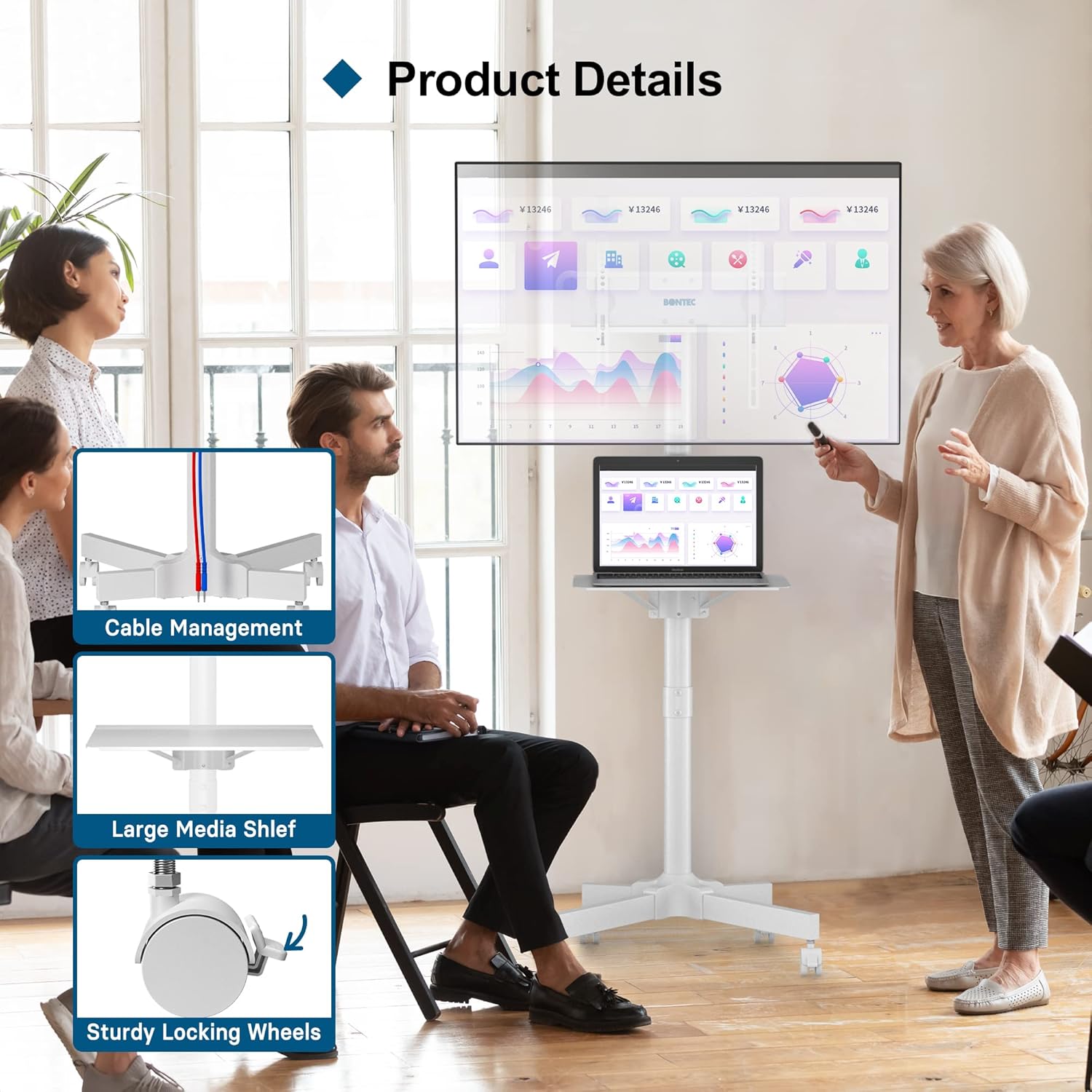
Figure 2: Key features including cable management, media shelf, and locking wheels.
3. Muntatge i muntatge
Follow these steps for proper assembly of your mobile TV cart. It is recommended to have two people for certain steps, especially when mounting the TV.
3.1 Unpacking and Parts Verification
Carefully unpack all components and verify against the included parts list. Ensure all screws, washers, and spacers are present.

Figure 3: Included fitting hardware for assembly.
3.2 Muntatge de base
- Attach the wheels to the base legs. Ensure the locking wheels are positioned as desired for easy access.
- Connect the vertical poles to the assembled base. Secure tightly with provided bolts.
3.3 Media Shelf Installation
The media shelf can be adjusted to various heights. Attach the shelf support to the main pole at your preferred height using the designated holes and screws.

Figure 4: Media shelf height adjustment.
3.4 TV Mount Installation
Attach the TV mounting brackets to the back of your TV using the appropriate VESA screws and spacers. Refer to your TV's manual for specific VESA pattern requirements. The TV mount supports VESA patterns up to 400x400mm.

Figure 5: VESA compatibility chart.
Once the brackets are attached to the TV, carefully lift the TV and hook the brackets onto the main pole's mounting plate. Secure with safety screws.
Video 1: Official BONTEC Mobile TV Cart assembly and feature overview. This video demonstrates the ease of assembly and highlights key features like height adjustment and mobility.
4. Instruccions de funcionament
4.1 Ajust de l'alçada del televisor
The TV mount can be adjusted along the main pole to achieve your desired viewing height. Loosen the securing mechanism, slide the TV mount to the new position, and re-tighten securely.

Figure 6: Adjustable height feature for optimal viewing.
4.2 Mobilitat i rodes amb bloqueig
To move the TV cart, ensure all wheel locks are disengaged. The 360° rotating wheels allow for easy maneuverability. To secure the cart in place, engage the locking mechanism on each wheel.

Figure 7: Detail of 360° rotating and locking wheels.
4.3 Gestió de cables
Utilize the integrated cable management system to keep your cables organized and out of sight. Route cables through the designated clips or channels along the main pole for a clean setup.

Figure 8: Cable management system for a tidy appearance.
5. Manteniment
- Reviseu regularment tots els cargols i connexions per assegurar-vos que estiguin ben ajustats i segurs.
- Clean the metal surfaces with a soft, damp drap. Eviteu productes de neteja o dissolvents abrasius.
- Inspect wheels periodically for any debris or wear that might affect mobility.
6. Solució De Problemes
- Issue: Cart is wobbly.
Solution: Ensure all assembly screws are tightened. Verify that the TV is securely mounted to the VESA plate and that the safety screws are engaged. Check that all wheel locks are properly engaged if stationary.
- Problema: Les rodes no giren suaument.
Solution: Disengage all wheel locks. Check for any debris (hair, lint, etc.) caught in the wheels and remove. Lubricate wheel axles if necessary.
- Issue: TV mount or media shelf cannot be adjusted.
Solution: Ensure the locking mechanisms for height adjustment are fully loosened before attempting to move. Do not force adjustment if resistance is met.
7. Especificacions
| Atribut | Detall |
|---|---|
| Marca | BONTEC |
| Número de model | TC003-WH |
| Mides de TV compatibles | 23-60 polzades |
| Max VESA Pattern | 400x400mm |
| Max TV Load Capacity | 88 lliures (40 kg) |
| Max Media Shelf Load Capacity | 22 lliures (10 kg) |
| Material | High-Quality Steel |
| Tipus de moviment | Rotate, Mobile (with locking wheels) |
| Pes de l'article | 16.39 lliures |
| Color | Blanc |
8. Garantia i Suport
For warranty information and customer support, please refer to the official BONTEC weblloc web o contacteu directament amb el seu servei d'atenció al client. Conserveu el rebut de compra com a comprovant de compra.
Per a més ajuda, podeu visitar el Botiga BONTEC a Amazon.


