Introducció
Thank you for choosing the SGNICS T59 Wireless Earbuds. These earbuds are designed to provide a high-quality audio experience with features like dual LED power display, long battery life, wireless and USB-C charging, and a secure fit for sports. This manual will guide you through the setup, operation, maintenance, and troubleshooting of your new earbuds.

Image: SGNICS T59 Wireless Earbuds shown inside their charging case, displaying battery levels on an LED screen.
Configuració
1. Càrrega inicial
Before first use, fully charge the earbuds and the charging case. The case supports both wireless charging and USB Type-C charging.
- Càrrega USB tipus C: Connect the provided Type-C cable to the charging case and a compatible USB power source. The battery display on the left will flash while charging.
- Càrrega sense fils: Place the charging case on a wireless charging pad (not included) with the LED display facing up.
A 15-minute charge can provide up to 1 hour of listening time. The LED bar on the case indicates the charging status of the earbuds, fading when fully charged.
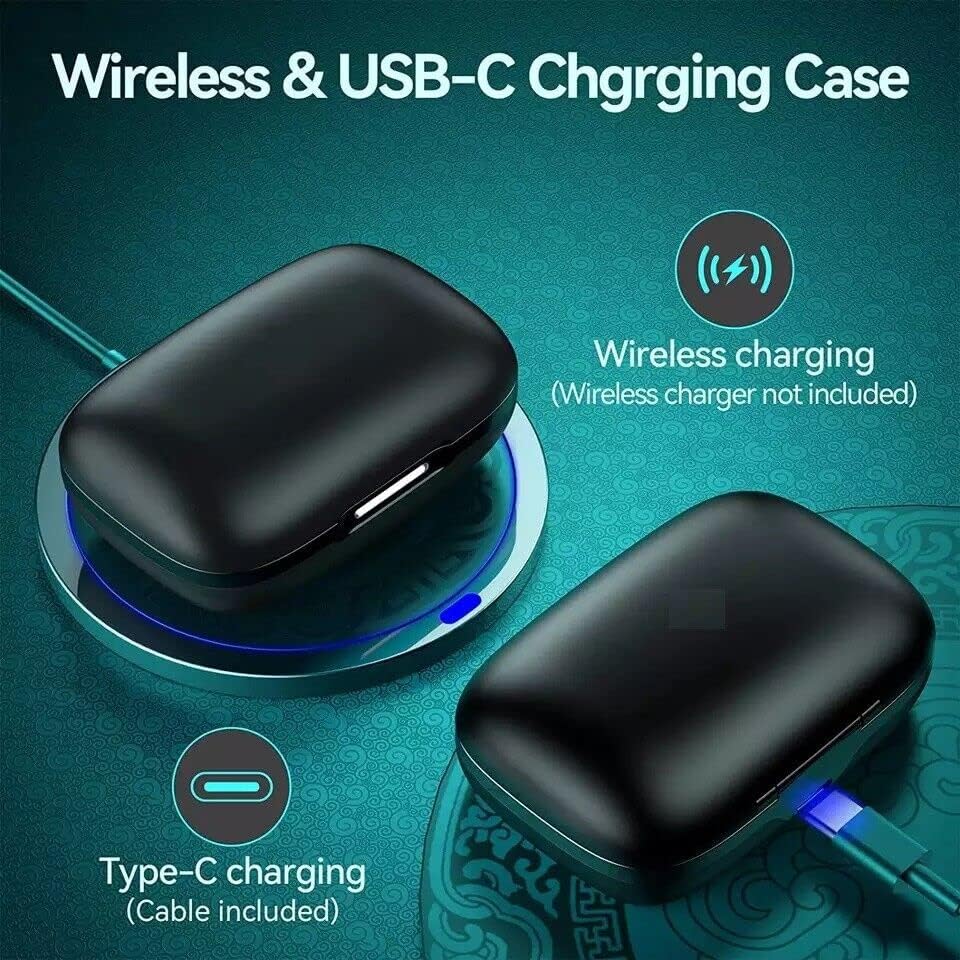
Image: The SGNICS T59 charging case demonstrating both wireless charging on a pad and wired charging via a USB-C cable.
2. Emparellament Bluetooth
- Assegureu-vos que els auriculars estiguin carregats.
- Obre l'estoig de càrrega. Els auriculars s'encendran automàticament i entraran en mode d'emparellament.
- Al dispositiu (telèfon intel·ligent, tauleta, ordinador), activeu el Bluetooth i cerqueu els dispositius disponibles.
- Select "SGNICS T59" from the list of devices to connect.
- Un cop connectats, sentireu un missatge d'àudio i els auriculars estaran llestos per al seu ús.
Els auriculars es tornaran a connectar automàticament a l'últim dispositiu emparellat quan es treguin de l'estoig, si el Bluetooth està activat al dispositiu.
Instruccions de funcionament
Encès/Apagat
- Encès: Traieu els auriculars de l'estoig de càrrega. S'encendran automàticament.
- Apagar: Place the earbuds back into the charging case. They will automatically power off and begin recharging.
Basic Controls (Multi-function Button)
Each earbud features a multi-function button for easy control of audio and calls.
- Reproduir/pausa: Un sol toc a qualsevol dels auriculars.
- Següent cançó: Toca dues vegades l'auricular dret.
- Cançó anterior: Toca dues vegades l'auricular esquerre.
- Respondre/Finalitzar la trucada: Toqueu un sol cop a qualsevol dels auriculars durant una trucada entrant o activa.
- Rebutja la trucada: Premeu i manteniu premut qualsevol dels auriculars durant 2 segons durant una trucada entrant.
- Activa l'Assistent de veu: Toqueu tres vegades qualsevol dels auriculars (la funcionalitat pot variar segons el dispositiu).

Image: A person wearing the SGNICS T59 earbuds, illustrating the secure fit provided by the flexible earhooks and the location of the button control. Also shows different ear tip sizes (S, M, L).
Portant els auriculars
The SGNICS T59 earbuds are designed with flexible earhooks and an ergonomic shape for a secure and comfortable fit, especially during physical activity.
- Select the appropriate ear tip size (S, M, L) for a snug fit.
- Col·loca l'auricular al conducte auditiu.
- Adjust the flexible earhook over the top and behind your ear until it feels secure and comfortable.
Pantalla de bateria
The charging case features a dual LED digital display to monitor battery levels:
- The number on the screen indicates the remaining battery percentage de la caixa de càrrega.
- The LED bars (L and R) show the charging status of the individual earbuds. These bars will fade as the earbuds reach full charge.
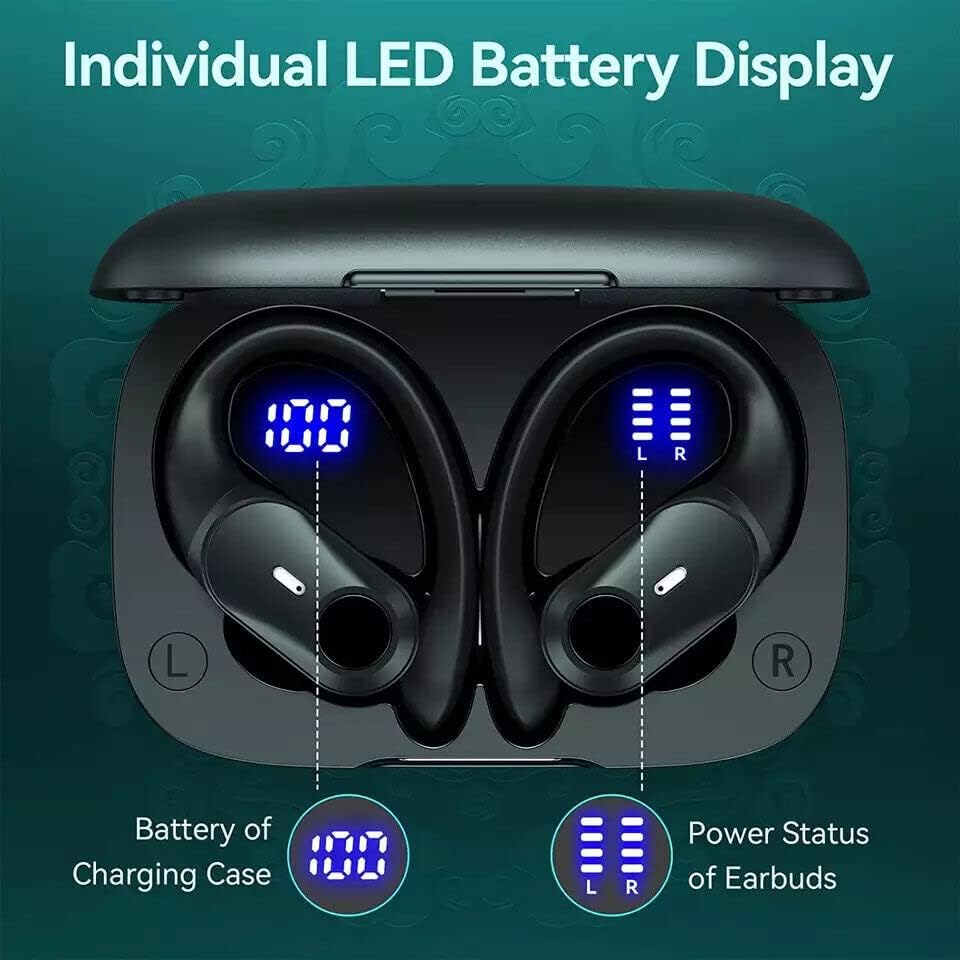
Image: Close-up of the SGNICS T59 charging case's LED display, clearly showing the numerical battery percentage for the case and separate bar indicators for the left and right earbuds.
Manteniment
- Neteja: Netegeu regularment els auriculars i l'estoig de càrrega amb un drap suau, sec i sense borrissol. Eviteu utilitzar productes químics agressius o materials abrasius.
- Consells per a les orelles: Traieu les puntes de les orelles i netegeu-les amb aigua i sabó suau si cal. Assegureu-vos que estiguin completament seques abans de tornar-les a col·locar.
- Emmagatzematge: Quan no els utilitzeu, guardeu els auriculars a la seva funda de càrrega per protegir-los i mantenir-los carregats. Guardeu-los en un lloc fresc i sec, allunyat de temperatures extremes.
- Resistència a l'aigua (IPX7): The earbuds are IPX7 waterproof, meaning they can withstand splashes, rain, and sweat. However, they are not designed for swimming or prolonged submersion. Ensure the charging port is dry before charging.
Resolució de problemes
- Auriculars que no s'aparellen amb el dispositiu:
- Ensure earbuds are charged and removed from the case.
- Desactiva i activa el Bluetooth al dispositiu.
- Forget/delete "SGNICS T59" from your device's Bluetooth list and try pairing again.
- Reinicieu el vostre dispositiu.
- Només funciona un auricular:
- Place both earbuds back into the charging case, close the lid, wait a few seconds, then remove them.
- Assegureu-vos que els dos auriculars estiguin carregats.
- Prova de tornar a emparellar els auriculars amb el dispositiu.
- Auriculars que no es carreguen:
- Ensure the charging case has power (check LED display).
- Verifiqueu que el cable USB-C estigui connectat correctament tant a la carcassa com a la font d'alimentació.
- Si feu servir la càrrega sense fil, assegureu-vos que la funda estigui correctament col·locada a la base de càrrega.
- Netegeu els contactes de càrrega tant dels auriculars com de l'interior de la funda.
- Mala qualitat del so:
- Ensure earbuds are properly seated in your ears with the correct ear tip size.
- Netegeu qualsevol residu dels altaveus dels auriculars.
- Apropeu-vos més al dispositiu connectat per evitar interferències de Bluetooth.
- Comproveu si la font d'àudio té problemes de qualitat.
Especificacions
| Característica | Detall |
|---|---|
| Número de model | T59 |
| Marca | SGNICS |
| Tecnologia de connectivitat | Sense fil (Bluetooth) |
| Comunicació sense fils | Bluetooth |
| Caixa de càrrega de la bateria | 650 mAh |
| Temps de reproducció de l'auricular | Fins a 6 hores per recàrrega |
| Temps de reproducció total (amb estoig) | Fins a 36 hores |
| Tipus de càrrega | USB tipus C, càrrega sense fil |
| Conductors | 11 mm |
| Resistència a l'aigua | IPX7 (resistent a la suor i a les esquitxades) |
| Mètode de control | Touch (Multi-function button) |
| Micròfon | Integrated for calls |
| Col·locació de l'orella | Over Ear (with earhooks) |
| Dispositius compatibles | Tablets, Cell Phones, Computers, Smart Phones |
Garantia i Suport
SGNICS products are designed for reliability and performance. For specific warranty information, please refer to the warranty card included with your purchase or visit the official SGNICS weblloc.
If you encounter any issues or have questions regarding your SGNICS T59 Wireless Earbuds, please contact SGNICS customer support through the retailer where you purchased the product or via the contact information provided on the official SGNICS weblloc.


