Introducció
Thank you for choosing the Soundmaster NR961 Nostalgic Stereo System. This compact retro system combines modern audio technologies like DAB+ digital radio, Bluetooth streaming, and USB playback with a classic design. This manual provides essential information for safe operation, setup, and maintenance of your device. Please read it thoroughly before use and keep it for future reference.
Instruccions de seguretat
- Font d'alimentació: Assegureu-vos que la font d'alimentació coincideixi amb el voltage especificat a la unitat.
- Ventilació: No bloquegeu les obertures de ventilació. Deixeu prou espai al voltant de la unitat per a un flux d'aire adequat.
- Aigua i humitat: Do not expose the unit to rain, moisture, or dripping/splashing liquids. Keep away from water sources.
- Calor: No col·loqueu a prop de fonts de calor com ara radiadors, registres de calor, estufes o altres aparells (inclosos amplificadors) que produeixen calor.
- Neteja: Desendolleu la unitat de la presa de corrent abans de netejar-la. Feu servir un drap suau i sec. No utilitzeu netejadors líquids ni aerosols.
- Manteniment: No intenteu atendre aquest producte vosaltres mateixos. Consulteu tots els serveis a personal de servei qualificat.
- Antena: Position the antenna for optimal reception without causing damage.
Contingut del paquet
Si us plau, comproveu que tots els elements estiguin presents a l'embalatge:
- Soundmaster NR961 Stereo System
- Control remot
- Cable d'alimentació
- Manual d'usuari (aquest document)
Producte acabatview
The Soundmaster NR961 features a classic wooden casing with modern controls and display.
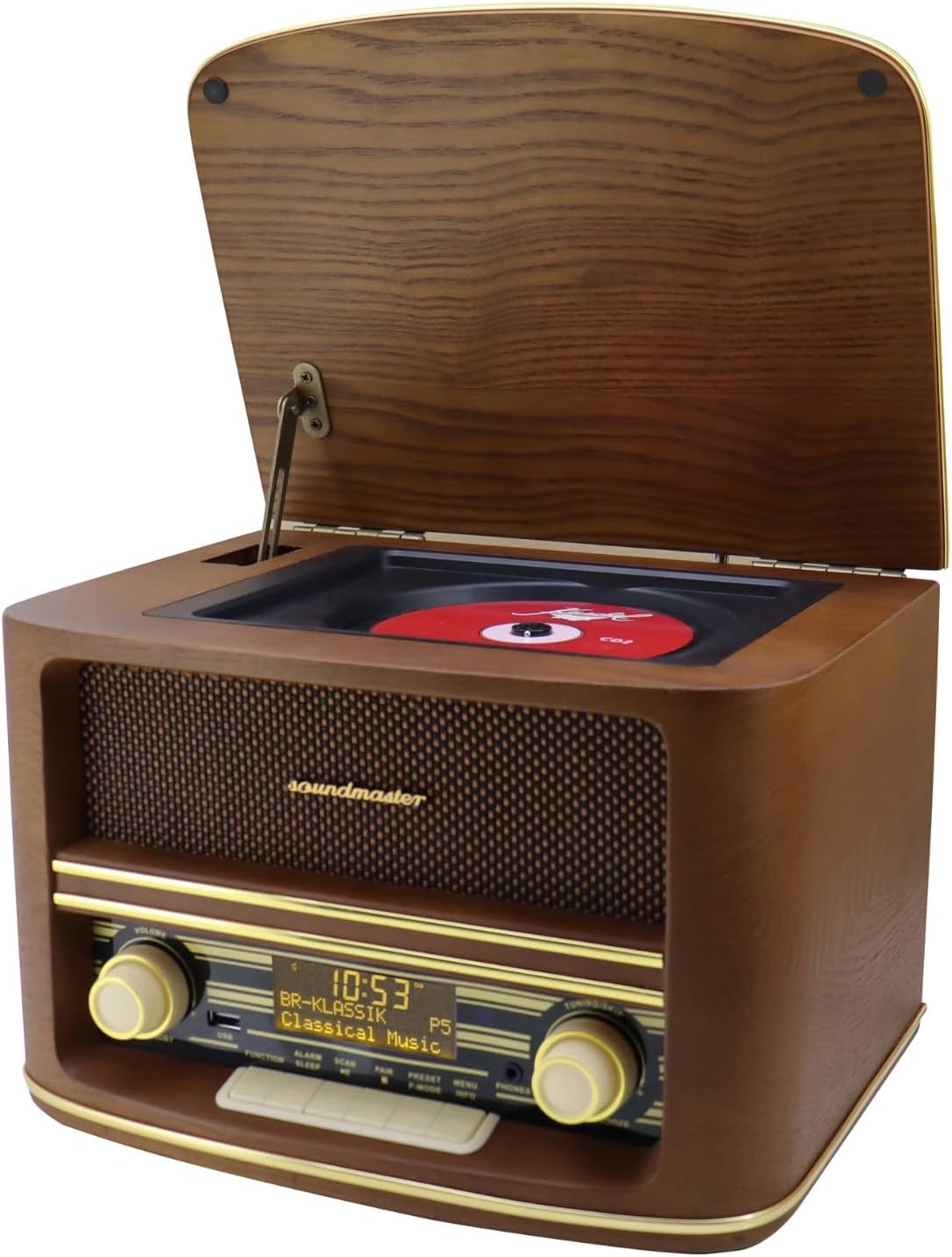
Figura 1: Davant view of the Soundmaster NR961 with the CD compartment lid open, revealing the CD player. The front panel displays the digital screen, volume and tuning knobs, and various control buttons.

Figura 2: Detallada view of the front control panel. It shows the digital display indicating time and radio station, a USB port, volume and tuning/skip knobs, and buttons for Function, Alarm, Sleep, Scan, Pair, Preset, Menu, Info, and Phones.

Figura 3: The included remote control for the Soundmaster NR961. It features buttons for Standby, Mode, Alarm, Mute, Snooze, Sleep, Menu/Info, Preset, Enter, track navigation (<<, >>), Pair/Scan, and Volume control.

Figura 4: Rear panel of the Soundmaster NR961, showing the extendable DAB+/FM antenna, AUX IN port, and DC 6V power input.
Controls del panell frontal:
- Pom de volum: Ajusta el nivell de sortida d'àudio.
- Tuning/Skip Knob: Navigates radio frequencies or skips tracks.
- Port USB: Per connectar dispositius d'emmagatzematge USB.
- Botó de funció: Switches between input modes (DAB+, FM, CD, USB, Bluetooth, AUX-IN).
- Botó d'alarma: Configura i gestiona alarmes.
- Botó de dormir: Activates sleep timer.
- Botó d'escaneig: Initiates radio station scanning.
- Botó de parella: Inicia l'emparellament Bluetooth.
- Botó predeterminat: Accesses and saves radio presets.
- Botó de menú/informació: Accesses system menu or displays information.
- Jack de telèfons: Sortida d'auriculars de 3.5 mm.
Configuració
- Desembalatge: Traieu amb cura la unitat i tots els accessoris de l'embalatge.
- Col·locació: Place the stereo system on a stable, flat surface. Ensure adequate ventilation around the unit.
- Connexió d'antena: Extend the DAB+/FM antenna located at the rear of the unit for optimal radio reception.
- Connexió d'alimentació: Connect the power cable to the DC 6V input on the rear of the unit, then plug the other end into a wall outlet.
- Encesa inicial: Premeu el botó ESPERA button on the front panel or remote control to turn on the unit.
Instruccions de funcionament
1. Encendre/apagar
- Premeu el botó ESPERA button (power symbol) on the front panel or remote control to turn the unit on or off.
2. Radio (DAB+/FM)
- Premeu el botó FUNCIÓ button repeatedly until "DAB" or "FM" mode is selected.
- Ràdio DAB+:
- Upon first use, the system will automatically scan for available DAB+ stations.
- To manually scan, press the ESCANEAR botó.
- Utilitza el TUNING/SKIP perilla o el << / >> buttons on the remote to navigate through stations.
- Per desar una emissora com a predefinida, manteniu premut el botó PRESET i, a continuació, utilitzeu el botó TUNING/SKIP knob to select a preset number and press SELECT/SNOOZE a la unitat o ENTRAR on the remote to confirm.
- Ràdio FM:
- Premeu el botó ESCANEAR button to automatically search for and store FM stations.
- Utilitza el TUNING/SKIP perilla o el << / >> buttons on the remote to manually tune or skip between saved stations.
- Saving presets works similarly to DAB+ mode.
3. Reproductor de CD
- Lift the wooden lid on top of the unit to reveal the CD compartment.
- Carefully place a CD (CD, CD-R/RW, MP3 CD) onto the spindle with the label side facing up.
- Close the lid. The unit will automatically detect and begin playing the CD.
- Utilitza el TUNING/SKIP perilla o el << / >> buttons on the remote to skip tracks.
- Premeu el botó REPRODUCCIÓ/PAUSA button (usually combined with SCAN or a dedicated button) to pause or resume playback.
4. Reproducció USB
- Insert a USB storage device (e.g., USB flash drive) containing MP3 files al port USB del panell frontal.
- Premeu el botó FUNCIÓ button repeatedly until "USB" mode is selected.
- The unit will automatically detect and begin playing MP3 files del dispositiu USB.
- Utilitza el TUNING/SKIP perilla o el << / >> buttons on the remote to navigate tracks.
5. Transmissió Bluetooth
- Premeu el botó FUNCIÓ button repeatedly until "Bluetooth" mode is selected. The display will show "Pairing" or similar.
- Activeu el Bluetooth al vostre telèfon intel·ligent, tauleta o altre dispositiu d'àudio.
- Cerca "NR961" (or similar device name) in your device's Bluetooth settings and select it to pair.
- Once paired, you can stream audio from your device to the Soundmaster NR961.
- Use your connected device or the stereo system's controls to manage playback and volume.
6. AUX IN
- Connect an external audio device (e.g., MP3 player, smartphone) to the 3.5mm AUX IN port on the rear of the unit using an audio cable (not included).
- Premeu el botó FUNCIÓ repetidament fins que se seleccioni el mode "AUX".
- Audio from the connected device will now play through the stereo system. Control playback from the external device.
7. Equalitzador
- The NR961 features pre-programmed equalizer settings (Normal, Classic, Jazz, Pop, Rock, Speech).
- Access these settings via the MENÚ button or a dedicated EQ button on the remote (if available) and navigate to the equalizer options.
- Select the desired sound profile to enhance your listening experience.
8. Ús d'auriculars
- Plug 3.5mm headphones into the TELÈFONS presa al panell frontal.
- The main speakers will be muted, and audio will be routed to your headphones.
- Adjust volume using the main volume knob.
9. Control remot
- Ensure batteries are correctly inserted into the remote control.
- Point the remote control towards the front panel of the stereo system.
- Use the remote for convenient control of power, mode selection, volume, track navigation, and menu functions.
Manteniment
- Neteja: Disconnect the power before cleaning. Use a soft, dry, lint-free cloth to wipe the unit. Do not use abrasive cleaners, waxes, or solvents.
- Cura del reproductor de CD: Handle CDs by their edges. Keep the CD compartment clean and free of dust. Do not touch the lens.
- Emmagatzematge: Si guardeu la unitat durant un període prolongat, desendolleu-la de la presa de corrent i guardeu-la en un lloc fresc i sec.
Resolució de problemes
| Problema | Causa possible | Solució |
|---|---|---|
| Sense poder | Power cable not connected; Wall outlet not active. | Ensure power cable is securely connected. Check wall outlet with another device. |
| Sense so | Volume too low; Mute activated; Incorrect input mode; Headphones connected. | Increase volume. Deactivate mute. Select correct function mode. Disconnect headphones. |
| Mala recepció de ràdio | Antena no estesa o posicionada correctament; Senyal feble. | Fully extend and adjust the antenna. Try repositioning the unit. Perform a new scan for DAB+ or FM stations. |
| El CD no es reprodueix | CD inserted incorrectly; CD dirty or scratched; CD format not supported. | Ensure CD is inserted label-side up. Clean CD with a soft cloth. Try a different CD. |
| S'ha produït un error en l'aparellament de Bluetooth | Device too far; Bluetooth not enabled on external device; Incorrect pairing procedure. | Ensure devices are within range. Enable Bluetooth on your device. Re-initiate pairing on both devices. |
| USB no reconegut | USB device not formatted correctly; Files not MP3; USB device damaged. | Ensure USB is FAT32 formatted. Verify files are MP3. Try a different USB device. |
Especificacions
| Número de model | NR961 |
| Marca | Mestre de so |
| Connectivitat | Bluetooth, USB, AUX-IN |
| Sintonitzador de ràdio | DAB+, FM RDS |
| Reproductor de CD | CD, CD-R/RW, MP3 compatible |
| Sortida d'àudio | 2 x 3 watts RMS |
| Característiques especials | Pre-programmed equalizer, Integrated clock, Headphone jack, Real wood casing, Remote control |
| Dispositius compatibles | Smartphone, tauleta |
| Font d'alimentació | Cable electric (DC 6V) |
| Dimensions (aprox.) | 30.2 cm x 23.5 cm x 21 cm |
Garantia i Suport
Soundmaster products are designed for reliability and performance. For information regarding warranty coverage, please refer to the warranty card included with your purchase or contact your local retailer. Spare parts availability is generally 1 year from the date of purchase.
For technical support or service inquiries, please visit the official Soundmaster weblloc o poseu-vos en contacte amb el seu departament d'atenció al client.


