Introducció
This manual provides detailed instructions for the proper use and maintenance of your Cellularline FINE Transparent TWS Wireless In-Ear Earbuds. Please read this manual thoroughly before using the product to ensure optimal performance and longevity.
The Cellularline FINE Transparent TWS Wireless In-Ear Earbuds feature a distinctive transparent design, showcasing the internal components of both the earbuds and their charging case. Designed for comfort and high-quality audio, these earbuds offer up to 3.5 hours of playtime per charge, extended to a total of 10 hours with the charging case. They include intuitive touch controls for managing calls and music, and an auto-pairing function for effortless connection. The Double Master function allows for independent use of either earbud.
Informació de seguretat
- No exposeu els auriculars ni l'estoig de càrrega a temperatures extremes, humitat o líquids.
- Eviteu deixar caure, colpejar o desmuntar el dispositiu. Això pot anul·lar la garantia.
- Mantenir fora de l'abast dels nens i mascotes.
- Feu servir només el cable de càrrega proporcionat o un equivalent certificat.
- Escolteu a un volum moderat per evitar danys auditius.
- No utilitzeu els auriculars en situacions on la impossibilitat d'escoltar els sons ambientals pugui ser perillosa (per exemple, conduir, anar en bicicleta o caminar pel trànsit).
Contingut del paquet
Si us plau, comproveu el paquet per veure si hi ha els elements següents:
- Cellularline FINE Transparent TWS Wireless In-Ear Earbuds (Left and Right)
- Estoig de càrrega
- Cable de càrrega USB
- Manual d'usuari
Producte acabatview
The Cellularline FINE earbuds are designed for ease of use and a distinctive aesthetic. Below is an overview dels components principals.
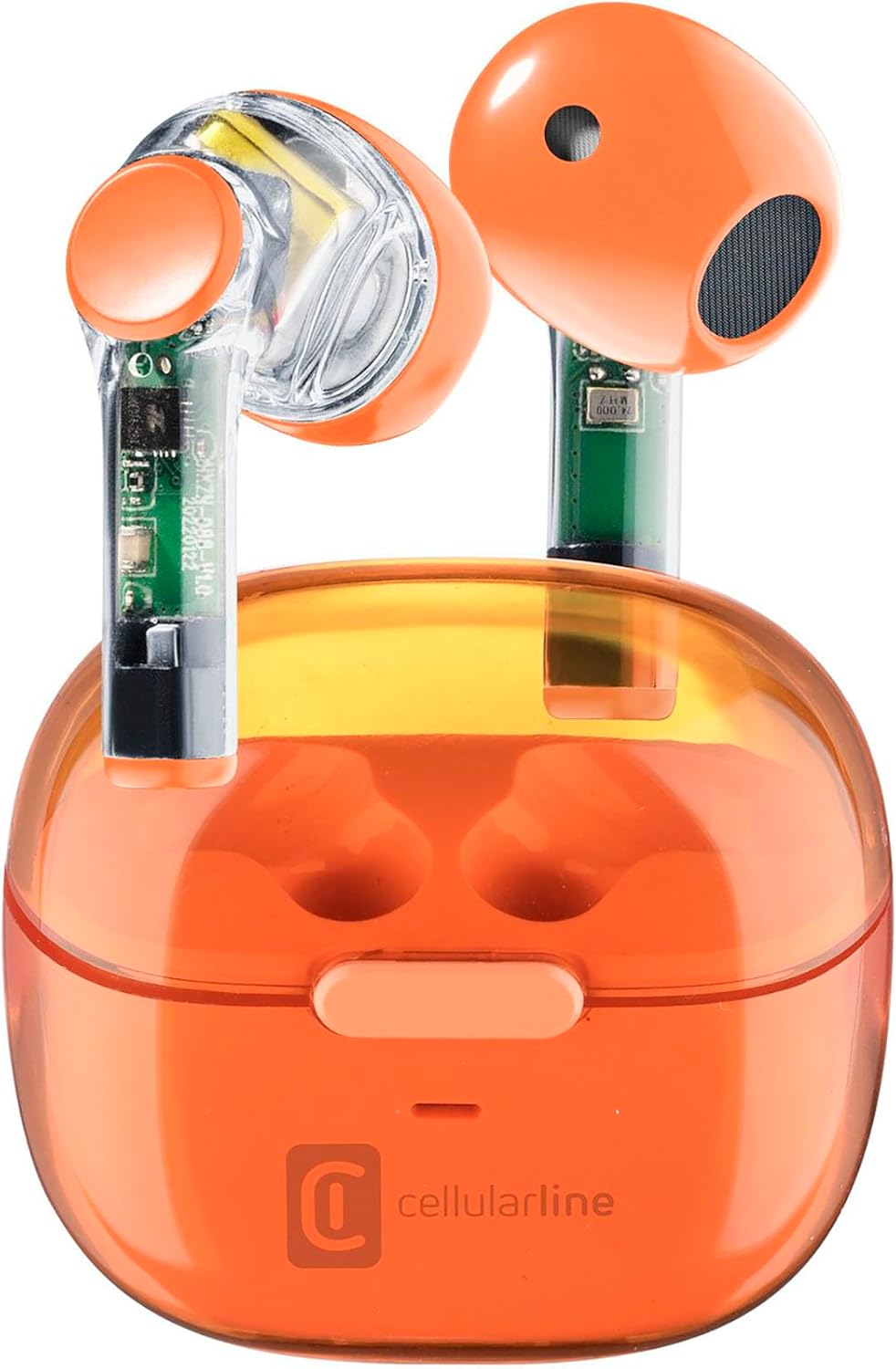
Image: Cellularline FINE Transparent TWS Wireless In-Ear Earbuds in their charging case. The earbuds and case feature a transparent orange design, revealing internal circuitry.

Imatge: Primer pla view highlighting the transparent design of the Cellularline FINE earbuds, showing the internal components.
Components:
- Auriculars: Left and Right, with touch control surfaces and microphones.
- Estoig de càrrega: Houses and charges the earbuds, with a charging port and LED indicator.
- Àrea de control tàctil: Situat a la superfície exterior de cada auricular per a diverses funcions.
- Micròfon: Integrated into each earbud for calls.
Configuració
1. Càrrega dels auriculars i l'estoig
Abans del primer ús, carregueu completament els auriculars i l'estoig de càrrega.
- Col·loca els dos auriculars a l'estoig de càrrega. Assegura't que estiguin correctament col·locats.
- Connect the USB charging cable to the charging port on the case and to a compatible USB power source (e.g., computer, wall adapter).
- The LED indicator on the charging case will show the charging status. Once fully charged, the indicator will change or turn off.
- A full charge provides approximately 3.5 hours of playtime for the earbuds, and the case can provide up to 4 additional charges, totaling 10 hours of playtime.

Image: Illustration showing the earbuds and charging case, indicating 3.5 hours of playtime per single charge and 10 hours of total playtime with the charging case.
2. Pairing with Your Device (Auto-Pairing)
The earbuds feature an auto-pairing function for quick and easy connection.
- Assegureu-vos que el Bluetooth del dispositiu estigui activat.
- Obre l'estoig de càrrega i treu els dos auriculars. S'encendran automàticament i entraran en mode d'emparellament.
- On your device, search for Bluetooth devices and select "Cellularline FINE" (or similar name) from the list.
- Un cop connectats, sentireu una confirmació audible i els auriculars estaran llestos per al seu ús.
- Per a usos posteriors, els auriculars es connectaran automàticament a l'últim dispositiu emparellat quan es treguin de l'estoig.

Image: A smartphone displaying a music player interface, with the Cellularline FINE earbuds and charging case nearby, illustrating the fast Bluetooth pairing process.
3. Posar-se els auriculars
Per a una qualitat de so i una comoditat òptimes, assegureu-vos que els auriculars estiguin correctament col·locats a les orelles.
- Introduïu suaument cada auricular a l'orella corresponent (E per a l'esquerra, R per a la dreta).
- Ajusta els auriculars fins que estiguin ben fixats i còmodes.

Image: A woman smiling while wearing the Cellularline FINE earbuds, demonstrating comfort and stability during use.
Instruccions de funcionament
Controls tàctils
The Cellularline FINE earbuds feature intuitive touch controls on each earbud. The specific functions may vary slightly depending on your device and operating system.
| Acció | Funció |
|---|---|
| Un sol toc (Auricular esquerre o dret) | Reproduir / Pausar música, Respondre / Finalitzar trucada |
| Fes doble toc (Auricular dret) | Pista següent |
| Fes doble toc (Auricular esquerre) | Pista anterior |
| Toca tres vegades (Auricular esquerre o dret) | Activa l'Assistent de veu |
| Premsa llarga (Auricular dret) | Augmenta el volum |
| Premsa llarga (Auricular esquerre) | Disminuir el volum |
| Long Press (2 seconds) during incoming call | Rebutja la trucada |
Single Earbud Use (Double Master Function)
The Double Master function allows you to use either the left or right earbud independently. This is useful for calls or when you need to be aware of your surroundings.
- Simply remove one earbud from the charging case. It will automatically connect to your device.
- The other earbud can remain in the case or be used later.
- To switch back to stereo mode, simply remove the second earbud from the case.
Manteniment
Neteja
- Netegeu regularment els auriculars i l'estoig de càrrega amb un drap suau, sec i sense borrissol.
- No utilitzeu netejadors abrasius, alcohol ni dissolvents químics.
- Traieu suaument la cera o les restes de les puntes dels auriculars i la malla de l'altaveu amb un raspall petit i suau o un bastonet de cotó.
- Assegureu-vos que els contactes de càrrega tant dels auriculars com de la funda estiguin nets i sense pols.
Emmagatzematge
- Quan no els utilitzeu, guardeu sempre els auriculars a la seva funda de càrrega per protegir-los i mantenir-los carregats.
- Guardeu el dispositiu en un lloc fresc i sec, allunyat de la llum solar directa i de temperatures extremes.
Resolució de problemes
If you encounter any issues with your Cellularline FINE earbuds, refer to the following common solutions:
| Problema | Possible solució |
|---|---|
| Els auriculars no s'emparellan ni es connecten |
|
| Només funciona un auricular |
|
| Volum baix o mala qualitat de so |
|
| Els auriculars no es carreguen |
|
Especificacions
| Característica | Detall |
|---|---|
| Marca | Línia cel·lular |
| Número de model | BTFINETWSO |
| Color | Taronja Transparent |
| Col·locació de l'orella | In-orella |
| Factor de forma | In-orella |
| Aïllament del soroll | Aïllament acústic |
| Tecnologia de connectivitat | Sense fil (Bluetooth) |
| Components inclosos | Auriculars |
| Bateria recarregable | Yes (Lithium-ion) |
| Característiques especials | Volume Control, Microphone Included |
| Mètode de control | Toca |
| Usos recomanats | Music Listening, Phone Calls, Sports, Outdoor Leisure |
| Dispositius compatibles | Laptops, Tablets, Mobile Phones, Music Production Equipment |
| Material | Plàstic |
| Temps de reproducció de l'auricular | Fins a 3.5 hores |
| Temps de reproducció total (amb estoig) | Fins a 10 hores |
Garantia i Suport
Cellularline products are designed and manufactured to the highest quality standards. For information regarding warranty coverage, technical support, or service, please refer to the official Cellularline weblloc web o contacteu directament amb el servei d'atenció al client. Conserveu el comprovant de compra per a reclamacions de garantia.
Per obtenir més ajuda, visiteu: www.cellularline.com


