Introducció
This manual provides detailed instructions for setting up, operating, and maintaining your Echo Dot (5th Gen) Kids Owl Edition and Echo Glow bundle. This smart speaker and multicolor smart lamp combination is designed to provide a fun and engaging experience for children, with robust parental controls and access to age-appropriate content.
The Echo Dot Kids offers an improved speaker for clearer vocals and vibrant sound, while the Echo Glow provides customizable lighting to enhance routines and playtime. Both devices integrate seamlessly with Alexa for voice-controlled interactions.
Què hi ha a la caixa
- Echo Dot (5th Gen) Kids Owl Edition
- Echo Glow multicolor smart lamp
- Glacier white power adapter (15W)
- Guia d'inici ràpid
- Alexa Guide for kids
Configuració
Follow these steps to set up your Echo Dot Kids and Echo Glow.
Encès inicial
- Plug the power adapter into your Echo Dot (5th Gen) Kids.
- Plug the power adapter into a wall outlet. The light ring on the Echo Dot will turn blue, then orange, indicating it's ready for setup.
- Repeat the process for the Echo Glow.
Connexió a Wi-Fi
- Download the Amazon Alexa app on your smartphone or tablet.
- Open the Alexa app and sign in with your Amazon account.
- Follow the on-screen instructions to add your new Echo Dot Kids device. The app will guide you through connecting it to your Wi-Fi network.
- Ensure your Wi-Fi network supports 802.11a/b/g/n/ac (2.4 and 5 GHz) networks. Ad-hoc networks are not supported.
Pairing Echo Glow
Once your Echo Dot Kids is set up, you can pair the Echo Glow:
- In the Alexa app, navigate to 'Devices'.
- Toqueu la icona "+" per afegir un dispositiu nou.
- Select 'Light' and then 'Amazon Echo Glow'.
- Follow the app's instructions to discover and pair your Echo Glow.

Image: The Echo Dot (5th Gen) Kids Owl Edition and the Echo Glow lamp, ready for setup.

Image: The Echo Dot Kids Owl Edition and Echo Glow on a surface, with a speech bubble showing the command "Alexa, set a Rainbow Timer for 30 minutes on Charlie's lamp." This illustrates the voice control functionality for the Echo Glow.
Instruccions de funcionament
Your Echo Dot Kids and Echo Glow are designed for intuitive voice control through Alexa.
Comandaments de veu
To interact with your Echo Dot Kids, simply say the wake word "Alexa" followed by your command or question. Alexa will automatically provide kid-friendly responses and filter explicit content.
- Música: "Alexa, play music." (Streams from Amazon Music, Apple Music, Spotify, etc.)
- Stories: "Alexa, read a bedtime story."
- Preguntes: "Alexa, how far away is the sun?"
- Rutines: "Alexa, good night." (Can be configured to trigger bedtime routines like dimming lights or playing soothing sounds.)
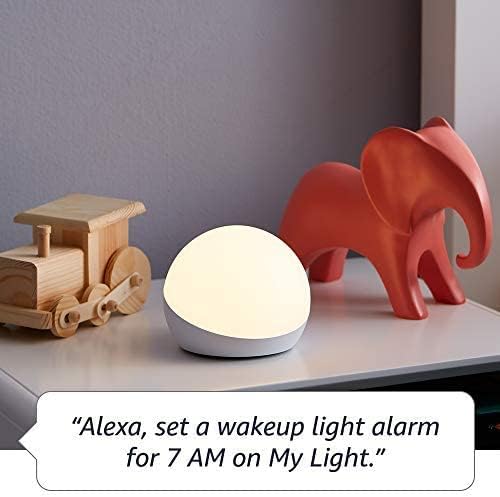
- Timers/Alarms: "Alexa, set a Rainbow Timer for 30 minutes on Charlie's lamp." or "Alexa, set a wakeup light alarm for 7 AM on My Light."
- Trucades: Kids can call parent-approved friends and family.

Image: The Echo Dot Kids Dragon Edition on a surface, with a speech bubble showing the command "Alexa, play music." This demonstrates the device's ability to stream audio content.

Image: The Echo Dot Kids Owl Edition on a desk, with a speech bubble showing the command "Alexa, how far away is the sun?" This highlights the device's capability to answer questions and provide information.
Controls parentals
Manage your child's experience through the Amazon Parent Dashboard. Here you can:
- Estableix límits de temps diaris per a l'ús del dispositiu.
- Review registres d'activitats.
- Approve contacts for calls.
- Filter explicit songs and content.
Funcions d'Amazon Kids+
Your bundle includes 1 year of Amazon Kids+, a digital subscription for kids aged 3-12. This provides access to:
- Kid-friendly Audible books.
- Interactive games.
- Fun Morning Routines.
- Educational Alexa skills.

Image: A graphic displaying icons for various age-appropriate content available through Amazon Kids+, including Barbie, Disney, Frozen, and Nat Geo Kids. This illustrates the diverse range of content accessible to children.
Manteniment
Neteja
To clean your Echo Dot Kids and Echo Glow, use a soft, dry, lint-free cloth. Do not use abrasive cleaners or sprays directly on the devices.
Actualitzacions de programari
Your Echo Dot Kids receives automatic software security updates. Ensure your device is connected to Wi-Fi to receive these updates, which improve performance and add new features.
Característiques de privadesa
The Echo Dot Kids is designed with multiple layers of privacy controls:
- Botó de desactivació del micròfon: Press the microphone off button on the top of the device to electronically disconnect the microphones. The light ring will turn red when the microphone is off.
- Tecnologia de Wake Word: Alexa devices are designed to detect the wake word only.
- Indicadors de transmissió: Visual indicators show when Alexa is streaming audio to the cloud.
- Gestió de gravacions de veu: Tens la capacitat de view and delete your voice recordings through the Alexa app or Amazon Privacy Hub.
Imatge: La part superior view of the Echo Dot Kids Owl Edition, with a red line through a microphone icon, indicating the microphone is turned off. Below it, text reads: "Press the mic off button to disconnect the microphones."
Resolució de problemes
Problemes comuns i solucions
- El dispositiu no respon: Ensure the device is plugged in and the light ring is active. Try unplugging and re-plugging the power adapter.
- Sense connexió Wi-Fi: Check your Wi-Fi router and ensure it's working. Re-run the Wi-Fi setup process in the Alexa app. Ensure your device is within range of your Wi-Fi network.
- Alexa not hearing commands: Ensure the microphone is not muted (red light ring indicates mute). Speak clearly and at a normal volume.
- Echo Glow not responding: Verify it's plugged in and paired correctly in the Alexa app. Try unpairing and re-pairing if issues persist.
- Content not playing: Verify your Amazon Kids+ subscription is active. Check internet connection.
Especificacions
| Característica | Descripció |
|---|---|
| Mida | 3.9" x 3.9" x 3.5" (100 mm x 100 mm x 89 mm) |
| Pes | 10.7 oz (304g) |
| Àudio | 1.73” (44 mm) front-firing speaker, Lossless High Definition |
| Connectivitat Wi-Fi | Dual-band Wi-Fi supports 802.11a/b/g/n/ac (2.4 and 5 GHz) networks. Does not support ad-hoc networks. |
| Connectivitat Bluetooth | A2DP support for audio streaming, AVRCP for voice control of connected mobile devices. |
| Smart Home Protocols | Wi-Fi, Bluetooth Low Energy Mesh. |
| Requisits del sistema | Alexa app compatible with Fire OS, Android, and iOS devices, or via web navegador. |
| Generació | Echo Dot (5th Gen) Kids - 2022 release |
| Llengua | Alexa speaks English and Spanish. Spanish is not available in Amazon Kids. |
| Franja d'edat | A partir de 3 anys. ADVERTÈNCIA: PERILL D'ASFIXIA: peces petites. No apte per a nens menors de 3 anys. |
| Subscripció | Includes 1 year of Amazon Kids+. |
Garantia i Suport
Informació de la garantia
Your Echo Dot (5th Gen) Kids and Echo Glow bundle comes with a 2-year worry-free guarantee. This warranty covers defects in materials and workmanship under normal use. For detailed terms and conditions, please refer to the warranty information provided with your product or visit the Amazon weblloc.
Atenció al client
For further assistance, troubleshooting, or warranty claims, please visit the Amazon customer support website or contact Amazon customer service directly. You can also find more information and FAQs on the Amazon product page for the Echo Dot (5th Gen) Kids and Echo Glow.
Software security updates are guaranteed for at least four years after the device is last available for purchase as a new unit on Amazon webllocs.


