1. Introducció
The Humax A1 is an advanced Android TV Box designed to transform your television into a smart entertainment hub. Featuring Android TV 11.0, it supports stunning 4K Ultra HD resolution, providing a superior viewing experience. With 8GB of flash storage and 2GB of RAM, it ensures smooth performance for all your applications and media. Integrated Dolby Audio, Wi-Fi 5.0, and Bluetooth 5.0 connectivity enhance your audio-visual experience and device interaction. The A1 also supports AV1 decoding for efficient streaming.

Figure 1: Humax A1 Android TV Box and Remote Control. This image displays the compact black Humax A1 streaming box alongside its sleek black remote control, highlighting the primary components of the product.
2. Característiques clau
- Resolució 4K Ultra HD: Experience unparalleled visual quality with a maximum resolution of 3840 x 2160 pixels.
- Chromecast integrat: Easily stream your media library from your phone, tablet, or computer directly to your TV.
- Google Assistant Voice Remote: Quickly search through over 400,000 TV shows and movies, receive personalized suggestions, and control smart home devices using voice commands.
- Smart Remote Control with Auto Learning Function: Simplifies control by allowing a single remote to manage both the TV and the set-top box.
- Android TV 11.0: Access a vast ecosystem of apps, games, and content from the Google Play Store.
- Suport d'àudio Dolby: Delivers enhanced sound quality for an immersive audio experience.
- Wi-Fi 5.0 i Bluetooth 5.0: Provides stable and fast wireless connectivity for streaming and connecting peripherals.

Figure 2: Humax A1 with Key Specifications. This image highlights the Humax A1 device along with icons and text indicating its core features: Amlogic S905Y4 processor, 8GB Flash/2GB RAM, 4K Ultra HD, Wi-Fi 5, Bluetooth 5.0, AV1 support, and Dolby Audio.
3. Contingut del paquet
Marqueu la casella per als elements següents:
- Humax A1 Android TV Box
- Control remot
- Adaptador d'alimentació
- Cable HDMI
- Piles AAA (2x)
- Guia d'inici ràpid / Manual d'usuari
4. Dispositiu acabatview
4.1. Frontal i lateral Views
The Humax A1 features a compact design with a minimalist front panel and accessible side ports.

Figure 3: Humax A1 Side ViewAquesta imatge proporciona una visió clara view del costat profile of the Humax A1 box, showcasing its sleek and compact form factor.
4.2. Connexions del panell posterior
The rear panel of the Humax A1 provides various ports for connecting to your TV, network, and other peripherals.

Figure 4: Humax A1 Rear Panel Ports. This image displays the back of the Humax A1 device, clearly showing the various input and output ports available for connectivity.
- Micro SD: Slot for expandable storage.
- USB: Two USB ports for connecting external storage devices or other USB peripherals.
- CC 12V: Port d'entrada d'alimentació.
- Òptic: Sortida d'àudio digital per connectar-se a sistemes de so.
- HDMI: High-Definition Multimedia Interface for connecting to your TV or display.
- LAN: Port Ethernet per a connexió de xarxa amb cable.
- DE: Analog audio/video output.
5. Control remot
The Humax A1 comes with a smart remote control designed for intuitive navigation and voice commands. It features an auto-learning function, allowing it to control both your TV and the A1 box, reducing remote clutter.
- Botó d'encesa: Encén o apaga el dispositiu.
- Botó de l'Assistent de Google: Activa les ordres de veu per a la cerca i el control.
- Navigation Pad (Directional & OK): Per a la navegació i selecció de menús.
- Botó d'inici: Torna a la pantalla d'inici d'Android TV.
- Botó enrere: Torna a la pantalla anterior.
- Pujar/baixar el volum: Ajusta el volum d'àudio.
- Botons d'aplicació dedicats: Quick access to popular streaming services like Netflix, YouTube, Prime Video, and Google Play.
6. Guia de configuració
6.1. Connexió del dispositiu
- Connectar l'alimentació: Plug the power adapter into the DC 12V port on the Humax A1 and then into a power outlet.
- Connectar-se al televisor: Use the provided HDMI cable to connect the HDMI port on the Humax A1 to an HDMI input on your television. Note the HDMI input number (e.g., HDMI 1, HDMI 2).
- Connexió de xarxa (opcional): For a wired connection, connect an Ethernet cable from your router to the LAN port on the Humax A1. For Wi-Fi, you will configure this during initial setup.
- Insereix les piles: Open the battery compartment on the remote control and insert the two AAA batteries, ensuring correct polarity.
6.2. Configuració inicial
- Encès: Turn on your TV and select the correct HDMI input source. The Humax A1 will power on automatically or can be turned on using the remote.
- Selecció d'idioma: Segueix les instruccions que apareixen a la pantalla per seleccionar l'idioma que prefereixis.
- Configuració de la xarxa: Choose your Wi-Fi network from the list and enter the password, or confirm your wired connection.
- Inici de sessió al compte de Google: Sign in with your existing Google account to access Google Play Store, personalized recommendations, and other Google services. You can use your phone/computer or the remote for this.

Figure 5: Google Account Sign-in Screen. This image shows the on-screen prompt for signing in with a Google account, offering options to use a phone/computer or the remote control.
7. Instruccions de funcionament
7.1. Navegació per la interfície
The Android TV 11 interface is designed for easy navigation. Use the directional pad on your remote to move between sections and select items.
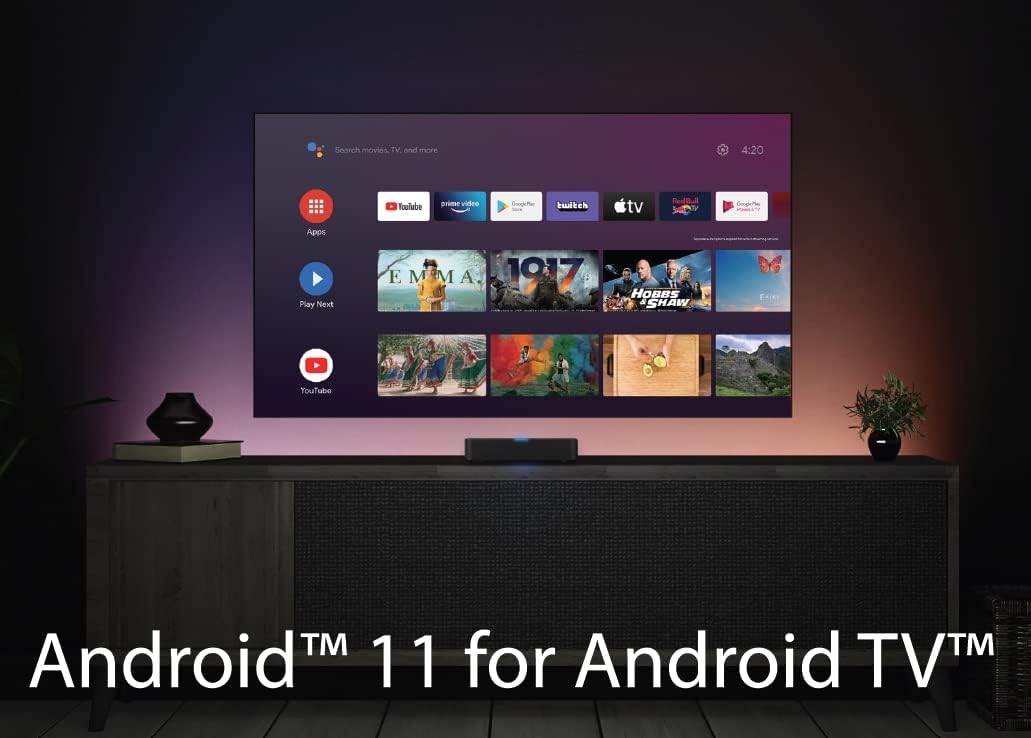
Figure 6: Android TV 11 Interface. This image displays the main home screen of the Android TV 11 operating system, showing various app icons and content recommendations.
- Pantalla d'inici: Provides quick access to your favorite apps, recently played content, and recommendations.
- Aplicacions: A dedicated section to view and launch all installed applications.
- Descobriu: Offers personalized content recommendations based on your viewing habits and installed apps.
7.2. Ús de Google Assistant
Press the Google Assistant button on your remote to activate voice control. You can ask questions, search for content, control smart home devices, and more.

Figure 7: Google Assistant Voice Control. This image illustrates the use of Google Assistant for voice commands, showing a search bar and content suggestions appearing on the TV screen.
7.3. Contingut en streaming
The Humax A1 supports various methods for streaming content:
- Aplicacions preinstal·lades: Use the dedicated buttons or navigate to launch apps like Netflix, YouTube, and Prime Video.
- Google Play Store: Download and install thousands of additional streaming apps, games, and utilities.
- Chromecast integrat: Cast videos, music, and photos from your compatible mobile devices or computer directly to your TV.

Figure 8: Chromecast Built-in Feature. This image demonstrates the Chromecast functionality, showing content being cast from a mobile phone to the TV screen via the Humax A1.

Figure 9: Official Android TV Device Interface. This image showcases the official Android TV interface, highlighting the wide range of content and apps available through the platform.
7.4. Personalizing Recommendations
The Discover tab helps you find new content. You can train the system by rating movies and shows to improve future recommendations.

Figure 10: Personalized Recommendations Screen. This image displays the Google Play interface with various movie and show recommendations, demonstrating how the system suggests content.
8. Manteniment
- Neteja: Gently wipe the device and remote control with a soft, dry cloth. Do not use liquid cleaners or abrasive materials.
- Actualitzacions de programari: The Humax A1 will periodically check for and prompt you to install software updates. It is recommended to keep your device updated for optimal performance and security.
- Ventilació: Assegureu-vos que el dispositiu estigui col·locat en una zona ben ventilada per evitar el sobreescalfament. No bloquegeu cap obertura de ventilació.
- Cicle d'alimentació: If the device becomes unresponsive, unplug the power adapter from the wall outlet, wait for 10 seconds, and then plug it back in.
9. Solució De Problemes
If you encounter issues with your Humax A1, refer to the table below for common problems and their solutions.
| Problema | Causa possible | Solució |
|---|---|---|
| El dispositiu no s'encén | L'adaptador de corrent no està connectat o la presa de corrent està defectuosa. | Assegureu-vos que l'adaptador de corrent estigui connectat correctament al dispositiu i a una presa de corrent que funcioni. Proveu una altra presa de corrent. |
| No hi ha imatge al televisor | Entrada HDMI incorrecta seleccionada al televisor; cable HDMI fluix o defectuós. | Verify TV is on the correct HDMI input. Check HDMI cable connections at both ends. Try a different HDMI cable or port. |
| Sense so | TV volume muted or too low; incorrect audio output settings. | Increase TV volume. Check audio settings on the Humax A1 and TV. Ensure external audio systems are properly connected and powered. |
| El comandament a distància no respon | Batteries are low or incorrectly inserted; remote not paired. | Replace batteries. Ensure batteries are inserted with correct polarity. Re-pair the remote if necessary (refer to device pairing instructions). |
| No es pot connectar a la Wi-Fi | Contrasenya Wi-Fi incorrecta; problemes amb l'encaminador; dispositiu massa lluny de l'encaminador. | Double-check Wi-Fi password. Restart your router. Move the device closer to the router or consider a wired connection. |
| Les aplicacions es bloquegen o es bloquegen | Insufficient memory; app bug; outdated software. | Close background apps. Clear app cache (Settings > Apps > [App Name] > Clear Cache). Ensure device software and apps are updated. Restart the device. |
10. Especificacions tècniques
| Característica | Detall |
|---|---|
| Marca | Humax |
| Número de model | 9-00159 |
| Sistema operatiu | Android TV 11.0 |
| Resolució | 4K Ultra HD (3840 x 2160) |
| Memòria (RAM) | 2 GB |
| Emmagatzematge (Flash) | 8 GB |
| Tecnologia de connectivitat | Bluetooth 5.0, Wi-Fi 5.0 (802.11ac) |
| Tipus de connectors | Micro USB, HDMI, Optical, LAN, AV, DC 12V |
| Característiques especials | Chromecast, Miracast, Google Assistant |
| Dimensions del producte | 9.6 x 9.6 x 2 cm |
| Pes | 124 g |
| Piles necessàries | 2 piles AAA (incloses) |
11. Garantia i Suport
Informació de la garantia: Your Humax A1 product is covered by a manufacturer's warranty. Please refer to the warranty card included in your product packaging for specific terms, conditions, and duration. Keep your proof of purchase for warranty claims.
Atenció al client: For technical assistance, troubleshooting beyond this manual, or warranty inquiries, please contact Humax customer support. Contact details can typically be found on the official Humax weblloc web o a la documentació del producte.


