1. Introducció
The MINISFORUM HM80 Mini PC is a compact desktop computer designed for various computing tasks, from everyday use to multimedia and light gaming. It features an AMD Ryzen 7 4800U processor, integrated AMD Radeon Graphics, and extensive connectivity options. This manual provides essential information for the proper setup, operation, and maintenance of your device.
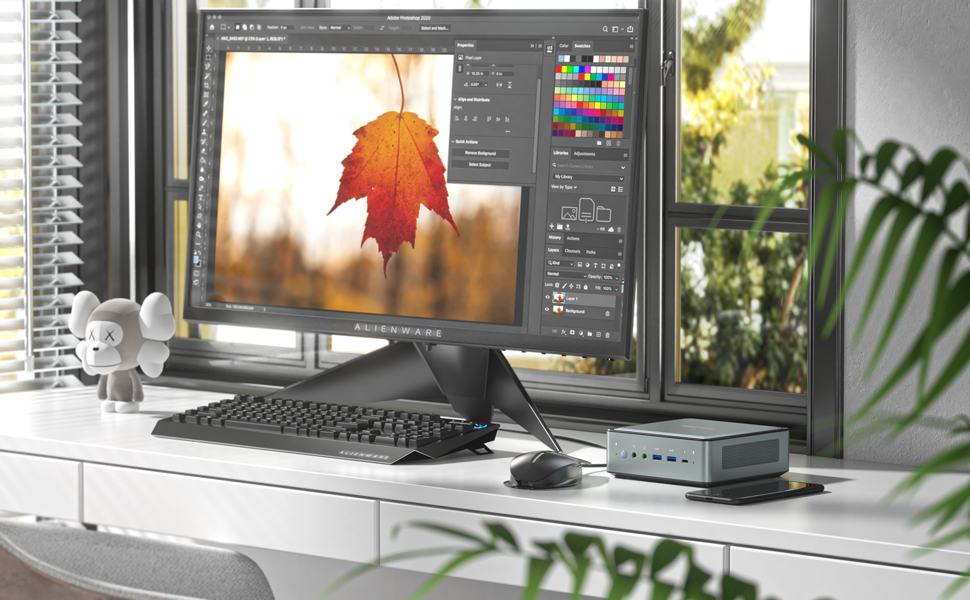
Image: The MINISFORUM HM80 Mini PC in a typical desktop setup, demonstrating its compact size next to a monitor.
2. Contingut del paquet
Verifiqueu que tots els elements siguin presents al paquet:
- 1x MINISFORUM HM80 Mini PC
- 1x cable HDMI
- 1 x suport de muntatge
- 1x adaptador de corrent dels EUA
- 1 x manual d'instruccions
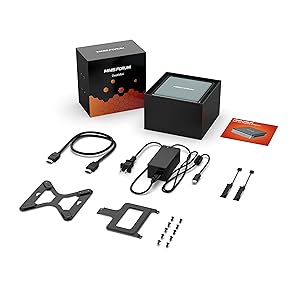
Image: All components included in the MINISFORUM HM80 Mini PC retail package.
3. Producte acabatview
3.1 Característiques clau
- Processador: AMD Ryzen 7 4800U (8 Cores/16 Threads, up to 4.0 GHz)
- Gràfics: Integrated AMD Radeon Graphics (1750 MHz)
- Memòria: DDR4 RAM (2x SODIMM slots, expandable up to 64GB)
- Emmagatzematge: M.2 2280 PCIe SSD (up to 2TB) and 2x 2.5-inch SATA HDD slots (up to 2TB each)
- Sortida de visualització: Triple 4K@60Hz output via HDMI 2.0, DisplayPort, and USB-C
- Xarxa: Dual RJ45 ports (1000/2500Mbps), WiFi 6 (802.11ax), Bluetooth 5.1
- Ports USB: 6x USB ports (various types)

Image: Visual representation of the MINISFORUM HM80's core components and features.
3.2 Disseny de ports
Familiarize yourself with the port layout for proper connection of peripherals.

Imatge: Detallada view of the front and rear input/output ports on the MINISFORUM HM80 Mini PC.
- Ports frontals: Power Button, 3.5mm Microphone Jack, 3.5mm Audio Jack, USB 3.1 Port x2, USB-C Port
- Ports posteriors: USB 3.0 Port x4, 2.5G LAN Port x2, HDMI Port, DisplayPort, USB-C Port, Kensington Lock, Reset Hole
4. Instruccions de configuració
4.1 Connexió inicial
- Connecta la pantalla: Use an HDMI, DisplayPort, or USB-C cable to connect your monitor(s) to the corresponding port(s) on the Mini PC.
- Connecteu els perifèrics: Connecteu el teclat, el ratolí i qualsevol altre dispositiu USB als ports USB disponibles.
- Connecta la xarxa (opcional): For a wired connection, connect an Ethernet cable from your router or modem to one of the RJ45 LAN ports. For wireless, ensure your WiFi network is available.
- Connectar l'alimentació: Plug the power adapter into the DC-in port on the Mini PC, then connect the power adapter to an electrical outlet.
4.2 Primer arrencada
- Premeu el botó d'engegada que es troba a la part frontal del Mini PC.
- The system will boot up. If it's the first time, it may guide you through the Windows 11 Pro setup process. Follow the on-screen instructions to complete the operating system configuration.
5. Instruccions de funcionament
5.1 Funcionament bàsic
- Encès/apagat: Press the power button to turn the PC on. To turn off, use the operating system's shutdown function or press and hold the power button for a few seconds for a forced shutdown (not recommended for regular use).
- Reinicia: Feu servir la funció de reinici del sistema operatiu.
- Mode de repòs: Feu servir la funció de repòs del sistema operatiu.
5.2 Configuració de triple pantalla
The HM80 supports connecting up to three independent displays simultaneously at 4K@60Hz resolution. Connect your monitors to the HDMI, DisplayPort, and USB-C video outputs. Once connected, configure the display settings within your operating system (e.g., Windows Display Settings) to extend or duplicate your desktop across the screens.

Image: The MINISFORUM HM80 Mini PC supporting a triple 4K display setup.
5.3 Connectivitat de xarxa
- Xarxa per cable: Connect an Ethernet cable to either of the two RJ45 ports. The system will automatically detect the connection.
- Wireless Network (Wi-Fi 6): Access network settings in your operating system, select your desired Wi-Fi network, and enter the password if required. The device supports 5GHz/2.4GHz dual-band Wi-Fi 6.
- Bluetooth 5.1: Enable Bluetooth in your operating system settings to pair with compatible devices such as keyboards, mice, or audio peripherals.
6. Manteniment i actualitzacions
6.1 Actualitzacions de components
The MINISFORUM HM80 Mini PC allows for upgrades to its RAM and storage components. Always ensure the device is powered off and disconnected from the power source before performing any internal maintenance.

Image: Exploded diagram illustrating the upgradeable components of the HM80 Mini PC.
- RAM: The device has two SODIMM slots for DDR4 memory. Each slot can support up to 32GB, for a total of 64GB.
- SSD M.2: A 2280 PCIe SSD slot is available, supporting drives up to 2TB.
- 2.5-inch SATA HDD/SSD: Two 2.5-inch SATA drive bays are available, each supporting drives up to 2TB.
Refer to the detailed instructions provided with your upgrade components or consult the MINISFORUM support website for specific upgrade procedures.
6.2 Instal·lació de muntatge a la paret
The included mounting bracket allows you to attach the Mini PC to the back of a VESA-compatible monitor or to a wall, saving desk space.
- Attach the mounting bracket to the desired location (e.g., VESA holes on a monitor or a wall) using appropriate screws.
- Slide the Mini PC onto the bracket until it securely locks into place.

Image: The MINISFORUM HM80 Mini PC installed using the wall mount bracket.
6.3 Neteja
To maintain optimal performance, periodically clean the exterior of the Mini PC with a soft, dry cloth. Ensure ventilation openings are free from dust accumulation. Do not use liquid cleaners directly on the device.
7. Solució De Problemes
This section addresses common issues you might encounter with your MINISFORUM HM80 Mini PC.
- Sense energia:
- Assegureu-vos que l'adaptador de corrent estigui connectat correctament tant al Mini PC com a una presa de corrent que funcioni.
- Verifiqueu que la presa de corrent funciona provant-la amb un altre dispositiu.
- Prova un adaptador de corrent diferent si està disponible i és compatible.
- Sense sortida de pantalla:
- Check that the display cable (HDMI, DisplayPort, or USB-C) is firmly connected to both the Mini PC and the monitor.
- Assegureu-vos que el monitor estigui encès i configurat a la font d'entrada correcta.
- Si és possible, prova amb un cable de pantalla o monitor diferent.
- System Unresponsive / Freezing:
- If the system becomes unresponsive, press and hold the power button for approximately 5-10 seconds to force a shutdown. Wait a few moments, then power it back on.
- Consider using the reset hole (located on the rear panel) with a thin pin if the power button is unresponsive. This will force a restart.
- Ensure the system has adequate ventilation to prevent overheating.
- Problemes de connectivitat de xarxa:
- Per a connexions amb cable, comproveu l'estat del cable Ethernet i del router.
- For Wi-Fi, ensure the Wi-Fi adapter is enabled in the operating system and you are connected to the correct network with the correct password.
- Reinicieu el vostre encaminador/mòdem.
8. Especificacions
Detailed technical specifications for the MINISFORUM HM80 Mini PC:
| Característica | Especificació |
|---|---|
| Processador | AMD Ryzen 7 4800U (8 nuclis, 16 fils de treball, fins a 4.0 GHz) |
| Gràfics | Integrated AMD Radeon Graphics (1750 MHz) |
| Tipus de RAM | SDRAM DDR4 |
| Capacitat màxima de RAM | 64 GB (2x SODIMM slots) |
| Emmagatzematge (SSD) | 512 GB M.2 2280 PCIe SSD (expandable up to 2TB) |
| Emmagatzematge (disc dur) | 2x 2.5-inch SATA HDD slots (each up to 2TB) |
| Resolució de pantalla màxima | 3840 x 2160 píxels (4K) |
| Sortides de visualització | HDMI 2.0, DisplayPort, USB-C (supports triple 4K@60Hz) |
| Ports LAN | 2x RJ45 (1000/2500Mbps) |
| Connectivitat sense fil | WiFi 6 (802.11ax), Bluetooth 5.1 |
| Ports USB | 2 USB 2.0, 3 USB 3.0, 1 USB-C |
| Sistema operatiu | Windows 11 Pro |
| Dimensions (LxWxH) | 5.87 x 5.91 x 2.2 polzades (14.96 x 14.96 x 5.55 cm) |
| Pes de l'article | 3.34 lliures (1.51 kg) |
| Color | Negre |
9. Garantia i Suport
9.1 Informació de la garantia
MINISFORUM products typically come with a limited warranty. Please refer to the warranty card included in your package or visit the official MINISFORUM weblloc web per obtenir informació detallada sobre els termes i condicions de la garantia específics per a la vostra regió i data de compra.
9.2 Suport tècnic
For technical assistance, troubleshooting beyond this manual, or inquiries about your product, please contact MINISFORUM customer support. Support contact information can usually be found on the official MINISFORUM weblloc web o a la documentació del producte.
MINISFORUM Official Weblloc: www.minisforum.com


