Introducció
This user manual provides comprehensive instructions for the installation, operation, and maintenance of your Volcora Thermal Receipt Printer. Designed for efficiency and reliability, this 80mm POS printer features an auto cutter and versatile USB/Ethernet connectivity, making it suitable for various business environments. Please read this manual thoroughly before using the printer to ensure proper function and longevity.

Figure 1: Volcora Thermal Receipt Printer (White model)
Informació de seguretat
- Assegureu-vos que la impressora estigui connectada a una presa de corrent amb connexió a terra.
- No exposeu la impressora a l'aigua ni a una humitat excessiva.
- Eviteu col·locar la impressora sota la llum solar directa o a prop de fonts de calor.
- No intenteu desmuntar ni reparar la impressora vosaltres mateixos. Poseu-vos en contacte amb personal de servei qualificat.
- Use only specified thermal paper rolls.
Contingut del paquet
Verifiqueu que tots els elements siguin presents al paquet:
- Volcora Thermal Receipt Printer
- Adaptador d'alimentació i cable
- Cable USB
- Sample Thermal Paper Roll
- Manual d'usuari (aquest document)
- Controlador de CD
- Paper Roll Holder/Spacer (if applicable)
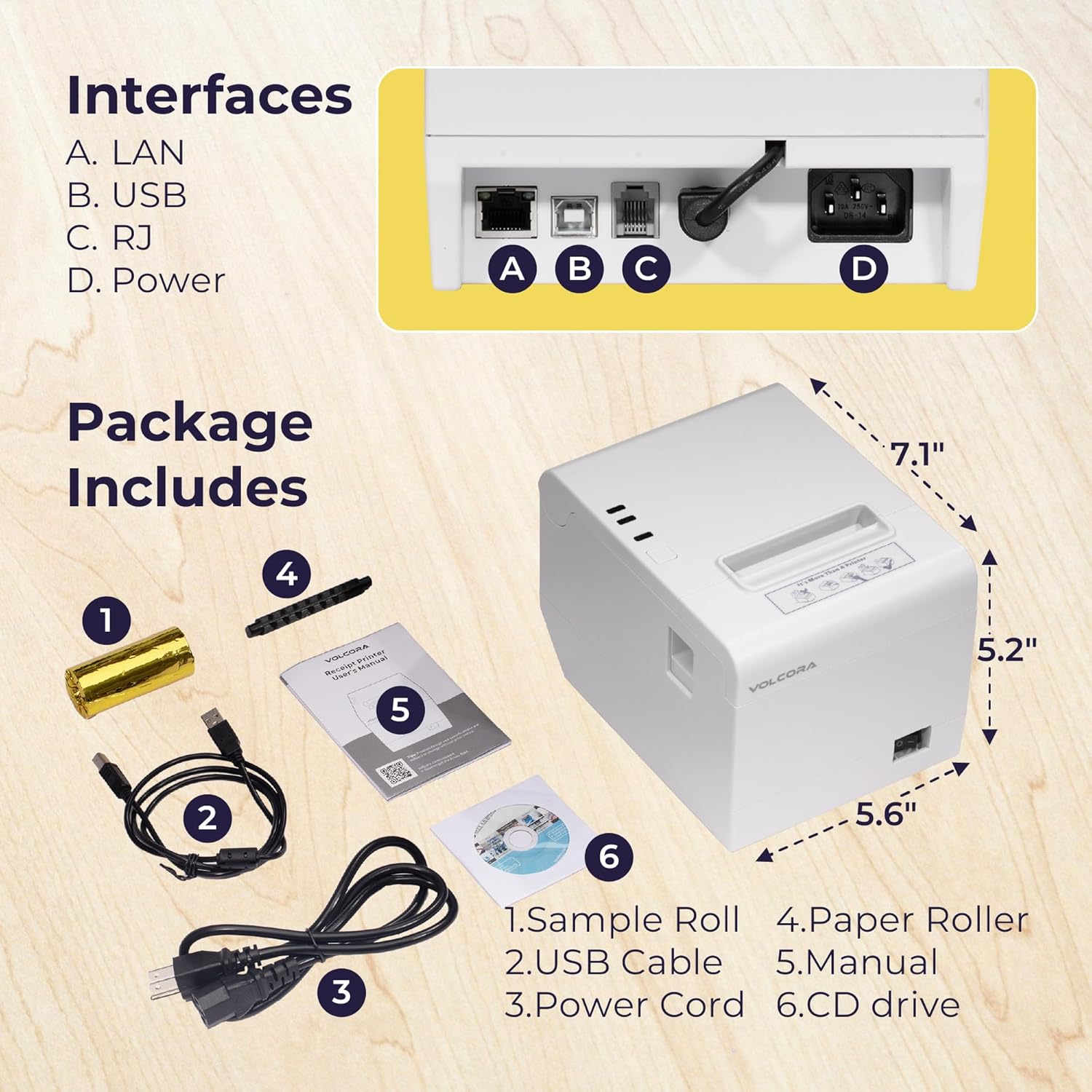
Figure 2: Package Contents and Printer Dimensions
Producte acabatview
Familiaritzeu-vos amb els components i les interfícies de la impressora.
Indicadors del panell frontal:
- Indicador d'alimentació: S'il·lumina quan la impressora està engegada.
- Indicador d'error: Flashes or lights up to indicate an error (e.g., paper out, cover open, cutter jam).
- Indicador de paper: Lights up when paper is low or out.
- Botó FEED: Press to advance paper manually.
Rear Panel Interfaces:
- Port LAN (Ethernet): Per a la connectivitat de xarxa.
- Port USB: Per a la connexió directa a un ordinador.
- RJ11 Cash Drawer Port: Per connectar un calaix portamonedes.
- Port d'alimentació: Per connectar l'adaptador de corrent.
Figure 3: Printer Interfaces (A. LAN, B. USB, C. RJ11, D. Power)
Configuració
1. Loading Thermal Paper:
- Open the printer cover by pressing the cover release button.
- Insert the thermal paper roll with the printing side facing up. Ensure the roll is seated correctly in the paper compartment.
- Estireu una petita quantitat de paper per treure-la del tallador.
- Tanqueu la coberta de la impressora fermament fins que encaixi al seu lloc.

Figure 4: Direct Thermal Print Mechanism and Paper Loading
2. Connexió de la impressora:
- Connexió d'alimentació: Connect the power adapter to the printer's power port and then plug it into a wall outlet. Turn on the printer using the power switch.
- Connexió USB: Connecteu un extrem del cable USB al port USB de la impressora i l'altre extrem a l'ordinador.
- Connexió Ethernet: Connecteu un cable Ethernet des del port LAN de la impressora al vostre encaminador o commutador de xarxa.
- Connexió al calaix d'efectiu: Connect the RJ11 cable from your cash drawer to the printer's RJ11 port.
3. Instal·lació del controlador:
The printer requires a driver for proper communication with your operating system. The included CD contains the necessary drivers. Alternatively, drivers can be downloaded from the Volcora support weblloc.
- Windows/Mac OS/Linux: Use the provided CD or download the appropriate driver from the Volcora support center. Follow the on-screen instructions for installation.
- Android/iOS/Raspberry Pi: For these systems, an SDK (Software Development Kit) is typically required to develop custom applications for printing. The Ethernet interface supports these operating systems with SDK integration.

Figure 5: Operating System and Interface Compatibility
Nota important de compatibilitat: This printer does not support direct integration with Ubereats, Grubhub, Doordash, Postmates, Clover, or Shopify POS software. For Square support, please contact Volcora customer support.
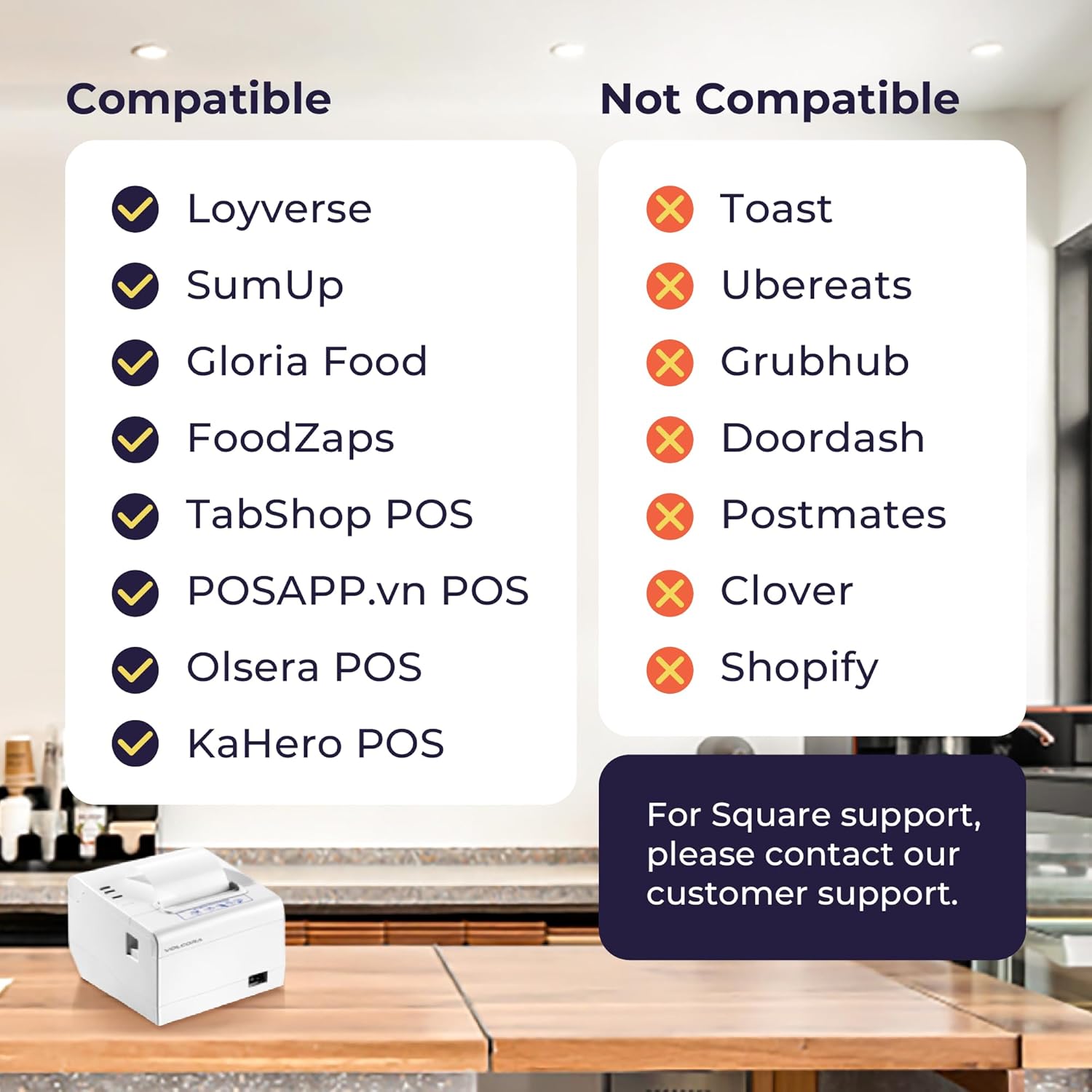
Figure 6: POS System Compatibility Overview
Funcionament de la impressora
Impressió bàsica:
Once the printer is connected and drivers are installed, you can initiate print jobs from your POS software or application. The printer will automatically feed and cut the receipt after printing.
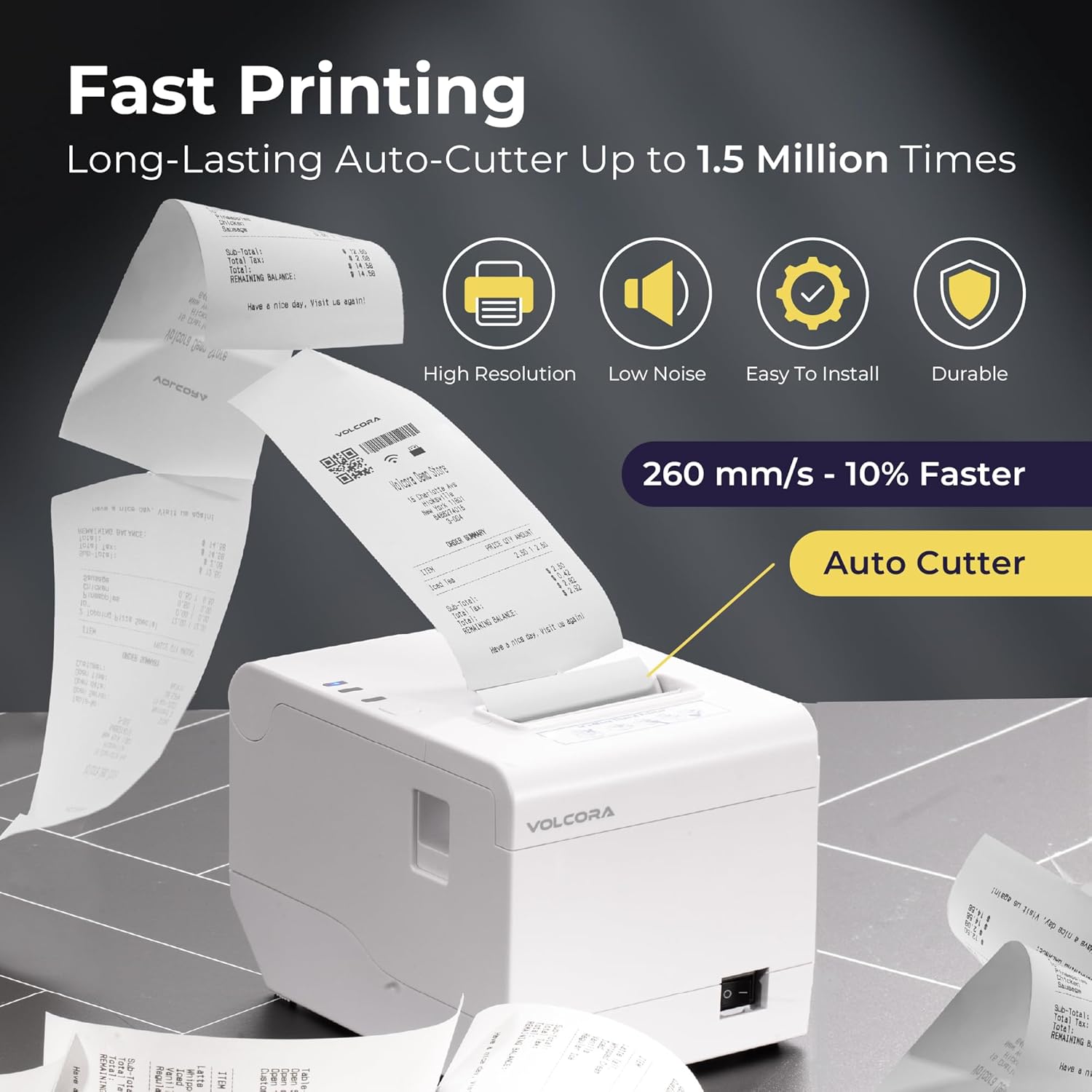
Figure 7: High-Speed Printing and Auto Cutter Function
The printer boasts a maximum printing speed of 260mm/s and features an automatic cutter designed for heavy usage, capable of up to 1.5 million cuts.
Opció de muntatge a la paret:
The printer includes two hanging holes at the bottom, allowing for convenient wall mounting in environments such as kitchens or service areas.

Figure 8: Wall Mount and Desktop Usage Options
Manteniment
Neteja de la impressora:
- Apagueu la impressora i desendolleu el cable d'alimentació abans de netejar-la.
- Utilitzeu un drap suau i sense pelusa dampened with water or isopropyl alcohol to clean the exterior.
- To clean the thermal print head, use a thermal printer cleaning pen or a cotton swab lightly dampHumitejat amb alcohol isopropílic. Netegeu suaument la superfície del capçal d'impressió. Deixeu-lo assecar completament abans d'utilitzar-lo.
- Traieu regularment la pols i les restes de paper del camí del paper.
Substitució de paper:
When the paper indicator lights up or printing becomes faint, replace the paper roll as described in the "Loading Thermal Paper" section.
Resolució de problemes
| Problema | Causa possible | Solució |
|---|---|---|
| La impressora no s'encén | Cable d'alimentació fluix o no connectat; problema amb la presa de corrent. | Comproveu les connexions d'alimentació; proveu una presa de corrent diferent. |
| Sense impressió | Paper out; printer offline; incorrect driver/settings; cable disconnected. | Load paper; check printer status; verify driver installation and settings; reconnect USB/Ethernet cable. |
| Faint or blank print | Paper loaded incorrectly (non-thermal side up); thermal head dirty or damaged. | Reload paper with thermal side up; clean thermal print head. |
| Embús de paper | Paper not loaded correctly; foreign object in paper path. | Open cover, remove jammed paper, ensure clear path, reload paper. |
| Cash drawer not opening | RJ11 cable loose; software not sending open command. | Check RJ11 connection; verify POS software settings for cash drawer. |
| Problemes d'impressió en xarxa | Incorrect IP address; network configuration problem. | Verify printer's IP address and network settings. Consult your network administrator if needed. |
If you encounter issues not listed here or require further assistance, please contact Volcora customer support.
Especificacions
| Característica | Detall |
|---|---|
| Marca | Volcora |
| Nom del model | Perf Receipt Printer White - USB+Ethernet (Model 500211) |
| Tecnologia d'impressió | Tèrmica directa |
| Velocitat d'impressió | Fins a 260 mm/s |
| Resolució | 203 x 203 DPI (576 dots/line) |
| Mida màxima del suport | 80 mm (3 polzades) |
| Vida útil del tallador automàtic | Fins a 1.5 milions de talls |
| Interfícies | USB, Ethernet, RJ11 Cash Drawer Port |
| Sistema operatiu compatible | Windows, Mac OS, Linux, VirtualCom, Android, RaspberryPi, iOS (with SDK) |
| Dimensions del producte | 16 x 4 x 16 polzades (aprox.) |
| Pes de l'article | 3.48 lliures |
| Color | Blanc |
| UPC | 810041567369 |
Garantia i Suport
All Volcora products are backed by a limited lifetime warranty, ensuring your peace of mind. For any assistance with setup, connection, compatibility, or other product-related issues, please do not hesitate to reach out to our customer support team based in the United States.
You can find support resources and contact information on the official Volcora weblloc: volcora.com/pages/support-center


