1. Introducció
This manual provides comprehensive instructions for the installation, operation, and maintenance of your ASRock Intel Arc A380 Challenger ITX 6GB OC Graphics Card. Please read this manual thoroughly before using the product to ensure proper functionality and to prevent damage. Keep this manual for future reference.
2. Informació de seguretat
Always observe the following safety precautions when handling and installing your graphics card:
- Assegureu-vos que el sistema informàtic estigui apagat i desendollat de la presa de corrent abans de la instal·lació.
- Discharge any static electricity from your body by touching a grounded metal object (e.g., the computer chassis) before handling components.
- Avoid touching the gold-plated connector pins on the graphics card.
- Install the graphics card in a well-ventilated area to prevent overheating.
- No exposeu la targeta gràfica a la humitat ni a temperatures extremes.
3. Contingut del paquet
Verifiqueu que tots els elements siguin presents al paquet del producte:
- ASRock Intel Arc A380 Challenger ITX 6GB OC Graphics Card
- Guia d'instal·lació ràpida
4. Producte acabatview
The ASRock Intel Arc A380 Challenger ITX 6GB OC Graphics Card is designed for compact systems, offering capable graphics performance in a single-slot ITX form factor. It features Intel's Arc A380 GPU with 6GB of GDDR6 memory and a 2250 MHz clock speed. Key features include a striped axial fan, 0dB silent cooling, and support for modern display technologies.

Figure 4.1: ASRock Intel Arc A380 Challenger ITX 6GB OC Graphics Card
4.1. Dimensions
This graphics card features a compact design suitable for ITX systems.
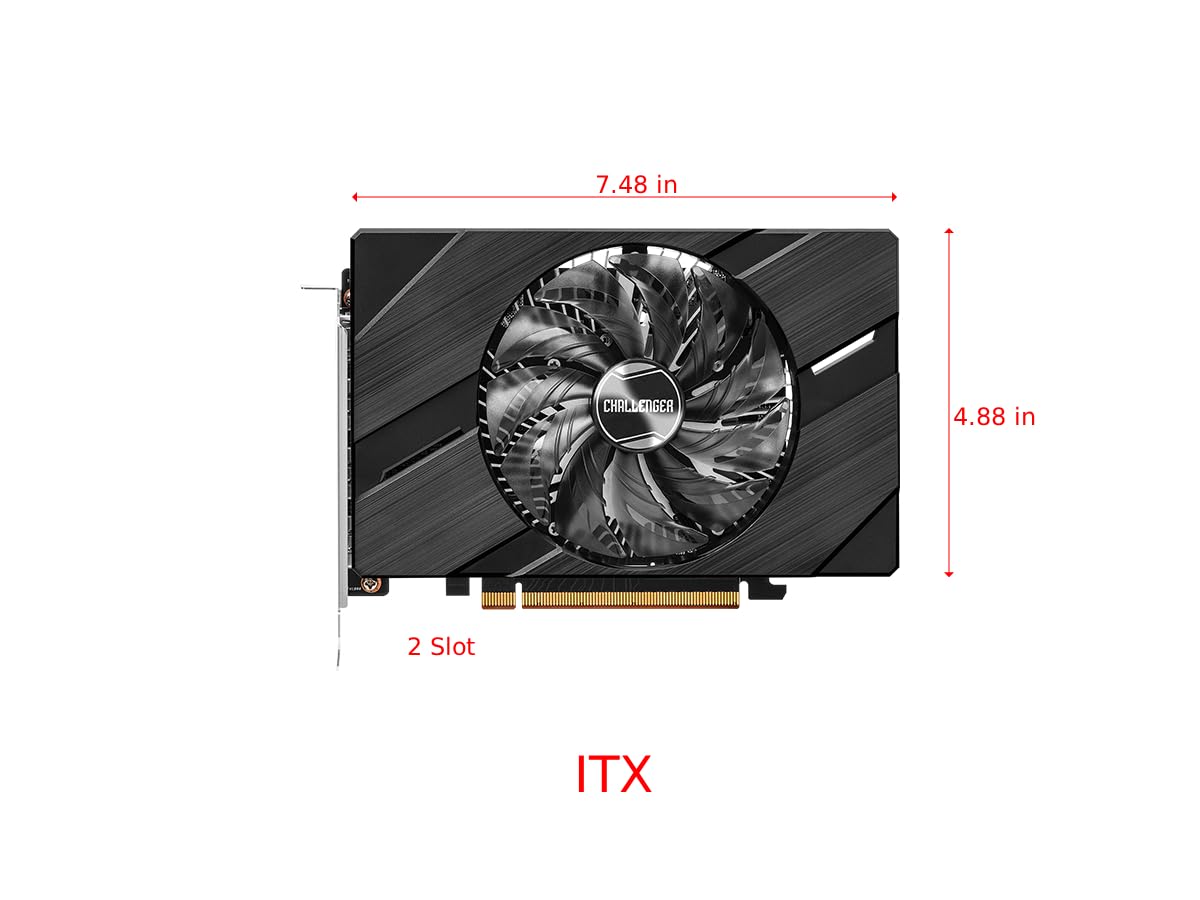
Figure 4.2: Graphics Card Dimensions (Approx. 7.48 in x 4.88 in, 2-slot)
4.2. Display Outputs
The card provides multiple display outputs for versatile connectivity.
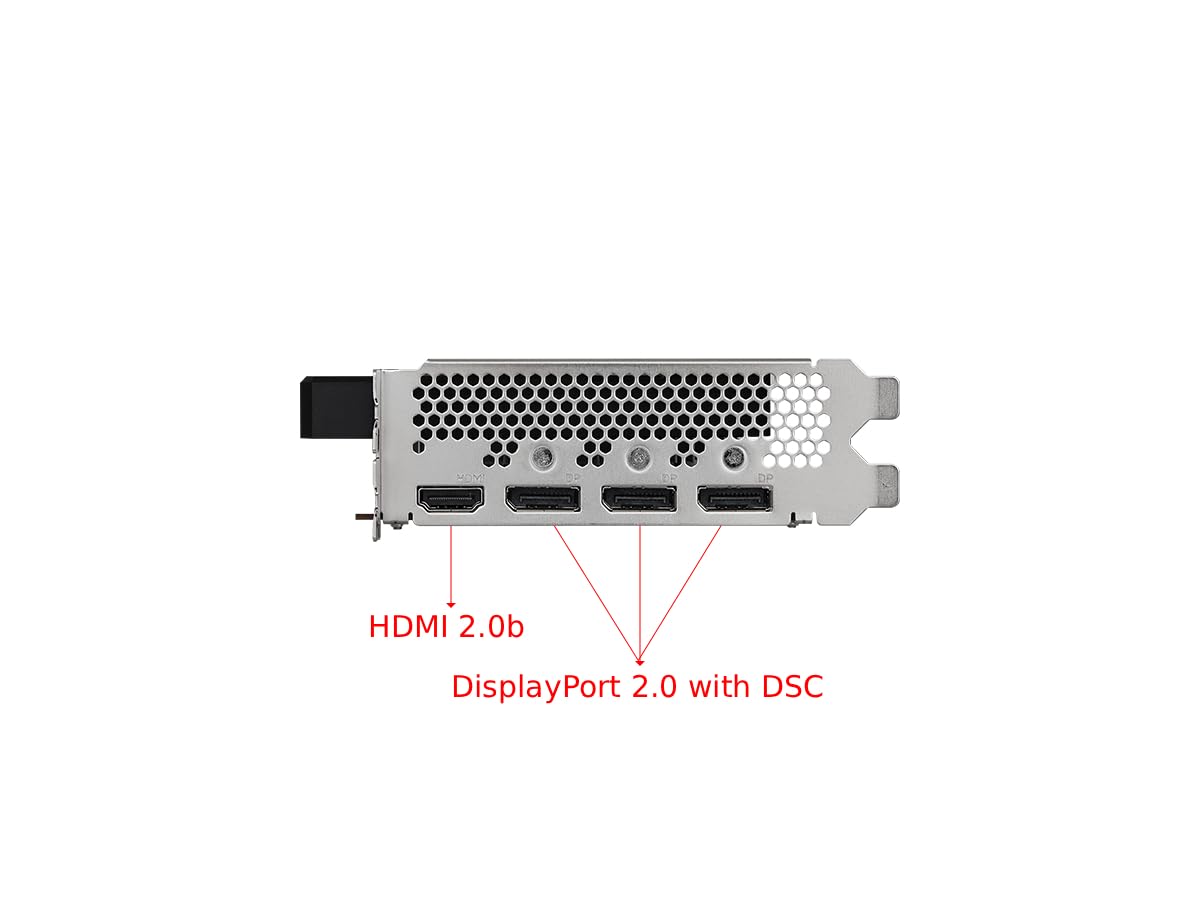
Figure 4.3: Display Outputs (1x HDMI 2.0b, 3x DisplayPort 2.0 with DSC)
4.3. Sistema de refrigeració
The ASRock custom Striped Axial Fan design enhances airflow for optimal cooling. The 0dB Silent Cooling technology ensures the fans stop spinning under light workloads for quiet operation.

Figure 4.4: Striped Axial Fan for enhanced airflow

Figure 4.5: 0dB Silent Cooling: Fans stop under light workloads
4.4. Vídeo oficial del producte
Vídeo 4.1: Acabatview of Intel ARC Graphics Cards by ASRock USA. This video provides a general introduction to the Intel ARC graphics card series.
5. Configuració
5.1. Instal·lació física
- Prepareu el vostre sistema: Apagueu l'ordinador i desconnecteu tots els cables. Obriu la carcassa de l'ordinador.
- Locate a PCIe slot: Identify an available PCI Express 4.0 x16 slot on your motherboard.
- Remove slot cover: Remove the corresponding slot cover from your computer case.
- Inseriu la targeta gràfica: Alineeu amb cura la targeta gràfica amb la ranura PCIe i premeu-la fermament fins que quedi ben col·locada. Assegureu-vos que el clip de retenció de la ranura PCIe quedi encaixat al seu lloc.
- Assegura la targeta: Fasten the graphics card to the computer case with a screw.
- Connecteu l'alimentació: Connect the single 8-pin PCIe power connector from your power supply to the graphics card. Ensure your power supply meets the recommended 500W minimum.
- Close case: Tanqueu la carcassa de l'ordinador i torneu a connectar tots els cables.
5.2. Instal·lació del controlador
After physical installation, you must install the latest drivers for your graphics card:
- Enceneu l'ordinador.
- Visit the official ASRock website or Intel's support weblloc.
- Navigate to the support section and locate the drivers for the Intel Arc A380 series.
- Download the latest graphics drivers for your operating system.
- Run the installer and follow the on-screen instructions. A system restart may be required.
6. Funcionament
Once drivers are installed, your ASRock Intel Arc A380 Challenger ITX graphics card is ready for use. Connect your display(s) to the available DisplayPort 2.0 or HDMI 2.0b ports. You can configure display settings, resolution, and refresh rates through your operating system's display settings or the Intel Arc Control software.
7. Manteniment
Un manteniment regular ajuda a garantir la longevitat i el rendiment òptim de la targeta gràfica:
- Eliminació de pols: Periodically clean dust from the fan and heatsink using compressed air. Ensure the system is powered off and unplugged before cleaning.
- Actualitzacions de controladors: Keep your graphics drivers updated to the latest version. New drivers often include performance improvements, bug fixes, and compatibility enhancements.
- Monitorització de la temperatura: Use monitoring software to keep an eye on the GPU temperature, especially during heavy workloads. While the 0dB cooling feature is efficient, ensuring good case airflow is crucial.
8. Solució De Problemes
Si teniu problemes amb la targeta gràfica, tingueu en compte els passos següents per resoldre'ls:
- Sense sortida de pantalla:
- Assegureu-vos que la targeta gràfica estigui completament col·locada a la ranura PCIe.
- Verify that the 8-pin power connector is securely attached.
- Check that your monitor cable is correctly connected to the graphics card and the monitor.
- Prova un port o cable de sortida de pantalla diferent.
- Driver Issues/Instability:
- Perform a clean installation of the latest graphics drivers. Uninstall previous drivers completely before installing new ones.
- Ensure your motherboard BIOS/UEFI is updated to the latest version, as this can improve compatibility.
- Verify that Resizable BAR (ReBAR) is enabled in your system's BIOS/UEFI for optimal performance with Intel Arc GPUs.
- Sobreescalfament:
- Assegureu-vos que hi hagi un flux d'aire adequat dins de la caixa de l'ordinador.
- Clean any dust buildup from the graphics card's fan and heatsink.
- Check that the fan is spinning correctly under load.
9. Especificacions
| Característica | Especificació |
|---|---|
| Coprocessador gràfic | Intel Arc A380 |
| Memòria de vídeo | 6 GB GDDR6 |
| Velocitat de memòria | 15.5 Gbps |
| Rellotge del motor | 2250 MHz |
| Resolució de pantalla màxima | 7680x4320 Pixels (8K) |
| Interfície de sortida de vídeo | 3x DisplayPort 2.0, 1x HDMI 2.0b |
| Número de model de l'article | 90-GA3KZZ-00UANF |
| Pes de l'article | 1.32 lliures |
| Dimensions del producte | 1.1 x 9.7 x 0.04 polzades |
| PSU recomanat | 500W |
10. Garantia i Suport
ASRock provides a manufacturer's warranty for this product. Please refer to the warranty card included in your package or visit the official ASRock website for detailed warranty terms and conditions. For technical support, driver downloads, and FAQs, please visit the ASRock support page at www.asrock.com/support.asp.
Optional protection plans are available for purchase, offering extended coverage beyond the standard manufacturer's warranty. These plans typically cover 3-year or 4-year durations, or monthly subscription options.


