
1. Introducció i finalview
The Weiser SmartCode Keypad Electronic Deadbolt offers enhanced security and convenience for your home. This keyless entry system allows access via a personalized code, eliminating the need for traditional keys. It features a fast and quiet motorized deadbolt, a backlit keypad for night visibility, and SmartKey re-key technology for added security and flexibility.
Característiques principals:
- Fast and quiet motorized deadbolt with one-touch motorized locking.
- ANSI Grade 2 security rating.
- Supports up to 50 user codes and 1 master code.
- Backlit keypad for increased visibility in low light conditions.
- SmartKey re-key technology for easy re-keying and enhanced security.
- Designed to fit standard doors 1-3/8" to 1-3/4" thick with an adjustable backset (2-3/8" or 2-3/4").
2. Informació de seguretat
Si us plau, llegiu atentament totes les instruccions abans de la instal·lació i l'ús. Conserveu aquest manual per a futures consultes.
- Do not attempt to disassemble or modify the lock beyond the instructions provided. This may void the warranty and compromise security.
- Use only 4 AA alkaline batteries. Do not mix old and new batteries, or different types of batteries.
- Avoid exposing the lock to excessive moisture or direct sunlight for prolonged periods.
- Ensure the door frame and door are properly aligned and secure before installation to prevent binding or malfunction.
- Keep your master code and user codes confidential.
3. Contingut del paquet
Verifiqueu que tots els components siguin presents abans de començar la instal·lació:
- Electronic Deadbolt (Exterior Assembly)
- Electronic Deadbolt (Interior Assembly)
- Pestillo ajustable
- Placa de vaga
- Collar
- Placa de muntatge
- Maquinari d'instal·lació (cargols)
- 2 Weiser Keys
- Eina SmartKey
- Guia d'instal·lació (aquest manual)
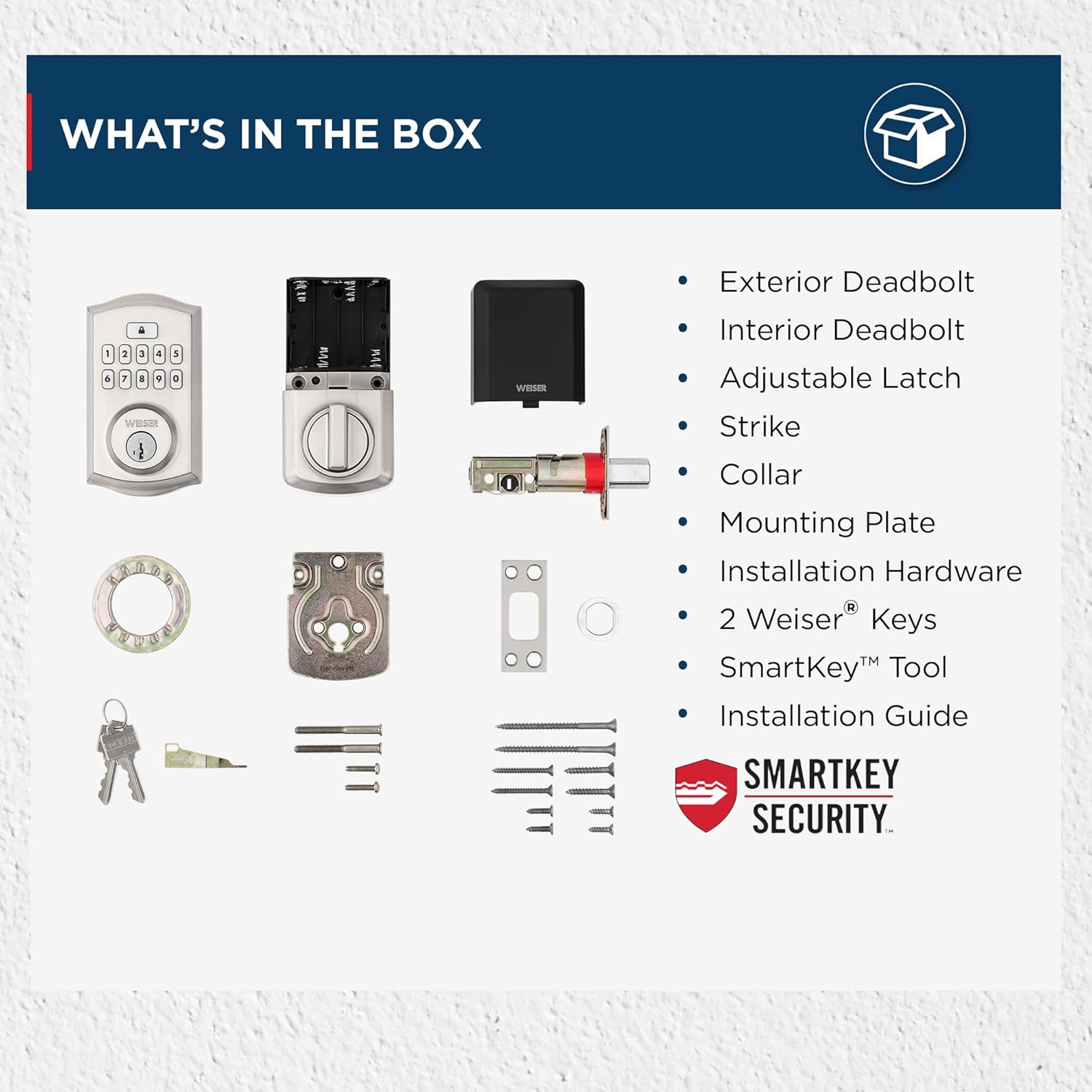
Image: All components included in the Weiser SmartCode Keypad Electronic Deadbolt package.
4. Instal·lació
The Weiser SmartCode Keypad Electronic Deadbolt is designed for easy installation. For detailed, step-by-step interactive 3D instructions with voice and video guidance, it is recommended to use the free BILT app.
Passos generals d'instal·lació:
- Prepara la porta: Ensure your door has the correct bore holes and backset. The lock is compatible with standard doors 1-3/8" to 1-3/4" thick.
- Instal·leu el tancament: Insert the adjustable latch into the door edge and secure it with screws. Ensure the latch bolt is facing the correct direction.
- Instal·leu el conjunt exterior: Route the cable from the exterior keypad assembly through the door bore hole and position the assembly flush against the door.
- Instal·leu la placa de muntatge: Secure the interior mounting plate to the exterior assembly using the provided screws, ensuring the cable passes through the plate.
- Instal·leu el conjunt interior: Connect the cable from the exterior assembly to the interior assembly. Align the tailpiece with the slot in the interior assembly and secure the interior assembly to the mounting plate.
- Instal·leu les bateries: Insert 4 AA alkaline batteries into the battery pack of the interior assembly.
- Realitzar el procés de mànager de portes: This step is crucial for the lock to learn the orientation of your door. Follow the specific instructions in the included installation guide or the BILT app.

Image: The Weiser SmartCode Keypad Electronic Deadbolt installed on a door, showcasing el seu disseny elegant.
5. Configuració i programació
After installation, you will need to program your master code and user codes.
Codi mestre: The master code is used to program and delete user codes. It does not unlock the door. It is recommended to create a master code immediately after installation.
Codis d'usuari: These codes are used to unlock the door. You can program up to 50 unique user codes.
Refer to your specific installation guide for detailed programming steps, as these can vary slightly by model revision. Generally, programming involves pressing the program button on the interior assembly, entering the master code, then entering the new user code, and confirming.

Image: The SmartCode lock supports up to 50 user access codes and one master code option, allowing multiple individuals secure entry.
6. Instruccions de funcionament
Using your SmartCode Keypad Electronic Deadbolt is straightforward.
Desbloqueig de la porta:
- Ús d'un codi d'usuari: Enter your personalized 4-8 digit user code on the keypad. The deadbolt will retract, and the door will unlock.
- Ús d'una clau: Insert the physical key into the keyway and turn to unlock the deadbolt.

Image: Keyless entry is made secure and convenient by simply entering your personalized code on the keypad.
Tancament de la porta:
- Bloqueig d'un sol toc: Press the Lock button on the keypad. The deadbolt will extend, locking the door.
- Funció de bloqueig automàtic: If enabled, the lock will automatically re-lock after a set period (e.g., 30 seconds) once unlocked.
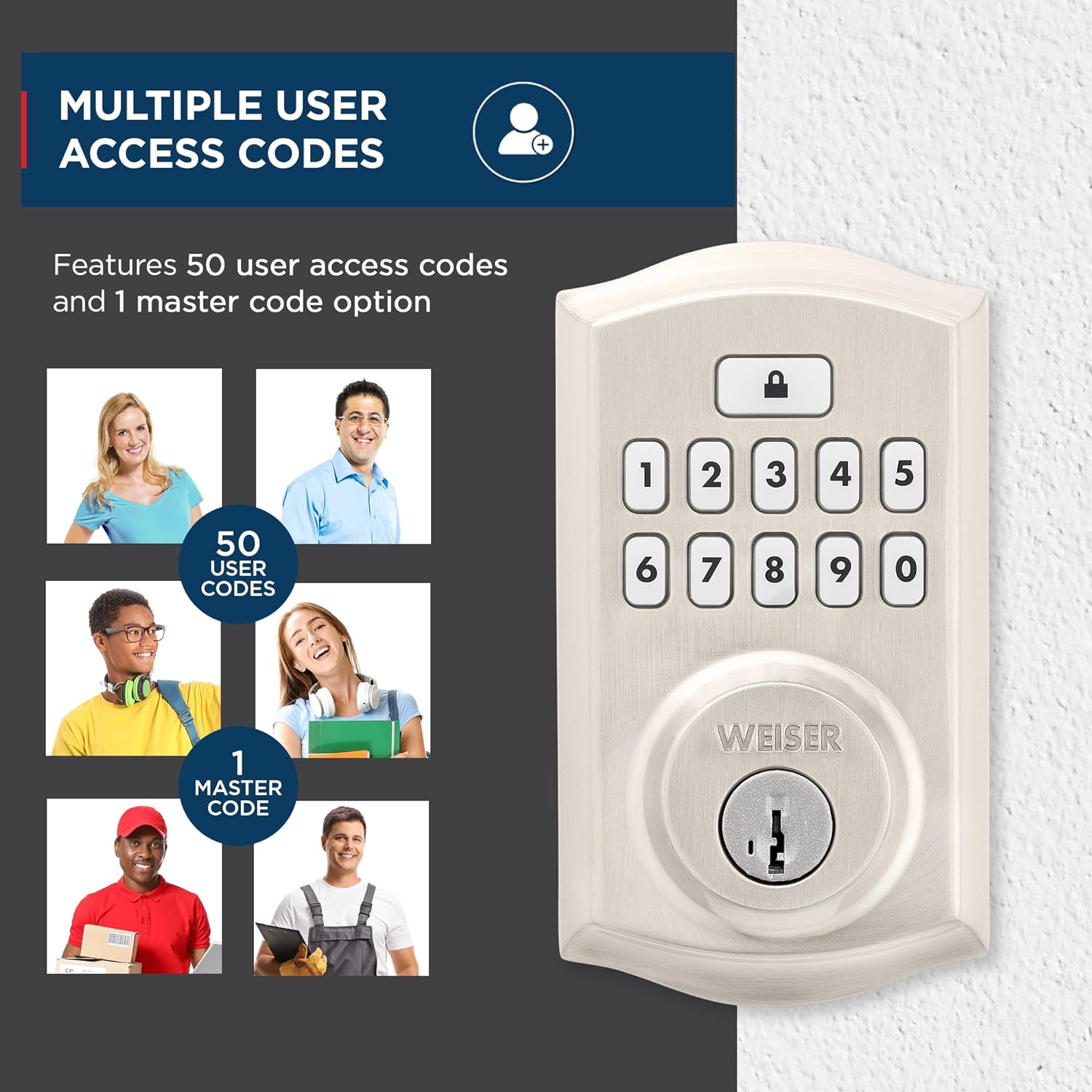
Image: The auto-lock feature allows you to lock your door with a single touch, requiring no additional turning or twisting.
Teclat retroil·luminat: The keypad illuminates for increased visibility at night and remains lit for 30 seconds after inactivity, making code entry easy in low light conditions.

Image: The keypad is backlit for increased visibility at night, staying lit for 30 seconds after inactivity for easy code entry.
Seguretat SmartKey: This technology allows you to re-key the lock yourself in seconds, providing convenience and maintaining key control without removing the lock from your door. It also protects against advanced break-in techniques.

Image: SmartKey Security protects against advanced break-in techniques and allows for easy re-keying of the lock in seconds.
7. Manteniment
Proper maintenance ensures the longevity and optimal performance of your SmartCode deadbolt.
- Neteja: Netegeu el pany amb un drap suauamp drap. Eviteu netejadors abrasius, dissolvents o productes químics agressius, ja que poden danyar l'acabat i els components electrònics.
- Substitució de la bateria: The lock operates on 4 AA alkaline batteries (not included). When the batteries are low, the lock will typically provide an audible or visual low battery warning. Replace all four batteries simultaneously with new, high-quality alkaline batteries. Do not use rechargeable batteries.
- Lubricació: Periodically lubricate the latch bolt and deadbolt mechanism with a silicone-based lubricant to ensure smooth operation. Do not lubricate the keypad or electronic components.
8. Solució De Problemes
If you encounter issues with your SmartCode deadbolt, refer to the following common problems and solutions:
| Problema | Causa possible | Solució |
|---|---|---|
| El pany no respon a les entrades del teclat. | Low batteries; incorrect code; keypad malfunction. | Replace batteries. Ensure correct code is entered. Perform door handing process again. |
| El forrellat no s'estén ni es retreu completament. | Door/frame misalignment; low batteries; latch binding. | Check door alignment and strike plate. Replace batteries. Lubricate latch. |
| Programming new codes fails (e.g., 3 beeps). | Incorrect master code; programming sequence error; unit needs reset. | Verify master code. Follow programming steps precisely. Reset the unit to factory settings (refer to manual for specific steps). |
| Auto-lock feature not working as expected. | Feature disabled; incorrect setting; door not fully closed. | Ensure auto-lock is enabled and set to desired time. Confirm door is fully closed. |
| La durada de la bateria és més curta del que s’esperava. | Frequent usage; poor quality batteries; auto-lock set to short interval. | Use high-quality alkaline batteries. Consider adjusting auto-lock time if not critical. |
For issues not covered here, please consult the full installation guide or contact Weiser customer support.
9. Especificacions
| Característica | Detall |
|---|---|
| Número de model | 9GED92600-001 |
| Dimensions del producte | 6.99 x 2.86 x 13.97 cm |
| Pes de l'article | 454 g |
| Material | Metall |
| Acabar | Brushed (Satin Nickel) |
| Estil | Tradicional |
| Tipus de bloqueig | Deadbolt, Electronic |
| Font d'alimentació | 4 piles AA (no incloses) |
| Característiques especials | Weather Resistant, Anti-Bump, One-Touch Lock, Auto-Lock, Back-Lit Keypad |
| Compatibilitat de portes | 1-3/8" to 1-3/4" thick doors, adjustable backset (2-3/8" or 2-3/4") |
10. Garantia i Suport
Garantia: This product comes with a 1-year warranty from the date of purchase. Please retain your proof of purchase for warranty claims. The warranty covers defects in material and workmanship under normal use.
Atenció al client: For technical assistance, troubleshooting, or warranty inquiries, please contact Weiser customer support. Refer to the contact information provided in your product packaging or visit the official Weiser weblloc web per obtenir els detalls d'assistència més actualitzats.
Nota: Les reparacions o modificacions no autoritzades poden anul·lar la garantia del producte.


