1. Introducció
This manual provides detailed instructions for the Nulea Wireless Ergonomic Keyboard, Model RT05. This keyboard is designed to enhance typing comfort and efficiency through its split, splayed, and curved layout, integrated wrist rest, and versatile connectivity options. It features a 7-color adjustable backlight and convenient USB-C charging.

Figure 1.1: Nulea Wireless Ergonomic Keyboard (Model RT05)
This image displays the Nulea Wireless Ergonomic Keyboard from a top-down perspective, highlighting its split design, integrated wrist rest, and full key layout including a numeric keypad. The keyboard is black with yellow accents on the spacebar area.
2. Contingut del paquet
Verifiqueu que tots els elements siguin presents al paquet:
- Teclat ergonòmic x1
- USB cable x1
- Manual d'usuari x1
3. Configuració
3.1 Càrrega inicial
Before first use, fully charge the keyboard using the provided USB-C cable. The keyboard features a 2000mAh internal battery for extended operation.
- Connect the USB-C end of the cable to the keyboard's charging port.
- Connect the USB-A end to a compatible USB power source (e.g., computer USB port, wall adapter).
- The battery indicator light will provide charging status. Recharge when the battery level is below 10% (backlight will turn off to conserve power).

Figure 3.1: USB-C Quick Charging
This image illustrates the Nulea keyboard being charged via a USB-C cable, with a graphic indicating a 2000mAh built-in rechargeable battery. The image emphasizes the convenience of USB-C charging.
3.2 Connectivitat sense fil
The Nulea keyboard supports both Bluetooth and 2.4G USB connectivity, allowing connection to up to three devices simultaneously.
2.4G USB Connection:
- Localitza el receptor USB de 2.4 G (normalment es guarda en un compartiment del teclat).
- Connecteu el receptor USB a un port USB disponible de l'ordinador.
- Engegueu el teclat. S'hauria de connectar automàticament al receptor.
Connexió Bluetooth:
- Enceneu el teclat.
- Premeu el botó Fn key simultaneously with either Q (per a 2.4G), W (for Bluetooth 1), or E (for Bluetooth 2) to select the desired connection channel. For Bluetooth pairing, select W or E.
- Mantingueu la selecció Fn + W or Fn + E combinació de tecles durant 3-5 segons fins que l'indicador lluminós parpellegi ràpidament, indicant el mode d'emparellament.
- On your device (computer, smartphone, tablet), go to Bluetooth settings and search for new devices.
- Select "Nulea Keyboard" or a similar name from the list of available devices to complete the pairing process.
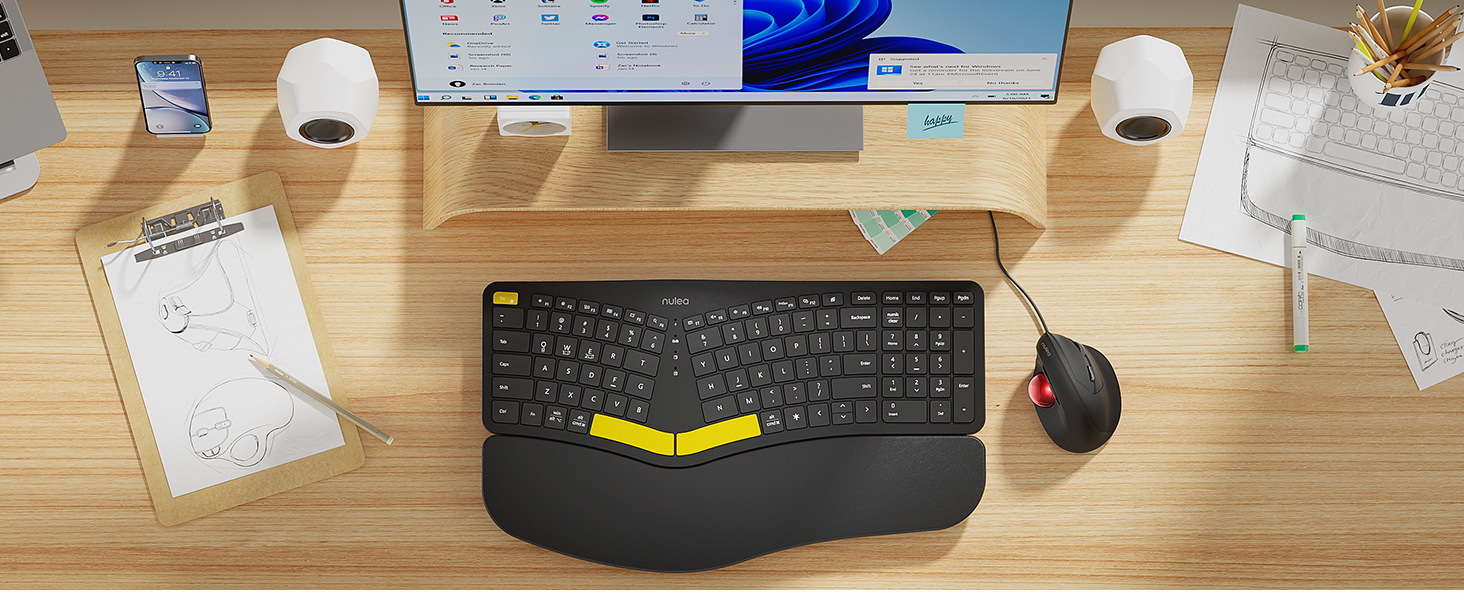
Figure 3.2: Wireless Connectivity Setup
This diagram illustrates the three connectivity options for the Nulea keyboard: 2.4G USB connection via a dongle, and two separate Bluetooth connections. It shows how to switch between devices using Fn + Q/W/E keys.
4. Instruccions de funcionament
4.1 Encès/Apagat
Locate the power switch on the keyboard (typically on the top edge or underside) and slide it to the 'ON' or 'OFF' position.
4.2 Canvi entre dispositius connectats
Once multiple devices are paired, you can switch between them instantly:
- Premeu Fn + Q to switch to the 2.4G USB connected device.
- Premeu Fn + W to switch to Bluetooth Device 1.
- Premeu Fn + E to switch to Bluetooth Device 2.

Figure 4.1: Easy Device Switching
This image shows the Nulea keyboard connected to a desktop monitor, a laptop, and a smartphone, illustrating its ability to easily switch between up to three paired devices with a single tap.
Control de retroiluminació 4.3
The keyboard features a 7-color backlight with 3 brightness levels. You can customize the lighting to your preference:
- To cycle through backlight colors (blue, green, red, cyan, purple, yellow, white), press the backlight control key (refer to keyboard layout for specific key).
- To adjust brightness levels, use the dedicated brightness control keys (refer to keyboard layout).
- Note: When the battery level drops below 10%, the backlight will automatically turn off to preserve basic keyboard functionality.

Figure 4.2: Adjustable 7-Color Backlight
This image displays the Nulea keyboard in a dimly lit environment, showcasing its illuminated keys with a vibrant backlight. The image highlights the 7 available backlight colors and 3 brightness levels.
4.4 Potes inclinables ajustables
The keyboard is equipped with 4 adjustable tilt legs, allowing you to set the keyboard at 3 different angles for optimal wrist comfort and posture.
- Gently pull out the tilt legs located on the underside of the keyboard to adjust the angle.
- Experiment with different tilt levels to find the most comfortable position for your typing style.

Figure 4.3: Adjustable Tilt Legs
Aquesta imatge mostra un costat view of the Nulea keyboard on a desk, with its adjustable tilt legs extended to demonstrate the ergonomic angle. The image emphasizes how the tilt legs help maintain a comfortable wrist position.
4.5 Experiència de mecanografia
The keyboard features spherical-dished key shapes designed to conform to your fingertips, promoting effortless and comfortable typing.

Figure 4.4: Spherical-Dished Keys
This close-up image focuses on the keys of the Nulea keyboard, highlighting their spherical-dished shape designed for comfortable and precise typing.
5. Manteniment
5.1 Neteja
Per mantenir l'aspecte i la funcionalitat del teclat:
- Desconnecteu el teclat de tots els dispositius i fonts d'alimentació abans de netejar-lo.
- Utilitzeu un drap suau i sense pelusa lleugerament dampesbandida amb aigua o una solució netejadora suau per netejar la superfície.
- Eviteu utilitzar productes químics agressius, netejadors abrasius o dissolvents.
- Feu servir aire comprimit per eliminar la pols i les restes que hi ha entre les tecles.
5.2 Cura de la bateria
Per allargar la durada de la bateria:
- Recharge the keyboard when the battery low indicator appears.
- Eviteu esgotar completament la bateria amb freqüència.
- Si guardeu el teclat durant un període prolongat, carregueu-lo aproximadament al 50% abans de guardar-lo.
6. Solució De Problemes
6.1 El teclat no respon
- Assegureu-vos que el teclat estigui encès.
- Comproveu el nivell de la bateria i recarregueu-la si cal.
- For 2.4G connection, ensure the USB receiver is securely plugged into the device. Try a different USB port.
- For Bluetooth connection, ensure Bluetooth is enabled on your device and the keyboard is paired. Try re-pairing the keyboard.
- Ensure you are on the correct connection channel (Fn + Q/W/E).
6.2 La retroiluminació no funciona
- Check the battery level. The backlight automatically turns off when the battery is below 10%. Recharge the keyboard.
- Ensure the backlight is turned on and brightness is adjusted using the dedicated keys.
6.3 Connectivity Issues / Lag
- Acosta el teclat al dispositiu per reduir les interferències.
- Avoid placing the keyboard near other wireless devices that may cause interference (e.g., Wi-Fi routers, cordless phones).
- Assegureu-vos que el sistema operatiu i els controladors Bluetooth del dispositiu estiguin actualitzats.
7. Especificacions
| Característica | Detall |
|---|---|
| Nom del model | RT05 |
| Dimensions del producte | 16.5" de llargada x 9.6" d'amplada x 1.3" d'alçada (41.9 x 24.4 x 3.3 cm) |
| Pes de l'article | 3.5 lliures (1.59 kg) |
| Fabricant | Nulea |
| Bateries | 1 bateria de ions de liti (inclosa) |
| Tecnologia de connectivitat | 2.4G USB, Bluetooth |
| Dispositius compatibles | Ordinador portàtil, PC, telèfon intel·ligent, tauleta |
| Característiques especials | Backlit, Rechargeable, Split Keyset Design, Adjustable Tilt Legs |
| Color | Negre |
8. Garantia i Suport
For warranty information, technical support, or service inquiries, please refer to the contact information provided on the Nulea official website or contact the seller directly. Keep your purchase receipt for warranty claims.
This user manual is included with your product for future reference.


