1. Introducció
Thank you for choosing the Roadstar RS-2714BR USB/Bluetooth Car Radio. This manual provides essential information for the proper installation, operation, and maintenance of your new car audio system. Please read this manual thoroughly before using the product to ensure optimal performance and safety.
2. Informació de seguretat
- Font d'alimentació: This unit is designed for a 12V DC negative ground electrical system. Ensure correct wiring to prevent damage.
- Instal·lació: Professional installation is recommended. Incorrect wiring can cause fire or damage to the vehicle's electrical system.
- Control de volum: Keep the volume at a level where you can still hear outside traffic sounds. Excessive volume can impair your ability to drive safely.
- Humitat: Do not expose the unit to moisture or water to prevent electric shock or malfunction.
- Neteja: Feu servir un drap suau i sec per netejar. Eviteu productes de neteja o dissolvents abrasius.
3. Contingut del paquet
Verifiqueu que tots els elements siguin presents al paquet:
- Roadstar RS-2714BR Car Radio Unit
- Control remot
- Arnès de cablejat del connector ISO
- Maquinari de muntatge
- Manual d'usuari (aquest document)
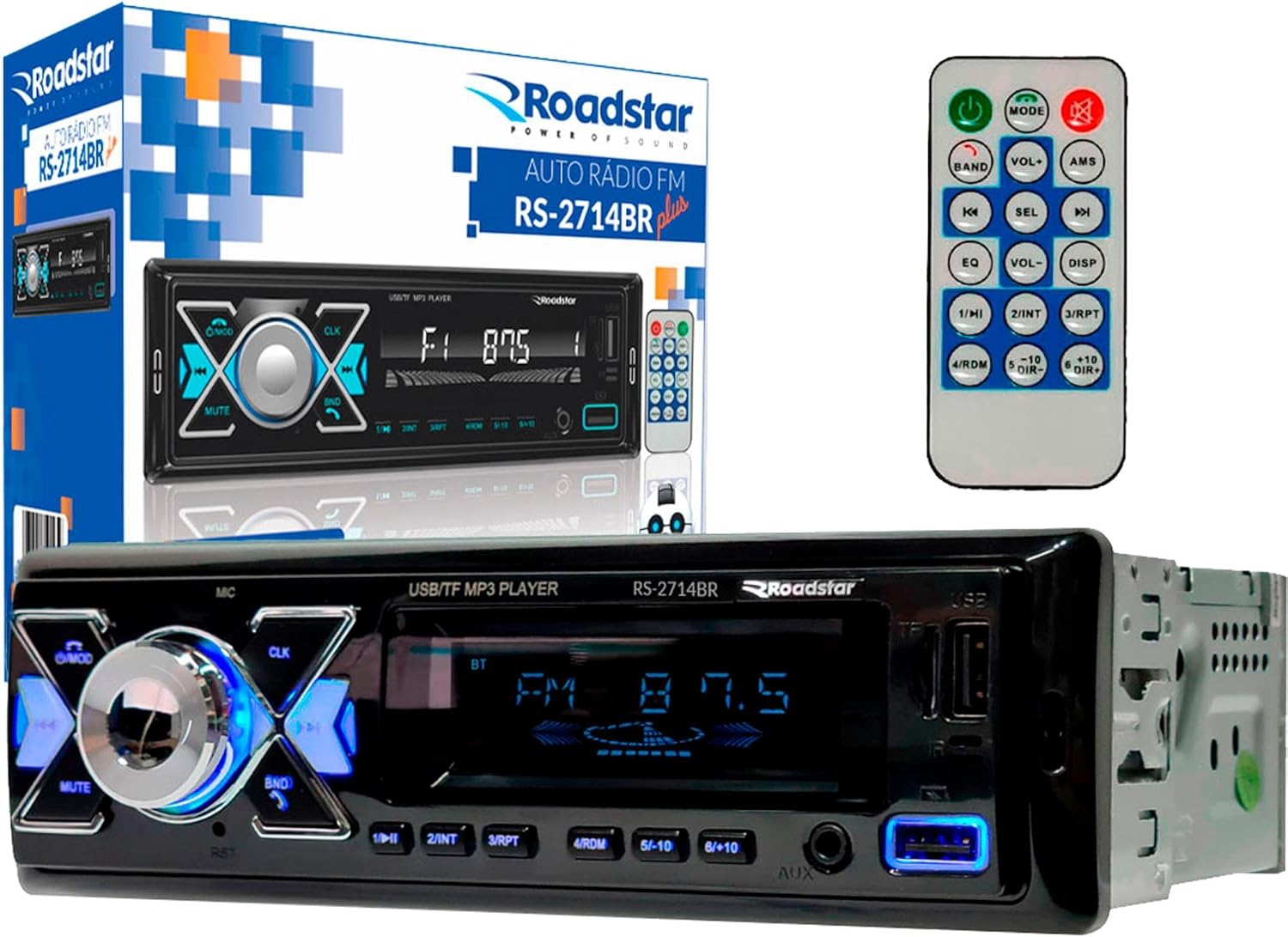
Image 3.1: The Roadstar RS-2714BR car radio unit, its remote control, and product packaging.
4. Producte acabatview
4.1 Tauler frontal
The front panel features the main controls and display for operating the car radio.

Imatge 4.1: Frontal view of the Roadstar RS-2714BR car radio, showing the white LED display, illuminated control buttons, USB ports, and Micro SD slot.
4.2 Panell posterior i lateral View
The rear panel provides all necessary connections for power, speakers, and external audio devices. The side view illustrates the mounting points.
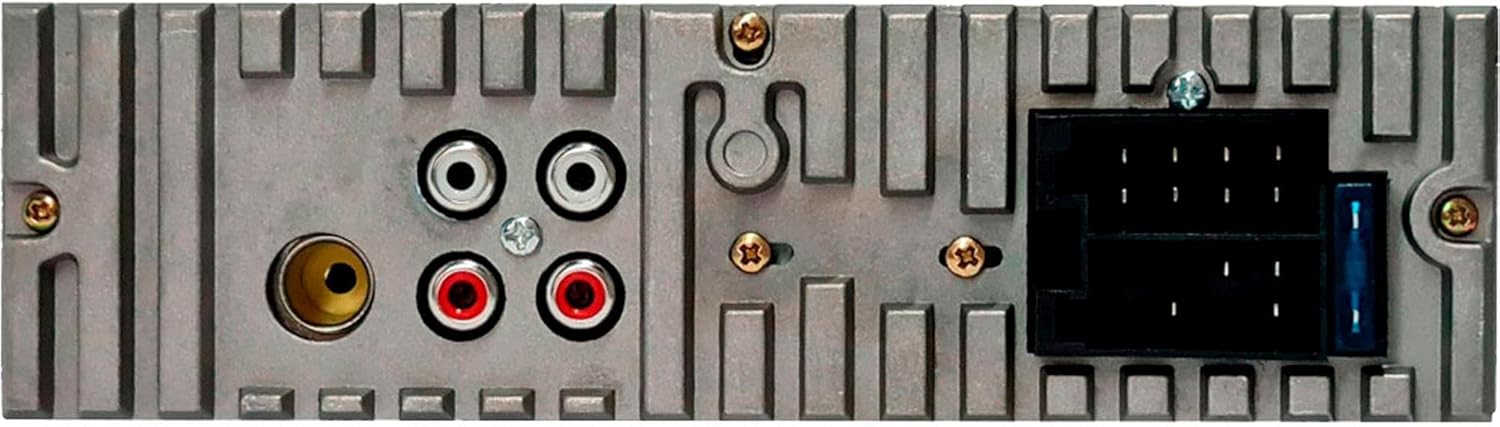
Imatge 4.2: posterior view of the car radio, highlighting the RCA outputs and the standard ISO connector for power and speaker wiring.

Imatge 4.3: Lateral view of the car radio, illustrating the metal mounting brackets and screw holes for secure installation.
5. Instal·lació
5.1 Muntatge
- Assegureu-vos que la bateria del vehicle estigui desconnectada abans de començar la instal·lació.
- Insert the mounting sleeve into the dashboard opening. Bend the tabs outwards to secure it.
- Slide the radio unit into the mounting sleeve until it clicks into place.
5.2 Esquema de cablejat
Refer to the following diagram for correct wiring connections. Incorrect wiring can cause damage to the unit or vehicle.
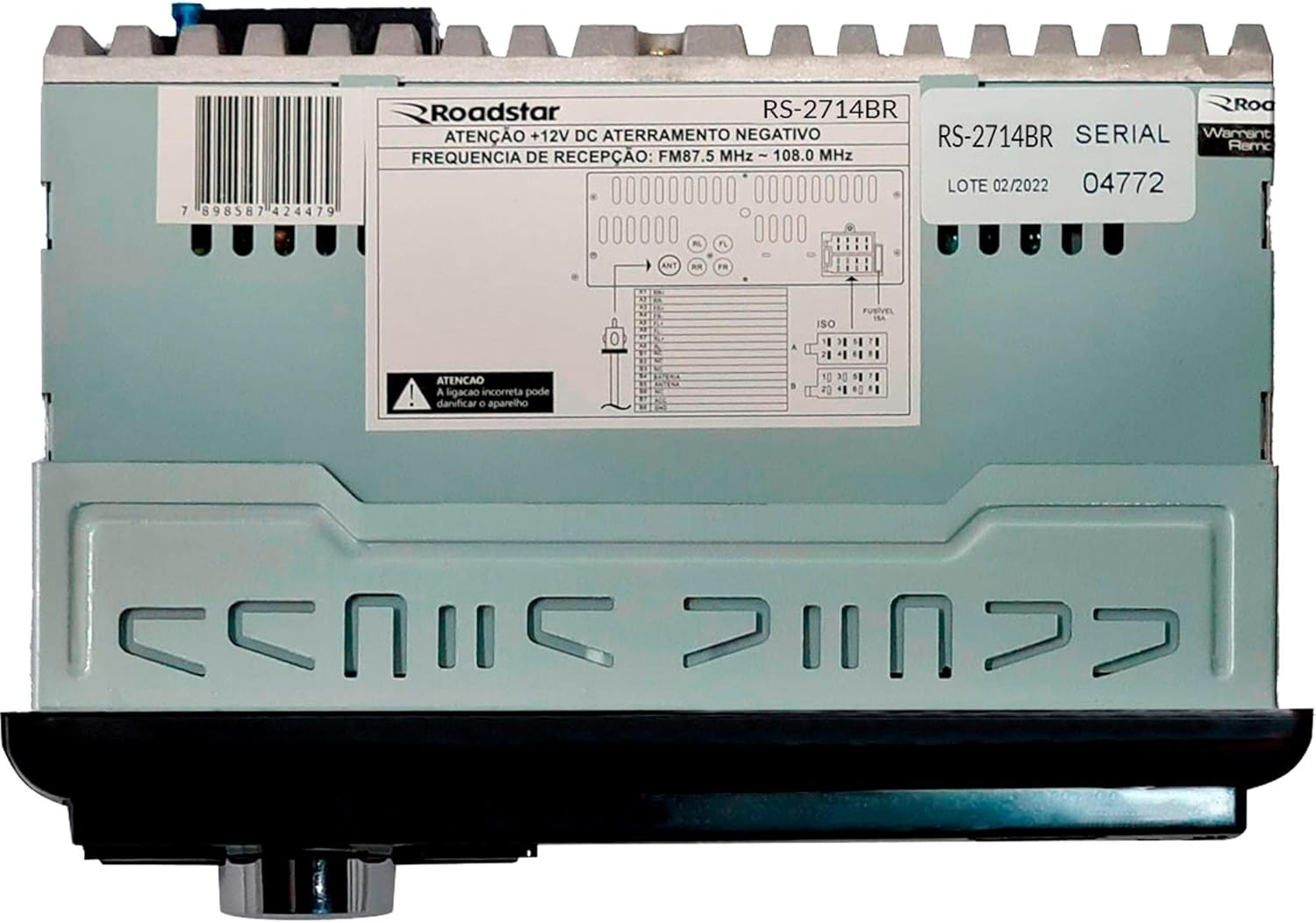
Image 5.1: Detailed wiring diagram located on the unit's chassis, showing connections for power, ground, antenna, and speakers.
- Yellow Wire (B+): Connect to the car battery's constant 12V supply.
- Cable vermell (ACC): Connect to the car's ignition switch (switched 12V).
- Cable negre (GND): Connect to the car chassis (ground).
- Blue Wire (ANT): Connect to the automatic antenna or ampEncenedor remot del lificador.
- Cables de l’altaveu: Connect to the corresponding positive (+) and negative (-) terminals of your car speakers. Ensure correct polarity.
- Sortides RCA: Connecteu-vos a l'exterior amplificadors si es desitja.
6. Funcionament bàsic
- Encès/apagat: Premeu el botó U/MOD botó per encendre o apagar la unitat.
- Selecció del mode: Premeu el botó U/MOD button repeatedly to cycle through available modes: FM Radio, USB, SD Card, Bluetooth, AUX.
- Control de volum: Gireu el botó central per ajustar el nivell de volum.
- Silenciar: Premeu el botó MUT button to temporarily silence the audio. Press again to restore.
7. Funcionament de la ràdio (FM)
- Seleccioneu el mode FM: Premeu el botó U/MOD button until FM mode is selected.
- Escaneig automàtic: Manteniu premut el botó BND button to automatically scan and store strong stations.
- Sintonització manual: Premeu el botó |< or >>| botons breument per ajustar la freqüència.
- Estacions preseleccionades: Utilitzeu botons 1-6 to select stored preset stations. To store a station, tune to the desired frequency, then press and hold one of the preset buttons (1-6) until you hear a beep.
8. USB/SD Card Operation
- Insert USB/SD: Insert a USB drive into the USB port or an SD card into the Micro SD slot. The unit will automatically switch to USB/SD mode and begin playback.
- Reproduir/pausa: Premeu el botó 1/►II botó per reproduir o pausar la reproducció.
- Seguiment anterior / següent: Premeu el botó >>| or |< botons per saltar a la pista següent o anterior.
- Repetició/Aleatori: Premeu el botó 3 / RPT button for repeat options (e.g., repeat one, repeat all). Press the 4 / RDM button for random playback.
9. Funcionament Bluetooth
- Maridatge:
- Switch the car radio to Bluetooth mode using the U/MOD button. The display will show "BT".
- Al dispositiu mòbil, activeu el Bluetooth i cerqueu els dispositius disponibles.
- Select "RS-2714BR" from the list. If prompted for a password, enter "0000".
- Un cop emparellat, la unitat confirmarà la connexió.
- Transmissió d'àudio: Play audio from your paired device. Use the radio's controls (|<, >>|, 1/►II) per controlar la reproducció.
- Gestió de trucades:
- Respon a la trucada: Premeu el botó BND button (often doubles as answer/end call) to answer an incoming call.
- Finalitzar la trucada: Premeu el botó BND botó de nou per finalitzar una trucada.
10. Configuració d'àudio
- EQ (equalitzador): Premeu el botó EQ button on the remote control to cycle through preset equalizer modes (e.g., Pop, Rock, Classic, Flat).
- Bass/Treble/Balance: Press the central knob briefly to access audio settings. Rotate the knob to adjust Bass, Treble, and Balance (left/right speaker distribution).
11. Solució De Problemes
| Problema | Causa possible | Solució |
|---|---|---|
| Sense poder | Incorrect wiring; Blown fuse; Vehicle battery low | Check power and ground connections; Replace fuse; Check vehicle battery. |
| Sense so | Cables d'altaveu desconnectats; Volum massa baix; Silenciament activat | Check speaker connections; Increase volume; Deactivate mute. |
| L'USB/SD no es reprodueix | Sense suport file format; suports corruptes; inserit incorrectament | Assegureu-vos files are MP3/WMA; Try different media; Reinsert USB/SD card. |
| Bluetooth no connectat | Not in pairing mode; Device too far; Incorrect password | Ensure radio is in BT mode; Bring device closer; Use password "0000". |
12. Especificacions
| Model | RS-2714BR |
| Marca | Roadstar |
| Potència de sortida | 4 x 55 watts RMS |
| Mostra | LED blanc |
| Connectivitat | Bluetooth, USB (1 Charger, 1 Player), Micro SD, Auxiliary (AUX), RCA Outputs |
| Interfície del maquinari | Bluetooth, Secure Digital Card, MicroSD, USB |
| Dispositius compatibles | Smartphones, USB devices, SD cards, external audio players via AUX input |
| Mode de sortida d'àudio | 4 canals estèreo |
| Color | Negre |
| Dimensions del producte | 20 x 16 x 9 cm |
| Pes del producte | 490 g |
13. Manteniment
- Neteja: Use a soft, dry cloth to clean the unit's surface. Do not use liquid or aerosol cleaners.
- Substitució de fusibles: Si la unitat no s'encén, comproveu el fusible que es troba a la part posterior de la unitat. Substituïu-lo per un fusible de la mateixa capacitat (per exemple, 10 A).
- Emmagatzematge: If storing the vehicle for an extended period, consider disconnecting the car battery to prevent drain.
14. Garantia i Suport
This Roadstar RS-2714BR unit comes with a 12 mesos de garantia des de la data de compra, que cobreix els defectes de fabricació. Conserveu el comprovant de compra per a reclamacions de garantia.
For technical support or warranty inquiries, please contact your authorized Roadstar dealer or visit the official Roadstar weblloc per obtenir informació de contacte.


