1. Introducció
This manual provides detailed instructions for the safe and effective use of your InfiRay P2 Pro Android Type-C Thermal Imaging Camera. The InfiRay P2 Pro is a compact, high-performance infrared thermal camera designed for various applications, including industrial inspections, home diagnostics, and PCB detection. Please read this manual thoroughly before operating the device.

Figure 1: InfiRay P2 Pro Thermal Imaging Camera with Android Phone Interface
2. Producte acabatview i Característiques
The InfiRay P2 Pro is engineered for precision and versatility, offering advanced thermal imaging capabilities in a portable form factor.
2.1 Característiques clau
- Quick Identification with Magnetic Macro Lens: The P2 Pro includes a magnetic macro lens, enabling close-up observation for detailed analysis of PCBs and microcircuits. This allows for sharp imaging and identification of resistance in the millimeter range.
- Rendiment excepcional: Features an IR resolution of 256 x 192 pixels and a fast frame rate of 25 Hz, providing high-resolution thermal imagery. It supports full-frame temperature measurement (Max, Min, Center Spots) across an extensive temperature range from -4 °F to 1022 °F (-20 °C to 550 °C).
- Alta precisió: Offers a measurement accuracy of ±2 °C or ±2% of the measurement range (whichever is greater), suitable for identifying hidden heat-related issues in various settings, including home inspections, HVAC troubleshooting, and professional electrical system checks.
- Batteryless and Secondary Analysis: Operates without an internal battery, drawing power directly from the connected smartphone. Captured infrared images can be used for secondary analysis directly within the software, allowing for point-line-surface analyses.
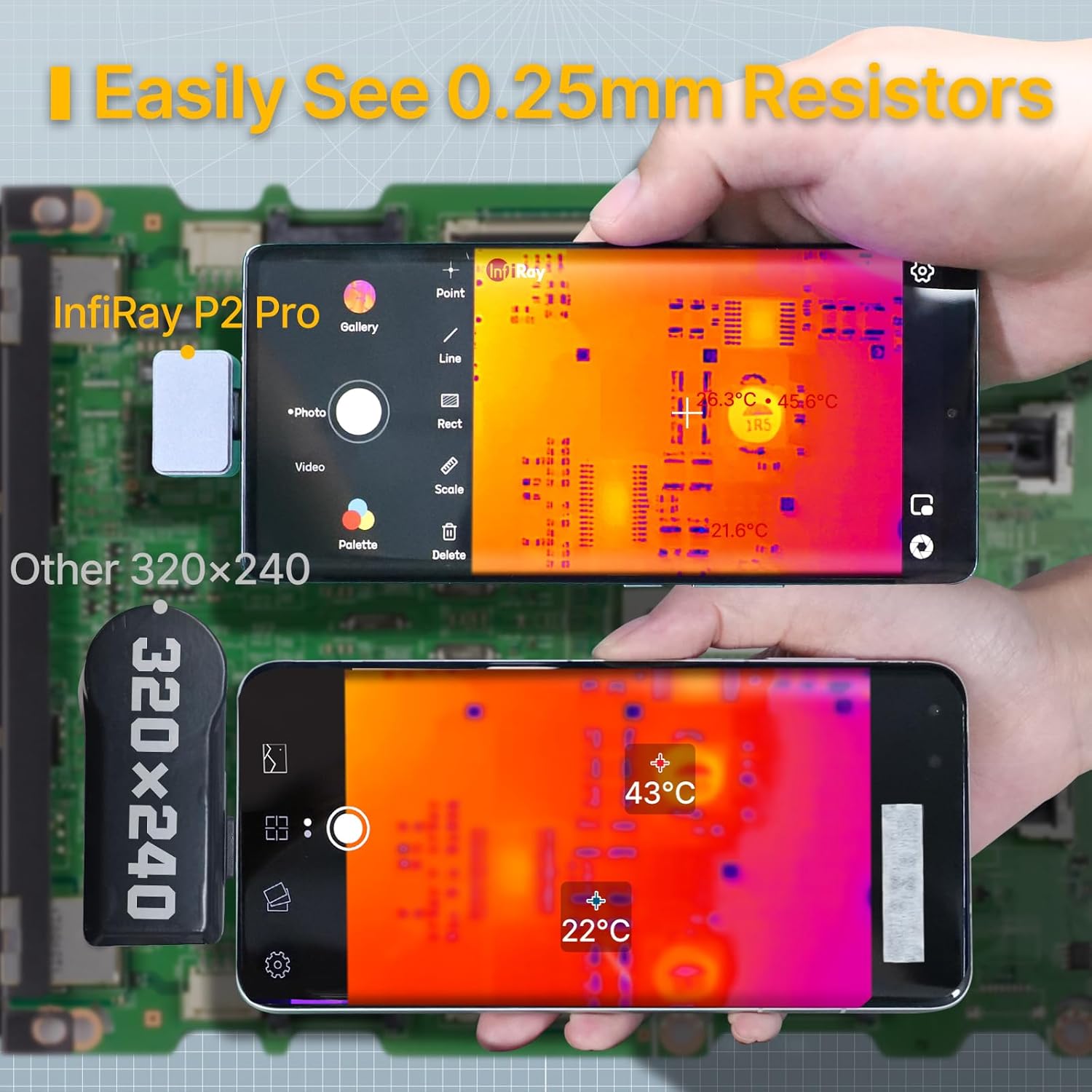
Figure 2: Macro Lens Capability for Detailed PCB Inspection

Figure 3: Comparison of Thermal Image Refresh Rates

Figure 4: Diverse Applications of the P2 Pro Thermal Camera

Figure 5: Low Power Consumption for Extended Use
3. Contingut del paquet
Upon opening your InfiRay P2 Pro package, please verify that all the following items are included:
- InfiRay P2 Pro Thermal Imaging Camera (latest model)
- Magnetic Macro Lens
- Manual d'usuari en anglès (aquest document)
- Connecting Cable (Type-C)
- Funda protectora
4. Configuració
Follow these steps to set up your InfiRay P2 Pro Thermal Imaging Camera:
- Descarrega l'aplicació: Cerca and download the "P2 Pro" application from your Android device's app store.
- Connecteu la càmera: Plug the InfiRay P2 Pro camera into your Android smartphone's Type-C port. The camera is designed for direct connection and does not require an external battery.
- Attach Macro Lens (Optional): If detailed close-up imaging is required, attach the magnetic macro lens to the camera. Ensure it is securely seated.
- Inicieu l'aplicació: Open the "P2 Pro" application. The camera feed should appear automatically.

Figure 6: Connecting the P2 Pro to an Android Device
Note: The InfiRay P2 Pro is not suitable for Google Pixel Phones.
5. Funcionament
Operating the InfiRay P2 Pro is intuitive through its dedicated application.
5.1 Imatges tèrmiques bàsiques
- Once connected and the app is open, the live thermal feed will be displayed on your smartphone screen.
- Observe the temperature scale on the side of the screen, indicating the temperature range being displayed.
5.2 Funcions avançades a través de l'aplicació
- Mesura de la temperatura: L’aplicació ho permet tag specific points, lines, or areas on the thermal image to obtain precise temperature readings (Max, Min, Center Spots).
- Paletes de colors: Select from various color palettes within the app to visualize temperature differences according to your preference or application needs.
- Captura d'imatge i vídeo: Use the app's interface to capture thermal images and videos. These can be saved directly to your device's gallery.
- Secondary Analysis: Captured images can be opened directly within the P2 Pro software for post-analysis, allowing you to add or modify temperature measurement points, lines, and surfaces without needing the physical camera connected.
- Rotació de la imatge: Rotate the image within the app to view temperature data from different angles, enhancing flexibility during inspections.
- Mode professional: Utilize Pro Mode to manually combine the infrared image with a visible image for clearer visualization of low-temperature items.

Figure 7: InfiRay P2 Pro App Interface and Features
6. Manteniment
To ensure the longevity and optimal performance of your InfiRay P2 Pro Thermal Imaging Camera, follow these maintenance guidelines:
- Neteja: Wipe the camera and lens clean with a soft, dry cloth. Avoid using abrasive materials or harsh chemicals that could damage the lens or housing.
- Emmagatzematge: When not in use, store the camera in its protective case to prevent dust accumulation and physical damage.
- Condicions ambientals: Eviteu exposar la càmera a temperatures extremes, humitat elevada o llum solar directa durant períodes prolongats.
7. Solució De Problemes
If you encounter issues with your InfiRay P2 Pro, consider the following common solutions:
- Càmera no detectada: Ensure the camera is securely plugged into your Android device's Type-C port. Try restarting the P2 Pro app or your smartphone.
- Problemes de funcionalitat de l'aplicació: Ensure your P2 Pro app is updated to the latest version. Clear the app's cache or reinstall it if problems persist.
- Qualitat de la imatge: Ensure the camera lens is clean and free from dust or smudges. For close-up work, verify the magnetic macro lens is correctly attached.
- Compatibilitat: Remember that the InfiRay P2 Pro is not compatible with Google Pixel Phones.
8. Especificacions
Detailed technical specifications for the InfiRay P2 Pro Thermal Imaging Camera:
| Especificació | Valor |
|---|---|
| Número de model | P2 Pro |
| Resolució IR | 256 x 192 píxels |
| Velocitat de fotogrames | 25 Hz |
| Interval de temperatura | -4 °F a 1022 °F (-20 °C a 550 °C) |
| Precisió de la temperatura | ±2 °C or ±2% (whichever is greater) |
| Sensibilitat tèrmica | ≤40 mK |
| Camp de View | 56.0° x 42.2° |
| Tecnologia de connectivitat | USB tipus C |
| Font d'alimentació | Smartphone powered (Batteryless) |
| Material exterior | Metall |
| Dimensions del producte | 8.27 x 1.57 x 1.57 polzades; 5.61 unces |
| Components inclosos | Thermal Camera, Magnetic Macro Lens, Connecting Cable, Protective Case |

Figure 8: InfiRay P2 Pro Production Comparison
9. Garantia i Suport
Your InfiRay P2 Pro Thermal Imaging Camera comes with a comprehensive warranty and support:
- Garantia: The InfiRay P2 Pro includes a 2-year warranty from the date of purchase. Please retain your proof of purchase for warranty claims.
- Suport de programari: For assistance with the P2 Pro application, refer to the in-app help section or visit the official InfiRay weblloc web per a preguntes freqüents i recursos de suport.


