1. Introducció
This manual provides detailed instructions for the installation, operation, and maintenance of your LSLYA RB-7018B Double Din Car Stereo. Please read this manual thoroughly before using the product to ensure proper function and safety.
2. Informació de seguretat
- Ensure the car stereo is only compatible with a 12V DC car power supply. Incorrect voltage pot causar danys.
- Professional installation is recommended for wiring to prevent electrical damage or fire.
- No feu servir el dispositiu de manera que us distregui de la conducció.
- Avoid exposing the unit to extreme temperatures, direct sunlight for prolonged periods, or moisture.
- Always disconnect the car battery's negative terminal before starting any installation or wiring work.
3. Contingut del paquet
Verifiqueu que tots els elements siguin presents al paquet:
- LSLYA RB-7018B Car Stereo Unit
- Control remot
- posterior View Càmera
- Arnès de cables d'alimentació
- Manual d'usuari (aquest document)
- Steering Wheel Control (SWC) Interface
- Micròfon

4. Producte acabatview
Familiarize yourself with the main components and connections of your car stereo.
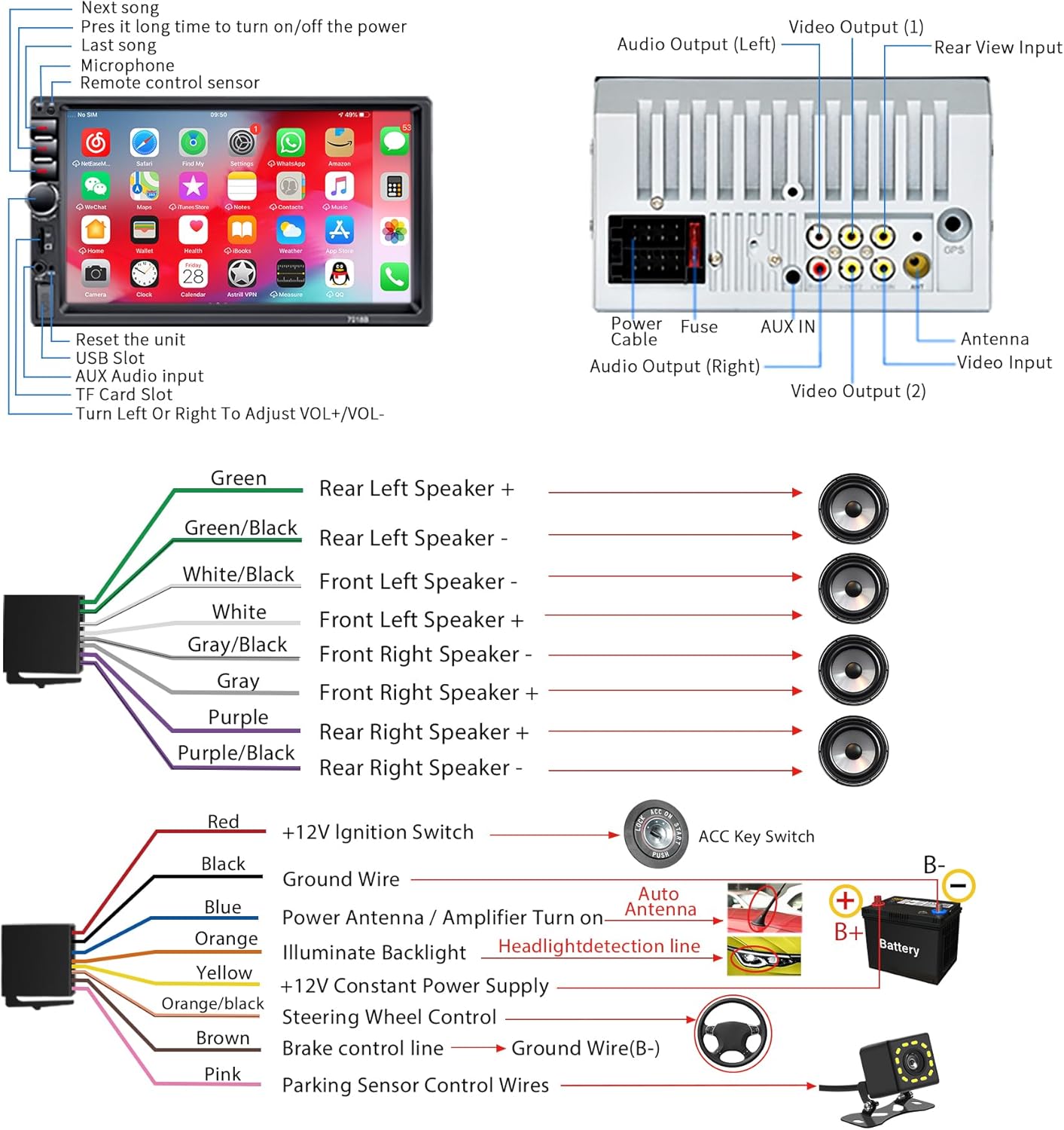
5. Instal·lació
5.1 Requisits d'alimentació
This car audio system is designed for a 12V DC car power supply only. Before installation, confirm your vehicle's power supply specifications. Using an incorrect power supply can damage the unit and void the warranty.
5.2 Esquema de cablejat
Refer to the following diagram for correct wiring connections. It is highly recommended to have this unit installed by a qualified professional.
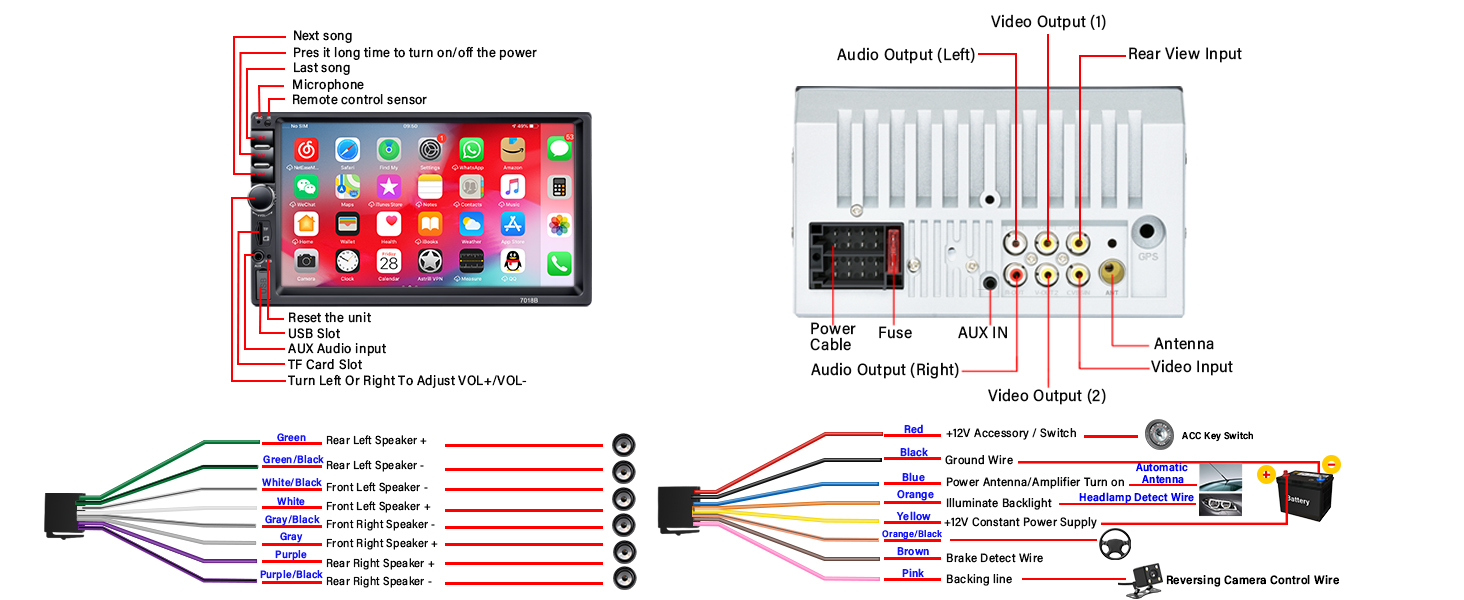
- Fil vermell: Connect to +12V Ignition Switch (ACC).
- Fil negre: Connect to Ground (GND).
- Fil groc: Connect to +12V Constant Power Supply.
- Filferro blau: Connect to Power Antenna or Amplifier Turn On.
- Fil taronja: Connect to Headlight Detection Line for backlight illumination.
- Fil marró: Connect to Brake Control Line.
- Fil rosa: Connect to Parking Sensor Control Wires for reversing camera trigger.
- Cables de l’altaveu: Connect according to the color codes for front and rear, left and right speakers (Green, Green/Black, White, White/Black, Gray, Gray/Black, Purple, Purple/Black).
5.3 Instal·lació de la càmera de marxa enrere
The included HD night vision rear view camera provides a wide viewing angle and is fully waterproof. Connect it as shown in the diagram below for automatic display when reversing.

6. Instruccions de funcionament
6.1 Operacions bàsiques
- Encès/apagat: Press and hold the power button on the front panel. A short press typically mutes/unmutes.
- Control de volum: Use the rotary knob on the front panel to adjust the volume.
- Restablir: A small reset button is available on the front panel (refer to Figure 4.1) for system restarts if needed.
6.2 Connectivitat Bluetooth
The stereo supports Bluetooth for hands-free calling and audio streaming.

- Activa el Bluetooth al teu telèfon mòbil.
- Cerca available devices on your phone and select "RB-7018B" (or similar name).
- Confirma l'emparellament en tots dos dispositius.
- Un cop connectat, podeu fer/rebre trucades i reproduir àudio en streaming sense fil.
6.3 Funció d'enllaç de mirall
Mirror Link allows you to display your smartphone's screen on the car stereo. Android phones support two-way connection, while iOS phones support one-way projection.

- Connect your smartphone to the stereo using a USB data cable.
- Follow the on-screen prompts on the stereo and your phone to establish the connection.
- Once connected, your phone's screen will be displayed on the stereo.
6.4 Ràdio FM
Access local radio stations and stay updated with news and music.

- Select the FM Radio application from the main menu.
- Use the "BAND" button to switch between FM bands.
- Use the search buttons to automatically scan for stations or manually tune to a frequency.
6.5 Media Playback (USB, TF Card, AUX)
The stereo supports multiple media input options for playing audio and video files.

- USB: Insert a USB drive into the USB slot. The system will automatically detect and play compatible media files. Supports fast charging for mobile phones.
- Targeta TF: Insert a TF (MicroSD) card into the TF card slot. The system will access media files'emmagatzemen a la targeta.
- AUX: Connect an external audio device using a 3.5mm audio cable to the AUX input. Select AUX mode on the stereo to play audio from the connected device.
6.6 Configuració de l'equalitzador (EQ)
Customize your audio experience with the built-in equalizer settings.
- Access the EQ settings from the audio menu.
- Choose from preset equalizer modes or manually adjust frequency bands to suit your preferences.
6.7 Comandaments al volant (SWC)
If your vehicle supports steering wheel controls, you can connect them to the stereo for convenient operation.

- Connect the SWC wires from your vehicle to the corresponding inputs on the stereo's wiring harness (refer to Figure 5.1).
- Access the SWC learning function in the stereo's settings menu to program the buttons.
7. Manteniment
- Clean the screen with a soft, lint-free cloth. Do not use abrasive cleaners or solvents.
- Mantingueu la unitat lliure de pols i deixalles.
- Assegureu-vos una ventilació adequada al voltant de la unitat per evitar el sobreescalfament.
8. Solució De Problemes
| Problema | Causa possible | Solució |
|---|---|---|
| Sense poder | Incorrect wiring; Blown fuse; Insufficient power supply. | Check all power connections (Red, Yellow, Black wires). Verify the fuse. Ensure 12V DC power supply. |
| Sense so | Speaker wires incorrectly connected; Volume too low; Mute function active. | Comproveu el cablejat dels altaveus. Augmenteu el volum. Desactiveu el silenci. |
| Bluetooth no connectat | Bluetooth no habilitat al telèfon/estèreo; Dispositiu no en mode d'emparellament; Interferències. | Ensure Bluetooth is active on both devices. Try restarting both devices. Move closer to the stereo. |
| Mirror Link issues (iPhone 16/17) | Compatibility challenges with newer iOS versions. | For iPhone 16 & 17 users experiencing issues, please contact customer support directly from your order page for an upgrade guide and assistance. |
| La càmera de marxa enrere no mostra el vídeo | Camera not powered; Video cable loose; Pink trigger wire not connected. | Check camera power and video connections. Ensure the pink trigger wire is correctly connected to the reversing lamp. |
9. Especificacions
| Característica | Detall |
|---|---|
| Número de model | RB-7018B |
| Mida de la pantalla | Pantalla tàctil HD de 7 polzades |
| Font d'alimentació | 12V DC |
| Connectivitat | Bluetooth, USB, AUX, targeta TF |
| Característiques especials | Bluetooth Hands-Free Calling, Mirror Link, FM Tuner, EQ Settings, Reversing Camera Support, USB Fast Charging |
| Mode de sortida d'àudio | estèreo |
| Configuració del canal de so envoltant | 4.0 |
| Suport de codificació de vídeo | RM, RMVB, AVI, MP4, MKV, 3GP |
| Dimensions del producte | 3.94 x 2.56 x 3.94 polzades |
| Pes de l'article | 1.72 lliures |
10. Atenció al client
If you encounter any issues or have questions regarding your LSLYA RB-7018B Car Stereo, please contact our customer support team. For specific issues like those with iPhone 16 & 17 Mirror Link, reach out directly from your order page for specialized assistance and upgrade guides.
Per obtenir més ajuda, visiteu el LSLYA Store on Amazon.


