Introducció
The FitNation by Echelon Pedal Pro Plus is a motorized seated elliptical designed to provide a convenient and effective way to exercise and aid in rehabilitation. It allows users to improve circulation, decrease joint pain, and engage in physical activity from the comfort of a chair, whether working, watching TV, or reading. This manual provides essential information for the setup, operation, maintenance, and troubleshooting of your device.
Característiques clau
- Exercise and Rehab: Designed to improve circulation, decrease joint pain, and facilitate exercise while seated.
- Auto and Manual Settings: Easily switch between automated programs and manual control for varied workout intensity.
- Improve Range of Motion: Features two-directional movement (forward and reverse) for enhanced flexibility and strength building.
- Preset Training Programs: Built-in display allows for the creation of three separate preset training programs for consistent exercise routines.
- Comandament a distància inclòs: A convenient remote control is provided for effortless adjustment of settings and programs.
- Pantalla LCD: A clear digital display tracks key metrics including Speed, Time, Distance, Steps, and Calories burned.
Components del producte
Your FitNation Pedal Pro Plus package includes the following items:
- FitNation Pedal Pro Plus Unit
- Cable d'alimentació
- Remote Control (requires 2x AAA batteries, included)
- Manual d'instruccions (aquest document)
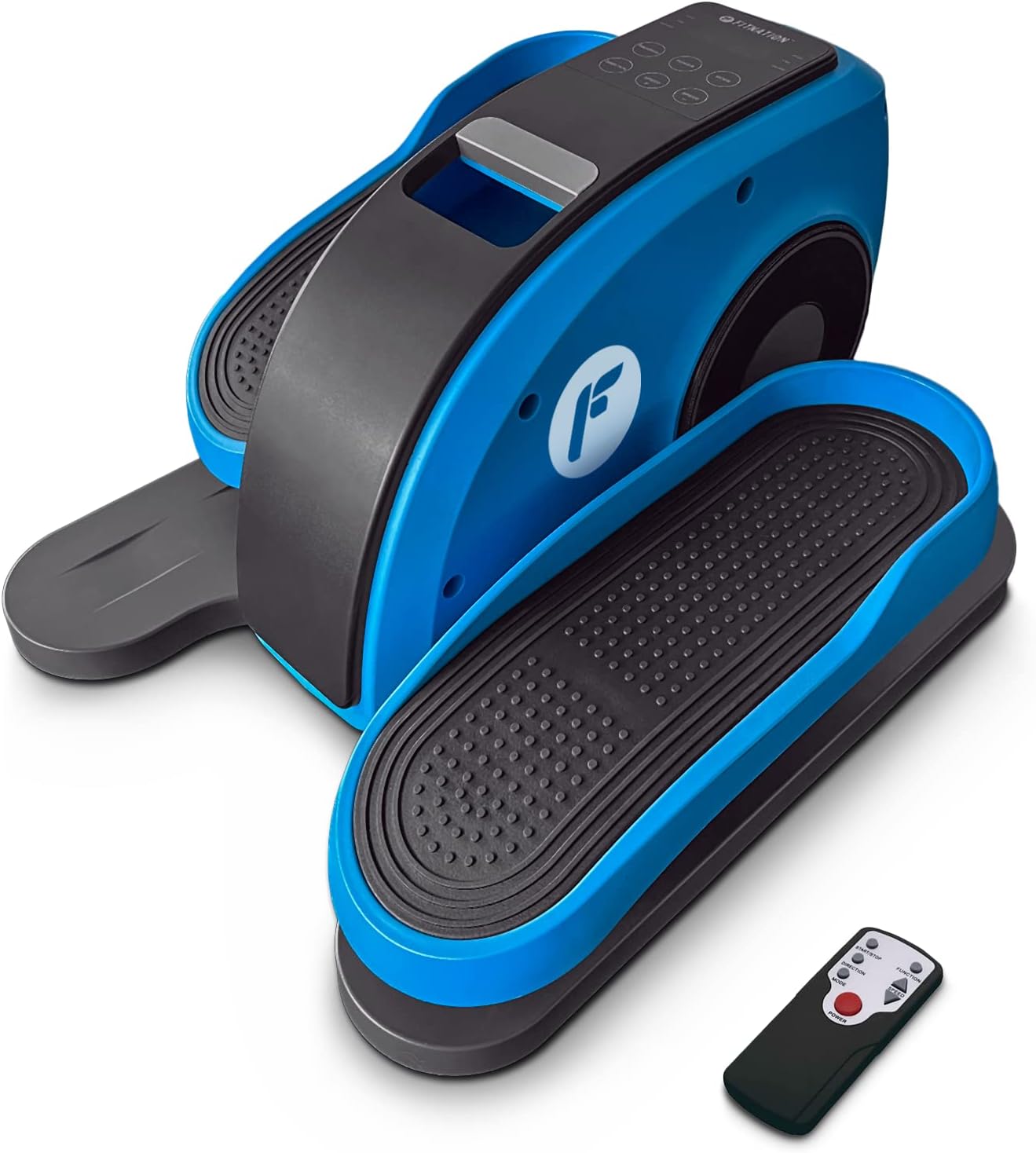
Figure 1: The FitNation Pedal Pro Plus unit with its remote control.
Configuració
- Desempaquetar la unitat: Traieu amb cura tots els components de l'embalatge. Conserveu l'embalatge per a futurs emmagatzematges o transports.
- Col·loca la unitat: Position the Pedal Pro Plus on a flat, stable surface near a power outlet. Ensure there is enough space for comfortable leg movement. It can be placed under a desk or in front of a chair.
- Connectar l'alimentació: Insert the power cord into the power input port located at the back of the unit. Plug the other end into a standard electrical outlet.

Figura 2: posterior view of the unit, highlighting the power input.
- Inseriu les piles del comandament a distància: Open the battery compartment on the back of the remote control and insert the two AAA batteries, ensuring correct polarity.

Figure 3: The remote control used to operate the elliptical.
Instruccions de funcionament
The Pedal Pro Plus can be operated using the control panel on the unit or the included remote control.
Tauler de control i pantalla

Figure 4: The main control panel and LCD display.
- Pantalla LCD: Shows Speed, Time, Distance, Steps, and Calories.
- Botó d'encendre: Encén o apaga la unitat.
- Botó MODE: Cycles through display metrics (Time, Distance, Steps, Calories).
- Botó PROGRAMA: Selects between preset training programs (P1, P2, P3) or manual mode.
- DIRECTION Button: Changes the direction of pedal rotation (forward or reverse).
- Botons de VELOCITAT +/-: Adjusts the speed level (1-10).
Funcions de control remot
The remote control mirrors most functions of the main control panel for convenience.

Figura 5: Disposició i funcions dels botons del comandament a distància.
- Botó d'inici / aturada: Initiates or pauses the elliptical movement.
- Botó de funció: Toggles between Auto and Manual programs.
- Botó de direcció: Reverses the pedal movement.
- Botons d'ajust de velocitat: Increases or decreases the speed level (1-10).
- Botó d'encesa: Encén o apaga la unitat.
Ús de l'el·líptica
- Ensure the unit is plugged in and the remote has batteries.
- Sit comfortably in a chair with the Pedal Pro Plus positioned in front of you. Place your feet securely on the pedals.
- Premeu el botó PODER button on the unit or remote to turn it on. The LCD display will illuminate.
- Seleccioneu el mode desitjat:
- Mode manual: Premeu el botó PROGRAMA button until no program number (P1, P2, P3) is displayed. Use the VELOCITAT +/- buttons to set your desired speed.
- Programes preestablerts: Premeu el botó PROGRAMA button to cycle through P1, P2, or P3. These programs have pre-defined speed variations.
- To change the direction of pedal movement, press the DIRECCIÓ botó.
- Begin pedaling. The display will show your workout metrics.
- To stop the workout, press the Inici/Parada botó del comandament a distància o del PODER botó de la unitat.
- Quan hàgiu acabat, premeu el botó PODER button to turn off the unit and unplug it from the wall outlet if not in use for an extended period.

Figure 6: The elliptical can be used discreetly under a desk.
Manteniment
- Neteja: Netegeu la unitat amb un suau, damp drap després de cada ús. No utilitzeu productes de neteja abrasius ni dissolvents.
- Emmagatzematge: Guardeu la unitat en un lloc fresc i sec, allunyat de la llum solar directa i de temperatures extremes.
- Inspecció: Periodically check all connections and moving parts for any signs of wear or damage. If any issues are found, discontinue use and contact customer support.
Resolució de problemes
| Problema | Causa possible | Solució |
|---|---|---|
| La unitat no s'encén. | Power cord not properly connected; No power from outlet; Remote batteries dead or incorrectly inserted. | Ensure power cord is securely plugged into unit and outlet. Test outlet with another device. Replace remote batteries, checking polarity. |
| Pedals are not moving smoothly. | Unit placed on uneven surface; Obstruction; Internal issue. | Ensure unit is on a flat, stable surface. Check for any objects obstructing pedal movement. If problem persists, contact customer support. |
| El comandament a distància no respon. | Dead or incorrectly inserted batteries; Obstruction between remote and unit; Remote out of range. | Replace remote batteries, checking polarity. Ensure clear line of sight to the unit's sensor. Move closer to the unit. |
| Display not showing correct metrics. | Mode incorrecte seleccionat. | Premeu el botó MODE button to cycle through the display metrics. |
Especificacions

Figure 7: Product dimensions and weight for easy reference.
| Atribut | Detall |
|---|---|
| Nom del model | Pedal Pro Plus Blue |
| Marca | FITNIACIÓ |
| Color | BLAU |
| Dimensions del producte (P x A x A) | 17.5 "P x 14.5" W x 10.5" H |
| Material | Steel, Plastic, Synthetic Leather |
| Mecanisme de resistència | Magnètic |
| Recomanació de pes màxim | 100 quilos (220 lliures) |
| Pes de l'article | 15.8 lliures (7.17 kg) |
| Nombre de nivells de resistència | 8 |
| UPC | 810091983218 |
| Número de model (número de peça) | PPP-FN-BLUE |
Garantia i Suport
The FitNation Pedal Pro Plus comes with a Garantia del fabricant de 1 anys. Aquesta garantia cobreix els defectes de materials i de mà d'obra en ús normal.
For warranty claims, technical assistance, or any questions regarding your product, please contact FitNation customer support. Refer to the contact information provided on the product packaging or the official FitNation weblloc.
Please have your model number (PPP-FN-BLUE) and proof of purchase ready when contacting support.


