1. Introducció
Thank you for choosing the Speedlink BRIO Stereo Soundbar. This manual provides essential information for the proper setup, operation, and maintenance of your device. Please read it carefully to ensure optimal performance and longevity of your soundbar.
The BRIO Stereo Soundbar is designed to deliver clear audio for your computer, featuring a compact design that fits conveniently under most monitors. It includes an illuminated volume control, and front-facing ports for headphones and a microphone for easy access.
2. Informació de seguretat
- No exposeu la barra de so a l'aigua, la humitat ni a temperatures extremes.
- Eviteu col·locar el dispositiu a prop de fonts de calor o sota la llum solar directa.
- Use only the provided cables or compatible replacements.
- No intenteu obrir ni reparar el dispositiu vosaltres mateixos. Encarregueu totes les tasques de manteniment a personal qualificat.
- Keep the soundbar away from strong magnetic fields.
3. Contingut del paquet
Si us plau, comproveu el paquet per veure si hi ha els elements següents:
- Speedlink BRIO Stereo Soundbar
- USB-A power cable (integrated)
- Two 3.5mm jack audio cables (integrated)

Image: The Speedlink BRIO Stereo Soundbar, showing its front grille, volume knob, headphone and microphone jacks, and the integrated USB-A and 3.5mm audio cables extending from the back.
4. Configuració
4.1 Col·locació
Position the Speedlink BRIO Stereo Soundbar on a stable, flat surface, ideally directly under your computer monitor. Its compact design is specifically engineered for this placement, optimizing desk space.

Image: The Speedlink BRIO Stereo Soundbar positioned neatly beneath a computer monitor, demonstrating its space-saving design on a desk next to a keyboard.
4.2 Connexions
- Connexió d'alimentació: Connect the integrated USB-A cable from the soundbar to an available USB-A port on your computer or a compatible USB power adapter. This supplies power to the soundbar.
- Entrada d'àudio: Connect the two integrated 3.5mm jack plugs to the corresponding audio output ports on your computer (typically a green port for line-out). Ensure both plugs are securely inserted.
5. Instruccions de funcionament
5.1 Engegada/Apagada i control de volum
The large illuminated swivel control knob on the front right side of the soundbar serves as both the power switch and volume control.
- Per encendre/apagar: Rotate the knob clockwise from the 'off' position to turn the soundbar on. Continue rotating to increase volume. Rotate counter-clockwise until it clicks to turn off.
- Per ajustar el volum: Rotate the knob clockwise to increase the volume and counter-clockwise to decrease it. The illumination around the knob indicates the power status and can change with volume adjustments.
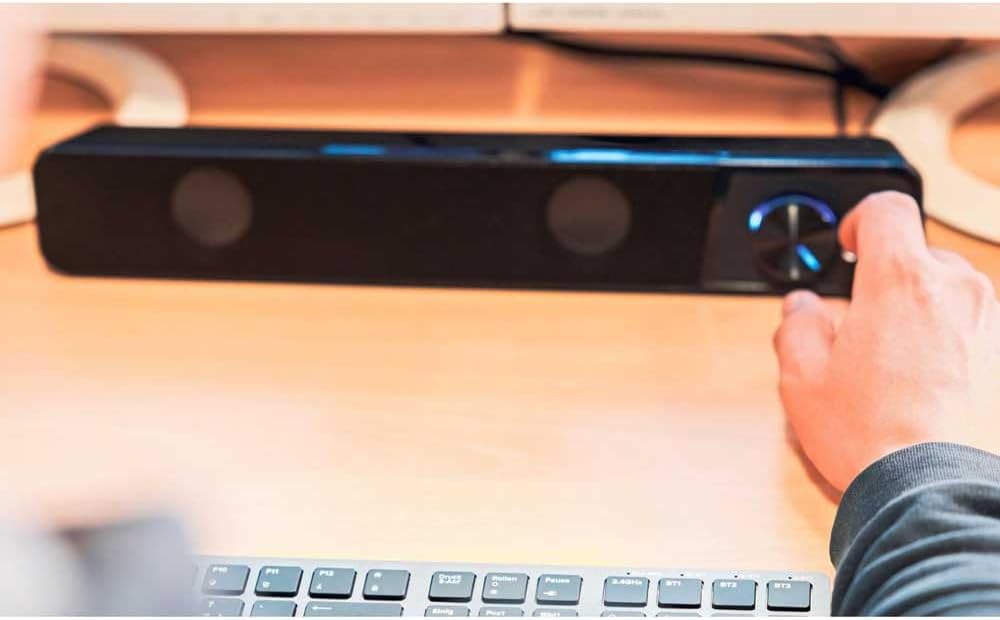
Image: A hand reaching to adjust the illuminated volume control knob on the Speedlink BRIO Stereo Soundbar, which is placed on a desk.
5.2 Headphone and Microphone Sockets
Two 3.5mm sockets are located on the front of the soundbar, next to the volume control, for convenient connection of headphones and a microphone.
- Presa per a auriculars: Plug your headphones into the designated headphone jack. This will typically mute the soundbar's speakers and route audio to your headphones.
- Microphone Socket: Plug your microphone into the designated microphone jack for voice input.
6. Manteniment
6.1 Neteja
To clean the soundbar, gently wipe its surface with a soft, dry, or slightly damp cloth. Do not use abrasive cleaners, solvents, or strong chemicals, as these can damage the finish.
6.2 Emmagatzematge
Quan no la feu servir durant períodes prolongats, guardeu la barra de so en un lloc fresc i sec, allunyat de la llum solar directa i de temperatures extremes.
7. Solució De Problemes
- Sense so:
- Ensure the soundbar is powered on and the volume knob is turned up.
- Verify that the USB-A cable is securely connected for power.
- Check that the 3.5mm audio jack cables are fully inserted into both the soundbar and your computer's audio output.
- Confirm your computer's audio output settings are configured to send sound to the correct device.
- If headphones are plugged into the front port, unplug them to enable soundbar speakers.
- Volum baix o so distorsionat:
- Adjust the volume on both the soundbar and your computer.
- Assegureu-vos que els cables d'àudio no estiguin danyats i que estiguin connectats correctament.
- Test with different audio sources to rule out source issues.
- El micròfon no funciona:
- Ensure the microphone is correctly plugged into the front microphone socket.
- Check your computer's sound settings to ensure the correct microphone input device is selected and its volume is not muted.
8. Especificacions
| Característica | Detall |
|---|---|
| Nom del model | BRIO |
| Número de model de l'article | SL-810200-BK |
| Tipus d'altaveu | Barra de so |
| Mode de sortida d'àudio | estèreo |
| Configuració del canal de so envoltant | 2.0 |
| Potència de sortida màxima dels altaveus | 12 watts |
| Tecnologia de connectivitat | Auxiliary (3.5mm Jack), USB-A (for power) |
| Resposta de freqüència | 18 kHz |
| Impedància | 4 ohms |
| Dimensions del producte (P x A x A) | 2.72" x 15.04" x 2.36" (69 x 382 x 60 mm) |
| Pes de l'article | 1.19 lliures (540 grams) |
| Material | Plàstic |
| Font d'alimentació | Corded Electric (USB-A) |
9. Garantia i Suport
9.1 Garantia limitada
The Speedlink BRIO Stereo Soundbar comes with a limited warranty. Please refer to the warranty card included with your purchase or visit the official Speedlink website for detailed terms and conditions. The EU spare part availability duration is 1 year.
9.2 Atenció al client
For technical assistance, troubleshooting beyond this manual, or warranty claims, please contact Speedlink customer support through their official weblloc web o la informació de contacte proporcionada amb la documentació del producte.


