1. Configuració i instal·lació
This section provides detailed instructions for setting up your BONTEC Under Desk Keyboard Tray. Please review all steps carefully before beginning installation.
1.1 Compatibilitat amb l'escriptori
Abans de la compraasing or installing, ensure your desk is compatible with the C-clamp mechanism. This keyboard tray is no compatible with desks that have curved, beveled, or rounded edges, or crossbars/support beams underneath the installation area. The desk must have a flat, unobstructed underside for proper clamp instal·lació.

Imatge: Examples of desk edges that are not suitable for this keyboard tray.

Imatge: El C-clamp mechanism with protective pads, designed for flat desk edges.
1.2 Required Desk Dimensions and Clearance
The tray requires specific dimensions underneath your desk to slide in and out smoothly:
- Amplada mínima: 25.8 polzades
- Profunditat mínima: 11.4 polzades
El C-clamps can attach to desks up to 1.57 polzades de gruix. Ensure there are no obstructions (like crossbars or support beams) in the required area under your desk.

Image: Visual guide for measuring the required 25.8-inch clearance under the desk.

Image: Illustration of the 11.4-inch depth clearance needed for the tray to slide in.
1.3 Installation Steps (No-Drill)
- Muntar la safata: The keyboard tray comes in two main pieces that connect. Secure these pieces together according to the included hardware.
- Adjunteu C-Clamps: Assegureu-vos el C-clamps to the support brackets on the keyboard tray. Ensure they are aligned correctly.
- Position on Desk: Slide the assembled keyboard tray onto the edge of your desk. The protective pads on the clamps prevent scratches.
- Apretar Clamps: Hand-tighten the C-clamps securely until the tray is firmly attached to the desk. No drilling or additional tools are required for this step.
1.4 Video Guide for Installation
No official BONTEC seller videos specifically demonstrating the installation of this model were found. Please refer to the written instructions and diagrams provided.
2. Instruccions de funcionament
The BONTEC Under Desk Keyboard Tray is designed for ease of use and to enhance your ergonomic setup.
2.1 Sliding Mechanism
The tray features a smooth slide-out mechanism. To use, gently pull the tray forward from underneath your desk. To store, push the tray back until it is fully retracted under the desk. This allows for quick access and storage, maximizing your desktop space.

Image: The keyboard tray in use, extended from under the desk.
2.2 Weight Capacity and Usage
The tray surface measures 20 polzades x 11.8 polzades and supports a maximum weight of 11 lliures. It is designed for standard keyboards and mice. Please note:
- Not recommended for vertical mice or split ergonomic keyboards due to potential height clearance issues.
- Avoid placing excessive weight on the tray to prevent damage or instability.
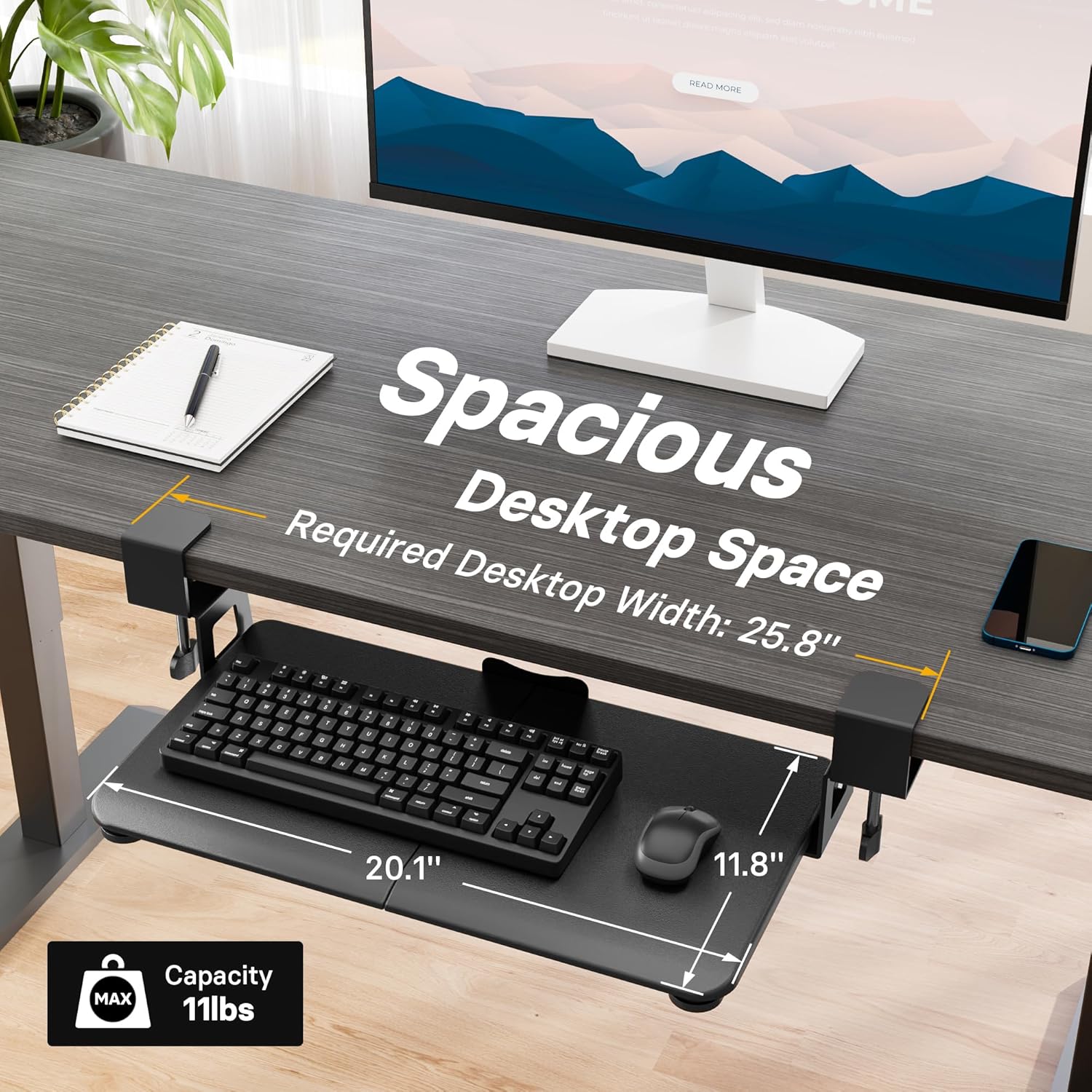
Image: Dimensions and weight capacity of the keyboard tray.
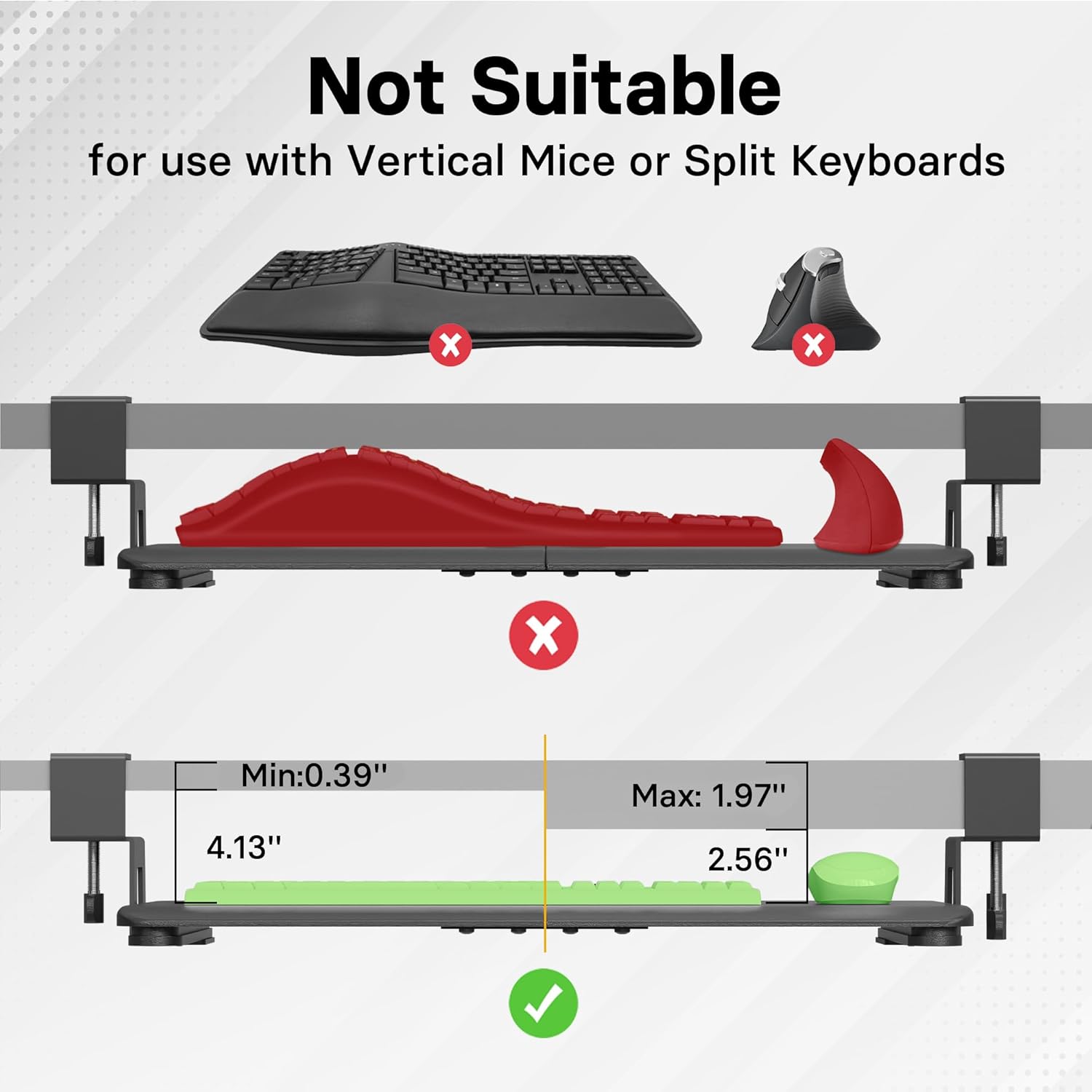
Image: Compatibility guide for different keyboard and mouse types.
3. Manteniment
To ensure the longevity and smooth operation of your keyboard tray, follow these simple maintenance guidelines:
- Neteja: Wipe the tray surface with a soft, damp drap. Eviteu productes de neteja abrasius o dissolvents que puguin danyar l'acabat.
- Comproveu Clamps: Comproveu periòdicament el C-clamps to ensure they remain tightly secured to your desk. Re-tighten if necessary.
- Lubricació: The sliding mechanism is designed for smooth operation. If you notice any stiffness, a small amount of silicone-based lubricant can be applied to the sliders.
4. Solució De Problemes
If you encounter any issues with your keyboard tray, please refer to the following common troubleshooting tips:
- Tray is Wobbly: Assegureu-vos que el C-clamps are fully tightened to the desk. Check that the desk surface is flat and the clamps are not obstructed.
- Tray Not Sliding Smoothly: Inspect the sliding rails for any debris or obstructions. Clean the rails and apply a small amount of silicone lubricant if needed.
- Keyboard/Mouse Not Fitting: Verify the dimensions of your keyboard and mouse against the tray's surface (20 x 11.8 inches) and ensure they are not vertical or split ergonomic types, which may not fit.
5. Especificacions
| Marca | BONTEC |
| Model | 20 x 11.8 polzada |
| Dimensions de la safata | 20 inches (Width) x 11.8 inches (Depth) |
| Capacitat de pes | Fins a 11 lliures |
| Desk Thickness Compatibility | Fins a 1.57 polzades |
| Minimum Under-Desk Width Clearance | 25.8 polzades |
| Minimum Under-Desk Depth Clearance | 11.4 polzades |
| Tipus d'instal·lació | C-Clamp (No-Drill) |
| Instruccions específiques d'ús | Negocis |
| Piles necessàries | No |
| Components inclosos | USB Cable (as per product data) |
| ASIN | B0BKRTGQXJ |
| Data de primera disponibilitat | 12 de gener de 2023 |
6. Garantia i Suport
For warranty information or customer support, please refer to the contact details provided with your product packaging or visit the official BONTEC weblloc. Conserveu el rebut de compra per a reclamacions de garantia.


