Introducció
The Audizio Brescia is an all-in-one audio system designed for versatile listening experiences. It integrates multiple audio sources including Internet Radio, DAB+, FM radio, CD player, USB MP3 playback, and Bluetooth 5.0 connectivity. Featuring a built-in 120W amplifier, it allows direct connection to passive speakers, making it a complete stereo solution. This manual provides detailed instructions for setup, operation, and maintenance of your Audizio Brescia unit.
Què hi ha a la caixa
- Audizio Brescia Main Unit
- Control remot
- Adaptador d'alimentació
- Guia d'inici ràpid
- Antena FM / DAB
- Cable d'àudio RCA
- Cable auxiliar de 3.5 mm

Controls i connexions
Panell frontal
The front panel features the primary controls and display for operating the Audizio Brescia.
- Botó d'encesa: Encén o apaga la unitat.
- Botó MODE: Cycles through available audio sources (Internet Radio, DAB+, FM, CD, USB, Bluetooth, AUX).
- Botó MENÚ/INFORMACIÓ: Accedeix al menú o mostra informació sobre la pista/emissora actual.
- Skip/Fast Forward/Rewind Buttons: Navega per vies o estacions.
- Botó Reproduir/Pausa: Controla la reproducció de CD, USB i Bluetooth.
- Pantalla TFT: 2.8-inch color display showing current status, menus, and track information.
- Port USB: Per connectar dispositius d'emmagatzematge USB per a la reproducció d'MP3.
- Presa d'auriculars (3.5 mm): Per a una escolta privada.
- Botó FAV: Accesses or saves favorite stations/presets.
- Botó TORNAR: Torna al menú o pantalla anterior.
- NAVIGATION/OK Knob: Rotates to navigate menus and presses to confirm selections.
- Botó de VOLUM: Ajusta el nivell de volum principal.

Panell posterior
The rear panel provides all necessary input and output connections.
- Interruptor d'alimentació: Interruptor principal d'encesa/apagada.
- Entrada d'alimentació: Es connecta a l'adaptador d'alimentació subministrat.
- Sortida d'altaveu (E/D): Screw terminals for connecting passive speakers (4-8 Ohm impedance).
- PRE OUT (L/R): RCA outputs for connecting to an external amplifier o altaveus alimentats.
- AUX IN (L/R): RCA inputs for connecting external audio sources.
- OPTICAL Input (Toslink): Digital audio input for connecting devices like TVs.
- COAXIAL Input (RCA): Entrada d'àudio digital.
- Connectors d'antena: For DAB+/FM antenna and Wi-Fi antenna.

Control remot
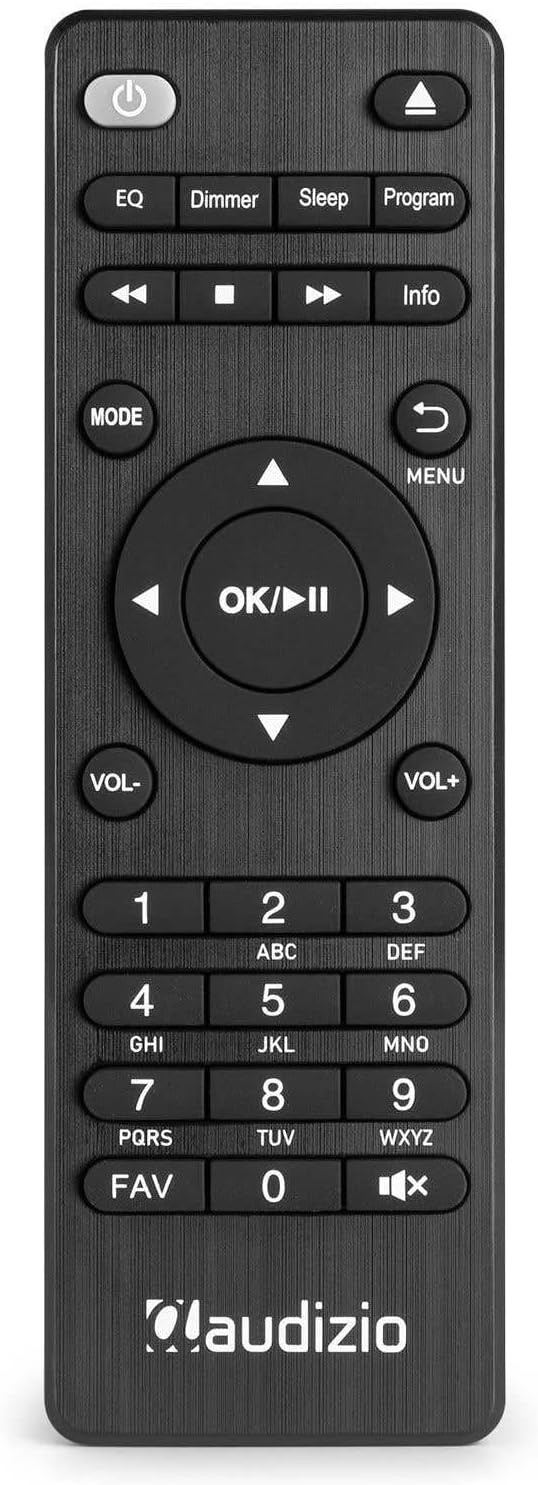
El comandament a distància inclòs ofereix totes les funcions per a un funcionament còmode des de la distància.
Configuració
- Desembalatge: Traieu amb cura la unitat i tots els accessoris de l'embalatge.
- Connexió de l'altaveu: Connect your passive speakers to the SPEAKER OUTPUT terminals on the rear panel. Ensure correct polarity (+ to + and - to -). The amplifier supports speakers with an impedance of 4-8 Ohms.
- Connexió d'antena: Connect the supplied DAB+/FM antenna to the corresponding connector on the rear panel. For optimal reception, extend the antenna fully. Attach the Wi-Fi antenna to its designated port.
- Connexió d'alimentació: Connect the power adapter to the DC IN port on the rear of the unit, then plug the adapter into a wall outlet.
- Encesa inicial: Flip the main power switch on the rear panel to the 'ON' position. Press the Power button on the front panel or remote control to turn on the unit.
- Assistent de configuració inicial: Upon first power-on, the unit will guide you through an initial setup wizard. Follow the on-screen prompts to select language, time/date, and connect to your Wi-Fi network.
Instruccions de funcionament
Encès/Apagat
Per encendre o apagar la unitat, premeu el botó Poder button on the front panel or the remote control. Ensure the main power switch on the rear is in the 'ON' position.
Selecció del mode
Premeu el botó MODE button on the front panel or remote control to cycle through the available audio sources: Internet Radio, DAB+, FM, CD, USB, Bluetooth, and AUX.
Ràdio per Internet
- Select 'Internet Radio' mode using the MODE botó.
- If not already connected, the unit will prompt you to connect to a Wi-Fi network. Use the NAVIGATION/OK knob to select your network and enter the password.
- Once connected, you can browse stations by location, genre, or search.
- To save a station as a favorite, tune to the desired station and press the FAV button. Follow the on-screen instructions to assign a preset number.
Ràdio DAB+
- Select 'DAB+' mode.
- The unit will automatically scan for available DAB+ stations. This may take a few minutes.
- Utilitza el NAVIGATION/OK knob or the Skip buttons to browse the list of found stations.
- Premeu OK per seleccionar una estació.
- Per desar una emissora, premeu la tecla FAV button and assign a preset number.
Ràdio FM
- Select 'FM' mode.
- Utilitza el NAVIGATION/OK knob to manually tune or press and hold the Skip buttons to auto-scan for the next available station.
- Per desar una emissora, premeu la tecla FAV button and assign a preset number.
Reproductor de CD
- Seleccioneu el mode 'CD'.
- Gently insert a CD into the slot-loading drive on the front panel. The unit will automatically draw in the disc.
- Playback should begin automatically. Use the Play/Pause and Skip buttons for control.
- To eject the CD, press the Eject button (usually indicated by a triangle with a line below it) on the remote or front panel.

Reproducció USB
- Insert a USB storage device (e.g., USB stick) containing MP3 files al port USB del panell frontal.
- Seleccioneu el mode 'USB'.
- The unit will scan the USB device. Use the NAVIGATION/OK knob to browse folders and files.
- Premeu OK to select and play a file.

Bluetooth
- Select 'Bluetooth' mode. The unit will enter pairing mode, indicated on the display.
- On your mobile device, enable Bluetooth and search for 'Audizio Brescia'.
- Select 'Audizio Brescia' to pair. Once paired, you can stream audio from your device to the unit.

Spotify Connect
The Audizio Brescia supports Spotify Connect, allowing you to control music playback directly from the Spotify app on your smartphone or tablet.
- Ensure your Audizio Brescia is connected to the same Wi-Fi network as your mobile device.
- Open the Spotify app on your mobile device.
- Reprodueix una cançó i toca la icona "Dispositius disponibles" (normalment una icona d'altaveu o d'ordinador).
- Select 'Audizio Brescia' from the list of available devices. The unit's display will show the Spotify logo and current track information.

Entrada AUX
Connect external audio devices (e.g., MP3 players, smartphones) to the AUX IN RCA ports on the rear panel using the supplied RCA cable or a 3.5mm to RCA cable. Select 'AUX' mode to listen to the connected device.
Temporitzador d'alarma i son
The unit includes dual alarm functions and a sleep timer. Access these settings through the main menu or dedicated buttons on the remote control to configure wake-up times, alarm sources, and sleep duration.
Especificacions
| Característica | Especificació |
|---|---|
| Marca | Audizio |
| Model | Brescia (102.270) |
| AmpTipus més viu | Classe D |
| Potència de sortida | 120 watts (màx.) |
| Impedància de l'altaveu | 4-8 Ohm |
| Connectivitat | Wi-Fi, Bluetooth 5.0, USB, AUX, Optical, Coaxial |
| Sintonitzador de ràdio | Internet Radio, DAB+, FM |
| Reproductor de CD | Slot-loading |
| Reproducció USB | MP3 compatible |
| Mostra | Pantalla TFT a color de 2.8 polzades |
| Font d'alimentació | 220-240V CA / 50Hz |
| Dimensions (L x P x A) | 43 x 32 x 7.5 cm |
| Pes | 3.3 kg |
| Material | Panell frontal d'alumini |
Resolució de problemes
- Sense energia: Ensure the power adapter is securely connected to both the unit and the wall outlet. Check that the main power switch on the rear panel is 'ON'.
- Sense so: Verify speaker connections and polarity. Check the volume level. Ensure the correct audio source is selected. If using external inputs (AUX, Optical, Coaxial), confirm the source device is playing and its volume is up.
- Poor Radio Reception (DAB+/FM): Extend the antenna fully. Try repositioning the antenna or the unit for better signal. For FM, consider switching to mono reception if stereo signal is weak.
- Internet Radio Not Connecting: Check your Wi-Fi network connection and password. Ensure the unit is within range of your Wi-Fi router. Restart your router and the Audizio Brescia.
- Problemes de vinculació de Bluetooth: Ensure the unit is in Bluetooth pairing mode. Delete 'Audizio Brescia' from your mobile device's Bluetooth list and try pairing again. Ensure no other devices are currently connected to the unit via Bluetooth.
- CD Not Playing/Ejecting: Ensure the CD is inserted correctly. Check if the disc is scratched or dirty. Try a different CD. If the disc is stuck, power cycle the unit.
- Problemes de reproducció per USB: Ensure the USB device is formatted to a compatible file sistema (per exemple, FAT32) i conté àudio compatible files (MP3). Try a different USB device.
Manteniment
- Neteja: Use a soft, dry cloth to clean the unit's exterior. Do not use abrasive cleaners or solvents.
- Unitat de CD: Avoid touching the lens inside the CD drive. Use a specialized CD lens cleaner if playback issues occur due to dust.
- Ventilació: Assegureu-vos que hi hagi una ventilació adequada al voltant de la unitat per evitar el sobreescalfament. No bloquegeu les obertures de ventilació.
- Emmagatzematge: Si guardeu la unitat durant un període prolongat, desconnecteu-la de l'alimentació i guardeu-la en un lloc fresc i sec.
Garantia i Suport
Your Audizio Brescia unit is covered by a manufacturer's warranty. Please refer to the warranty card included with your product for specific terms and conditions. For technical support, service, or further inquiries, please contact your retailer or visit the official Audizio weblloc per obtenir informació de contacte.


