Introducció
The 1Mii B06T6 Bluetooth Transmitter is designed to wirelessly stream audio from non-Bluetooth devices such as TVs, PCs, and stereo systems to Bluetooth-enabled headphones or speakers. Featuring Bluetooth 5.2 technology, it ensures a stable and reliable connection with low latency, making it ideal for watching movies or playing games without audio delay. It supports dual-link functionality, allowing two Bluetooth headphones or speakers to connect simultaneously.
Què hi ha a la caixa
- 1Mii B06T6 Bluetooth Adapter
- Cable USB (per a l'alimentació)
- Cable òptic
- Cable d'àudio de 3.5 mm
- Cable de 3.5 mm a RCA
- Manual d'usuari
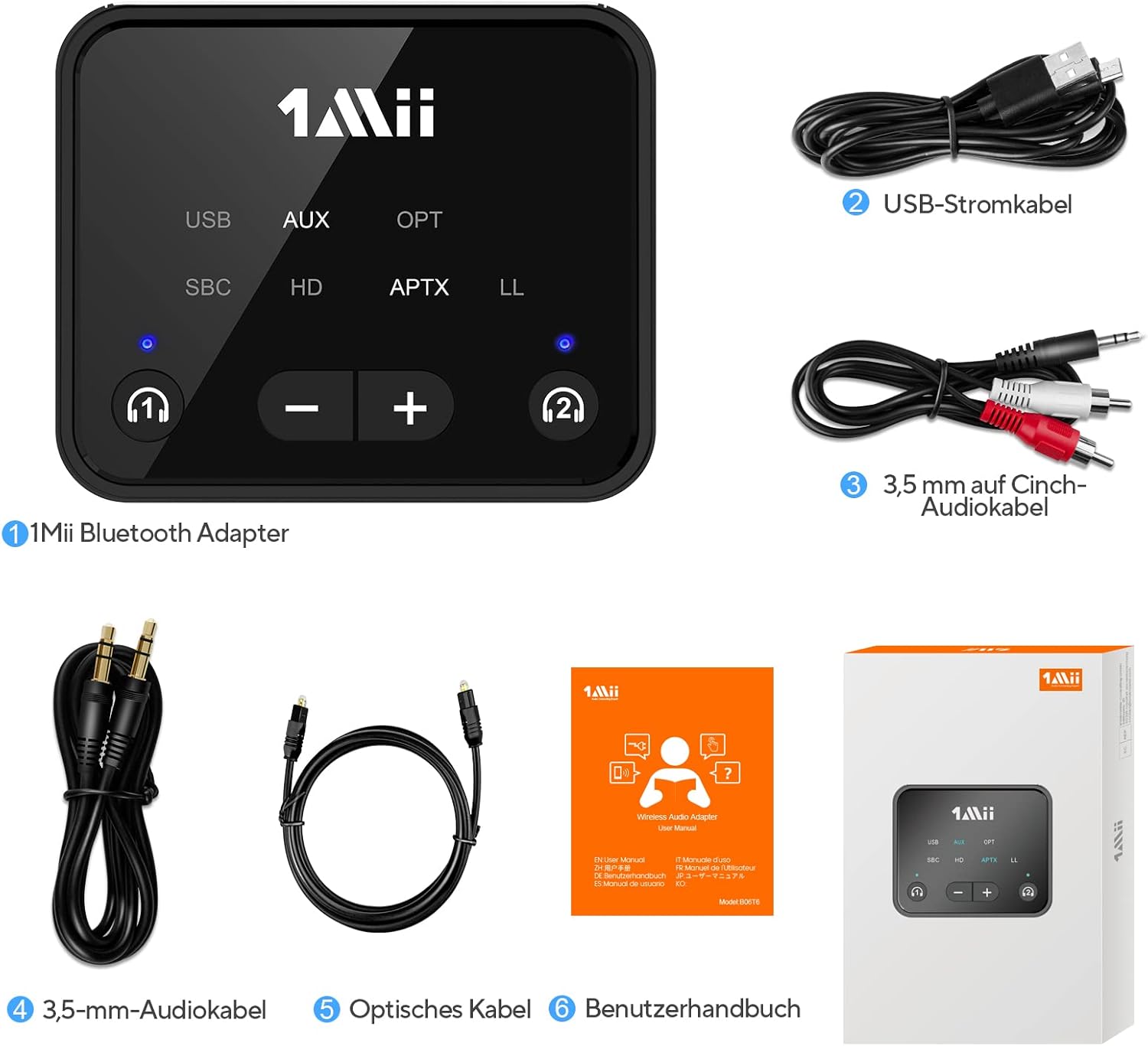
Figure 1: Package Contents of the 1Mii B06T6 Bluetooth Transmitter.
Producte acabatview
The 1Mii B06T6 is a compact device with multiple input options and intuitive controls. Its design allows for easy integration into various audio setups.

Figura 2: superior view of the 1Mii B06T6 with control and indicator lights.

Figura 3: posterior view of the 1Mii B06T6 with input ports and dimensions.
Característiques principals:
- Bluetooth 5.2: Provides a stable and reliable wireless connection.
- Enllaç dual: Connects two Bluetooth headphones or speakers simultaneously.
- Latència baixa: Supports aptX Low Latency codec for synchronized audio and video.
- Múltiples entrades d'àudio: Compatible with Optical, AUX (3.5mm), USB, and RCA connections.
- Control de volum: Integrated volume buttons for convenient audio adjustment.
Guia de configuració
Pas 1: engegueu el dispositiu
Connect the 1Mii B06T6 to a power source using the provided USB-C cable. The device will automatically enter pairing mode, indicated by the LED light flashing red and blue alternately.
Video 1: Demonstrates how to power on the 1Mii B06T6 and its automatic entry into pairing mode.
Step 2: Connect to Your Audio Source (e.g., TV)
Plug the 1Mii B06T6 into your TV or other audio source using one of the provided cables (Optical, AUX, or RCA). Ensure your TV's audio output settings are configured correctly for the chosen connection type (e.g., set digital audio output to PCM for optical connection).
Video 2: Illustrates connecting the 1Mii B06T6 to a TV via optical cable and adjusting TV audio settings.
Step 3: Connect to a Bluetooth Headset
With the B06T6 in pairing mode (LED flashing red and blue), turn on your Bluetooth headset and ensure it is also in pairing mode. Place the headset close to the B06T6 and wait for the connection. Once successfully paired, the corresponding headset indicator light (1 or 2) on the B06T6 will turn blue.
Video 3: Shows how to enter pairing mode on the 1Mii B06T6 for connecting a Bluetooth headset.
Instruccions de funcionament
Dual Link Connection (Two Headsets)
To connect a second Bluetooth headset, first ensure one headset is already connected. Then, press and hold the headset 2 button on the B06T6 for 3 seconds to enter pairing mode for the second headset. The indicator light for headset 2 will flash red and blue. Turn on your second Bluetooth headset and put it into pairing mode. Place it close to the B06T6. Once connected, the headset 2 indicator light will turn blue.
Video 4: Demonstrates the process of connecting two Bluetooth devices simultaneously to the 1Mii B06T6.

Figure 4: The 1Mii B06T6 supports connecting two headphones for shared listening.
Switching aptX Modes
To switch between aptX HD and aptX LL (Low Latency) modes, quickly press the headset 1 button three times. The device will cycle through available codecs (SBC, aptX, aptX LL, aptX HD) as indicated by the corresponding LED lights. Repeat the action until the desired mode is active.
Video 5: Guide on how to switch between aptX HD and aptX LL modes on the 1Mii B06T6.
Control de volum
Use the '+' and '-' buttons on the device to adjust the volume of the connected Bluetooth headphones or speakers. This allows for independent volume control without affecting the TV's main volume.

Figure 5: Adjusting volume using the dedicated buttons on the 1Mii B06T6.
Resolució de problemes
- No Sound/Static when using Optical: Ensure your TV's digital audio output is set to PCM. The B06T6 does not support Dolby or DTS signals via optical input.
- Cannot Pair Headset: Make sure both the B06T6 and your headset are in pairing mode (LEDs flashing red/blue or similar on headset). Ensure they are close to each other. Try resetting both devices.
- Retard d'àudio (latència): Verify that both the B06T6 and your Bluetooth headset support aptX Low Latency (LL) codec. If supported, ensure the LL mode is active on the B06T6 as described in the 'Switching aptX Modes' section.
- Caigudes de connexió: Ensure the device is within range (up to 30 meters/100 feet in open air, less with obstacles). Avoid strong interference sources.
Especificacions
| Característica | Detall |
|---|---|
| Número de model | B06T6 |
| Marca | 1 Mii |
| Dimensions del producte | 6.6 x 5.5 x 1.98 cm |
| Pes | 150 grams |
| Comunicació sense fils estàndard | Bluetooth 5.2 |
| Característica especial | Dual Connection, Low Latency |
| Entrades d'àudio | Optical, AUX (3.5mm), USB, RCA |
Manteniment
To ensure the longevity and optimal performance of your 1Mii B06T6 Bluetooth Transmitter, follow these maintenance guidelines:
- Neteja: Use a soft, dry cloth to clean the device. Avoid using abrasive cleaners, solvents, or strong chemicals.
- Emmagatzematge: Guardeu el dispositiu en un lloc fresc i sec, allunyat de la llum solar directa i de temperatures extremes.
- Manipulació: Manipuleu el dispositiu amb cura. Eviteu deixar-lo caure ni sotmetre'l a impactes forts.
- Potència: Always use the provided USB cable for power. Do not attempt to open or modify the device.
Garantia i Suport
For warranty information, technical support, or further assistance, please refer to the official 1Mii weblloc web o poseu-vos en contacte amb el servei d'atenció al client. Conserveu el rebut de compra per a reclamacions de garantia.
This product may interfere with other wireless devices. Do not dispose of the device or its battery in fire. Follow local regulations for recycling.


