1. Introducció
This manual provides detailed instructions for the safe and efficient use of your Intenso Video Scooter BT MP3 Player. Please read this manual thoroughly before operating the device and retain it for future reference. This device allows you to play music (MP3), videos (MP4), and view images on its 1.8-inch color display, with the added convenience of Bluetooth connectivity.
2. Producte acabatview
The Intenso Video Scooter BT is a compact and portable media player designed for on-the-go entertainment. It features a 1.8-inch color display, 16 GB of internal storage, and Bluetooth for wireless audio streaming.

Figura 2.1: The Intenso Video Scooter BT MP3 Player in blue, shown with the included headphones connected. The microUSB port for charging and data transfer, and the microSD card slot for expandable storage, are visible on the side.
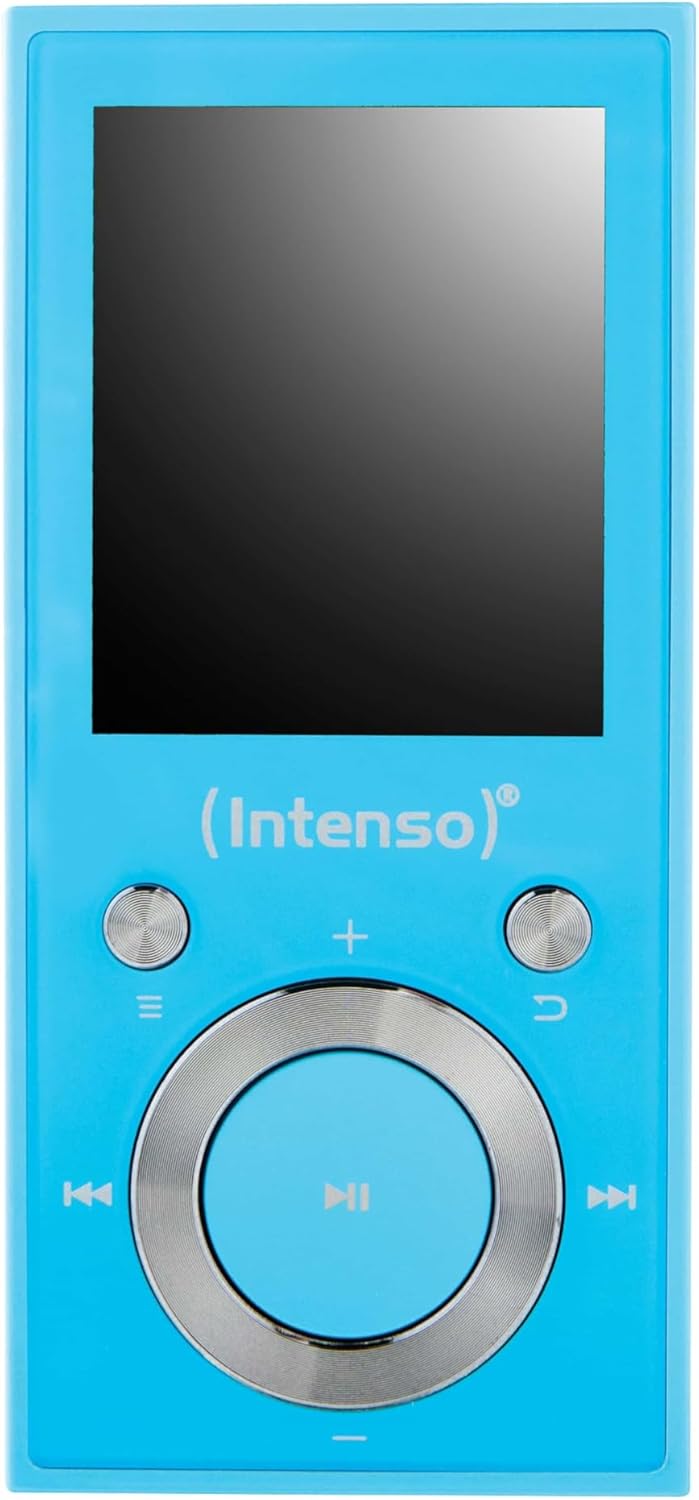
Figura 2.2: Un primer pla view of the Intenso Video Scooter BT MP3 Player's front panel, displaying the 1.8-inch screen and the navigation buttons. The central button is for play/pause/confirm, surrounded by directional controls, and dedicated buttons for menu, back, and volume.
Contingut del paquet:
- Intenso Video Scooter BT MP3 Player
- Auriculars
- Cable USB
- Manual d'usuari (aquest document)
3. Configuració
3.1 Càrrega del dispositiu
- Connect the small end of the included USB cable to the microUSB port on the player.
- Connect the large end of the USB cable to a powered USB port on a computer or a compatible USB wall adapter (not included).
- L'indicador de la bateria a la pantalla mostrarà l'estat de càrrega. Una càrrega completa sol trigar aproximadament 2-3 hores.
3.2 Inserció d'una targeta MicroSD
The device supports microSDHC cards for expanded storage. To insert a card:
- Localitza la ranura per a targetes microSD al lateral del reproductor.
- Gently insert the microSD card into the slot with the gold contacts facing down until it clicks into place.
- Per treure-la, empenyeu lleugerament la targeta fins que surti.
3.3 Connecting to a Computer and Transferring Files
- Assegureu-vos que el reproductor estigui encès.
- Connect the player to your computer using the supplied USB cable.
- El reproductor apareixerà com una unitat de disc extraïble a l'ordinador.
- Drag and drop your desired MP3 music, MP4 videos, or image files into the appropriate folders on the player or inserted microSD card.
- Expulseu el dispositiu de l'ordinador de manera segura abans de desconnectar el cable USB.
4. Instruccions de funcionament
4.1 Encès/Apagat
- Per encendre: Press and hold the power button (often integrated with the play/pause button or a dedicated side button) for a few seconds until the screen illuminates.
- Per apagar: Premeu i manteniu premut el botó d'engegada de nou fins que el dispositiu s'apagui.
4.2 Navegació de menús
Use the directional buttons around the central 'Play/Pause/Confirm' button to navigate through menus. The 'Menu' button (often represented by three horizontal lines) typically brings up options or returns to the main menu. The 'Back' button (often a curved arrow) returns to the previous screen.
4.3 Reproducció de música
- Al menú principal, seleccioneu "Música".
- Browse through your music library by artist, album, genre, or all songs.
- Select a song and press the central 'Play/Pause' button to begin playback.
- Use the left/right directional buttons to skip tracks.
- Use the volume buttons (often '+' and '-') to adjust the audio level.
- Premeu el botó "Reprodueix/Pausa" per pausar o reprendre la reproducció.
4.4 Reproducció de vídeo
- Al menú principal, seleccioneu "Vídeo".
- Browse and select the desired video file.
- Press the central 'Play/Pause' button to start playback.
4.5 Connectivitat Bluetooth
To pair your Intenso Video Scooter BT with Bluetooth headphones or speakers:
- From the main menu, navigate to 'Bluetooth'.
- Assegureu-vos que el dispositiu d'àudio Bluetooth estigui en mode d'emparellament.
- Selecciona 'Cerca Devices' on the player.
- Once your device appears in the list, select it to pair.
- After successful pairing, audio will be routed to the connected Bluetooth device.
5. Manteniment
- Neteja: Feu servir un drap suau i sec per netejar el dispositiu. No utilitzeu netejadors líquids ni dissolvents.
- Emmagatzematge: Guardeu el reproductor en un lloc fresc i sec, allunyat de la llum solar directa i de temperatures extremes.
- Cura de la bateria: Per allargar la durada de la bateria, eviteu descarregar-la completament amb freqüència. Carregueu el dispositiu regularment, fins i tot si no l'utilitzeu durant períodes prolongats.
- Actualitzacions de programari: Check the official Intenso weblloc web periòdicament per a les actualitzacions de firmware disponibles per garantir un rendiment òptim.
6. Solució De Problemes
El dispositiu no s'encén:
- Assegureu-vos que la bateria estigui carregada. Connecteu el reproductor a una font d'alimentació i deixeu-lo carregar durant almenys 30 minuts abans d'intentar tornar-lo a encendre.
- If the device is unresponsive, locate the 'RESET' pinhole (if present, often on the side or back) and gently press it with a thin object (e.g., a paperclip) to restart the device.
Sense so:
- Comproveu el nivell de volum.
- Ensure headphones are properly connected or that Bluetooth headphones/speakers are paired and connected.
- Test with different headphones to rule out a faulty pair.
Problemes de connexió Bluetooth:
- Ensure both the player and the Bluetooth audio device are sufficiently charged.
- Make sure both devices are within close proximity (typically within 10 meters) and free from obstructions.
- Prova de desvincular i tornar a vincular els dispositius.
- Restart both the player and the Bluetooth audio device.
Files Not Appearing or Playing:
- Comproveu que el files are in a supported format (MP3 for audio, MP4 for video).
- Assegureu-vos files were transferred correctly to the device's internal storage or the microSD card.
- If using a microSD card, ensure it is properly inserted and not corrupted.
7. Especificacions
| Nom del model | Vídeo Scooter BT |
| Número de model de l'article | 3717474 |
| Marca | Intenso |
| Capacitat d'emmagatzematge de memòria | 16 GB |
| Mida de la pantalla | 1.8 polzades |
| Tecnologia de connectivitat | USB, Bluetooth |
| Dispositius compatibles | Dispositius Bluetooth |
| Tipus de suport | MP3, MP4 |
| Característica especial | MP3 Playback, Video Playback |
| Dimensions del producte | 6.3 x 3.54 x 1.97 polzades |
| Pes de l'article | 0.917 unces |
| Bateries | 1 bateria de polímer de liti (inclosa) |
8. Garantia i Suport
For warranty information and technical support, please refer to the documentation included with your product or visit the official Intenso weblloc web. Conserveu el comprovant de compra per a reclamacions de garantia.


