Introducció
The Formuler Z11 Pro is a 4K Android 11 media streamer designed to provide a comprehensive entertainment experience. It features dual-band 5G Wi-Fi, Gigabit LAN, 2GB RAM, and 16GB of storage, ensuring smooth performance for streaming, gaming, and app usage. This manual provides detailed instructions for setting up, operating, maintaining, and troubleshooting your device.
Què hi ha a la caixa
Carefully unpack your Formuler Z11 Pro. The package should contain the following items:
- Formuler Z11 Pro Main Unit
- Premium IR1 Remote Control
- Cable HDMI
- Extensor de control remot
- Adaptador d'alimentació
- Bateries
- Guia de configuració ràpida

Image: Formuler Z11 Pro box contents, including the main unit, remote control, HDMI cable, power adapter, and other accessories.
Configuració
Follow these steps to set up your Formuler Z11 Pro media streamer:
- Connectar-se al televisor: Connect one end of the provided HDMI cable to the HDMI port on the Formuler Z11 Pro and the other end to an available HDMI input on your television.
- Connectar l'alimentació: Plug the power adapter into the DC IN port on the Formuler Z11 Pro and then into a wall outlet. The device will power on automatically.
- Connecteu-vos a la xarxa:
- Wired Connection (Recommended): Connect an Ethernet cable from your router to the Gigabit LAN port on the Formuler Z11 Pro.
- Connexió sense fil: During the initial setup wizard, select your Wi-Fi network and enter the password. The device supports dual-band 5G Wi-Fi for faster speeds.
- Configuració del control remot: Insert the included batteries into the Premium IR1 Remote Control. The remote is pre-paired for basic functions. For advanced TV control features, follow the on-screen instructions during initial setup or refer to the remote control section of this manual.
- Assistent de configuració inicial: Follow the on-screen instructions to complete the initial setup, including language selection, time zone, and Google account login.
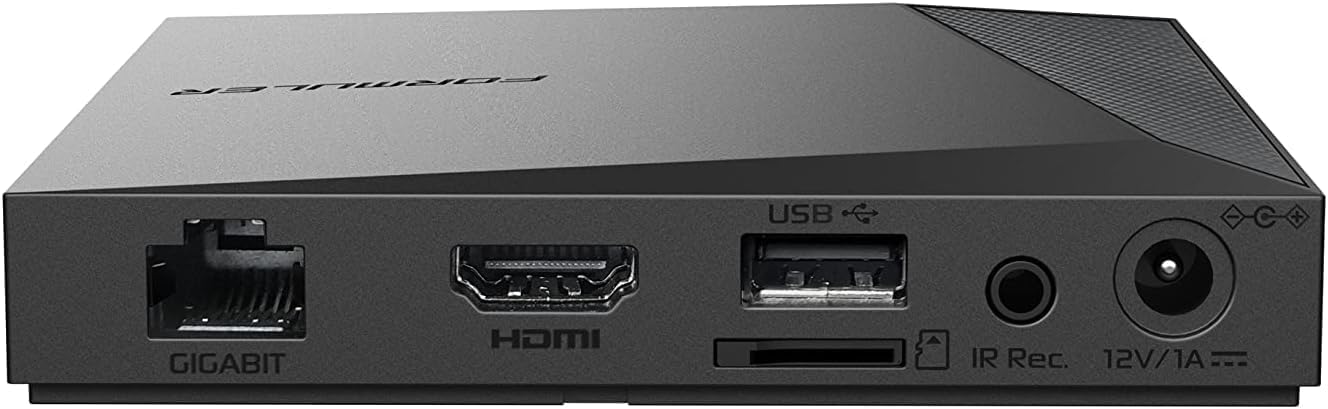
Image: Rear panel of the Formuler Z11 Pro, illustrating the Gigabit Ethernet, HDMI, USB, IR Receiver, and 12V/1A power input ports.
Instruccions de funcionament
Navegant per la interfície
The Formuler Z11 Pro runs on Android 11, offering a user-friendly interface. Use the remote control's directional pad and OK button to navigate through menus and select applications. The home screen displays your favorite apps and provides quick access to settings and other features.
Using MyTV Online 3
MyTV Online 3 is a pre-installed application for IPTV services. Launch the app from the home screen. You will need to configure your IPTV service provider details within the application. MyTV Online 3 offers features such as live TV, video-on-demand (VOD), electronic program guide (EPG), and recording capabilities.
Instal·lació d'aplicacions
Access the Google Play Store from the home screen to download and install a wide variety of applications, including streaming services, games, and utility apps. A Google account is required for Play Store access.
Recording and Time-Shift
The Formuler Z11 Pro supports recording and time-shift functions. Connect an external USB storage device (e.g., a USB flash drive or external hard drive) to one of the USB ports for recording. Use the dedicated record button on your remote control to initiate recordings or activate time-shift during live TV viewing.
Premium IR1 Remote Control Functions
The IR1 remote control provides comprehensive control over your Formuler Z11 Pro and can also be programmed to control your TV. Refer to the image below for a detailed layout of the remote control buttons and their functions.
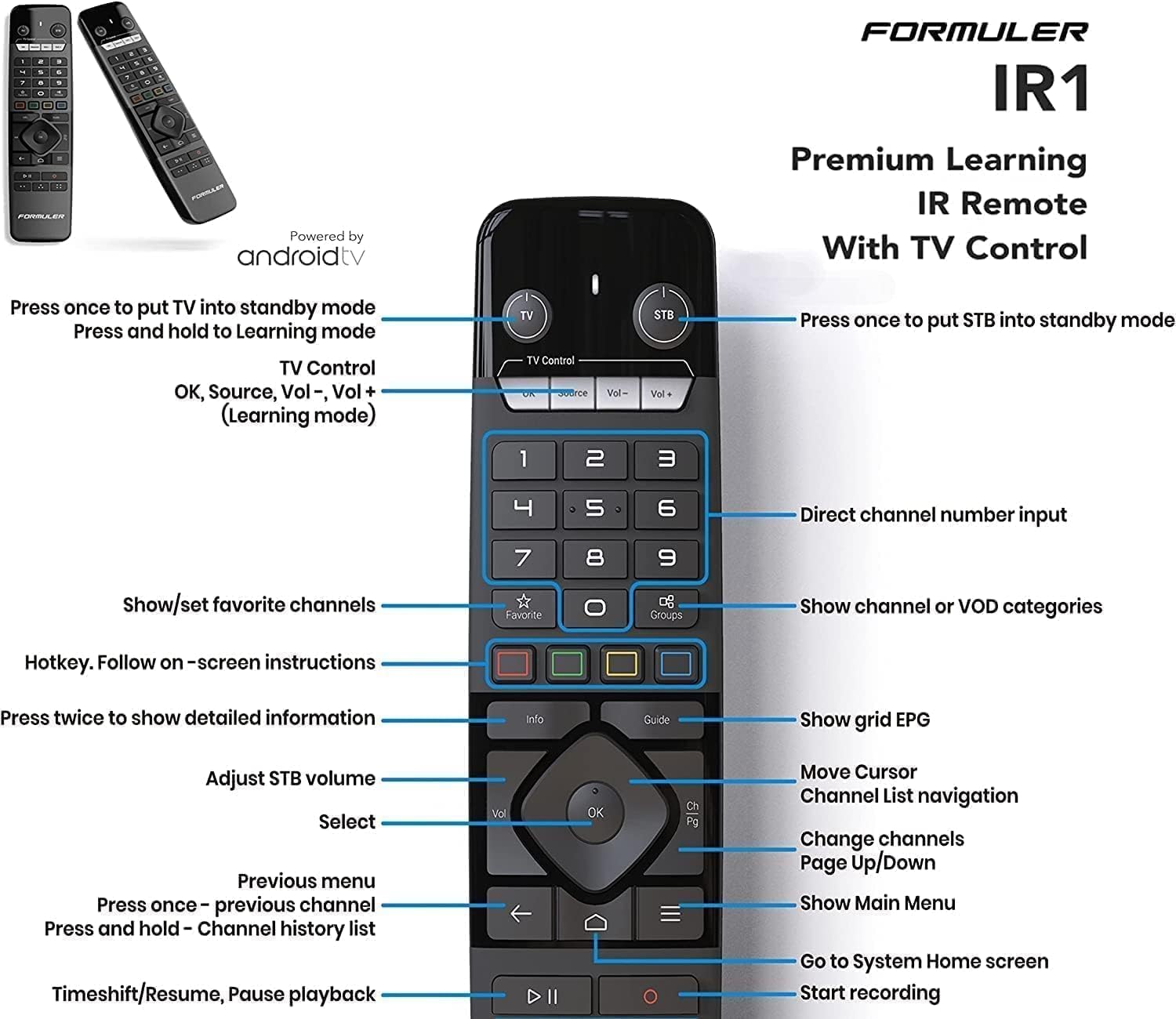
Imatge: Detallada view of the Formuler IR1 Remote Control, highlighting buttons for power, channel navigation, volume, menu access, and recording functions.
- Power (TV/STB): Press once to put TV/STB into standby mode. Press and hold for Learning mode.
- TV Control (OK, Source, Vol-, Vol+): Controls basic TV functions.
- Teclat numèric (0-9): Direct channel number input.
- Favorite/Groups: Show/set favorite channels, show channel or VOD categories.
- Botons de color (vermell, verd, groc, blau): Hotkeys, follow on-screen instructions.
- Informació: Press twice to show detailed information.
- Guia: Show grid EPG (Electronic Program Guide).
- Volume (Vol): Adjust STB volume.
- D'ACORD: Select, move cursor, channel list navigation.
- Canal amunt/avall: Change channels, page up/down.
- Enrere/Menú: Previous menu, show main menu.
- Inici: Go to System Home screen.
- Playback Controls (Play/Pause, Stop, Rewind, Fast Forward): Timeshift/Resume, Pause playback, Start recording.
Manteniment
Actualitzacions de programari
Periodically check for software updates to ensure optimal performance and access to the latest features. Navigate to Configuració > Quant a > Actualització del sistema per comprovar i instal·lar les actualitzacions disponibles.
Neteja
To clean the device, use a soft, dry cloth. Do not use liquid cleaners or abrasive materials, as they may damage the surface. Ensure the device is powered off and unplugged before cleaning.
Gestió d'emmagatzematge
The Formuler Z11 Pro comes with 16GB of internal storage. If you require more space for apps or recordings, you can connect an external USB storage device to the available USB 2.0 or USB 3.0 ports.
Resolució de problemes
If you encounter issues with your Formuler Z11 Pro, refer to the following common solutions:
- Sense energia: Assegureu-vos que l'adaptador de corrent estigui connectat correctament al dispositiu i a una presa de corrent que funcioni. Proveu una altra presa de corrent.
- Sense imatge/senyal: Verify that the HDMI cable is correctly connected to both the device and the TV. Ensure your TV is set to the correct HDMI input.
- Sense connexió a Internet:
- Amb cable: Check the Ethernet cable connection to both the device and your router. Confirm your router is working correctly.
- Sense fil: Vés a Configuració> Xarxa i Internet to ensure Wi-Fi is enabled and connected to the correct network. Re-enter the Wi-Fi password if necessary.
- El control remot no respon: Check the batteries in the remote control and replace them if needed. Ensure there are no obstructions between the remote and the device.
- Bloqueig/bloqueig de l'aplicació: Try force-stopping the app (Configuració > Aplicacions > Veure totes les aplicacions > [Nom de l'aplicació] > Forçar l'aturada) or clearing its cache (Configuració > Aplicacions > Veure totes les aplicacions > [Nom de l'aplicació] > Emmagatzematge i memòria cau > Esborra la memòria cau). Si el problema persisteix, desinstal·leu i torneu a instal·lar l'aplicació.
- Restabliment de fàbrica: If problems persist, you may need to perform a factory reset. Go to Configuració > Sistema > Opcions de restabliment > Esborra totes les dades (restabliment de fàbrica). Avís: This will erase all data and settings on your device.
Especificacions
| Característica | Especificació |
|---|---|
| Model | Z11 Pro |
| Sistema operatiu | Android 11 |
| RAM | 2 GB |
| Emmagatzematge | 16 GB |
| Resolució | 4K |
| Connectivitat | Dual Band 5G Wi-Fi, Gigabit LAN (1000M) |
| Ports | HDMI, USB 2.0, USB 3.0, Gigabit Ethernet, IR Rec. |
| Característiques especials | Wireless, Premium IR1 Remote Control |
| Dimensions | 8 cm de llargada x 6 cm d'amplada x 2 cm d'alçada (aprox.) |
| Pes | 1.32 lliures (aprox.) |
Garantia i Suport
The Formuler Z11 Pro comes with a manufacturer's warranty. Please refer to the warranty card included in your product packaging for specific terms and conditions. For technical support, product registration, or further assistance, please visit the official Formuler weblloc web o poseu-vos en contacte amb el seu servei d'atenció al client. Conserveu el rebut de compra com a comprovant de compra per a reclamacions de garantia.


