1. Introducció
The Logicool Signature M550MGR is a silent wireless mouse designed for comfort and productivity. It features the unique SmartWheel for versatile scrolling and SilentTouch technology for reduced click noise. This mouse offers dual connectivity options: Bluetooth Low Energy and the Logi Bolt USB receiver, ensuring stable performance across various operating systems.

Image: The Logicool Signature M550MGR mouse, highlighting its ergonomic design and advanced scrolling capabilities.
2. Contingut del paquet
- Logicool Signature M550MGR Wireless Mouse
- Receptor USB Logi Bolt
- 1 pila AA (preinstal·lada)
- Documentació d'usuari (aquest manual)
3. Configuració
3.1. Instal·lació de la bateria
- Localitzeu el compartiment de la bateria a la part inferior del ratolí.
- Obriu la tapa del compartiment de la bateria.
- Ensure the AA battery is correctly oriented according to the polarity indicators (+/-).
- Tanqueu la tapa del compartiment de la bateria.
3.2. Connectar el ratolí
The M550MGR offers two connection methods: Logi Bolt USB receiver or Bluetooth Low Energy.
3.2.1. Connexió del receptor USB Logi Bolt
- Remove the Logi Bolt USB receiver from the battery compartment or packaging.
- Connecteu el receptor USB Logi Bolt a un port USB disponible de l'ordinador.
- The mouse should automatically connect. If not, ensure the mouse is powered on.
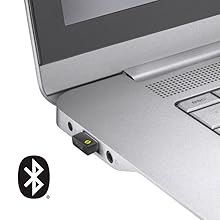
Image: The Logi Bolt USB receiver connected to a laptop, illustrating the wireless connection method.
3.2.2. Bluetooth Low Energy Connection
- Assegureu-vos que el Bluetooth del vostre dispositiu estigui activat.
- Enceneu el ratolí.
- Press and hold the connect button on the underside of the mouse for 3 seconds until the LED indicator starts blinking rapidly.
- On your device, go to Bluetooth settings and select "Logicool M550MGR" from the list of available devices to pair.
- The LED indicator will turn solid for a few seconds, then turn off, indicating a successful connection.

Image: Visual representation of the two connectivity options: Bluetooth and the Logi Bolt USB receiver.
4. Instruccions de funcionament
4.1. Funcions bàsiques
- Clic esquerre: Acció primària, selecció.
- Clic dret: Secondary action, context menus.
- Roda de desplaçament: Desplaça't amunt o avall pels documents i web pàgines.
4.2. Desplaçament amb la roda intel·ligent
The SmartWheel automatically switches between two scrolling modes:
- Line-by-line Scrolling: For precise navigation, ideal for detailed work.
- Hyper-fast Scrolling: Spin the wheel quickly to effortlessly glide through long documents and web pages. The wheel will automatically switch to this mode when spun with momentum.

Imatge: Un primer pla view of the SmartWheel, demonstrating its design for efficient scrolling.
4.3. Tecnologia SilentTouch
The M550MGR incorporates SilentTouch technology, which reduces click noise by 90% compared to traditional mice, while maintaining the familiar click feel. This creates a quieter work environment without compromising tactile feedback.

Image: A user operating the silent mouse in a calm environment, illustrating the benefit of SilentTouch technology.
5. Característiques
- Roda intel·ligent: Automatic switching between precise line-by-line and hyper-fast scrolling.
- Tecnologia SilentTouch: 90% reduced click noise with retained click feel.
- Connectivitat dual: Connect via Logi Bolt USB receiver or Bluetooth Low Energy.
- Disseny ergonòmic: Comfortable shape with rubber side grips for extended use.
- Llarga vida útil de la bateria: Fins a 24 mesos amb una sola pila AA.
- Compatibilitat amb diversos sistemes operatius: Supports Windows, macOS, Chrome OS, iPadOS, and Android.
6. Informació de la bateria
- Tipus de bateria: 1 x AA alkaline battery.
- Durada de la bateria: Up to 24 months, depending on usage.
- Substitució de la bateria: Replace the AA battery when the LED indicator on the mouse turns red or when performance degrades. Follow the installation steps in Section 3.1.
7. Compatibilitat
The Logicool Signature M550MGR mouse is compatible with the following operating systems:
- Logi Bolt Connection:
- Windows 10, 11 o posterior
- macOS 10.10 o posterior
- Chrome OS
- Bluetooth Low Energy Connection:
- Windows 10, 11 o posterior
- macOS 10.15 o posterior
- Chrome OS
- iPadOS 13.4 o posterior
- Android 5.0 o posterior
Note: This mouse is not compatible with Logitech Unifying receivers.
8. Manteniment
- Neteja: Use a soft, lint-free cloth to clean the mouse surface. For stubborn dirt, slightly dampRenta el drap amb aigua. Evita productes químics agressius o materials abrasius.
- Sensor: Keep the optical sensor on the underside of the mouse clean and free from dust or debris for optimal tracking performance.
- Emmagatzematge: When not in use for extended periods, turn off the mouse to conserve battery life. Store in a dry, cool place.
9. Solució De Problemes
9.1. El ratolí no respon
- Assegureu-vos que el ratolí estigui encès.
- Comproveu el nivell de la bateria i substituïu-la si cal.
- For Logi Bolt connection: Ensure the receiver is securely plugged into a working USB port. Try a different USB port.
- For Bluetooth connection: Ensure Bluetooth is enabled on your device and the mouse is paired. Try re-pairing the mouse (refer to Section 3.2.2).
- Reinicieu l'ordinador o el dispositiu.
9.2. Moviment erràtic del cursor
- Netegeu el sensor òptic de la part inferior del ratolí.
- Assegureu-vos que feu servir el ratolí sobre una superfície adequada. Eviteu superfícies molt reflectants o transparents.
- Move the mouse closer to the Logi Bolt receiver or your Bluetooth-enabled device to reduce interference.
9.3. SmartWheel Not Switching Modes
- Ensure the wheel is spun with enough momentum to activate hyper-fast scrolling.
- Check for any debris around the scroll wheel that might impede its movement.
10. Especificacions
| Marca | Logicool |
| Número de model | M550MGR |
| Color | Grafit |
| Tecnologia de connectivitat | Bluetooth, Logi Bolt (USB) |
| Tecnologia de detecció de moviment | Òptic |
| Característiques especials | SilentTouch, Wireless |
| Dimensions del producte | 6.1 x 10.82 x 3.88 cm |
| Pes de l'article | 97.4 g |
| Tipus de bateria | 1 x bateria AA |
| Temps d'ús continu | Fins a 24 mesos |
11. Garantia i Suport
The Logicool Signature M550MGR Wireless Mouse comes with a Garantia del fabricant de 2 anys des de la data de compra.
For technical support, warranty claims, or additional information, please visit the official Logicool support weblloc web o poseu-vos en contacte amb el servei d'atenció al client. Conserveu el comprovant de compra per a la garantia.
Official Logicool Support: www.logicool.co.jp


