1. Producte acabatview
The OMTech 20W Fiber Laser Marking Machine is a high-precision MOPA laser engraver designed for etching and marking various materials, particularly metals. It features a solid-state laser with an extended lifespan, a high-speed galvanometric system for accurate and fast processing, and a generous workbed area. This machine is compatible with LightBurn and EzCad2 software, offering versatility for a wide range of applications from artistic designs to industrial part marking.
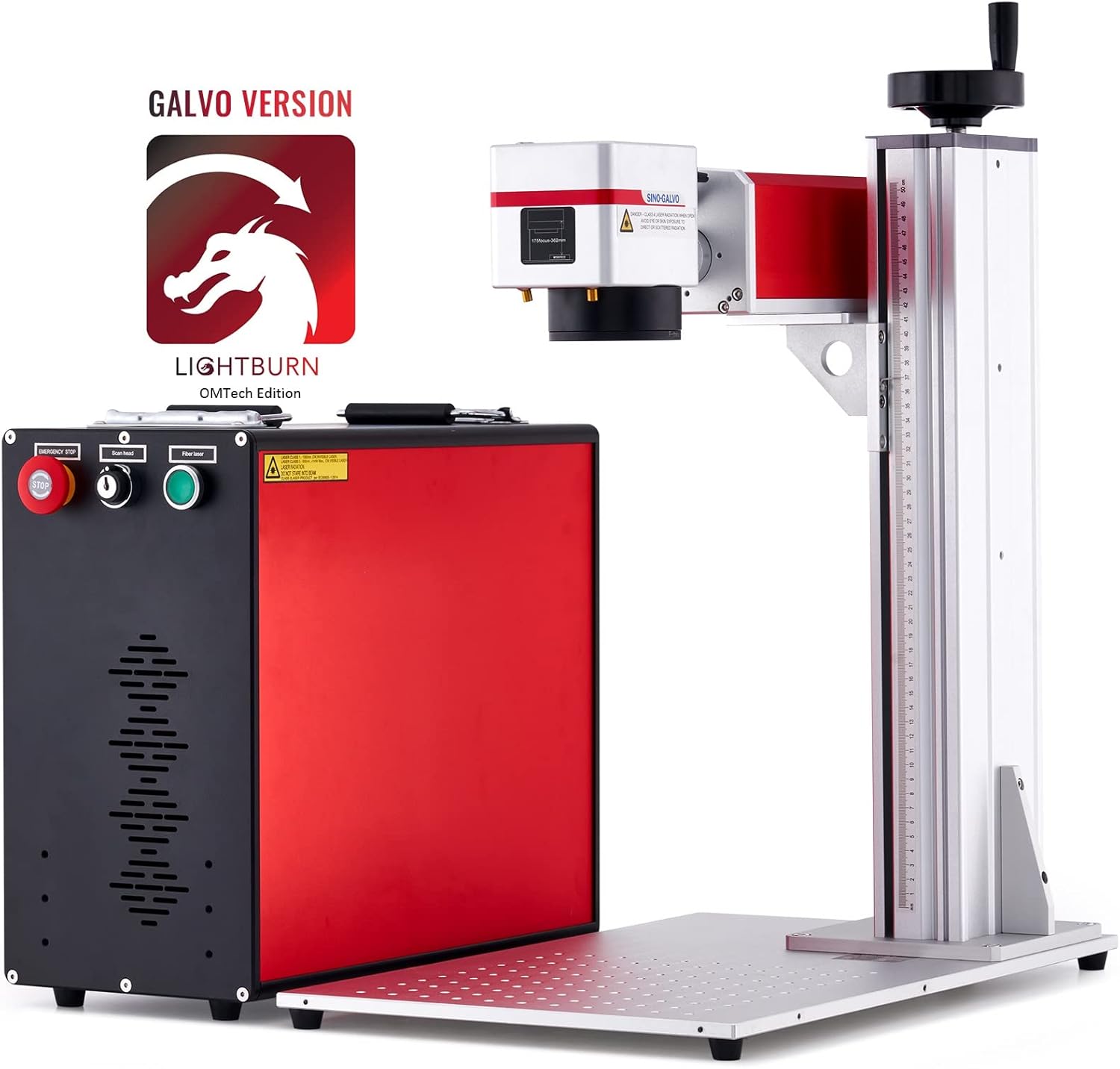
Figure 1.1: OMTech 20W Fiber Laser Marking Machine, showcasing the main unit and the laser head assembly, with the LightBurn OMTech Edition logo.
2. Informació de seguretat
Operating a laser marking machine requires strict adherence to safety protocols to prevent injury and damage. This device is a Class 2 laser product (0.874 mW output power).
- Protecció ocular: Always wear the provided protective eyewear when the laser is in operation. Direct exposure to the laser beam can cause severe eye damage.
- Àrea de treball: Ensure the work area is clear of flammable materials. Do not operate the machine in an explosive atmosphere.
- Ventilació: Some materials may produce fumes during engraving. Ensure adequate ventilation to prevent inhalation of harmful substances.
- Parada d'emergència: Familiarize yourself with the location and operation of the emergency stop button. In case of any malfunction or emergency, press this button immediately.
- Personal autoritzat: Only trained and authorized personnel should operate the laser marking machine.
- Font d'alimentació: Connect the machine to a properly grounded power outlet. Do not use damaged power cords.
- Compatibilitat de materials: Only engrave materials known to be safe for laser processing. Avoid materials that may produce toxic fumes or catch fire easily.
3. Contingut del paquet
Verifiqueu que tots els elements que s'enumeren a continuació siguin presents al vostre paquet:
- 1 x 20W MOPA Fiber Laser Engraver (Main Unit)
- 1 x LightBurn Galvo Version License Key (Sent by Email)
- 1 x Protective Eyewear
- 1 x Manual d'instruccions (aquest document)
- All Necessary Accessories (e.g., power cable, USB cable, focusing aids)
4. Guia de configuració
Follow these steps to set up your OMTech 20W Fiber Laser Marking Machine:
- Desembalatge: Traieu amb cura tots els components de l'embalatge. Conserveu l'embalatge original per a futurs transports o emmagatzematge.
- Col·locació: Place the laser marking machine on a stable, level surface in a well-ventilated area. Ensure there is sufficient space around the machine for operation and maintenance.
- Muntatge:
- Attach the laser head assembly to the vertical column, ensuring it is securely fastened.
- Connect the necessary cables between the laser head and the main control unit.
- Connexió d'alimentació: Connect the power cable to the main control unit and then to a grounded electrical outlet. Ensure the power switch is in the OFF position before connecting.
- Instal·lació de programari:
- Install the EzCad2 software on your Windows computer. The software supports Windows XP, Vista, 7, 8, and 10.
- For LightBurn compatibility, ensure you have the correct Galvo Version license key and install the software on a compatible operating system (Windows, macOS, Linux).
- Connexió USB: Connecteu la màquina a l'ordinador mitjançant el cable USB proporcionat.

Figure 4.1: The laser engraver is compatible with various Windows operating systems (XP, Vista, 7, 8, 10) and LightBurn software.
5. Instruccions de funcionament
This section outlines the general steps for operating your fiber laser marking machine.
5.1 Basic Operation Flow
- Encès: Turn on the main power switch on the control unit.
- Llançament del programari: Launch EzCad2 or LightBurn software on your computer.
- Design Creation/Import: Create your design or import an existing image/vector file. The software supports various image formats.
- Col·locació del material: Place the material to be marked on the workbed. Use the laser locator (red dot guide) for precise positioning and focusing. Grid dots on the workbed assist with alignment.
- Configuració dels paràmetres: Adjust laser parameters such as power, speed, frequency, and pulse width within the software based on the material and desired effect. The machine offers adjustable pulse frequency and width for color marking on metals like stainless steel.
- Enfocament: Adjust the laser head height to achieve optimal focus. The compact F-theta field lens provides throughput with less than 1% distortion.
- Start Marking: Ensure you are wearing protective eyewear. Initiate the marking process from the software. The machine operates at speeds up to 275.6 ips (10000 mm/s).
- Seguiment: Monitor the marking process. In case of any issues, press the emergency stop button.
- Apagar: Once marking is complete, power off the machine.
5.2 Funcions avançades
- Color Marking: The MOPA laser allows for adjustable pulse frequency and width, enabling the creation of various colors on certain metals, particularly stainless steel.
- Rotary Axis Compatibility: The machine includes a 4-pin port for easy connection of an optional rotary axis (not included). This allows for engraving on curved surfaces such as rings, bracelets, pens, bottles, and tubes.

Figura 5.1: Examples of color marking capabilities on stainless steel, demonstrating various hues achieved by adjusting laser parameters.

Figure 5.2: Illustration of rotary axis compatibility, showing how cylindrical objects can be engraved.
6. Manteniment
Regular maintenance ensures the longevity and optimal performance of your laser marking machine.
- Neteja: Regularly clean the workbed and the exterior of the machine to prevent dust and debris buildup. Use a soft, lint-free cloth.
- Neteja de lents: Periodically inspect and gently clean the F-theta lens and protective window using lens cleaning solution and specialized wipes. Avoid touching the optical surfaces with bare hands.
- Reixes de ventilació: Ensure the ventilation grilles on the control unit are free from obstructions to maintain proper air cooling.
- Inspecció del cable: Check all cables for signs of wear or damage. Replace any damaged cables immediately.
- Actualitzacions de programari: Keep your EzCad2 and LightBurn software updated to the latest versions for improved performance and new features.
7. Solució De Problemes
Aquesta secció ofereix solucions a problemes comuns que podeu trobar.
| Problema | Causa possible | Solució |
|---|---|---|
| La màquina no s'encén. | Cable d'alimentació desconnectat; interruptor apagat; font d'alimentació defectuosa. | Check power cable connection; ensure power switch is ON; contact support if issue persists. |
| Laser not firing. | Emergency stop engaged; software not connected; laser parameters incorrect. | Disengage emergency stop; ensure software is connected to machine; verify laser power and frequency settings. |
| Poor engraving quality. | Incorrect focus; wrong parameters for material; dirty lens. | Adjust focus; optimize laser power, speed, and frequency settings; clean the F-theta lens. |
| Software not recognizing machine. | USB cable disconnected or faulty; driver issues. | Check USB connection; try a different USB port; reinstall USB drivers or software. |
8. Especificacions tècniques
| Característica | Especificació |
|---|---|
| Número de model | RYGEL-J2W2BU |
| Potència làser | 20W |
| Font làser | JPT |
| Longitud d'ona làser | 1064 nm |
| Zona de marcatge | 6.9 x 6.9 polzades (175 x 175 mm) |
| Màx. Velocitat de marcatge | 10000 mm/s (275.6 ips) |
| Màx. Profunditat de marcatge | 0.002 polzades |
| Freqüència làser | 1-4000 kHz |
| Amplada del pols | 2-500 ns |
| Max. Pulse Energy | 0.8 mJ |
| Estimated Laser Service Life (MTTF) | 100,000 hores |
| Sistema de refrigeració | Refrigeració per aire |
| Dimensions del producte (L x A x A) | 17.8 x 22.1 x 27.6 polzades |
| Pes de l'article | 66.2 lliures |
| Programari inclòs | LightBurn (Galvo Version), EzCad2 |
| Sistemes operatius compatibles | Windows, macOS, Linux |

Figure 8.1: Visual representation of key technical specifications for the laser marking machine.
9. Garantia i Suport
OMTech is committed to providing excellent customer service and support for your product.
9.1 After-Sale Support
For any questions, technical assistance, or support needs, please contact OMTech directly:
- Telèfon: +1 (949) 438-4949 (7 days a week, 24 hours a day)
- Correu electrònic general: SUPPORT@OMTECHLASER.COM
- Correu electrònic d'assistència tècnica: TECHSUPPORT@OMTLASER.COM

Figure 9.1: OMTech's dedicated customer support team, available for assistance.


