1. Introducció
This manual provides comprehensive instructions for the operation, maintenance, and troubleshooting of your Mibro C2 Smart Watch. Please read this manual carefully before using the device to ensure proper functionality and to extend its lifespan.

Figure 1: Mibro C2 Smart Watch with its main display showing various health metrics.
2. Informació de seguretat
To ensure safe and effective use of your Mibro C2 Smart Watch, please observe the following precautions:
- No intenteu desmuntar o modificar el dispositiu.
- Mantingueu el dispositiu allunyat de temperatures extremes, llum solar directa i camps magnètics forts.
- Eviteu exposar el dispositiu a productes químics o substàncies corrosives.
- Netegeu el dispositiu amb un drap suau i sec. No utilitzeu productes de neteja abrasius.
- Consult a medical professional before starting any new exercise regimen, especially if you have pre-existing health conditions. The heart rate and SpO2 measurements are for reference only and should not be used for medical diagnosis.
3. Característiques del producte
The Mibro C2 Smart Watch offers a range of advanced features designed to enhance your daily life and fitness tracking:
- Pantalla HD de 1.69 polzades: A large, high-definition display for clear visibility of information and watch functions.
- Monitorització de la freqüència cardíaca les 24 hores: Continuous heart rate tracking with early warning modes for exercise, resting, and sleep.
- Blood Oxygen Saturation (SpO2) Measurement: Optical sensor for on-demand SpO2 readings.
- 20 modes esportius: Automatic recognition for running mode and real-time data display for various activities.
- Impermeable 2ATM: Suitable for daily use and water exposure up to 20 meters, but not for diving or high-velocity water sports.
- Durada de la bateria de 7 dies: Long-lasting battery for extended usage on a single charge in daily mode.
- Disseny lleuger: Weighing approximately 34g for comfortable wear.
- Smart Sleep Monitoring: Helps establish regular bedtime routines and tracks sleep trends.
- Life Assistant Features: Timely reminders for messages, calls, weather, and alarms.

Figure 2: The Mibro C2 Smart Watch highlighting its lightweight design and large screen.

Figure 3: The 1.69-inch HD screen provides a large and clear view for all information.

Figure 4: The optical sensor on the back of the watch for 24-hour heart rate monitoring.

Figure 5: The 2ATM waterproof rating allows for use in various water-related activities, excluding deep diving or high-pressure water sports.
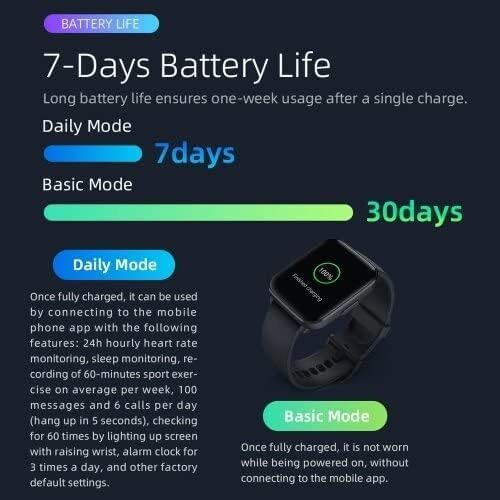
Figure 6: Battery life illustration, showing 7 days in daily mode and up to 30 days in basic mode.
4. Configuració
4.1 Càrrega del dispositiu
Before first use, fully charge your Mibro C2 Smart Watch. Connect the magnetic charging cable to the charging contacts on the back of the watch and plug the USB end into a power adapter (not included) or a computer's USB port.
- Ensure the charging contacts are clean and dry.
- A charging icon will appear on the screen to indicate charging status.
- Full charge typically takes approximately 2 hours.
4.2 Engegada/apagada
- Encès: Premeu i manteniu premut el botó lateral fins que aparegui el logotip de Mibro.
- Apagar: From the watch face, swipe down to access quick settings, then tap the power icon, or go to Settings > System > Power Off. Confirm your choice.
4.3 Emparellament amb el telèfon intel·ligent
To unlock the full potential of your Mibro C2 Smart Watch, pair it with the official Mibro Fit application on your smartphone.
- Download the "Mibro Fit" app from your smartphone's app store (Google Play Store for Android, Apple App Store for iOS).
- Obre l'aplicació Mibro Fit i crea un compte o inicia la sessió.
- Assegureu-vos que el Bluetooth estigui habilitat al vostre telèfon intel·ligent.
- In the app, navigate to "Device" or "Add Device" and select "Mibro C2" from the list of available devices.
- Follow the on-screen prompts in the app and on your watch to complete the pairing process. A confirmation message will appear on both devices once successfully paired.
Note: For optimal performance, keep the Mibro Fit app running in the background and ensure your watch is within Bluetooth range of your phone.
5. Instruccions de funcionament
5.1 Navegació bàsica
- Llisca cap amunt: Accés a les notificacions.
- Llisca cap avall: Access quick settings (e.g., brightness, battery, DND mode).
- Llisca cap a l'esquerra/dreta: Navigate through widgets (e.g., heart rate, activity data, weather).
- Premeu el botó lateral: Torna a l'esfera del rellotge o obre la llista d'aplicacions.
- Toca: Seleccioneu un element o obriu una aplicació.

Figure 7: The Mibro C2 Smart Watch displaying a dynamic watch face with health data.
5.2 Vigilància de la salut
The Mibro C2 Smart Watch provides continuous health monitoring features:
- Freqüència cardíaca: The watch automatically monitors your heart rate throughout the day. You can view real-time data by swiping to the heart rate widget or opening the Heart Rate app.
- SpO2: To measure your blood oxygen saturation, open the SpO2 app on the watch. Keep your arm still and the watch snug on your wrist for accurate readings.
- Monitorització del son: Porta el rellotge al llit per a un seguiment automàtic del son. Dades sobre els sonstages and quality will be available in the Mibro Fit app the next morning.
- Passos i calories: The watch tracks your daily steps, distance, and estimated calories burned. This data is visible on the watch face and in the activity widget.

Figure 8: Smart sleep monitoring helps track your sleep patterns and quality.
5.3 modes esportius
The Mibro C2 supports 20 different sports modes. To start a workout:
- A la llista d'aplicacions, seleccioneu la icona "Entrenament" o "Esports".
- Choose your desired sport (e.g., Running, Cycling, Walking).
- Tap "Go" or the start icon to begin tracking.
- During the workout, you can view real-time data such as duration, heart rate, and calories.
- To pause or end the workout, press the side button or swipe on the screen and select the appropriate option.

Figure 9: Visual representation of the 20 sports modes supported by the Mibro C2 Smart Watch.
5.4 Notificacions i recordatoris
Once paired with your smartphone, the Mibro C2 can receive notifications for calls, messages, and app alerts. Ensure notification permissions are enabled in the Mibro Fit app and your phone's settings.
- Trucades entrants: The watch will vibrate and display caller ID. You can choose to mute or reject the call from the watch.
- Missatges: View message content directly on your watch screen.
- Alertes d'aplicacions: Receive notifications from selected apps.

Figure 10: The Mibro C2 acts as a life assistant, providing timely reminders and information like weather updates.
6. Manteniment
6.1 Neteja del rellotge
- Regularly clean the watch body and strap with a soft, lint-free cloth.
- Per a la brutícia tossuda, dampen the cloth slightly with water. Do not use soap or harsh chemicals.
- Ensure the charging contacts on the back of the watch are clean and free of debris to maintain proper charging.
6.2 Cura de la corretja
To prevent skin irritation and maintain the strap's condition:
- Keep the strap clean and dry.
- If the strap gets wet, dry it thoroughly before wearing.
- Eviteu l'exposició prolongada a la llum solar directa o temperatures altes.
6.3 Emmagatzematge
When not in use for extended periods, store the watch in a cool, dry place. It is recommended to charge the watch to about 50% before storing to preserve battery health.
7. Solució De Problemes
| Problema | Causa possible | Solució |
|---|---|---|
| El rellotge no s'encén. | Bateria baixa; mal funcionament del dispositiu. | Charge the watch for at least 30 minutes. If it still doesn't power on, contact support. |
| No es pot emparellar amb el telèfon intel·ligent. | Bluetooth desactivat; problema amb l'aplicació; rellotge no detectable. | Ensure Bluetooth is on. Restart both watch and phone. Reinstall Mibro Fit app. Reset watch to factory settings. |
| Notificacions no rebudes. | Permissions not granted; app not running; watch out of range. | Check notification permissions in Mibro Fit app and phone settings. Ensure app is running in background. Keep watch close to phone. |
| Lectures inexactes de la freqüència cardíaca/SpO2. | Loose fit; sensor obstruction; movement during measurement. | Ensure watch is snug on wrist. Clean sensor. Remain still during measurement. |
| Durada de la bateria curta. | Frequent use of features; high brightness; continuous monitoring. | Reduce screen brightness. Limit continuous monitoring features. Use basic mode for longer battery life. |
8. Especificacions
| Característica | Detall |
|---|---|
| Número de model | XPAW009 |
| Mostra | Pantalla tàctil HD de 1.69 polzades |
| Dimensions | 4.5 x 3.53 x 1.12 cm |
| Pes | 34 g |
| Capacitat de la bateria | Polímer de liti de 270 mAh |
| Durada de la bateria | Up to 7 days (Daily Mode), Up to 30 days (Basic Mode) |
| Resistència a l'aigua | 2ATM (20 metres) |
| Connectivitat | Bluetooth |
| Sistema operatiu | watchOS |
| Sensors | Heart Rate Monitor, SpO2 Sensor |
| GPS | A través de Smartphone |
| Capacitat d'emmagatzematge de memòria | 2300 MB |
9. Garantia i Suport
9.1 Informació de la garantia
The Mibro C2 Smart Watch comes with a standard manufacturer's warranty. Please refer to the warranty card included in your product packaging for specific terms and conditions, including warranty period and coverage details. Keep your purchase receipt as proof of purchase for warranty claims.
Note: Damage caused by misuse, unauthorized modification, or failure to follow instructions in this manual is not covered under warranty.
9.2 Atenció al client
For technical assistance, troubleshooting, or warranty inquiries, please contact Mibro customer support through the following channels:
- Official Mibro Weblloc: Visit the official Mibro weblloc web amb preguntes freqüents, recursos d'assistència i informació de contacte.
- Mibro Fit App: The app may contain a "Help" or "Support" section with useful information and direct contact options.
- Suport al detall: Contact the retailer where you purchased the device for assistance.
When contacting support, please have your product model number (XPAW009) and purchase details ready.


