1. Introducció
Thank you for choosing the Gembird USB-C Gigabit Network Adapter with 3-Port USB 3.1 Hub. This device is designed to expand the connectivity of your USB-C enabled laptop, tablet, or computer, providing both high-speed Gigabit Ethernet and additional USB 3.1 ports. This manual provides essential information for setting up, operating, and maintaining your device.
2. Característiques del producte
- Connectivitat USB-C: Connects to your host device via a reversible USB-C port.
- Port Gigabit Ethernet: Provides a stable and fast wired network connection up to 1000 Mbps.
- 3-Port USB 3.1 Hub: Adds three USB 3.1 ports for connecting peripherals such as external hard drives, flash drives, keyboards, and mice.
- Transferència de dades d'alta velocitat: USB 3.1 ports support data transfer rates up to 5 Gbps.
- Plug and Play: No driver installation required for most modern operating systems.
3. Contingut del paquet
Please ensure the following items are included in your package:
- Gembird USB-C Gigabit Network Adapter with 3-Port USB 3.1 Hub (Model A-CMU3-LAN-01)
4. Producte acabatview
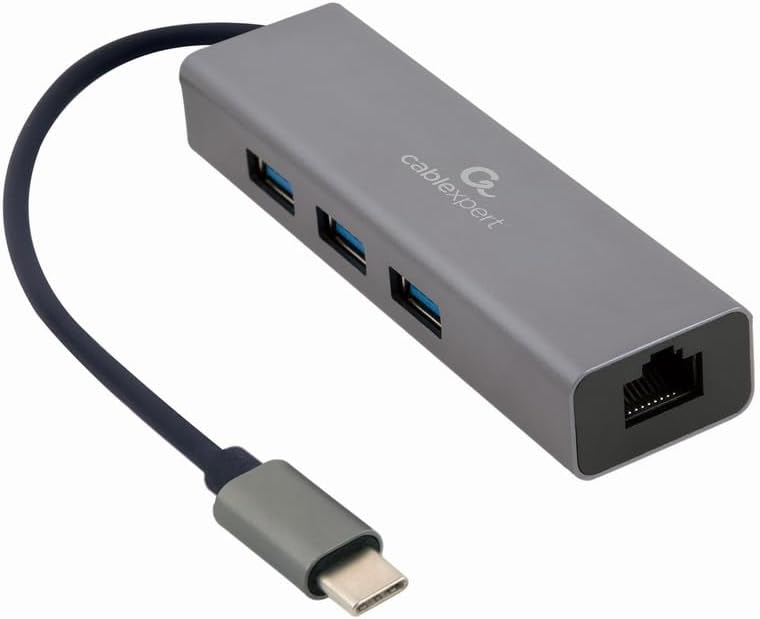
Figura 1: Davant view of the Gembird USB-C Gigabit Network Adapter, showing the USB-C cable, three USB 3.1 ports, and the RJ45 Gigabit Ethernet port.

Figura 2: Retail packaging for the Gembird USB-C Gigabit Network Adapter, highlighting key features like USB Type-C, USB 3.1 x 3, RJ45, Gigabit, 1000 Mbps, and Plug & Play.
5. Configuració
Follow these steps to set up your Gembird USB-C Gigabit Network Adapter:
- Connecta't al dispositiu amfitrió: Plug the USB-C connector of the adapter into an available USB-C port on your laptop, tablet, or computer.
- Connecteu-vos a la xarxa: Insert an Ethernet cable (RJ45) from your router or modem into the Gigabit Ethernet port on the adapter.
- Connecteu els perifèrics USB: Plug your USB devices (e.g., flash drives, external hard drives, mouse, keyboard) into the three available USB 3.1 ports on the adapter.
- Instal·lació del controlador: The adapter is typically plug-and-play. Your operating system (Windows, macOS, Linux, Chrome OS) should automatically detect and install the necessary drivers. If prompted, allow the system to install drivers.
6. Instruccions de funcionament
Once connected, the adapter functions automatically:
- Accés a la xarxa: Your host device should now have a wired network connection. You can verify this in your operating system's network settings.
- USB Device Access: Connected USB peripherals will be recognized by your host device and function as if directly connected.
7. Solució De Problemes
Si teniu problemes, consulteu els següents problemes i solucions habituals:
- Sense connexió de xarxa:
- Assegureu-vos que el cable Ethernet estigui connectat correctament tant a l'adaptador com al vostre encaminador/mòdem.
- Comproveu que el vostre encaminador/mòdem funcioni correctament.
- Verifiqueu la configuració de xarxa al dispositiu amfitrió.
- Prova de connectar l'adaptador a un port USB-C diferent del dispositiu amfitrió.
- Dispositius USB no reconeguts:
- Ensure USB devices are properly plugged into the adapter's USB 3.1 ports.
- Try connecting the USB device directly to your host computer to confirm it is functional.
- Some high-power USB devices may require an external power source if your host device's USB-C port does not provide sufficient power (this adapter does not have a dedicated power input).
- Velocitat de xarxa lenta:
- Ensure your Ethernet cable is rated for Gigabit speeds (Cat5e or higher).
- Verify your internet service provider's speed and your router's capabilities.
- Ensure your host device's USB-C port supports USB 3.0/3.1 speeds.
8. Especificacions
| Número de model | A-CMU3-LAN-01 |
| Interfície del maquinari | USB-C (Host), USB 3.1 (Hub), RJ45 (Ethernet) |
| Ports USB totals | 3 (USB 3.1) |
| Ports Ethernet | 1 (Gigabit RJ45) |
| Velocitat de transferència de dades (USB) | Fins a 5 Gbps (USB 3.1) |
| Data Transfer Rate (Ethernet) | 10/100/1000 Mbps |
| Dimensions del producte | 10 x 2 x 2.7 polzades |
| Pes de l'article | 2.46 unces |
9. Manteniment
Per garantir la longevitat i el rendiment òptim del vostre adaptador:
- Neteja: Feu servir un drap suau i sec per netejar l'exterior del dispositiu. Eviteu netejadors líquids o dissolvents.
- Emmagatzematge: Guardeu l'adaptador en un lloc fresc i sec, allunyat de la llum solar directa i de temperatures extremes quan no l'utilitzeu.
- Manipulació: Avoid dropping or subjecting the device to strong impacts. Do not attempt to disassemble the adapter.
10. Garantia i Suport
This Gembird product comes with a garantia de dos anys contra defectes de fàbricaSi us plau, conserveu el comprovant de compra per a reclamacions de garantia.
For technical support or warranty inquiries, please contact your retailer or visit the official Gembird weblloc per obtenir informació de contacte.


