1. Introducció
Thank you for choosing the TESSAN TS-1020-C Flat Plug Power Strip. This device is designed to expand your power options efficiently and safely, converting a single wall socket into multiple AC outlets and USB charging ports. Its ultra-thin design and versatile features make it ideal for various indoor settings, including homes, offices, dorm rooms, and for travel.
2. Característiques del producte
- Multiple in 1 Desktop Power Strip: Transforms one wall socket into multiple AC outlets and 3 USB ports (including 1 USB-C), allowing simultaneous charging of up to 7 devices without blocking adjacent outlets.
- USB-C Charging Station: Features dual USB-A ports (2.4A max) and one USB-C port (3A max). These ports intelligently detect connected devices to deliver optimal charging speeds for smartphones, tablets, earphones, and more.
- Space-Saving Flat Head Plug: The ultra-slim 0.31-inch flat plug is designed to fit easily in tight spaces, allowing furniture to sit flush against the wall. The 5-foot flat extension cord helps prevent tripping hazards.
- Opcions de muntatge versàtils: Includes an extra mounting hole for secure installation on walls, floors, or under counters. Four rubber feet on the bottom prevent slipping on desktops and tables.
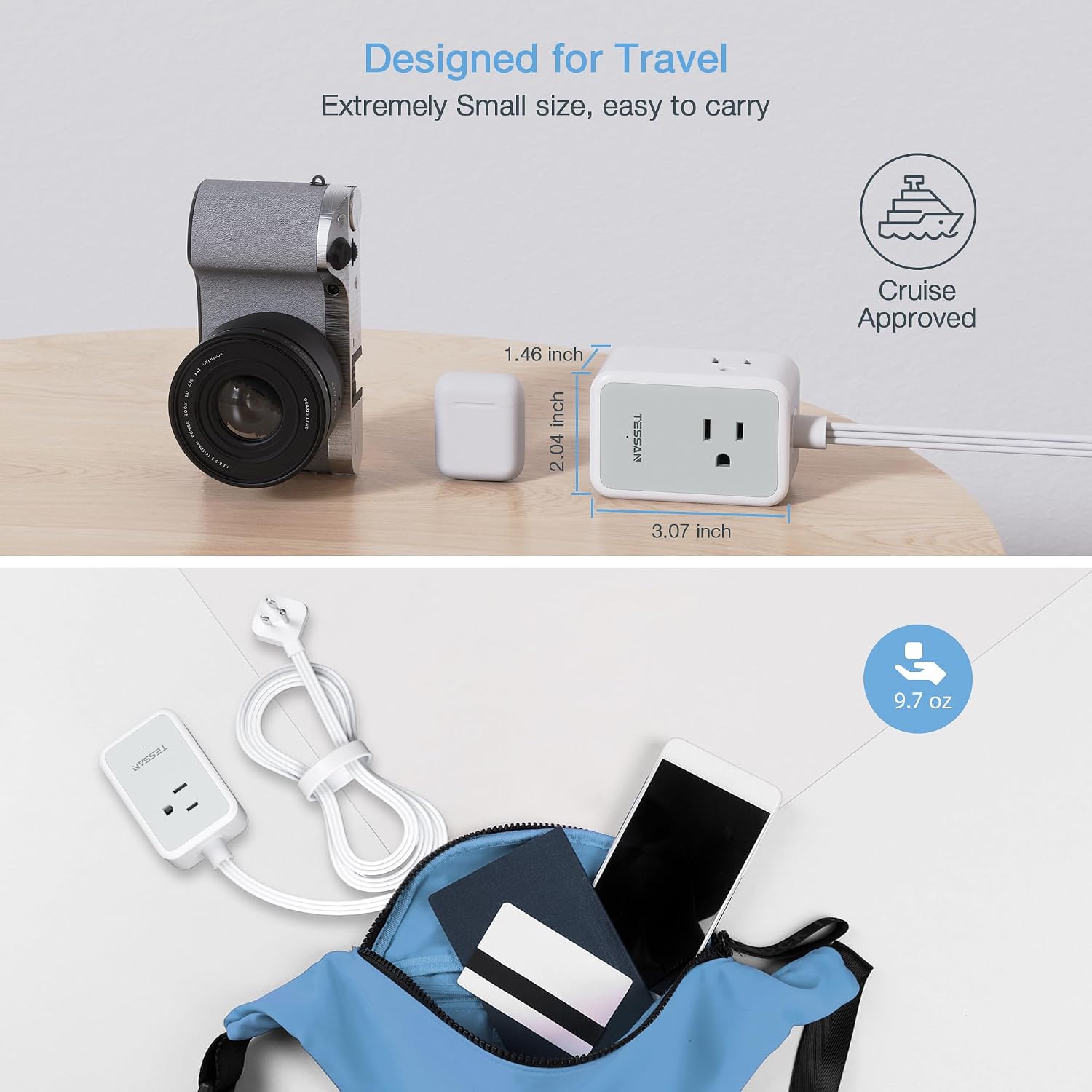
- Easy to Carry for Travel: Compact and lightweight design makes it convenient to pack in luggage or backpacks, serving as an essential travel accessory.
3. Especificacions
| Especificació | Detall |
|---|---|
| Marca | TESSAN |
| Model | TS-1020-C |
| Color | Blanc |
| Total de preses de corrent altern | 5 |
| Sortida USB-A | 2.4A Max per port |
| Sortida USB-C | 3 A màx |
| Voltage | 125 Volts |
| Longitud del cable | 5 peus |
| Característica especial | Mountable, USB Slot, Flat Plug, Surge Protection |
4. Configuració
The TESSAN TS-1020-C is designed for easy setup and integration into any space. Its flat plug and compact design ensure minimal intrusion.
- Trieu una ubicació: Select a dry, indoor location near a wall outlet. Consider areas where space is limited, such as behind furniture or on a desk.
- Plug In the Power Strip: Insert the ultra-thin flat plug into a standard 3-prong wall outlet. The 45-degree angle of the plug allows it to sit flush against the wall, saving space.
- Muntatge opcional: If desired, use the integrated mounting holes on the back of the power strip to secure it to a wall, desk, or other surface using appropriate screws (not included). The rubber feet provide stability if placed on a flat surface.


5. Instruccions de funcionament
The TESSAN TS-1020-C provides convenient power and charging for multiple devices.
- Encès/apagat: Locate the power button on the side of the power strip. Press it to turn the power strip on or off. A small indicator light will illuminate when the power is on.
- Connecteu els dispositius de corrent altern: Plug your AC-powered devices into any of the 5 available 3-prong outlets. The outlets are strategically placed on three sides to accommodate bulky adapters without blocking other ports.
- Càrrega de dispositius USB: Connect your USB-powered devices (smartphones, tablets, etc.) to the two USB-A ports or the single USB-C port. The smart charging technology will automatically detect your device and deliver the optimal charging current.
- Ús simultani: You can use all AC outlets and USB ports simultaneously, provided the total power consumption does not exceed the maximum rated power of 1875W (15A at 125V).


6. Manteniment
Per garantir la longevitat i el funcionament segur del vostre reglet d'endolls TESSAN, seguiu aquestes pautes de manteniment:
- Neteja: Desconnecteu el reglet de la presa de corrent abans de netejar-lo. Feu servir un drap sec i suau per netejar l'exterior. No utilitzeu netejadors líquids ni materials abrasius.
- Inspecció: Periodically inspect the power strip and its cord for any signs of damage, such as frayed wires, cracked casing, or loose connections. If any damage is found, discontinue use immediately and contact customer support.
- Emmagatzematge: When not in use for extended periods, store the power strip in a cool, dry place away from direct sunlight and moisture. Use the included cable tie to keep the cord neatly organized.
- Condicions ambientals: This power strip is designed for indoor use only. Avoid exposing it to water, excessive humidity, or extreme temperatures.

7. Solució De Problemes
If you encounter any issues with your TESSAN power strip, refer to the following common troubleshooting steps:
- Sense alimentació als dispositius:
- Ensure the power strip is securely plugged into a functioning wall outlet.
- Check if the power button on the strip is in the 'ON' position and the indicator light is illuminated.
- Verify that the wall outlet itself is working by plugging in another device directly.
- If the power strip has a reset button (often combined with the power switch), try pressing it to reset the surge protection.
- Càrrega lenta per USB:
- Assegureu-vos que feu servir un cable USB d'alta qualitat.
- Check if your device supports faster charging speeds and if the power strip's ports are compatible.
- Avoid charging too many high-power devices simultaneously, as this can affect overall charging speed.
- Sobreescalfament:
- If the power strip feels excessively hot, immediately unplug it and all connected devices.
- Assegureu-vos el wat totaltage of connected devices does not exceed the power strip's maximum rating (1875W).
- Ensure adequate ventilation around the power strip.
If these steps do not resolve the issue, please contact TESSAN customer support for further assistance.
8. Garantia i Suport
TESSAN products come with a standard manufacturer's warranty. For detailed warranty information, product registration, or technical support, please visit the official TESSAN weblloc web o poseu-vos en contacte amb el seu equip d'atenció al client. Conserveu el rebut de compra per a reclamacions de garantia.
Informació de contacte:
Please refer to the packaging or the official TESSAN weblloc web per obtenir les dades de contacte més actualitzades.
9. Portabilitat
The TESSAN TS-1020-C is designed with portability in mind, making it an excellent companion for travel or for use in various locations where power access is needed.
- Mida compacta: Its small footprint allows it to fit easily into luggage, backpacks, or briefcases.
- Pes lleuger: The lightweight construction adds minimal bulk to your travel essentials.
- Flat Cord Management: The flexible 5-foot flat cord can be neatly wrapped and secured with the included cable tie, preventing tangles and making it easy to store.