Introducció
Thank you for choosing the Xtreme Multicolor LED Gaming Mouse. This manual provides essential information for setting up, operating, maintaining, and troubleshooting your new gaming mouse. Please read this guide thoroughly to ensure optimal performance and longevity of your device.
Característiques del producte
- Multicolor LED Lighting Effect: Experience dynamic lighting with a multicolor LED light that cycles through various colors, enhancing your gaming setup.
- Fast Motion Scroll Wheel: Navega per documents i web pages with precision and speed using the responsive scroll wheel.
- Instal·lació fàcil Plug-and-Play: Simply connect the mouse's 4ft USB wire to your computer's USB port for immediate use. No drivers required.
- Compatibilitat universal: Designed to work seamlessly with both Windows desktops and Mac computers.
- 1000 Max DPI: Provides responsive and accurate tracking for various tasks.
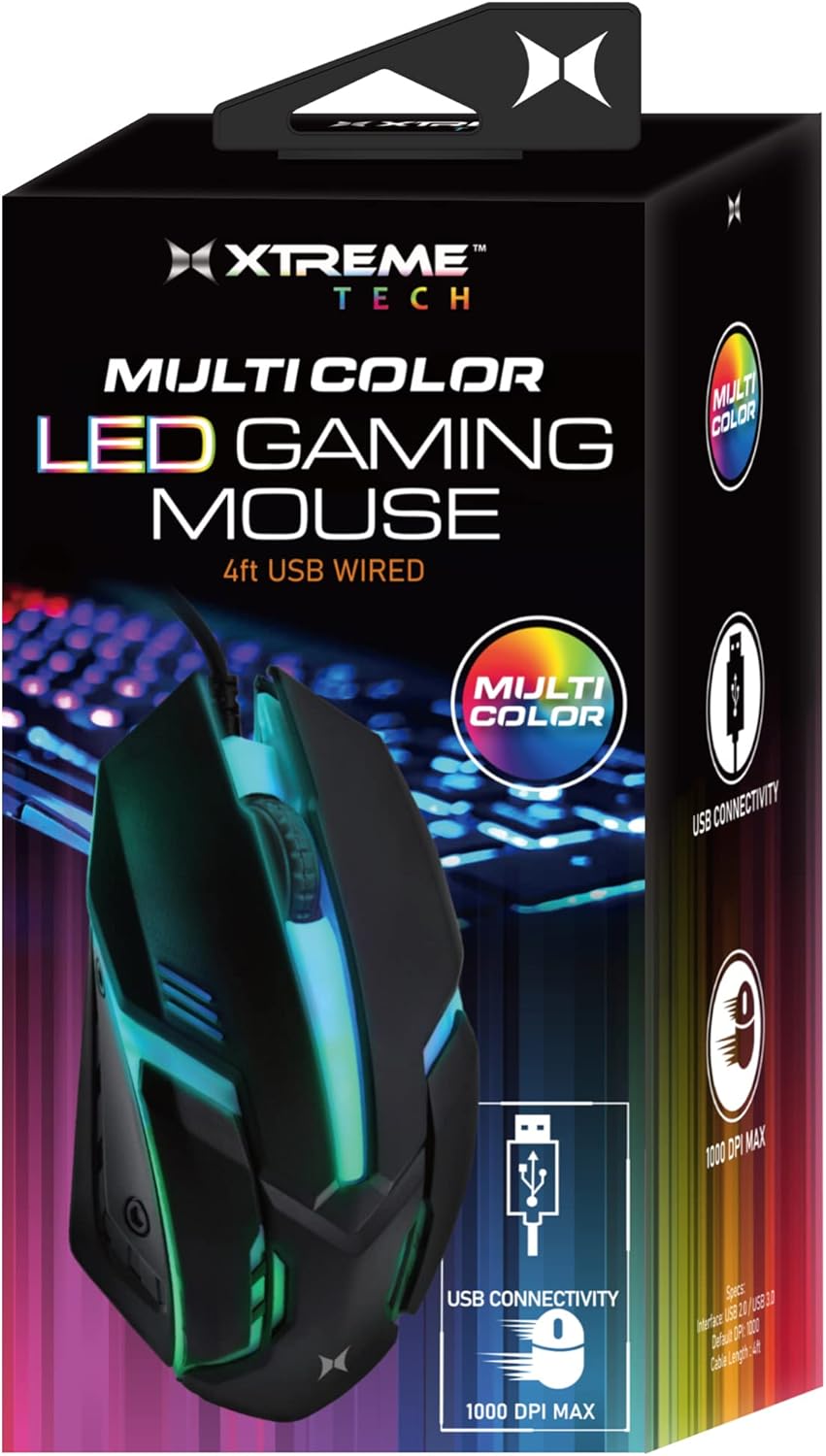
The Xtreme Multicolor LED Gaming Mouse in its retail packaging, highlighting its key features.

De dalt a baix view of the gaming mouse showcasing its vibrant orange LED lighting effect.

The gaming mouse from a side angle, displaying its blue and green LED illumination, positioned near a backlit keyboard.

A dynamic side view of the mouse, highlighting its striking purple LED lighting.

Another side perspective of the mouse, featuring its cool blue and green LED glow.

A dalt view of the gaming mouse, illuminated with a vibrant green LED light.

A detailed close-up of the mouse's scroll wheel, indicating its functionality.

An image showing a hand comfortably resting on the mouse, emphasizing its 1000 DPI MAX capability.

The mouse connected via its USB cable, illustrating its simple USB powered setup.

The Xtreme LED Gaming Mouse displayed alongside its packaging, highlighting its design.
Guia de configuració
The Xtreme Multicolor LED Gaming Mouse is designed for quick and easy installation.
- Desempaqueta el ratolí: Traieu amb cura el ratolí del seu embalatge.
- Localitza un port USB: Identify an available USB port on your desktop computer or laptop.
- Connecteu el ratolí: Insert the USB connector of the mouse's 4ft wire into the USB port.
- Reconeixement automàtic: L'ordinador hauria de detectar i instal·lar automàticament els controladors necessaris. Aquest procés pot trigar uns instants.
- A punt per al seu ús: Once recognized, the LED lights on the mouse will activate, and it will be ready for immediate use.
Instruccions de funcionament
Using your Xtreme Multicolor LED Gaming Mouse is straightforward:
- Moviment bàsic: Mou el ratolí per una superfície plana per controlar el cursor a la pantalla. El sensor làser proporciona un seguiment precís.
- Clic esquerre: Feu servir el botó esquerre per seleccionar elements, obrir files, i interactuant amb els elements de la pantalla.
- Clic dret: Feu servir el botó dret per accedir als menús contextuals i a les opcions addicionals.
- Roda de desplaçament: Rotate the scroll wheel forward or backward to scroll through documents, web pages, or lists. The scroll wheel also functions as a clickable middle button for specific actions (e.g., opening links in new tabs).
- Il·luminació LED: The multicolor LED lighting effect will automatically activate upon connection and continuously cycle through various colors, providing an ambient glow. This feature is integrated and does not require separate controls.
Manteniment
To ensure the longevity and optimal performance of your gaming mouse, follow these simple maintenance guidelines:
- Neteja: Use a soft, dry, lint-free cloth to wipe down the mouse's surface. For stubborn dirt, slightly dampen the cloth with water or a mild, non-abrasive cleaner. Avoid excessive moisture and do not spray cleaners directly onto the mouse.
- Neteja del sensor: Occasionally, gently clean the optical sensor on the underside of the mouse with a cotton swab to remove any dust or debris that might affect tracking performance.
- Cura del cable: Eviteu doblegar o doblegar bruscament el cable USB. Guardeu el cable amb cura quan no l'utilitzeu per evitar danys.
- Emmagatzematge: Quan no l'utilitzeu, guardeu el ratolí en un entorn net i sec, allunyat de temperatures extremes i de la llum solar directa.
Resolució de problemes
If you encounter any issues with your Xtreme Multicolor LED Gaming Mouse, please refer to the following common problems and solutions:
| Problema | Causa possible | Solució |
|---|---|---|
| Mouse not responding / Cursor not moving | Connexió USB fluixa, port USB defectuós, problema amb el controlador. | Ensure the USB cable is securely plugged into the port. Try a different USB port on your computer. Restart your computer. |
| Els llums LED no funcionen | No power, faulty connection. | Check USB connection. Try a different USB port. Ensure your computer is powered on. |
| Moviment erràtic del cursor | Sensor òptic brut, superfície inadequada. | Netegeu el sensor òptic de la part inferior del ratolí. Feu servir el ratolí sobre una superfície neta, no reflectant i opaca o sobre una alfombrilla de ratolí. |
| Scroll wheel not working | Debris in scroll mechanism, software issue. | Gently try to dislodge any debris around the scroll wheel. Restart your computer. |
Si el problema persisteix després de provar aquestes solucions, poseu-vos en contacte amb l'atenció al client per obtenir més ajuda.
Especificacions
| Característica | Detall |
|---|---|
| Número de model | XCA2-1026-BLK |
| Tecnologia de connectivitat | Cable USB |
| Longitud del cable | 4 peus (aprox. 1.2 metres) |
| Tecnologia de detecció de moviment | Làser |
| DPI màxim | 1000 DPI |
| Característica especial | Llums LED multicolors |
| Color | Multi-color (Black body) |
| Pes de l'article | 1.58 unces (aproximadament 44.79 grams) |
| Dimensions del paquet | 6.02 x 2.99 x 1.73 polzades |
| Fabricant | Accessoris Jem |
| Data de primera disponibilitat | 1 de novembre de 2022 |
Garantia i Suport
This Xtreme Multicolor LED Gaming Mouse is covered by a limited warranty against defects in materials and workmanship. For specific warranty terms and conditions, please refer to the warranty card included with your product or visit the official XTREME DIGITAL LIFESTYLE ACCESSORIES weblloc.
For technical support, troubleshooting assistance, or warranty claims, please contact the manufacturer or seller directly. Keep your purchase receipt as proof of purchase.
Informació de contacte: Please refer to your product packaging or the seller's information for the most current contact details.


