Introducció
Thank you for choosing the Steelplay Slimpack 2.4GHz Wireless Controller. This manual provides detailed instructions for the proper setup, operation, and maintenance of your controller. Designed for compatibility with PlayStation 4, PlayStation 3, and PC, this controller features dual vibration feedback and four programmable rear paddles for an enhanced gaming experience.
Contingut del paquet
- Steelplay Slimpack 2.4GHz Wireless Controller
- Receptor USB de 2.4 GHz
- Cable de càrrega USB
- Manual d'usuari (aquest document)
Disseny del controlador
Familiarize yourself with the buttons and features of your Steelplay Slimpack Wireless Controller.
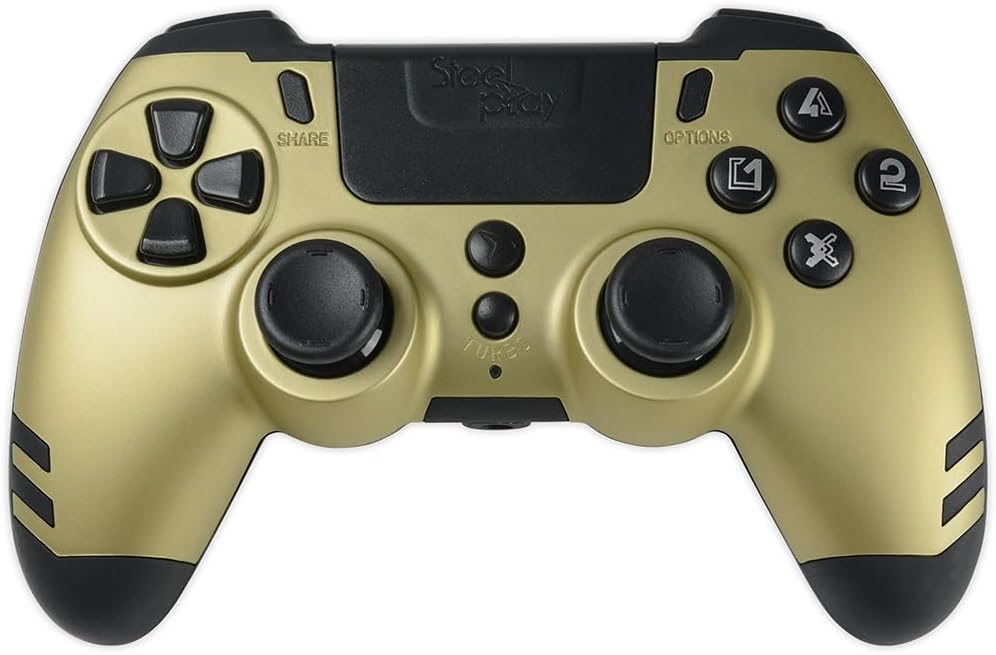
Figura 1: De dalt a baix view of the Steelplay Slimpack Wireless Controller. This image displays the layout of the directional pad, action buttons (triangle, circle, cross, square), dual analog sticks, SHARE and OPTIONS buttons, and the central touchpad area.
- Coixinet direccional (D-Pad): Per a una entrada direccional precisa.
- Botons d'acció (Triangle, Cercle, Creu, Quadrat): Primary input buttons.
- Manets analògics esquerre/dret: Per al moviment i el control de la càmera.
- Botó COMPARTIR: Access sharing features (PS4).
- Botó OPCIONS: Access in-game menus or system options.
- Botó PS: Power on/off the controller, access system menu.
- Botons L1/R1: Botons a l'espatlla.
- Disparadors L2/R2: Disparadors analògics.
- Rear Paddles (P1, P2, P3, P4): Four programmable buttons located on the back of the controller.
- Botó TURBO: Activates turbo function for selected buttons.
Configuració
1. Càrrega del controlador
- Connect the small end of the USB charging cable to the charging port on the controller.
- Connect the large end of the USB charging cable to a USB port on your console (PS4/PS3) or PC, or a compatible USB wall adapter (not included).
- The LED indicator on the controller will slowly flash while charging and turn off when fully charged.
- Una càrrega completa sol trigar aproximadament 2-3 hores.
2. Connecting to PS4/PS3/PC (2.4GHz Wireless)
The controller connects wirelessly via the included 2.4GHz USB receiver.
- Insert the 2.4GHz USB receiver into an available USB port on your PlayStation 4, PlayStation 3, or PC.
- Premeu el botó Botó PS on the controller to power it on.
- The controller will automatically attempt to pair with the USB receiver. The LED indicator will flash rapidly during pairing and remain solid when successfully connected.
- If the controller does not connect, ensure the receiver is properly inserted and try pressing the PS button again.
Instruccions de funcionament
Controls bàsics
Once connected, the controller functions similarly to standard PS4/PS3/PC controllers. Refer to your game's instructions for specific button mappings.
Feedback de doble vibració
The controller features dual vibration motors that provide tactile feedback during gameplay, enhancing immersion. This feature is automatically active when supported by the game.
Programming Rear Paddles
The four rear paddles (P1, P2, P3, P4) can be programmed to replicate other buttons on the controller, allowing for quick access to frequently used commands without repositioning your fingers.

Figura 2: En angle view of the Steelplay Slimpack Wireless Controller. This image shows the ergonomic design of the grips and the placement of the four programmable rear paddles on the underside of the controller.
- Introduïu el mode de programació: Manteniu premut el botó Botó TURBO i el Botó COMPARTIR simultaneously for 3 seconds. The LED indicator will start flashing rapidly to indicate programming mode.
- Selecciona la pala: Press the rear paddle (P1, P2, P3, or P4) you wish to program. The LED indicator will flash slowly.
- Assign Button: Press the button on the front of the controller (e.g., X, O, Triangle, Square, L1, R1, L2, R2, D-Pad directions, Left/Right Stick clicks) that you want the paddle to emulate.
- Sortir del mode de programació: Premeu el botó Botó TURBO again. The LED indicator will return to solid, indicating the paddle is programmed and programming mode is exited.
- Repeat for other paddles as desired.
- To clear a programmed paddle, enter programming mode, select the paddle, and then press the TURBO button without assigning another button.
Funció Turbo
The Turbo function allows a button to be repeatedly pressed automatically as long as it is held down.
- Activa el Turbo: Manteniu premut el botó Botó TURBO, then press the desired action button (e.g., X, O, Triangle, Square, L1, R1, L2, R2). The button will now have turbo functionality.
- Desactiva el Turbo: To remove turbo from a button, press and hold the Botó TURBO again, then press the same action button.
Manteniment
- Neteja: Feu servir un drap suau i sec per netejar el controlador. No utilitzeu productes químics agressius ni materials abrasius.
- Emmagatzematge: Guardeu el controlador en un lloc fresc i sec, allunyat de la llum solar directa i de temperatures extremes.
- Cura de la bateria: To prolong battery life, avoid fully discharging the controller frequently. Charge it regularly.
- Evitar l'impacte: No deixeu caure el controlador ni el sotmeteu a impactes forts, ja que això podria danyar els components interns.
Resolució de problemes
| Problema | Causa possible | Solució |
|---|---|---|
| El controlador no s'encén. | Bateria baixa. | Carregueu el controlador amb el cable USB proporcionat. |
| El controlador no es connecta sense fil. | USB receiver not properly inserted or not recognized. Controller not paired. | Ensure the 2.4GHz USB receiver is fully inserted into a working USB port. Press the PS button on the controller to initiate pairing. Try a different USB port. |
| Retard d'entrada o connexió perduda. | Interference from other wireless devices. Controller too far from receiver. Low battery. | Move closer to the USB receiver. Ensure no major obstructions. Charge the controller. Minimize other 2.4GHz wireless devices nearby. |
| Els botons o els joysticks analògics no responen. | Software glitch. Physical damage. | Try resetting the controller (if a reset button is available, typically a small pinhole on the back). If the issue persists, contact customer support. |
Especificacions
- Número de model: JVAMUL00154
- Connectivitat: 2.4 GHz sense fils
- Compatibilitat: PlayStation 4, PlayStation 3, PC
- Característiques: Dual Vibration Feedback, 4 Programmable Rear Paddles, Turbo Function
- Font d'alimentació: Bateria recarregable incorporada
- Dimensions del paquet: 20.4 x 18.2 x 7.8 cm
- Pes de l'article: 360 g
Garantia i Suport
For warranty information or technical support, please refer to the documentation provided with your purchase or visit the official Steelplay weblloc web. Conserveu el comprovant de compra per a reclamacions de garantia.


