Introducció
Gràcies per la compraasing the White Shark Shinobi GK-2022 Mechanical Keyboard. This manual provides detailed instructions for setting up, operating, maintaining, and troubleshooting your new keyboard. Please read this manual thoroughly before using the product to ensure proper function and longevity.
Informació de seguretat
- Mantingueu el teclat allunyat de líquids i d'humitat excessiva.
- Eviteu exposar el teclat a temperatures extremes.
- No intenteu desmuntar ni modificar el teclat. Això pot anul·lar la garantia i causar danys.
- Feu servir només el cable USB proporcionat per a la connexió.
- Clean the keyboard with a soft, dry cloth. Avoid harsh chemicals.
Contingut del paquet
- White Shark Shinobi GK-2022 Mechanical Keyboard
- Detachable USB Type-C to USB 2.0 Cable
- Manual d'usuari (aquest document)
Producte acabatview
De dalt a baix View
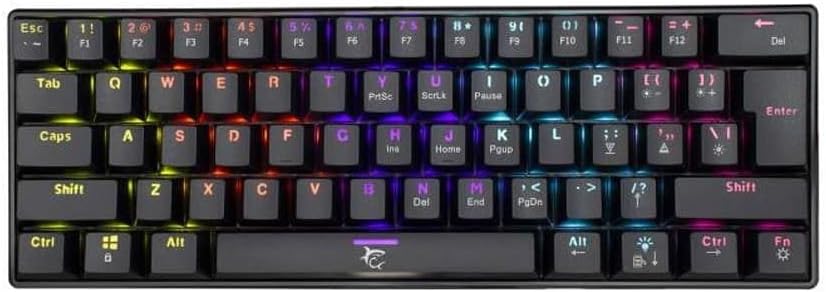
This image displays the full layout of the White Shark Shinobi GK-2022 mechanical keyboard from a top-down perspective. It features a compact 61-key US layout with visible RGB backlighting under the keycaps.
En angle View

Un angle view of the keyboard, highlighting its compact form factor and the slight curvature of the keycap rows, designed for ergonomic typing.
Side Profile

Aquesta imatge mostra el lateral profile of the keyboard, demonstrating its overall height and the angle of the keycaps from the side.
Key Switch Detail

A detailed close-up of one of the mechanical key switches, revealing the red switch stem, which indicates the type of switch used in this keyboard (Bella Red switches).
Peus ajustables

This image shows the adjustable feet located on the underside of the keyboard, which can be flipped out to change the typing angle for user comfort.
Port USB-C

Un primer pla view of the detachable USB Type-C port on the keyboard, along with the end of the braided USB cable, illustrating the connection point.
Configuració
- Connecteu el cable: Insert the USB Type-C end of the provided cable into the port on the keyboard.
- Connexió a l'ordinador: Plug the USB-A end of the cable into an available USB 2.0 port on your computer.
- Instal·lació del controlador: The keyboard is plug-and-play. Your operating system (e.g., Windows 10) should automatically detect and install the necessary drivers. No additional software installation is typically required.
- Adjust Feet (Optional): Flip out the adjustable feet on the underside of the keyboard to achieve your preferred typing angle.
Instruccions de funcionament
Funcions bàsiques
The Shinobi GK-2022 functions as a standard 61-key US layout keyboard. Simply type as you would on any other keyboard. All standard alphanumeric keys, modifiers (Shift, Ctrl, Alt), and the Enter key are present.
Function Layer (Fn Key)
Due to its compact 61-key layout, many functions typically found on a full-sized keyboard are accessed via a secondary function layer using the Fn key. Hold down the Fn key and press the corresponding key to activate its secondary function.
- Fn + 1-0, -, =: F1-F12 keys (e.g., Fn + 1 = F1, Fn + 2 = F2, etc.)
- Fn + Q/W/E/R/T/Y/U/I/O/P: Various media controls and shortcuts (specific mappings may vary, refer to keycap legends).
- Fn + A/S/D/F/G/H/J/K/L: Navigation keys like Home, End, Page Up, Page Down.
- Fn + Z/X/C/V/B/N/M: Arrow keys and other special functions.
- Fn + Barra espaiadora: Cycle through RGB lighting modes.
- Fn + Maj dreta: Adjust lighting brightness.
- Fn + Intro: Change lighting color.
Refer to the legends printed on the keycaps for specific secondary functions.
Manteniment
- Neteja: Use a can of compressed air to remove dust and debris from between the keycaps. For surface cleaning, gently wipe the keycaps and frame with a slightly damp, lint-free cloth. Ensure the keyboard is disconnected before cleaning.
- Emmagatzematge: When not in use for extended periods, store the keyboard in a dry, cool place, away from direct sunlight.
- Cura del cable: Eviteu doblegar o doblegar bruscament el cable USB per evitar danys interns.
Resolució de problemes
| Problema | Possible solució |
|---|---|
| El teclat no respon. |
|
| Les claus no es registren ni s'escriuen dues vegades. |
|
| Backlighting is not working or inconsistent. |
|
Especificacions
| Característica | Detall |
|---|---|
| Marca | Tauró blanc |
| Model | Shinobi GK-2022 |
| Tipus | Teclat mecànic amb cable |
| Nombre de claus | 61 |
| Commutadors de tecles | Bella Red Switches |
| Força de premsa de tecla | 60 +/- 15 grams |
| Interfície | Detachable USB Type-C to USB 2.0 |
| Longitud del cable | 1.8 metres |
| Disseny | Disseny dels EUA |
| Color | Black (with RGB backlighting) |
| Sistema operatiu compatible | Windows 10 (and likely other Windows versions, macOS, Linux) |
| Material | Plàstic |
| Pes de l'article | 850 grams |
| Dimensions del paquet | 33.29 x 13.2 x 9.1 cm |
Garantia i Suport
For warranty information and technical support, please refer to the documentation included with your purchase or visit the official White Shark weblloc web. Conserveu el comprovant de compra per a reclamacions de garantia.
If you encounter any issues not covered in this manual, please contact White Shark customer support for assistance.