1. Introducció
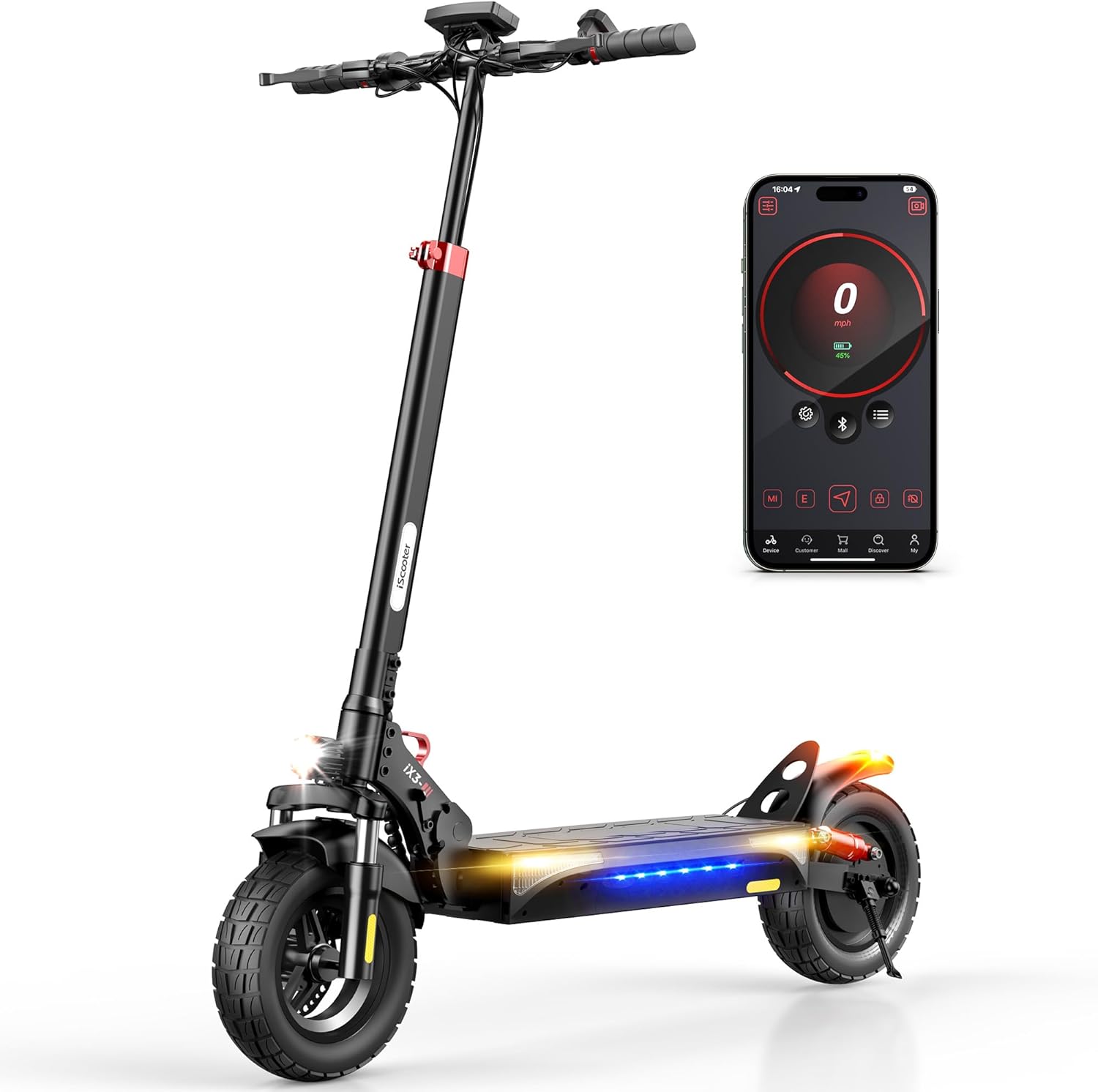
The iScooter iX3 Electric Scooter is designed for versatile use, offering a robust solution for commuting, errands, and off-road adventures. This manual provides essential information for the safe and efficient operation and maintenance of your iX3 scooter.
Característiques principals:
- Motor potent: Equipped with an 800W brushless motor for speeds up to 25 MPH and climbing inclines of 20-25°.
- Interval estès: A 480WH battery provides an impressive cruising range of up to 25 miles.
- Capacitat tot terreny: Features 10-inch off-road pneumatic tires and dual front and rear shock absorbers for a smooth ride on various terrains.
- Enhanced Safety & Visibility: Includes directional signals, ambient lighting, powerful front headlights, and tail lights for improved nighttime visibility.
- Adjustable & Portable Design: Adjustable handlebar height (44.5-52.8 inches) and a foldable design for easy transport and storage.
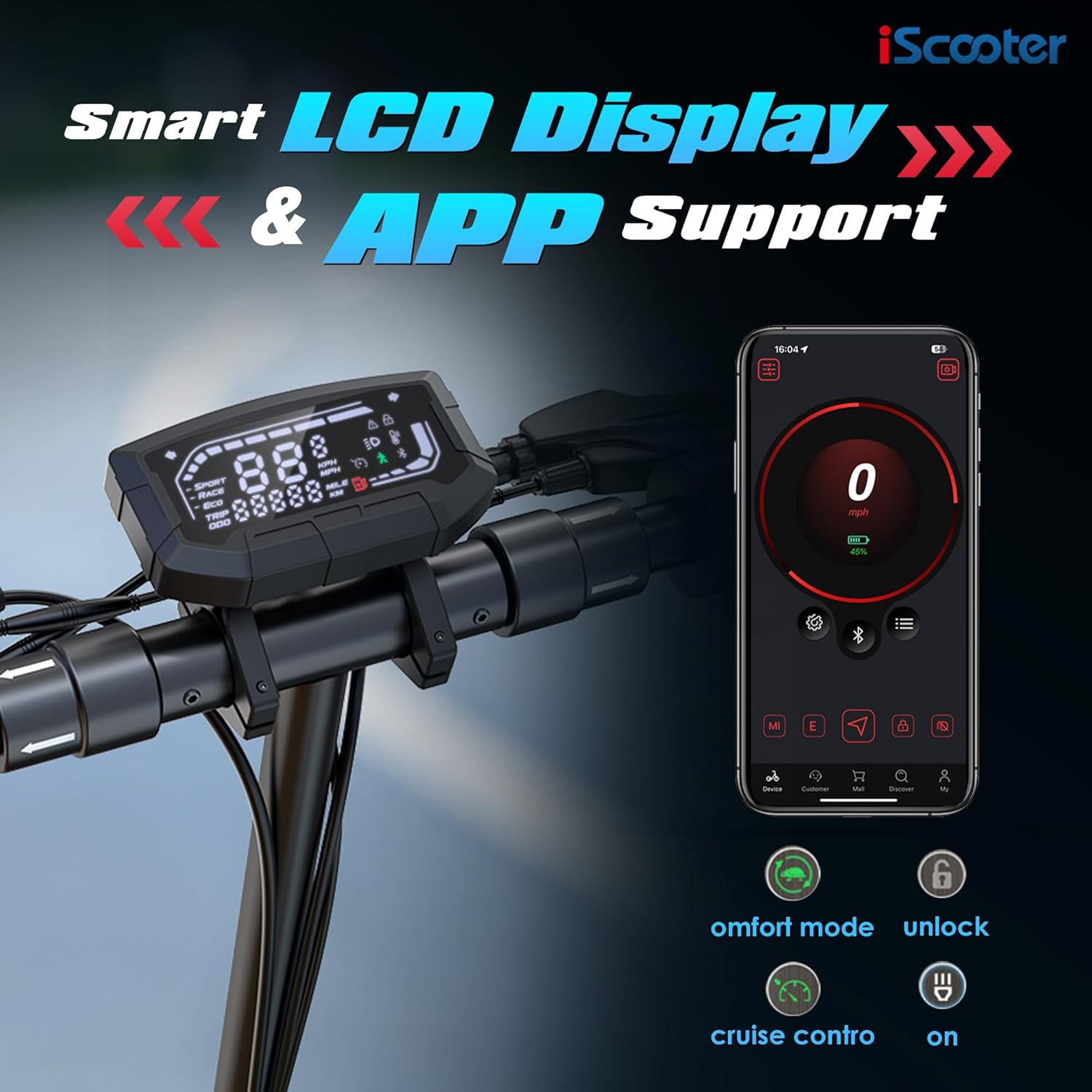
- Control intel·ligent: Three riding speed modes (ECO, STD, TURBO) and full-color LCD display. Customize settings and lock the scooter via the 'iScooter Club' app.
2. Informació de seguretat
Your safety is paramount. Always adhere to the following guidelines when operating the iScooter iX3:
- Always wear a certified helmet and appropriate protective gear (e.g., knee pads, elbow pads) while riding.
- Familiaritzeu-vos amb les lleis i regulacions locals sobre l'ús de patinets elèctrics.
- No conduïu sota els efectes de l'alcohol o les drogues.
- Mantingueu una velocitat i una distància de seguretat amb altres vehicles i vianants.
- Avoid riding in heavy traffic, on slippery surfaces, or in adverse weather conditions.
- Regularly inspect your scooter for any damage, loose parts, or tire pressure issues before each ride.
- Assegureu-vos que la bateria estigui ben carregada abans d'utilitzar-la.
3. Configuració i muntatge
3.1. Què hi ha a la caixa
Upon unboxing your iScooter iX3, verify that all components are present:
- iX3 Electric Scooter (partially folded)
- Carregador
- Manual d'instruccions
- Tool Kit (including Allen wrench)
3.2. Instruccions de muntatge
The iX3 features a one-piece pre-installation design, minimizing assembly. Follow these steps to prepare your scooter for its first ride:
- Desplega el patinet:
- Col·loqueu el patinet sobre una superfície plana.
- Unfold the kickstand to ensure stability.
- Push the stem away from the base until it clicks into place.
- Close the quick-release lever firmly to secure the stem.
- Fixeu el manillar:
- Carefully organize the cables to prevent pinching.
- Slide the handlebar and cables into the stem.
- Ensure the headlight is facing forward.
- Use the provided Allen wrench to insert and tighten the four screws in the suggested order (refer to the diagram in the physical manual for specific order).

4. Instruccions de càrrega
To charge your iScooter iX3:
- Locate the charging port and open the rubber plug.
- Insert the charger plug into the port.
- Connecteu el carregador a una font d'alimentació.
- The LED indicator on the charger will turn from red to green when fully charged.
- Once charging is complete, remove the charger and reinsert the rubber plug to protect the port.
Activació de la bateria: For the first use, plug the scooter into the charger for at least 3 seconds to activate the battery.
Battery Sleep Mode: If the battery power is 30% or less and the scooter has not been powered on for about 7 consecutive days, the battery will enter sleep mode. To reactivate, charge the battery to 30% or higher.

5. Activació
To activate your iScooter iX3 and unlock its full potential, you need to use the 'iScooter Club' app:
- Download and install the 'iScooter Club' app on your smartphone.
- Creeu un compte o inicieu sessió.
- Power on your iX3 Electric Scooter.
- In the app, search for your vehicle and pair it via Bluetooth.
- Follow the on-screen instructions and watch any required riding safety videos within the app.
- Tap to activate your iX3.
Nota: Upon initial activation, the scooter's speed mode may be set to a limited "Demo Mode" (e.g., 20 km/h). You can adjust this in the app after activation.
6. Instruccions de funcionament
6.1. Com muntar
- Enceneu el scooter.
- Fold up the kickstand.
- Place one foot firmly on the footboard.
- Empeny amb l'altre peu per guanyar impuls inicial.
- Un cop en moviment, premeu suaument l'accelerador per accelerar.
- Per reduir la velocitat, deixeu anar l'accelerador i premeu les palanques de fre.
- For safety, the motor will not engage until the scooter reaches approximately 1.9 MPH (3 km/h). This start speed can be adjusted via the app.
6.2. Modes de velocitat
The iX3 offers three riding modes, selectable via the control panel:
- Mode ECO: Max speed approximately 10 MPH (16 km/h). Ideal for energy saving and beginners.
- STD Mode (Standard): Max speed approximately 18 MPH (29 km/h). A balanced mode for daily commuting.
- Mode TURBO: Max speed approximately 25 MPH (40 km/h). For maximum performance and speed.
- Mode de caminada: Max speed approximately 3.1 MPH (5 km/h). Assists when pushing the scooter manually.

6.3. Girant
To turn left or right, gently pivot the handlebar in the desired direction.
6.4. Lights and Bell
- Far: Press the dedicated button on the handlebar to turn the headlight on or off.
- Tail Light & Ambient Lights: The tail light and ambient mood lights activate automatically for enhanced visibility.
- Senyals de gir: Use the directional indicator buttons on the handlebar to signal turns. Press again to turn them off.
- Campana: Press the bell button to alert pedestrians or other riders.

6.5. Custom Button
The iX3 features a customizable button. Through the 'iScooter Club' app, you can assign various quick features to this button, such as Automatic Hill Hold Assist. Refer to the app settings for customization options.
7. Apple Find My Integration
The iScooter iX3 is compatible with Apple Find My, allowing you to track your scooter's whereabouts using the global Find My network of iOS devices.
- Open the 'iScooter Club' app.
- Navigate to "More Functions" and then "Segway-Ninebot Lab".
- Select "Locating vehicle" (Beta version).
- Agree to use the function and start pairing with your scooter.
- The app will automatically redirect you to the Apple Find My app.
- In the Find My app, add a new item and give your scooter a name.
Once set up, you can quickly and conveniently locate your iX3 via the Find My app on your iPhone.
8. Manteniment
8.1. Inflat de pneumàtics
Proper tire pressure is crucial for ride quality and safety. The iX3 uses 10-inch off-road pneumatic tires.
- Unscrew the valve cap on the tire.
- Connect a pump to the tire valve.
- Inflate the tire to the recommended pressure of 45 PSI.
- Remove the pump and replace the valve cap.

8.2. Phone Holder Installation (Optional)
If you wish to install a phone holder (not included), follow these general steps:
- Use an Allen wrench to loosen the screws on the handlebar where the removable part is located.
- Remove the existing removable part.
- Install your phone holder in its place.
- Tighten the screws to secure the phone holder.
Refer to your specific phone holder's manual for detailed installation instructions.
9. Solució De Problemes
If you encounter issues with your iScooter iX3, consider the following common solutions:
- El patinet no s'encén:
- Ensure the battery is charged above 30% and not in sleep mode.
- Comproveu totes les connexions de cable per seguretat.
- El motor no s'engega:
- Confirm the scooter is activated via the 'iScooter Club' app.
- Ensure you are pushing off to reach the minimum start speed (1.9 MPH) before applying throttle.
- Problemes de connectivitat de l'aplicació:
- Ensure Bluetooth is enabled on your phone and the scooter is powered on.
- Try restarting both the app and the scooter.
- Rendiment/abast reduït:
- Check tire pressure; under-inflated tires can reduce range and speed.
- Rider weight, terrain, wind conditions, and speed mode can all affect performance.
For persistent issues or error codes, please refer to the 'iScooter Club' app's help section or contact customer support.
10. Especificacions
| Característica | Detall |
|---|---|
| Marca | iScooter |
| Nom del model | iX3 |
| Potència del motor | 800W |
| Velocitat màxima | 25 MPH |
| Abast màxim de distància | 25 milles |
| Bateria | 480 WH |
| Mida del pneumàtic | 10 polzades |
| Tipus de pneumàtic | Off-Road Pneumatic |
| Tipus de suspensió | Dual Suspension (Front and Rear) |
| Estil de fre | Front and Rear Double Braking Systems |
| Alçada del manillar ajustable | 44.5-52.8 polzades |
| Pes de l'article | 22 quilograms (aprox. 48.5 lliures) |
| Límit de pes | 264 lliures |
| Temps de càrrega | 7 hores |
| Material del marc | Alumini |
| Dimensions del producte (LxWxH) | 47 cm de llargada x 23 cm d'amplada x 50 cm d'alçada |
| UPC | 699838690608 |
11. Garantia i assistència
iScooter is committed to providing quality products and service. Your iX3 Electric Scooter comes with a limited warranty:
- Scooter elèctric: Garantia d’un any.
- Specific Parts (e.g., Motor, Battery): 180 dies de garantia.
This warranty is non-transferable after the product's initial sale. iScooter also offers a 7-day no-reason return policy, provided there is no human damage or stains.
Atenció al client: For any questions, warranty claims, or assistance, please contact iScooter customer service:
- Correu electrònic: vip.support@iscooterglobal.com
- Telèfon: +1 (855) 696-2888
If shipping damage occurs, please provide photo or video proof when contacting support.
12. Vídeos oficials de productes
iX3 Video from iScooter Center
Aquest vídeo ofereix una visió generalview of the iX3 Electric Scooter, highlighting its features and usage. It is provided by iScooter Center.


