Introducció
This manual provides essential information for the setup, operation, and maintenance of your ONN 42-Inch Class Full HD 1080p LED Smart TV. This television offers a crystal-clear 1080p resolution, a 60Hz refresh rate for smooth motion, and integrated smart TV capabilities with access to popular streaming services. It is also compatible with Alexa and Google Assistant for convenient voice control. Please read this manual thoroughly before using your television to ensure proper functionality and safety.
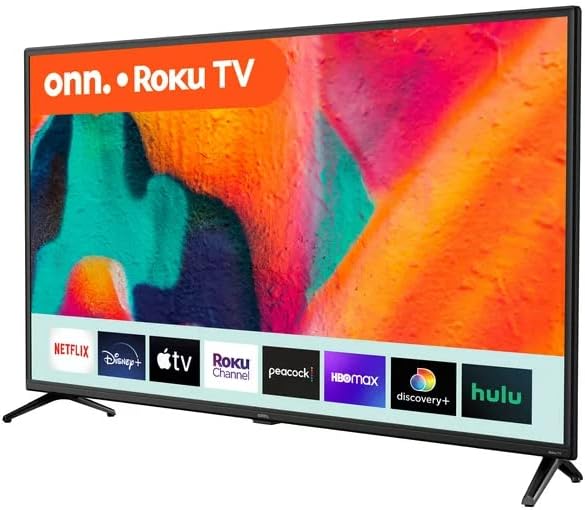
Figura 1: Frontal view of the ONN 42-Inch Roku TV, showcasing its smart interface with streaming applications like Netflix, Disney+, and Hulu.
Configuració
1. Desembalatge
Traieu amb cura el televisor i tots els accessoris de l'embalatge. Conserveu l'embalatge per a futures necessitats de transport o manteniment.
2. Instal·lació de l'estand
Place the TV screen-down on a soft, clean surface. Align the TV stands with the screw holes on the bottom of the TV. Secure the stands using the provided screws. Ensure the stands are firmly attached before placing the TV upright.
3. Muntatge a la paret (opcional)
If you choose to wall mount your TV, ensure you use a VESA-compatible wall mount kit (sold separately) that supports the TV's weight and size. Follow the instructions provided with your wall mount kit. The TV's back panel includes mounting points.

Figura 2: posterior view of the ONN 42-Inch TV, illustrating the placement of input ports and VESA mounting points for wall installation.
4. Dispositius de connexió
Connect your external devices (e.g., cable box, gaming console, Blu-ray player) to the TV's HDMI or AV input ports. Connect the power cord to the TV and then to a power outlet.
5. Engegada inicial i configuració de la xarxa
Press the power button on the remote control or the TV. Follow the on-screen instructions to complete the initial setup, including language selection, time zone, and connecting to your Wi-Fi network. This step is crucial for accessing smart TV features and streaming services.
En funcionament
1. Funcions de control remot
The included remote control allows you to navigate the TV's interface, adjust settings, and access streaming apps. It features dedicated buttons for popular services like Netflix, Disney+, Hulu, and Vudu, along with standard navigation, volume, and power controls.
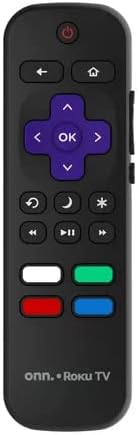
Figure 3: The ONN Roku TV remote control, highlighting its intuitive layout and quick-access buttons for streaming platforms.
2. Navigating the Smart TV Interface (Roku TV)
Your ONN TV uses the Roku TV operating system. Use the directional pad on your remote to browse the home screen, which displays your installed streaming channels and input options. Select a channel or input by pressing the 'OK' button.
3. Using Voice Assistants
The TV is compatible with Alexa and Google Assistant. Once connected to your smart home ecosystem, you can use voice commands to power on/off the TV, change channels, adjust volume, and launch apps. Refer to your voice assistant's specific instructions for pairing.
4. Selecció d'entrada
To switch between connected devices (e.g., HDMI 1, AV), navigate to the 'Inputs' section on the Roku TV home screen and select the desired source.
5. Configuració d'imatge i so
Access the 'Settings' menu from the home screen to customize picture modes (e.g., Standard, Movie, Vivid), adjust brightness, contrast, and color, and configure sound settings like audio mode and volume levels.
Manteniment
1. Neteja de la pantalla
Netegeu suaument la pantalla amb un drap suau, sec i sense borrissol. Per a marques difícils, netegeu suaument.ampen the cloth with water or a screen-specific cleaning solution (never spray directly onto the screen). Avoid using harsh chemicals or abrasive materials.
2. Atenció general
Keep the TV in a well-ventilated area, away from direct sunlight, heat sources, and excessive moisture. Do not block ventilation openings. Unplug the TV during lightning storms or when unused for extended periods.
Resolució de problemes
- Sense energia: Assegureu-vos que el cable d'alimentació estigui ben connectat tant al televisor com a una presa de corrent que funcioni. Proveu una altra presa de corrent.
- Sense imatge/so: Verify that the correct input source is selected. Check all cable connections (HDMI, AV) to ensure they are secure. Restart connected devices.
- El comandament a distància no funciona: Substituïu les piles del comandament a distància. Assegureu-vos que no hi hagi cap obstacle entre el comandament a distància i el sensor d'infrarojos del televisor.
- Problemes de connectivitat de xarxa: Check your Wi-Fi router and internet connection. Restart both the TV and your router. Re-enter your Wi-Fi password in the TV's network settings.
- Les funcions intel·ligents no responen: Ensure the TV is connected to the internet. Try restarting the TV. If issues persist, a factory reset may be necessary (refer to the Settings menu for this option).
Especificacions
| Característica | Detall |
|---|---|
| Marca | Onn |
| Número de model | 100068372 |
| Mida de la pantalla | 42 polzades |
| Tecnologia de visualització | LED |
| Resolució | 1080p Full HD |
| Freqüència d'actualització | 60 Hz |
| Relació d'aspecte | 16:9 |
| Característica especial | Flat, Smart TV (Roku TV) |
| Tecnologia de connectivitat | Wi-Fi |
| Serveis d'Internet compatibles | Netflix, YouTube, Disney+, Hulu, Vudu, and more via Roku Channel Store |
| Compatibilitat | Alexa i Google Assistant |
| Dimensions del producte | 8.7 x 37.4 x 23.5 polzades |
| Pes de l'article | 13.2 lliures |
| Components inclosos | TV, Stand, Remote Control |
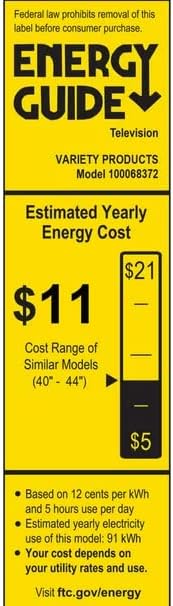
Figure 4: Energy Guide label for the ONN 42-Inch TV, indicating its estimated yearly energy cost and consumption.
Garantia i Suport
Your ONN TV is covered by a manufacturer's warranty. Please refer to the warranty card included with your product for specific terms and conditions, including the duration of coverage and how to make a claim. For technical support, troubleshooting assistance, or to inquire about service, please visit the official ONN support weblloc web o poseu-vos en contacte amb la línia directa d'atenció al client. Normalment, podeu trobar la informació de contacte al fabricant. weblloc o a l'embalatge del producte.


