1. Introducció
The EnGenius Fit EWS850-FIT is a high-performance outdoor Wi-Fi 6 (802.11ax) access point designed for robust and reliable wireless connectivity in demanding outdoor environments. This dual-band 2x2 device delivers combined throughput of up to 1.8Gbps (1200Mbps at 5GHz and 574Mbps at 2.4GHz) with MU-MIMO technology, making it suitable for outdoor Wi-Fi zones, warehouses, and hospitality deployments. Its IP67-rated weatherproof housing ensures durability against dust, rain, and extreme weather conditions.

Image 1.1: The EnGenius Fit EWS850-FIT Outdoor Wi-Fi 6 Access Point with antennas.
2. Contingut del paquet
Verifiqueu que tots els elements siguin presents al vostre paquet:
- Fit Managed EWS850-FIT Wi-Fi 6 2x2 Outdoor Wireless Access Point
- 1 x Pole-Mounting Brackets
- 1 x Wall-Mount Screw Set
- 2 x 2.4GHz 5dBi SMA Antennas
- 2 x 5GHz 5dBi SMA Antennas
- Guia d'inici ràpid Codi QR
- Codi QR de l'aplicació mòbil
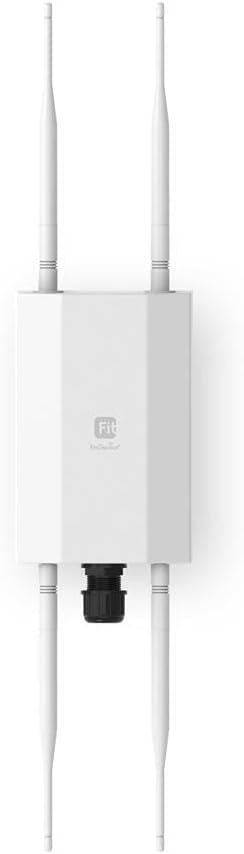
Imatge 2.1: Frontal view of the EWS850-FIT with all four antennas connected.
3. Configuració i instal·lació
3.1 Instal·lació física
The EWS850-FIT is designed for outdoor deployment and can be mounted on poles or walls. Use the provided pole-mounting brackets or wall-mount screw set for secure installation. Ensure the mounting location provides optimal signal coverage and is accessible for cabling.
3.2 Connexió de l'antena
Attach the two 2.4GHz 5dBi SMA antennas and two 5GHz 5dBi SMA antennas to their respective ports on the access point. Ensure they are securely fastened to prevent water ingress and maintain optimal wireless performance.
3.3 Connexió d'alimentació i xarxa
The EWS850-FIT is powered via Power over Ethernet (PoE+). Connect an Ethernet cable from a PoE+ (802.3at) or 48V PoE compliant switch or injector to the 2.5GbE PoE+ port on the access point. This single cable provides both power and data connectivity. The device supports cable runs up to 330 feet (100 meters).

Image 3.1: The EWS850-FIT access point deployed in an outdoor setting, emphasizing its IP67 weatherproof design.
4. Configuració
The EnGenius Fit EWS850-FIT offers multiple management options:
- FitXpress Cloud: For centralized management and monitoring across multiple sites.
- FitController: An on-premises software controller for local network management.
- Local Web GUI: Direct access to the device's web interface for standalone configuration.
Refer to the Quick Start Guide (accessible via QR code in the package) for initial setup instructions, including default IP addresses or discovery methods for local access, and steps to onboard the device to FitXpress Cloud or FitController.

Image 4.1: The EnWiFi mobile application, demonstrating its interface for managing EnGenius Wi-Fi devices.
5. Funcionament
Once configured, the EWS850-FIT provides high-speed Wi-Fi 6 connectivity. It operates on both 2.4GHz and 5GHz bands, utilizing 2x2 MU-MIMO technology to efficiently serve multiple devices simultaneously. Key operational features include:
- Dual-Band Performance: Supports both 2.4GHz and 5GHz frequencies for flexible client connectivity and reduced interference.
- MU-MIMO: Enhances network efficiency by allowing the access point to communicate with multiple devices concurrently.
- Mode convidat: Provides isolated network access for visitors, enhancing security.
- Qualitat de servei (QoS): Prioritizes network traffic for critical applications.
- Accés remot: Manage and monitor the access point from anywhere using cloud or controller solutions.

Image 5.1: Demonstrating strong, far-reaching Wi-Fi coverage provided by the EWS850-FIT in an outdoor environment.
6. Manteniment
Regular maintenance ensures optimal performance and longevity of your EWS850-FIT access point.
6.1 actualitzacions de microprogramari
Periodically check for and apply firmware updates through your chosen management platform (FitXpress Cloud, FitController, or local web GUI). Firmware updates often include performance enhancements, security patches, and new features.
6.2 Neteja
Although IP67-rated, occasional cleaning of the exterior may be necessary, especially in dusty or harsh environments. Use a soft, damp drap per netejar el casing. Do not use abrasive cleaners or solvents. Ensure all cable glands are securely tightened to maintain the weatherproof seal.
6.3 Consideracions ambientals
The EWS850-FIT is built to withstand various outdoor conditions. However, ensure it is installed according to guidelines to prevent physical damage from extreme impacts or prolonged exposure to corrosive elements.

Image 6.1: Visual representation of the EWS850-FIT's weatherproof enclosure, designed to endure rain, snow, wind, and dust.
7. Solució De Problemes
If you encounter issues with your EWS850-FIT, consider the following troubleshooting steps:
- Sense energia: Verify the Ethernet cable is securely connected to both the access point and the PoE+ source. Ensure the PoE+ source is active and providing power.
- Sense connectivitat de xarxa: Check the Ethernet cable for damage. Confirm the PoE+ switch port is operational and configured correctly. Verify the access point's IP address and network settings.
- Rendiment Wi-Fi deficient: Check for potential sources of interference (e.g., other wireless devices, physical obstructions). Ensure antennas are correctly attached and oriented. Consider adjusting channel settings or transmit power.
- No es pot accedir a la interfície de gestió: Ensure your computer is on the same network segment as the access point. Try pinging the access point's IP address. If using cloud or controller management, verify the device is properly registered and connected.
- Restabliment del dispositiu: If issues persist, a factory reset may be necessary. Refer to the Quick Start Guide for instructions on performing a hardware reset. Note that a reset will erase all custom configurations.
8. Especificacions
| Característica | Especificació |
|---|---|
| Nom del model | EWS850-FIT |
| Dimensions del producte | 7.5 x 4.1 x 2.1 polzades |
| Pes de l'article | 1.54 lliures |
| Comunicació sense fils estàndard | 802.11ax (Wi-Fi 6) |
| Classe de banda de freqüència | Doble banda (2.4 GHz, 5 GHz) |
| Tecnologia de connectivitat | Ethernet, Wi-Fi |
| Característiques especials | Access Point Mode, Guest Mode, QoS, Remote Access, Weatherproof (IP67) |
| Compatibilitat PoE | 802.3af & 48V PoE Input |
| Port Ethernet | 2.5GbE PoE+ Port |
| Antenes | 2 x 2.4GHz 5dBi SMA, 2 x 5GHz 5dBi SMA |
| Fabricant | Tecnologies EnGenius |
| Data de primera disponibilitat | 9 de novembre de 2022 |
9. Garantia i Suport
EnGenius products typically come with a limited warranty. For specific warranty terms and conditions applicable to your region, please refer to the warranty information provided with your product or visit the official EnGenius weblloc.
For technical assistance, product support, or to report issues, please contact EnGenius customer support through their official website or the contact information provided in your product documentation. Ensure you have your product model number (EWS850-FIT) and purchase details ready when seeking support.


