1. Producte acabatview
The Baseus Bowie WM02 True Wireless Earphones are designed to provide a seamless audio experience with their compact design and advanced wireless technology. These earphones offer clear sound, comfortable fit, and intuitive touch controls for music playback and call management.

Image: Baseus Bowie WM02 True Wireless Earphones packaging box.
2. Què hi ha a la caixa
Carefully unpack your Baseus Bowie WM02 True Wireless Earphones package. Ensure all items listed below are present and in good condition.
- Baseus Bowie WM02 True Wireless Earbuds (Left and Right)
- Estoig de càrrega
- Cable de càrrega USB-C
- Puntes d'orella de silicona (múltiples mides)
- Manual d'usuari (aquest document)
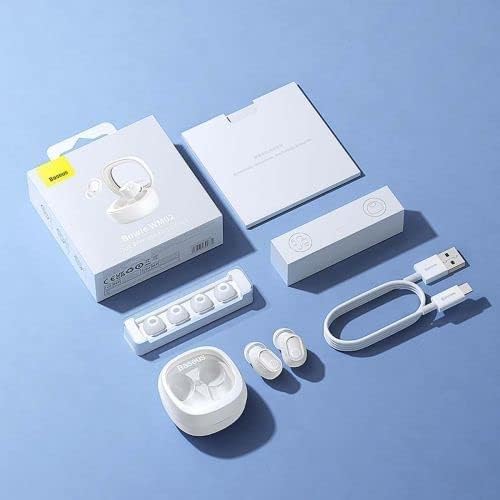
Image: Contents of the Baseus Bowie WM02 True Wireless Earphones package.
3. Configuració
3.1 Càrrega dels auriculars i l'estoig
Abans del primer ús, carregueu completament els auriculars i l'estoig de càrrega.
- Col·loca els auriculars a l'estoig de càrrega. Assegura't que estiguin correctament col·locats a les seves ranures respectives.
- Connecteu el cable de càrrega USB-C al port de càrrega de la funda i l'altre extrem a un adaptador de corrent USB (no inclòs) o al port USB d'un ordinador.
- The indicator light on the charging case will show charging status. Once fully charged, the light will indicate completion (refer to specific light behavior in the quick start guide if provided).
3.2 Vinculació Bluetooth
Follow these steps to pair your earphones with a Bluetooth-enabled device.
- Open the charging case. The earbuds will automatically enter pairing mode, and the indicator light on the earbuds will flash.
- Al dispositiu (telèfon intel·ligent, tauleta, etc.), activeu el Bluetooth.
- Cerca Bluetooth devices and select "Baseus Bowie WM02" from the list.
- Once connected, the indicator lights on the earbuds will stop flashing, indicating successful pairing.

Image: Earbuds in open charging case, ready for pairing or use.
3.3 Com posar-se els auriculars
Per a una qualitat de so i una comoditat òptimes, assegureu-vos que s'adaptin correctament.
- Choose the ear tips that best fit your ear canal. Experiment with different sizes for the most secure and comfortable seal.
- Gently insert each earbud into your ear, twisting slightly until it feels snug and secure.
4. Instruccions de funcionament
4.1 Encès/Apagat
- Encès: Obriu la funda de càrrega i els auriculars s'encendran automàticament.
- Apagar: Torneu a col·locar els auriculars a l'estoig de càrrega i tanqueu la tapa. S'apagaran automàticament i començaran a carregar-se.
4.2 Controls tàctils
The Baseus Bowie WM02 earphones feature intuitive touch controls on each earbud.
| Acció | Auricular esquerre | Auricular dret |
|---|---|---|
| Reproduir/Pausa | Un sol toc | Un sol toc |
| Pista següent | Triple toc | Triple toc |
| Pista anterior | N/A | N/A |
| Respondre/Finalitzar la trucada | Un sol toc | Un sol toc |
| Rebutja la trucada | Mantén premut (2 s) | Mantén premut (2 s) |
| Activa l'Assistent de veu | Fes doble toc | Fes doble toc |
Note: Specific touch control functions may vary slightly. Refer to the quick start guide for any additional or alternative controls.
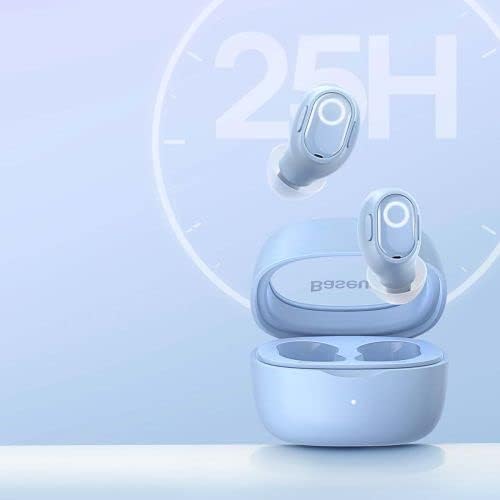
Image: Earbuds and case, illustrating long battery life.
5. Manteniment i cura
- Neteja: Regularly clean the earbuds and charging case with a soft, dry, lint-free cloth. Do not use harsh chemicals or abrasive materials. Gently remove any earwax or debris from the ear tips and speaker mesh using a small, soft brush.
- Emmagatzematge: Quan no els utilitzeu, guardeu els auriculars a la funda de càrrega per protegir-los de la pols i els danys. Guardeu-los en un lloc fresc i sec, allunyat de la llum solar directa i de temperatures extremes.
- Cura de la bateria: Per allargar la durada de la bateria, eviteu descarregar completament els auriculars i la funda amb freqüència. Carregueu-los regularment, fins i tot si no els feu servir constantment.
- Resistència a l'aigua: Aquests auriculars no són impermeables. Eviteu l'exposició a l'aigua, la suor o la humitat elevada.
6. Solució De Problemes
If you encounter issues with your Baseus Bowie WM02 earphones, try the following solutions:
- Sense so:
- Assegureu-vos que els auriculars estiguin carregats.
- Check if the earphones are properly connected to your device.
- Ajusta el volum tant al dispositiu com als auriculars.
- Problemes d'aparellament:
- Assegureu-vos que el Bluetooth estigui habilitat al vostre dispositiu.
- Make sure the earphones are in pairing mode.
- Oblida el dispositiu de la llista de Bluetooth i intenta emparellar-lo de nou.
- Assegureu-vos que els auriculars no estiguin connectats a cap altre dispositiu.
- Els auriculars no es carreguen:
- Assegureu-vos que el cable de càrrega estigui ben connectat.
- Comproveu la font d'alimentació.
- Netegeu els contactes de càrrega tant dels auriculars com de la funda.
- Un auricular no funciona:
- Place both earbuds back into the case, close the lid, wait a few seconds, then open it again.
- Prova de tornar a emparellar els auriculars amb el dispositiu.
Si el problema persisteix, poseu-vos en contacte amb l'assistència al client per obtenir més ajuda.
7. Especificacions
| Característica | Detall |
|---|---|
| Marca | Baseus |
| Número de model | NGTW180003 |
| Dimensions del producte | 50 x 50 x 28 cm |
| Pes de l'article | 60 g |
| Color | Blau |
| Tipus de material | Per defecte |
| Fabricant | Baseus |
8. Informació de seguretat
- No desmunteu, repareu ni modifiqueu el producte. Això pot provocar incendis, descàrregues elèctriques o danys totals al producte.
- Mantingueu el producte allunyat de temperatures extremes, llum solar directa i humitat elevada.
- Eviteu deixar caure o sotmetre el producte a forts impactes.
- Mantenir fora de l'abast dels nens i les mascotes. Les peces petites poden suposar un perill d'asfíxia.
- Do not use the earphones at excessively high volumes for prolonged periods, as this may cause hearing damage.
- Be aware of your surroundings when using the earphones, especially in traffic or other potentially dangerous situations.
9. Garantia i Suport
Baseus products are covered by a limited warranty. For detailed warranty terms and conditions, please refer to the warranty card included with your product or visit the official Baseus website. If you require technical support or have questions about your product, please contact Baseus customer service through their official channels.
Per a més informació, visiteu el Botiga Baseus a Amazon.


