Introducció
This manual provides comprehensive instructions for the setup, operation, maintenance, and troubleshooting of your CANYON Sandy KW-44 Smartwatch. Please read this manual carefully before using the device to ensure proper functionality and to maximize your user experience. Keep this manual for future reference.
Producte acabatview
The CANYON Sandy KW-44 is a smartwatch designed for connectivity and convenience. It features a 1.44-inch OLED display, Bluetooth connectivity, and is compatible with both iOS and Android smartphones and tablets. The device is equipped with a camera and supports phone and video calls, making it suitable for communication. It also includes a built-in music player and is IP67 waterproof.

Imatge: Anglesa view of the CANYON Sandy KW-44 Smartwatch, showcasing its turquoise strap and watch face with a digital clock and rocket graphic.
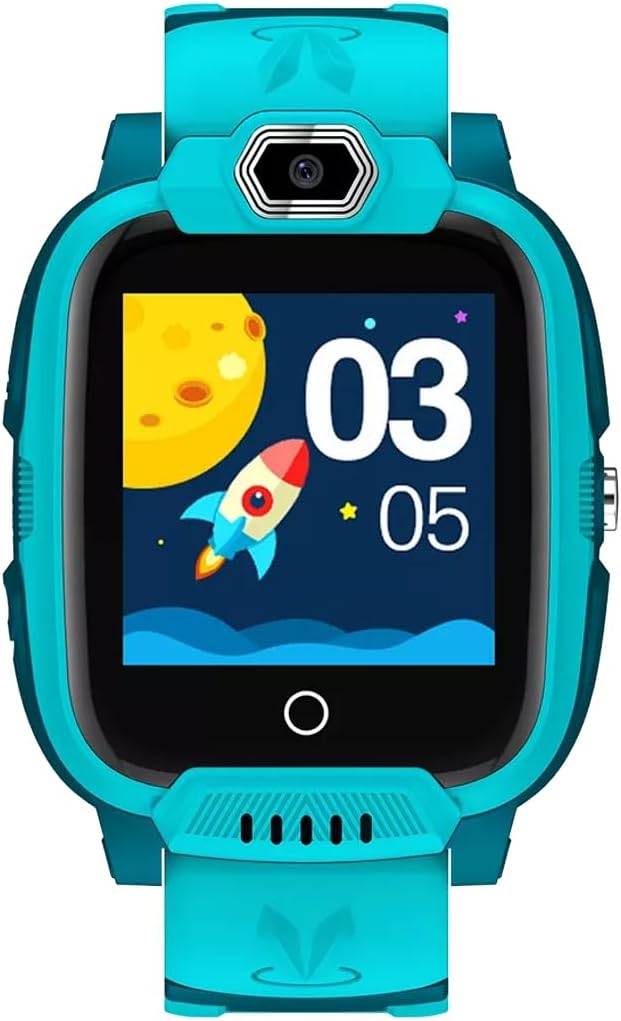
Imatge: Frontal view of the CANYON Sandy KW-44 Smartwatch, highlighting the 1.44-inch OLED display and the camera module at the top.

Image: Retail packaging for the CANYON Kids Smartwatch Jondy KW-44, showing product features like 4G network, video calls, IP67 waterproof rating, and GPS+GLONASS positioning.
Configuració
1. Càrrega del dispositiu
- Connect the charging cable to the smartwatch's charging port.
- Connecteu l'altre extrem del cable a un adaptador de corrent USB compatible (no inclòs) o al port USB d'un ordinador.
- Allow the device to charge fully before first use. A full charge typically takes approximately 2-3 hours. The battery indicator on the screen will show charging status.
2. Instal·lació de la targeta SIM
The CANYON Sandy KW-44 supports a SIM card for network connectivity, enabling calls and data functions. Refer to the device's side for the SIM card slot. Use the provided tool (if applicable) to open the SIM tray and insert a nano-SIM card with the gold contacts facing down. Ensure the tray is securely closed to maintain the IP67 waterproof rating.
3. Instal·lació i emparellament de l'aplicació
- Download the official CANYON smartwatch application from your smartphone's app store (available for iOS and Android devices).
- Obre l'aplicació i crea un compte o inicia la sessió.
- Follow the on-screen instructions within the app to pair your smartwatch. This typically involves scanning a QR code displayed on the smartwatch screen or manually entering a device ID.
- Assegureu-vos que el Bluetooth estigui activat al telèfon intel·ligent durant el procés d'emparellament.
Instruccions de funcionament
Navegació bàsica
- Encès/apagat: Press and hold the power button (usually on the side) to turn the smartwatch on or off.
- Pantalla tàctil: Swipe left, right, up, or down on the 1.44-inch OLED display to navigate through menus and features. Tap to select an option.
- Botó enrere: A dedicated button or a swipe gesture may serve as a back function to return to the previous screen.
Característiques de comunicació
- Fer trucades: Access the "Phone" or "Contacts" application on the smartwatch. You can dial numbers directly or select contacts from your synced list.
- Recepció de trucades: When a call comes in, tap the green answer icon on the screen to accept, or the red icon to decline.
- Videotrucades: If a 4G network is available via the SIM card, the smartwatch supports video calls. Access the video call application and select a contact.
- Missatgeria: View incoming messages and send quick replies (if supported) through the messaging application.
Multimedia and Other Functions
- Càmera: Open the camera application to take photos. Images are stored in the device's 512 MB memory.
- Reproductor de música: Use the built-in music player to listen to audio files'emmagatzemen al dispositiu.
- Seguiment GPS: While the device does not have built-in GPS, it may utilize network-assisted positioning (LBS) or be paired with a smartphone's GPS for location tracking through the companion app.
Manteniment
- Neteja: Wipe the smartwatch regularly with a soft, dry, lint-free cloth. For stubborn dirt, slightly dampRenta el drap amb aigua. Evita utilitzar productes químics agressius o materials abrasius.
- Resistència a l'aigua: The device is IP67 waterproof, meaning it is protected against dust ingress and can withstand immersion in water up to 1 meter for 30 minutes. It is suitable for everyday use and splashes but should not be used for swimming or diving. Ensure all ports and covers are securely closed.
- Cura de la bateria: To prolong battery life, avoid extreme temperatures. Charge the device regularly and avoid letting the battery completely drain for extended periods.
- Emmagatzematge: Quan no l'utilitzeu durant un període prolongat, guardeu el rellotge intel·ligent en un lloc fresc i sec.
Resolució de problemes
| Problema | Possible solució |
|---|---|
| El dispositiu no s'encén. | Ensure the battery is charged. Connect the smartwatch to its charger for at least 30 minutes. If it still doesn't turn on, try a different charging cable or power adapter. |
| No es pot emparellar amb el telèfon intel·ligent. | Check if Bluetooth is enabled on both devices. Ensure the smartwatch is in pairing mode. Restart both the smartwatch and the smartphone, then try pairing again. Make sure you are using the correct companion app. |
| Poor call quality or no network. | Verify that the SIM card is correctly inserted and activated. Check for network coverage in your area. Restart the smartwatch. |
| La pantalla tàctil no respon. | Restart the smartwatch. Ensure the screen is clean and dry. If the issue persists, contact customer support. |
| La bateria s'esgota ràpidament. | Reduce screen brightness. Close unnecessary background applications. Limit frequent use of power-intensive features like video calls. Ensure the device is not in an area with poor network signal, which can cause increased battery consumption. |
Especificacions
| Característica | Detall |
|---|---|
| Marca | CANYON |
| Número de model | CNE-KW44GB |
| Tipus de visualització | OLED |
| Mida de la pantalla | 1.44 polzades |
| Tecnologia de connectivitat | Bluetooth, 4G Network (via SIM card) |
| Comunicació sense fils estàndard | Bluetooth |
| Dispositius compatibles | Smartphone, Tablet (iOS and Android compatible) |
| Capacitat d'emmagatzematge de memòria | 512 MB |
| GPS | No (Network-assisted positioning may be available) |
| Bateria | 1 Lithium-polymer (Rechargeable) |
| Resistència a l'aigua | IP67 (Dust protected, immersion up to 1m for 30 min) |
| Descripció del rang d'edat | Adult (Note: Product packaging indicates "Kids Smartwatch") |
Garantia i Suport
For information regarding the product warranty, please refer to the warranty card included with your purchase or contact your retailer. Keep your proof of purchase for warranty claims.
For technical support or further assistance, please visit the official CANYON weblloc web o poseu-vos en contacte amb el seu departament d'atenció al client. Normalment, les dades de contacte es poden trobar a l'embalatge del producte o a la pàgina oficial de la marca. weblloc.


