Introducció
Welcome to the user manual for your CANYON Sandy KW-44 Smartwatch. This guide provides essential information on setting up, operating, maintaining, and troubleshooting your device. Please read this manual carefully to ensure optimal performance and longevity of your smartwatch.
Configuració
1. Contingut del paquet
Abans de començar, assegureu-vos que tots els elements estiguin presents al paquet:
- CANYON Sandy KW-44 Smartwatch
- Cable de càrrega
- Manual d'usuari (aquest document)

Figure 1: Product packaging showing the smartwatch and brand details.
2. Càrrega del rellotge intel·ligent
Abans del primer ús, carrega completament el teu rellotge intel·ligent.
- Connect the charging cable to the charging port on the smartwatch.
- Connecteu l'altre extrem del cable a un adaptador de corrent USB (no inclòs) o al port USB d'un ordinador.
- L'indicador de càrrega a la pantalla mostrarà l'estat de càrrega.
- Una càrrega completa sol trigar aproximadament 2 hores.
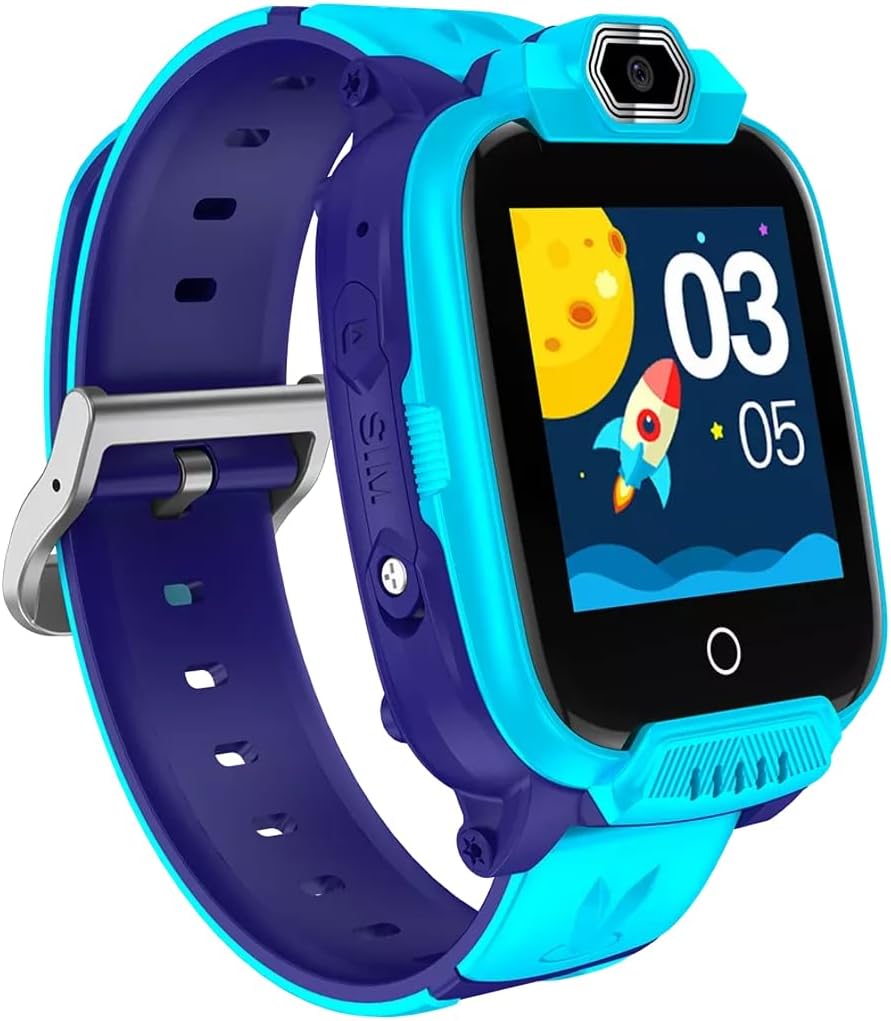
Figura 2: Angle view of the CANYON Sandy KW-44 Smartwatch, showing the side buttons and SIM card slot area.
3. Instal·lació de la targeta SIM (opcional)
The smartwatch supports a SIM card for call functions.
- Power off the smartwatch.
- Localitzeu la ranura de la targeta SIM al lateral del dispositiu (vegeu la figura 2).
- Carefully insert a nano-SIM card into the slot with the gold contacts facing up, ensuring it clicks into place.
- Tanqueu bé la tapa de la ranura de la targeta SIM.
- Power on the smartwatch.
4. Instal·lació i emparellament de l'aplicació
To unlock full features and manage your smartwatch, download the companion app on your smartphone.
- Cerca the "CANYON Life" app (or similar, check product documentation for exact app name) in your smartphone's app store (Google Play Store or Apple App Store).
- Baixeu i instal·leu l'aplicació.
- Obriu l'aplicació i seguiu les instruccions a la pantalla per crear un compte o iniciar sessió.
- Activa el Bluetooth al teu telèfon intel·ligent.
- In the app, select "Add Device" and choose your CANYON Sandy KW-44 from the list of available devices.
- Confirma la sol·licitud d'emparellament tant al teu telèfon intel·ligent com al rellotge intel·ligent.
Instruccions de funcionament
1. Navegació bàsica

Figura 3: Frontal view of the CANYON Sandy KW-44 Smartwatch, showing the main display with time and a rocket graphic.
- Encès/apagat: Press and hold the power button (usually on the side) to turn the device on or off.
- Pantalla tàctil: Swipe left/right or up/down to navigate through menus and features. Tap to select an option.
- Botó enrere: A dedicated button or a swipe gesture may be used to go back to the previous screen.
2. Fer i rebre trucades
With a properly installed and activated SIM card, you can make and receive calls directly from your smartwatch.
- Fer una trucada: Access the "Dialer" or "Contacts" app on the smartwatch, select a contact or dial a number, and tap the call icon.
- Recepció d'una trucada: When a call comes in, the smartwatch will ring and display the caller ID. Tap the green answer icon to accept or the red icon to decline.
3. Ús de la càmera
The smartwatch is equipped with a built-in camera.
- Navigate to the "Camera" application on your smartwatch.
- Enquadra la teva foto utilitzant la pantalla com a viewcercador.
- Tap the capture button on the screen to take a photo.
- Photos are saved to the smartwatch's internal memory.

Figura 4: Angle view of the CANYON Sandy KW-44 Smartwatch, highlighting the camera lens above the display.
4. Altres característiques
Explore other functionalities available on your smartwatch, which may include:
- Visualització de l'hora: Customizable watch faces.
- Notificacions: Receive alerts for calls, messages, and app notifications from your paired smartphone.
- Seguiment de l'activitat: Monitor steps, distance, and calories (if supported by the model).
- Reproductor de música: Play music stored on the device or control music on your paired phone.
Manteniment
1. Neteja
- Netegeu el rellotge intel·ligent i la corretja amb un drap suau.amp tela.
- No utilitzeu productes químics ni productes de neteja abrasius.
- Assegureu-vos que el dispositiu estigui sec abans de carregar-lo.
2. Cura de la bateria
- Eviteu les temperatures extremes, que poden afectar la durada de la bateria.
- No deixeu la bateria completament descarregada durant períodes prolongats.
- Utilitzeu només el cable de càrrega subministrat.
3. Resistència a l'aigua (IP67)
The CANYON Sandy KW-44 Smartwatch is rated IP67, meaning it is protected from dust and can withstand immersion in water up to 1 meter for 30 minutes.
- Do not use the smartwatch for swimming or diving.
- Avoid exposure to hot water, steam, or high-pressure water jets.
- Ensure all ports and covers are securely closed to maintain water resistance.
Resolució de problemes
| Problema | Possible solució |
|---|---|
| El rellotge intel·ligent no s'encén. | Assegureu-vos que la bateria estigui carregada. Connecteu-la al carregador durant almenys 30 minuts. |
| No es pot emparellar amb el telèfon intel·ligent. |
|
| No s'ha detectat la targeta SIM. |
|
| La pantalla no respon. | Restart the smartwatch by pressing and holding the power button. If unresponsive, allow the battery to drain completely and then recharge. |
Especificacions
| Característica | Detall |
|---|---|
| Marca | CANYON |
| Nom del model | Sandy KW-44 |
| Número de model | CNE-KW44BL |
| Mida de la pantalla | 1.44 polzades |
| Tecnologia de connectivitat | Bluetooth |
| Comunicació sense fils estàndard | Bluetooth |
| Capacitat d'emmagatzematge de memòria | 512 MB |
| Tipus de bateria | 1 Lithium-polymer (Rechargeable) |
| Components inclosos | Cable de càrrega |
| Amplada de la corretja | 20 mil·límetres |
| Classificació de resistència a l'aigua | IP67 (Dust protected, immersion up to 1m for 30 min) |
Garantia i Suport
For warranty information and technical support, please refer to the official CANYON website or contact their customer service. Details are typically provided on the product packaging or the manufacturer's official support page.
Fabricant: CANYON


