Introducció
This manual provides detailed instructions for the Dyzeryk JS-01 MP3 Player. Please read this manual thoroughly before using the device to ensure proper operation and to maximize its features. Keep this manual for future reference.

Figura 1: Dyzeryk JS-01 MP3 Player, showing the device, a pair of white earphones, and a 4GB Micro SD card. The player is black and compact.
Especificacions
The Dyzeryk JS-01 MP3 Player offers a compact design and essential features for portable audio playback.
- Dimensions: 3.3 x 0.9 x 0.4 polzades (8.38 x 2.29 x 1.02 cm)
- Pes: 33.2 g (1.17 unces)
- Memòria interna: 4 GB
- Memòria ampliable: Supports TF card (Micro SD) from 128MB up to 64GB
- Connectivitat: Hi-Speed USB 2.0 (functions as a flash disk)
- Bateria: Ió de liti de 180 mAh (inclosa)
- Durada de la bateria: Fins a 10 hores de reproducció de música
- Formats d'àudio: MP3, WMA, WAV
- Components inclosos: Music Player, Earphones, Lanyard
Contingut del paquet
Verifiqueu que tots els elements siguin presents al paquet:
- 1 reproductor de MP01 Dyzeryk JS-3
- 1 x Auriculars
- 1 x cordó
Configuració
1. Càrrega del dispositiu
Before initial use, fully charge the MP3 player. The device must be turned on for charging to occur. When the battery is low, the player will stop playing and shut down automatically, indicating that charging is required.
- Connect the MP3 player to a USB power source (e.g., computer USB port, mobile phone charger, power bank) using a compatible USB cable.
- Durant la càrrega, un llum vermella parpellejarà.
- Once charging is complete, the llum vermella will remain steadily on.
- Charging typically takes 60-90 minutes for a full charge, providing up to 10 hours of playback.
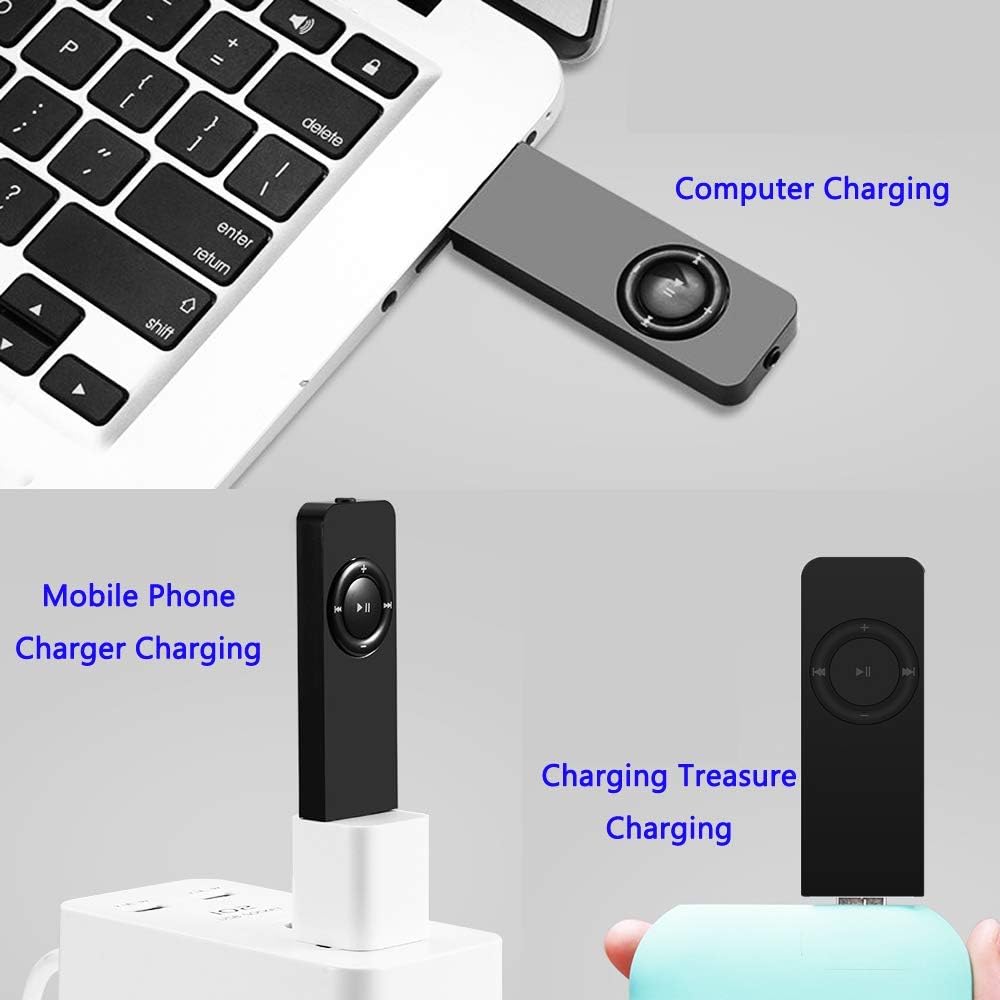
Figura 2: Various charging methods for the Dyzeryk JS-01 MP3 Player, including connection to a computer's USB port, a mobile phone charger, and a portable power bank.
2. Connecting to a Computer and Transferring Files
The MP3 player functions as a USB flash drive, allowing for easy file transferència.
- Ensure the MP3 player is powered on.
- Connect the MP3 player to your computer's USB port using a USB cable.
- The computer will recognize the device as a removable disk.
- Drag and drop your desired MP3, WMA, or WAV audio files a la carpeta d'emmagatzematge del reproductor.
- Una vegada fileUn cop es transfereixin els fitxers, expulseu el dispositiu de l'ordinador de manera segura abans de desconnectar el cable USB.
3. Inserting a TF Card (Micro SD)
The device supports external memory expansion via a TF card (Micro SD card) up to 64GB.
- Locate the TF card slot on the side of the MP3 player.
- Gently insert the TF card into the slot until it clicks into place. Ensure the card is oriented correctly.
- Per treure-la, empenyeu suaument la targeta cap a dins fins que surti.
Instruccions de funcionament

Figura 3: Key description for the Dyzeryk JS-01 MP3 Player, illustrating the location and function of each button and port.
1. Encendre/apagar
- Per engegar, feu lliscar el Interruptor ON/OFF a la posició "ON".
- Per apagar, feu lliscar el botó Interruptor ON/OFF a la posició "OFF".
2. Controls bàsics de reproducció
- Reproduir/pausa: Premeu el centre ►▮▮ botó per reproduir o posar en pausa la pista actual.
- Següent cançó: Premeu el botó ►►| botó per saltar a la pista següent.
- Cançó anterior: Premeu el botó |◀◀ botó per tornar a la pista anterior.
- Pujar el volum: Premeu el botó + botó per augmentar el volum.
- Baixar el volum: Premeu el botó - botó per baixar el volum.
3. Modes de reproducció
The device supports three playback modes, indicated by LED light patterns:
- Sequential Playback Mode: El llum verda parpellejos.
- Random Play Mode: El llum vermella flashes. To switch to this mode, long press the Puja el volum (+) botó.
- Single Loop Mode: El green and red lights alternately flash. To switch to this mode, long press the Baixar el volum (-) botó.
4. Folder Playback
To switch between folders containing music files, long press the central ►▮▮ Botó (Reproduir/Pausa).
5. Connexió dels auriculars
Insert the 3.5mm jack of your earphones into the earphone port located on the device. Ensure a secure connection for optimal audio output.
Manteniment i cura
- Neteja: Feu servir un drap suau i sec per netejar el dispositiu. Eviteu netejadors líquids o materials abrasius.
- Emmagatzematge: Guardeu el reproductor MP3 en un lloc fresc i sec, allunyat de la llum solar directa i de temperatures extremes.
- Exposició a l'aigua: Aquest dispositiu no és impermeable. Eviteu l'exposició a l'aigua o a una humitat elevada.
- Impacte: Protegiu el dispositiu de caigudes i impactes, que poden danyar els components interns.
- Cura de la bateria: Per allargar la durada de la bateria, eviteu descarregar-la completament amb freqüència. Carregueu el dispositiu regularment, fins i tot si no l'utilitzeu durant períodes prolongats.
Resolució de problemes
| Problema | Causa possible | Solució |
|---|---|---|
| El dispositiu no s'encén. | La bateria està esgotada. | Charge the device for at least 60-90 minutes. Ensure the ON/OFF switch is in the "ON" position during charging. |
| No se sent so dels auriculars. | Auriculars no connectats correctament; Volum massa baix; Àudio corrupte file. | Ensure earphones are fully plugged in. Increase volume using the '+' button. Try playing a different audio fileProva amb uns altres auriculars. |
| No es pot transferir files al dispositiu. | Incorrect USB connection; Device not recognized by computer; Corrupted device storage. | Ensure the USB cable is securely connected to both the player and the computer. Try a different USB port or cable. Ensure the device is powered on. Reformat the device if necessary (this will erase all data). |
| Player shuts down unexpectedly. | Bateria baixa. | Recarrega el dispositiu. |
| Buttons are unresponsive or difficult to press. | Physical obstruction or manufacturing variation. | Ensure no debris is lodged around the buttons. Apply firm, direct pressure. If issues persist, contact customer support. |
Garantia i Suport
The Dyzeryk JS-01 MP3 Player comes with a 12 mesos de garantia des de la data de compra.
If you encounter any problems or have questions regarding your device, please contact our professional after-sales service team. You will receive a quick response and a satisfactory resolution.
For support, please refer to the contact information provided with your purchase or visit the official Dyzeryk support weblloc.


