Producte acabatview
The Yunbaoit VT03 60-Minute Visual Timer is a versatile time management tool designed to enhance concentration and productivity for both children and adults. Its intuitive visual countdown display helps users understand the passage of time without the need for constant clock-watching. Featuring silent operation, adjustable alarm modes, and a night light function, this timer is suitable for various settings including home, school, and work.

Image: A child is shown studying at a desk with the Yunbaoit Visual Timer placed beside her, illustrating its use in a learning environment.
Configuració
- Instal·lació de la bateria: The Yunbaoit VT03 timer requires 2*AAA batteries (included in the package). Open the battery compartment located on the back of the device. Insert the batteries, ensuring correct polarity (+/-). Close the battery compartment securely.
- Encesa inicial: Once batteries are installed, the timer is ready for use. There is no separate power button; the device activates upon battery insertion.

Imatge: Una imatge detallada view of the back of the Yunbaoit Visual Timer, highlighting the battery compartment and the switches for alarm volume and duration.
Instruccions de funcionament
- Configuració del temporitzador: To set the countdown time, simply twist the central knob clockwise to your desired duration, up to 60 minutes. A colored disk will appear, visually representing the set time.
- Començant el compte enrere: Once the knob is set, the timer automatically begins counting down. The colored disk will gradually disappear as time elapses.
- Aturar l'alarma: When the set time is up, the timer will activate its alarm (audible or mute flash, depending on settings). To stop the alarm, press the top touch button once.
- Adjusting Alarm Mode: On the back of the timer, there are switches to select the alarm mode:
- Mute Flash: The timer will flash silently when time is up.
- Alarma baixa: A soft audible alarm will sound.
- Alarma forta: A loud audible alarm will sound.
- Funció de llum nocturna: The timer includes a night light. Press the top touch button once to turn the light on. The light will automatically turn off after 15 seconds.

Image: A three-panel diagram illustrating the process of setting the timer, the colored disk receding as time passes, and the alarm ringing/flashing when time is up.

Image: Two scenarios showing the timer in use: one in a quiet library setting with mute flash, and another in a kitchen with an audible alarm.
Video: A user demonstrates the Yunbaoit Visual Timer, highlighting its compact size, ease of use, and the visual countdown feature. The video also shows the battery compartment and the volume/duration settings for the alarm.
Característiques
- Compte enrere visual: The 60-minute visual timer features a colored disk that recedes as time passes, providing a clear visual representation of remaining time. This is particularly beneficial for children and individuals who benefit from visual cues for time management.
- Funcionament silenciós: The timer operates silently, ensuring no ticking sounds to distract users, making it ideal for quiet environments like classrooms, libraries, or study areas.
- Adjustable Audible Alert: Users can choose between three alarm modes: mute flash (silent), low volume, or loud volume. This flexibility allows the timer to be adapted to different situations and preferences.
- Funció de llum nocturna: A built-in night light provides subtle illumination, automatically turning off after 15 seconds to conserve battery life.
- Aplicació àmplia: This timer is suitable for various activities, including studying, cooking, exercise, classroom management, and managing screen time.

Imatge: Una mostra de collageasing the timer's versatility in various settings: learning, cooking, yoga, and classroom activities.
Manteniment
- Neteja: Netegeu el temporitzador amb un drap suau i sec. No utilitzeu productes de neteja abrasius ni submergiu el dispositiu en aigua.
- Substitució de la bateria: Replace batteries when the timer's performance diminishes or if it stops functioning. Always use new AAA batteries and dispose of old batteries responsibly.
- Emmagatzematge: Store the timer in a cool, dry place away from direct sunlight and extreme temperatures. If not in use for a long period, remove the batteries to prevent leakage.
Resolució de problemes
| Problema | Causa possible | Solució |
|---|---|---|
| Timer not starting/functioning | Piles baixes o gastades; instal·lació incorrecta de la bateria. | Replace with new AAA batteries; ensure correct polarity. |
| Alarm is too quiet or too loud | Incorrect alarm volume setting. | Adjust the volume switch on the back of the timer to desired setting (low, loud, or mute flash). |
| Colored disk not moving smoothly | Obstrucció o dany del mecanisme intern. | Ensure the knob is not forced past the 0 position. If the issue persists, contact customer support. |
Especificacions
- Model: VT03
- Marca: Yunbaoit
- Material: Plàstic
- Color: Lila
- Dimensions del producte: 2 "P x 3.5" W x 3.5" H
- Pes de l'article: 5.6 unces (0.16 quilograms)
- Font d'alimentació: 2 * piles AAA
- Number of Settings (Alarm): 3 (Mute Flash, Low, Loud)
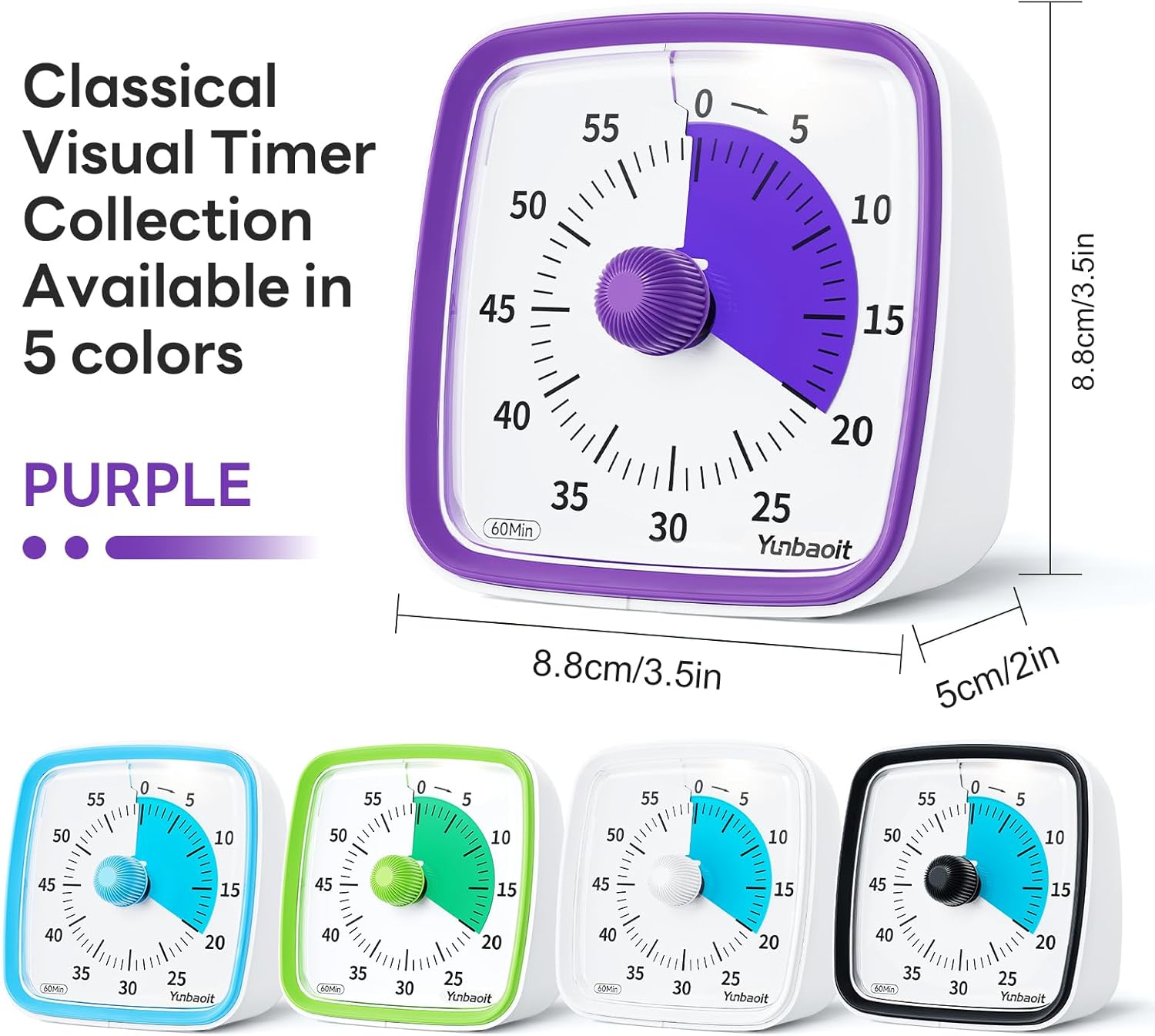
Image: The purple Yunbaoit Visual Timer displayed with its key dimensions (height, width, and depth) indicated.
Garantia i Suport
For any problems or concerns regarding your Yunbaoit Visual Timer, please contact our seller directly via the Amazon Platform. We are committed to addressing your issues promptly and providing considerate service, even if the standard return window has closed.
Contacte amb l'assistència: Navigate to your Amazon order history, find your purchase of the Yunbaoit Visual Timer, and select the option to contact the seller. Provide a detailed description of your issue for efficient assistance.

