1. Introducció i finalview
This manual provides detailed instructions for the proper setup, operation, and maintenance of your Techbee TE02 Indoor Digital Electrical Outlet Timer Plug. This device is designed to automate the power supply to your electrical appliances, offering convenience, energy savings, and enhanced home security through its programmable features.
The Techbee TE02 timer plug features a large, easy-to-read display and intuitive controls, allowing for precise scheduling of up to 20 ON/OFF programs per day. It also includes advanced functions such as a countdown timer and a random ON/OFF mode for vacation security. Its built-in battery ensures that your programmed settings are retained even during power outages.
2. Característiques del producte
- Extensive Programming: Supports up to 20 weekly ON-OFF timing programs for flexible scheduling.
- Funció de compte enrere: Allows for precise delay ON/OFF timing, from 1 second up to 99 hours, 59 minutes, and 59 seconds.
- Anti-theft Random Mode: Activates lights or other appliances at varying times to simulate occupancy, deterring potential intruders.
- Pantalla fàcil d'utilitzar: Features a large screen for clear visibility of digits and numbers.
- Potència Outage Protecció: Equipped with a built-in NiMH 1.2V battery to retain programmed settings for over 30 days during power interruptions.
- Versatile Time Format: Interchangeable 12-hour (AM/PM) and 24-hour formats.
- Presa de terra: Designed with a 3-prong plug and socket for safe use with a wide range of appliances.
- Funcionament silenciós: Operates completely silently, making it suitable for home use.
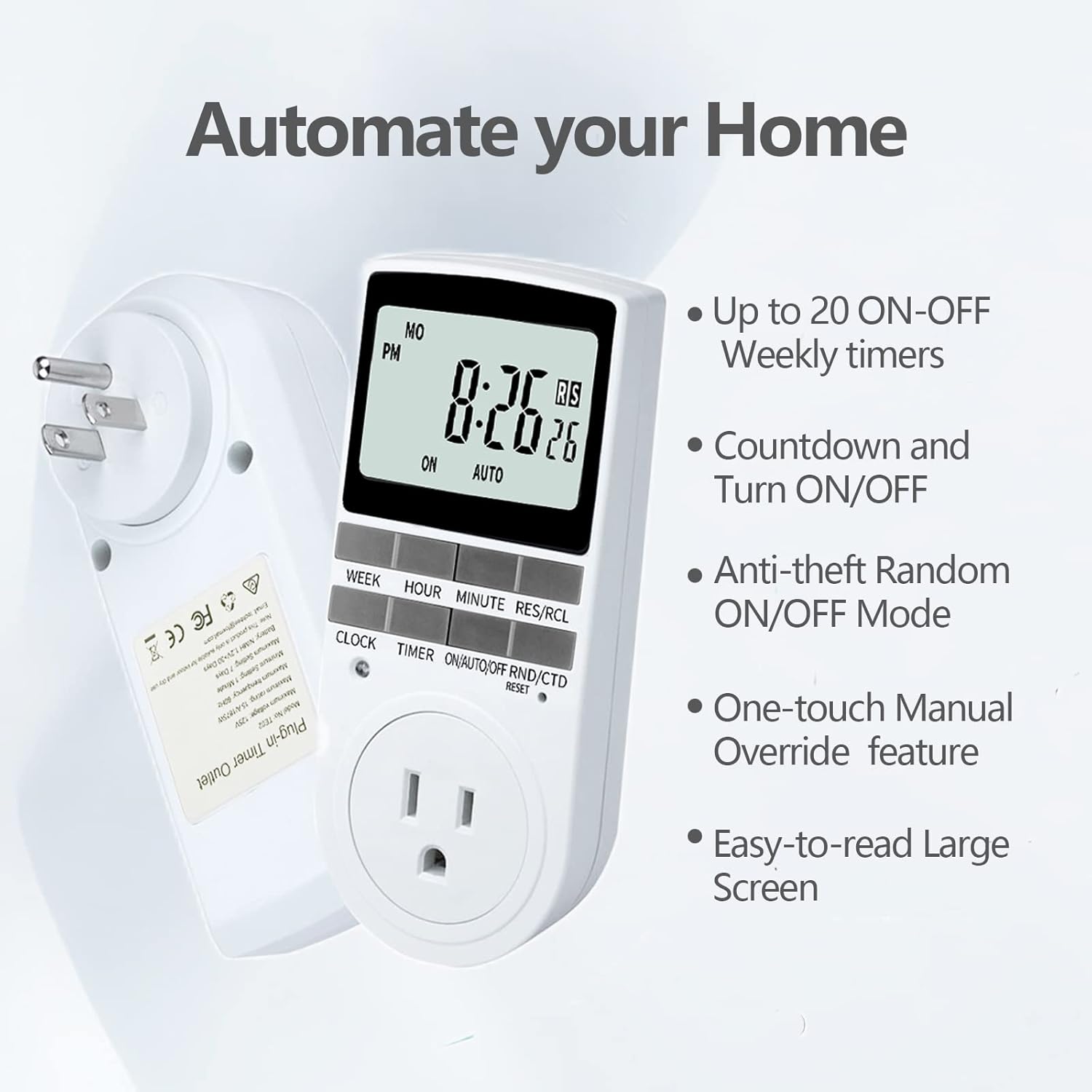
Figure 2.1: Key features of the Techbee TE02 Digital Timer Plug.
3. Especificacions
| Especificació | Valor |
|---|---|
| Número de model | TE02 |
| Volum màximtage | 125 V |
| Valoració màxima | 15 A / 1875 W |
| Freqüència màxima | 60 Hz |
| Minimum Setting Interval | 1 Minute (1 second for countdown) |
| Maximum Setting Duration | 7 dies |
| Tipus de bateria | NiMH 1.2V (retains settings >30 days) |
| Nombre de configuracions | 20 ON-OFF programs |

Figure 3.1: Technical data and features as displayed on the product packaging.
4. Configuració
Before initial use, it is recommended to plug the timer into a live outlet for at least 30 minutes to charge the internal battery. This ensures that the timer retains its settings even if unplugged or during a power outage.
- Unpack the timer plug and included instruction manual.
- Locate a standard 125V grounded electrical outlet.
- Plug the Techbee TE02 timer directly into the wall outlet. The display should illuminate.
- Premeu el botó RESET button (usually a small recessed button) using a non-metallic pointed object (like a pen tip) to clear all previous settings and ensure proper function.
- Proceed to set the current time and day as described in the 'Operating Instructions' section.

Figure 4.1: The Techbee TE02 Digital Timer Plug ready for setup.
Vídeo 4.1: Un overview of the Techbee TE02 timer plug, including unboxing and initial setup steps.
5. Instruccions de funcionament
5.1. Configuració de l'hora i el dia actuals
- Premeu el botó RELOJ botó. La pantalla mostrarà l'hora actual.
- Mentre sosteniu el RELOJ botó, premeu SETMANA per configurar el dia actual (DL, DM, DC, DJ, DV, DS, DG).
- Mentre sosteniu el RELOJ botó, premeu HORA to set the current hour (12-hour or 24-hour format).
- Mentre sosteniu el RELOJ botó, premeu MINUT per configurar el minut actual.
- Allibera el RELOJ per desar la configuració.
5.2. Programming ON/OFF Times (Up to 20 Programs)
- Premeu el botó TEMPORIZADOR per entrar al mode de programació. La pantalla mostrarà "1 ON".
- Premeu SETMANA to select the day(s) for this program (e.g., MO, TU, WE, TH, FR, SA, SU, or various combinations).
- Premeu HORA per configurar l'hora d'encesa desitjada.
- Premeu MINUT per ajustar el minut d'encesa desitjat.
- Premeu TEMPORIZADOR de nou. La pantalla mostrarà "1 OFF".
- Repeat steps 2-4 to set the desired OFF time for this program.
- Continueu prement TEMPORIZADOR to cycle through programs "2 ON", "2 OFF" up to "20 ON", "20 OFF", setting each as needed.
- Després de configurar tots els programes desitjats, premeu el botó RELOJ per sortir del mode de programació i tornar a la visualització de l'hora actual.

Figure 5.1: Programming the timer for daily routines.
5.3. Funció de compte enrere
The countdown function allows the timer to turn ON or OFF after a specified duration.
- Premeu el botó ON/AUTO/OFF RND/CTD button repeatedly until "CTD" appears on the display.
- Premeu HORA, MINUT, i RES/RCL (for seconds) to set the desired countdown duration.
- Premeu TEMPORIZADOR to start the countdown. The display will show the remaining time.
- Once the countdown reaches zero, the connected appliance will either turn ON or OFF, depending on its initial state.

Figure 5.2: Setting a countdown timer to turn an appliance ON or OFF.
5.4. Random Function (Anti-theft Mode)
The random function helps deter intruders by turning connected lights or appliances ON and OFF at irregular intervals.
- Premeu el botó ON/AUTO/OFF RND/CTD button repeatedly until "RND" appears on the display.
- The timer will now randomly turn the connected appliance ON and OFF within a set time window (typically 6 PM to 6 AM, but the Techbee TE02 offers random from any time).
- Per desactivar, premeu la tecla ON/AUTO/OFF RND/CTD button again until "AUTO" or "ON"/"OFF" is displayed.

Figure 5.3: Utilizing the random function for home security.
5.5. Anul·lació manual
You can manually switch the timer's output state without affecting the programmed settings.
- Premeu el botó ON/AUTO/OFF RND/CTD botó per recórrer els modes: ON (sempre encès), AUTO (segueix programes), OFF (sempre apagat), RND (random), CTD (countdown).
- Seleccioneu ON or OFF for immediate control. The timer will remain in this state until manually changed or switched back to AUTO.
6. Manteniment
- Neteja: Desconnecteu el temporitzador de la presa de corrent abans de netejar-lo. Netegeu l'exterior amb un drap suau i sec. No utilitzeu netejadors líquids ni materials abrasius.
- Emmagatzematge: If storing the timer for an extended period, ensure the internal battery is charged by plugging it in for a few hours every few months. Store in a cool, dry place away from direct sunlight and extreme temperatures.
- Bateria: The internal NiMH battery is designed for long-term use and retains settings for over 30 days. It is not user-replaceable.
7. Solució De Problemes
- Timer Display is Blank:
- Assegureu-vos que el temporitzador estigui ben connectat a una presa de corrent activa.
- The internal battery might be fully discharged. Plug the timer in for at least 30 minutes to charge it.
- Programes que no s'activen:
- Verifiqueu que el dia i l'hora actuals estiguin configurats correctament.
- Check that the timer is in AUTO mode.
- Ensure the ON/OFF programs are set correctly and do not overlap in an unintended way.
- Confirm the connected appliance is functioning correctly and its power switch is in the ON position.
- Timer Not Responding to Buttons:
- Perform a full reset by pressing the RESET button with a pointed object. You will need to re-enter all settings after a reset.
- Appliance Does Not Turn ON/OFF with Countdown:
- Assegureu-vos que el temporitzador estigui activat CTD mode and the countdown duration is set.
- Verify the connected appliance is working and its power switch is ON.
8. Garantia i Suport
For warranty information, technical support, or any inquiries regarding your Techbee TE02 Digital Timer Plug, please refer to the official documentation provided with your product or visit the official Techbee store.
You can find additional support and product information by visiting the Techbee Store on Amazon.
A detailed PDF instruction manual is also available for download: Instruccions d'ús (PDF).


