1. Introducció
The Autel MaxiSys MS909 EV is an advanced intelligent diagnostic scanner designed for comprehensive diagnostics of both electric (EV) and conventional vehicles. It integrates cutting-edge technology for high-voltage system analysis, battery pack diagnostics, ECU programming, and advanced service functions. This manual provides essential information for setting up, operating, maintaining, and troubleshooting your MS909 EV device.
Descripció del vídeo: An introduction to the Tesla EV diagnostic functions available on Autel MaxiSys scanners, demonstrating the device's capabilities for electric vehicles.
Descripció del vídeo: This video highlights the high-voltage and battery pack analysis features of the Autel MaxiSys MS909EV, crucial for electric vehicle maintenance.
2. Informació de seguretat
Always observe the following safety precautions when operating the Autel MaxiSys MS909 EV:
- Ensure the vehicle is in a safe, stable position before performing any diagnostic or service procedures.
- Wear appropriate personal protective equipment (PPE), especially when working with high-voltagsistemes electrònics.
- Do not connect or disconnect any test equipment while the ignition is on or the engine is running, unless instructed otherwise.
- Keep the device dry and clean. Avoid exposure to extreme temperatures or humidity.
- Only qualified technicians should perform high-voltage operacions relacionades.
3. Contingut del paquet
The Autel MaxiSys MS909 EV package typically includes the following components:
- MaxiSys MS909 EV Tablet
- Caixa EVDiag
- MaxiFlash VCI (Vehicle Communication Interface)
- Cable principal
- Cable USB
- Adaptador d'alimentació
- Various diagnostic cables and adapters for EV and conventional vehicles
- User Manual and Quick Reference Guide
- Maleta de transport

Descripció de la imatge: Una completa view of the Autel MaxiSys MS909EV intelligent diagnostic scanner, including the main tablet, EVDiag Box, MaxiFlash VCI, and a variety of diagnostic cables and adapters neatly organized within its robust carrying case.
4. Configuració
4.1. Engegada inicial
- Connect the power adapter to the MS909 EV tablet and a power outlet.
- Press and hold the Power button to turn on the tablet.
- Seguiu les instruccions que apareixen a la pantalla per completar la configuració inicial, inclosa la selecció d'idioma i la connexió Wi-Fi.
4.2. VCMI/EVDiag Box Connection
The MaxiFlash VCI and EVDiag Box are essential for vehicle communication and EV-specific diagnostics.
- Connect the MaxiFlash VCI to the MS909 EV tablet via the provided USB cable for initial setup and firmware updates.
- Ensure the VCMI firmware is updated to the latest version through the VCMI Manager application on the tablet.
- For EV diagnostics, connect the EVDiag Box to the MaxiFlash VCI using the appropriate cables.
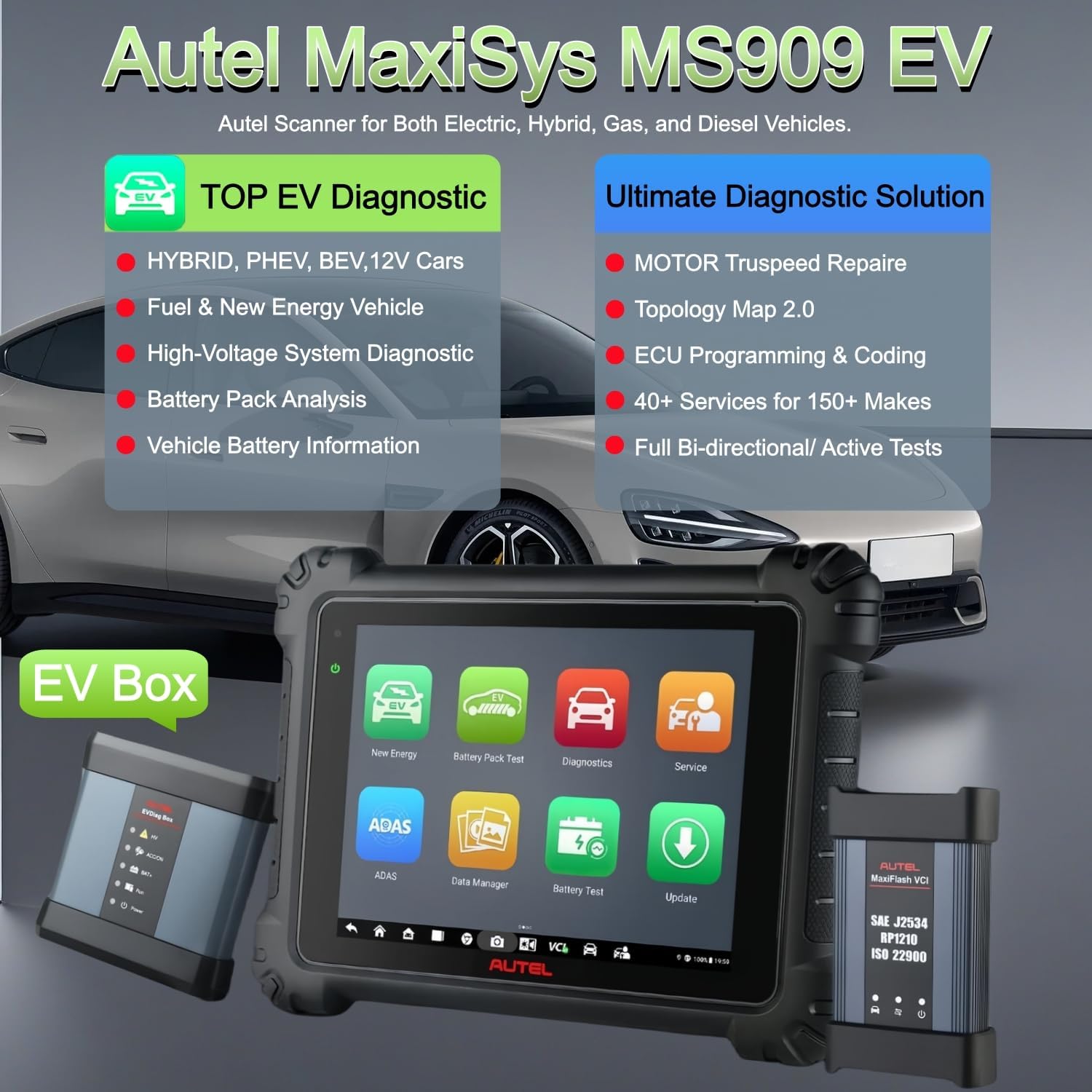
Descripció de la imatge: The Autel MaxiSys MS909EV tablet is shown alongside the EVDiag Box and MaxiFlash VCI, illustrating the core components of the diagnostic system for electric and hybrid vehicles.
4.3. Connexió de vehicles
Connect the diagnostic tool to the vehicle's OBDII port or specific EV diagnostic connectors.
- Locate the vehicle's OBDII port (usually under the dashboard).
- Connect the main diagnostic cable from the MaxiFlash VCI to the vehicle's OBDII port.
- For specific EV models (e.g., Tesla), use the dedicated EV diagnostic adapter cables and connect them to the appropriate vehicle ports as per the vehicle's service manual.
- Ensure all connections are secure before proceeding with diagnostics.
5. Instruccions de funcionament
5.1. Navegació per la interfície
The MS909 EV features an intuitive Android-based interface. Key applications include:
- New Energy: For EV-specific diagnostics and functions.
- Battery Pack Test: Dedicated app for battery pack analysis.
- Diagnòstic: For comprehensive system scans and fault code reading on all supported vehicles.
- Servei: Access to over 40 common maintenance and service functions.
- Remote Expert: Connect with remote experts for complex tasks.
- Actualització: For software and firmware updates.
5.2. EV System Diagnostics
5.2.1. Alt Voltage System Diagnosis
The MS909 EV provides in-depth diagnostics for high-voltage systems in electric and hybrid vehicles.
- Al menú principal, seleccioneu Nova Energia aplicació.
- Choose the vehicle make and model.
- Seleccioneu HV System Diagnosis to perform a dedicated scan of the high-voltage components.
- View system lists, block diagrams, and component information to identify faults.

Descripció de la imatge: The Autel MaxiSys MS909EV screen displays a detailed block diagram for high-voltage system diagnosis, showing components, wiring, and diagnostic notes for a BMW vehicle.
5.2.2. Battery Pack Analysis
Analyze the health and status of the vehicle's battery pack.
- Des del Nova Energia menú, seleccioneu Prova de la bateria.
- The system will display real-time data such as State of Charge (SOC), State of Health (SOH), total voltage, current, and individual module voltages.
- Utilitzeu el Ubicacions dels mòduls feature to pinpoint specific battery modules within the pack.
- The device also supports offline battery pack diagnostics for packs removed from the vehicle.

Descripció de la imatge: A screen capture from the Autel MaxiSys MS909EV showing detailed battery pack analysis, including SOC, SOH, voltage, current, temperature, and individual module status, along with maintenance advice.
5.3. Intelligent Diagnostics & Topology Mapping 2.0
Intelligent Diagnostics provides step-by-step repair guidance, including Technical Service Bulletins (TSBs), DTC analysis, repair assist, repair tips, and relevant case studies. Topology Mapping 2.0 visually represents all vehicle systems and their communication status in a color-coded format, allowing for quick identification of fault locations.
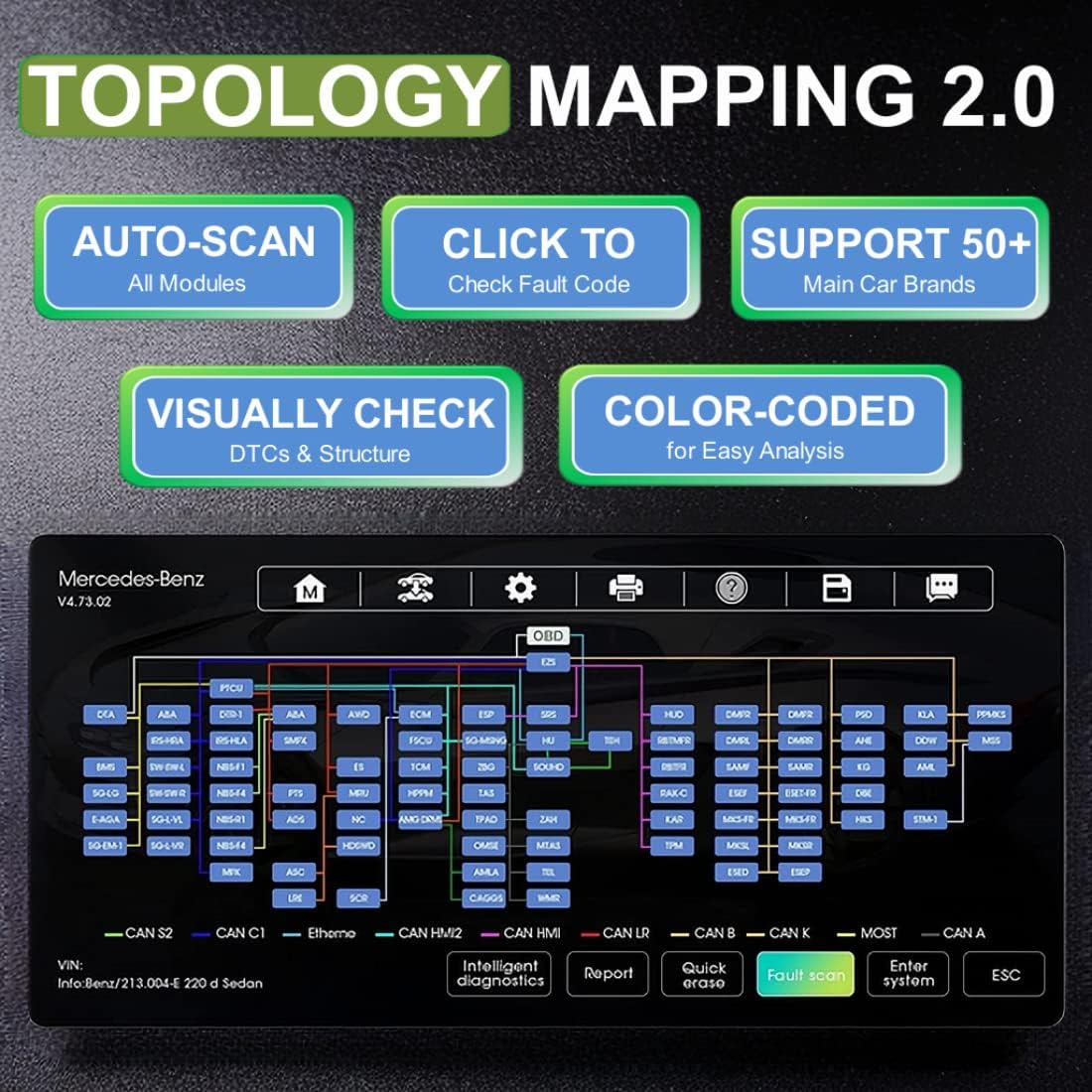
Descripció de la imatge: The Autel MaxiSys MS909EV displays the Topology Mapping 2.0 interface, which visually organizes vehicle modules and their communication lines, color-coding them to indicate diagnostic trouble code (DTC) status for easy analysis.
5.4. ECU Programming & Coding
The MS909 EV supports J2534 ECU programming for select BMW and Mercedes-Benz vehicles, allowing for reflashing and recoding of new ECUs. It also offers ECU coding for most conventional vehicles to match ECUs, activate hidden features, and improve performance.

Descripció de la imatge: The MaxiFlash VCI unit is shown, highlighting its support for J2534, RP1210, CAN FD, and DoIP protocols, essential for advanced ECU programming and coding functions on the Autel MaxiSys MS909EV.

Descripció de la imatge: A screen from the Autel MaxiSys MS909EV illustrating the OE ECU Programming & Coding options, including programming new ECUs, repairing ECUs, and customizing settings for various vehicle systems.
5.5. Funcions de servei
The MS909 EV is equipped with over 40 common maintenance and service functions, including but not limited to:
- Restabliment d’oli
- Restabliment de l'EPB (fre d'estacionament electrònic)
- Restabliment del BMS (sistema de gestió de bateries)
- Calibratge SAS (sensor d'angle de direcció)
- Adaptació de l'accelerador
- Sagnat de l’ABS
- Codificació d'injectors
- Capamp Ajust
- Regeneració DPF (filtre de partícules dièsel).

Descripció de la imatge: A visual representation of over 40 enhanced maintenance services available on the Autel MaxiSys MS909EV, displayed as a grid of icons for various functions like Oil Reset, BMS Reset, SAS Reset, and more.
Descripció del vídeo: This video provides an introduction to the Remote Expert feature on Autel diagnostic tools, explaining how technicians can connect with remote specialists for assistance with complex diagnostic and programming tasks.
Descripció del vídeo: A demonstration of the Autel AutoScan 2.0 feature, showcasing its ability to quickly and efficiently scan all vehicle systems for diagnostic trouble codes and provide a comprehensive health report.
6. Manteniment
Regular maintenance ensures optimal performance and longevity of your MS909 EV scanner:
- Actualitzacions de programari: Regularly check for and install software updates via the Actualització application to ensure access to the latest vehicle coverage and functions.
- Actualitzacions de firmware: Keep the MaxiFlash VCI and EVDiag Box firmware updated through the VCMI Manager.
- Neteja: Clean the tablet screen and exterior with a soft, damp tela. Eviteu els netejadors abrasius.
- Cura de la bateria: Charge the tablet's lithium polymer battery regularly. Avoid fully discharging the battery frequently to prolong its lifespan.
- Emmagatzematge: Store the device and accessories in their carrying case in a cool, dry place when not in use.
7. Solució De Problemes
If you encounter issues with your MS909 EV, refer to the following common troubleshooting steps:
- El dispositiu no s'encén: Ensure the battery is charged or the power adapter is securely connected. Try a different power outlet.
- Sense comunicació amb el vehicle: Verify all diagnostic cables are correctly connected to the VCI/EVDiag Box and the vehicle's diagnostic port. Ensure the vehicle's ignition is on. Check VCMI firmware status.
- Software Freezes/Crashes: Restart the tablet. Ensure the software is updated. Clear application cache if necessary.
- Lectures inexactes: Ensure the correct vehicle make, model, and year are selected. Verify all connections.
- Problemes d'actualització: Ensure a stable internet connection. Do not disconnect the VCMI during firmware updates.
8. Especificacions tècniques
| Característica | Especificació |
|---|---|
| Sistema operatiu | Android 10.0 |
| Processador | Samsung Exynos 8895 Octa-core Processor |
| Memòria | 4GB RAM & 128GB Storage |
| Mostra | Pantalla tàctil LCD de 10.1 polzades |
| Bateria | 15000mAh Lithium Polymer (8h working) |
| Connectivitat | Dual Wi-Fi, Bluetooth, USB |
| Dimensions | 9 x 1.67 x 12 polzades |
| Pes de l'article | 31.2 lliures |
| Protocols compatibles | J2534, D-PDU/RP1210, CAN FD/DoIP |
9. Garantia i Suport
Autel provides comprehensive support for its products. The MaxiSys MS909 EV comes with a standard warranty, which is automatically renewed with an active software subscription.
- Software Subscription: An active software subscription is required to receive the latest updates, vehicle coverage, and to maintain hardware warranty.
- Suport tècnic: For technical assistance, troubleshooting, or inquiries, please contact Autel customer support. Refer to your device's documentation or the Autel weblloc per obtenir informació de contacte.
- Total Care Program (TCP): Consider enrolling in the Total Care Program for extended benefits and support.


