1. Introducció
This manual provides detailed instructions for the assembly, operation, and maintenance of your Sharkoon SHA-VS4-WBK Mid-Tower PC Case. Please read this manual thoroughly before beginning installation to ensure proper setup and to maximize the lifespan of your components.
2. Producte acabatview
The Sharkoon SHA-VS4-WBK is a mid-tower PC case designed for ATX and Micro-ATX motherboards, featuring a full black aesthetic and an acrylic side window panel. It offers ample space for various components and efficient cable management.
Característiques principals:
- Acrylic side window panel for component visibility.
- Three 5.25-inch drive bays (two with tool-less mounting).
- Three 3.5-inch drive bays.
- Four 2.5-inch drive bays.
- Two external USB 3.0 ports on the front panel.
- Expansion card clearance up to 385mm (with 2.5-inch drive cage removed).
- CPU cooler height support up to 160mm.
- Convex side panel design for improved cable management space.
Referència visual:

Figura 2.1: Part frontal view of the Sharkoon SHA-VS4-WBK Mid-Tower PC Case, showcasing the acrylic side panel and front I/O ports.
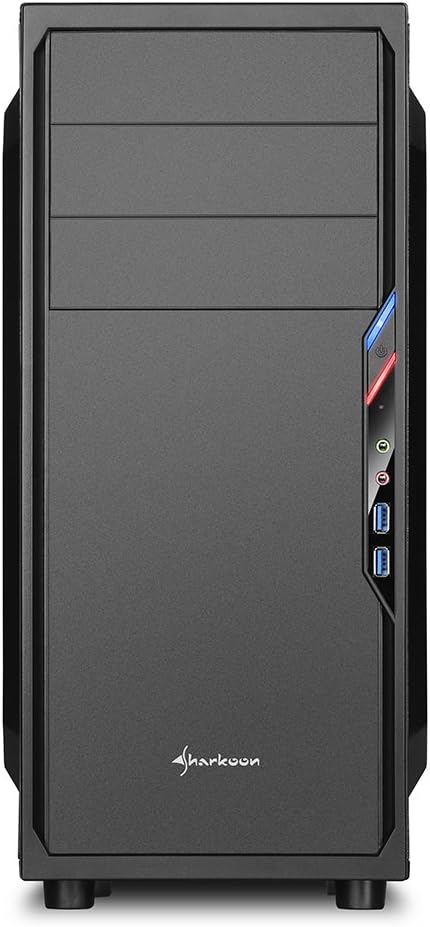
Figura 2.2: Frontal view of the PC case, highlighting the drive bays and front panel design.

Figura 2.3: lateral view of the PC case, clearly showing the acrylic window panel.

Figura 2.4: posterior view of the PC case, showing expansion slots and power supply mounting area.

Figura 2.5: Interior view of the PC case, illustrating the motherboard tray, drive bays, and cable routing options.
3. Configuració i instal·lació
Follow these steps for proper installation of your PC components into the SHA-VS4-WBK case.
3.1 Preparació del cas
- Desembaleu la caixa amb cura i traieu tots els materials d'embalatge.
- Traieu els panells laterals desenroscant els cargols de la part posterior de la carcassa.
3.2 Instal·lació de la placa base
- Install the necessary standoffs onto the motherboard tray according to your motherboard's form factor (ATX or Micro-ATX).
- Col·loqueu la protecció d'E/S a l'obertura posterior de la carcassa.
- Alineeu amb cura la placa base amb els separadors i la pantalla d'E/S i, a continuació, fixeu-la amb cargols.
3.3 Instal·lació de la unitat
- 5.25-inch Drives: For the two tool-less bays, simply slide the drive in until it clicks into place. For the third bay, secure with screws.
- 3.5-inch Drives: Mount 3.5-inch HDDs into the designated drive cages.
- 2.5-inch Drives: Mount 2.5-inch SSDs/HDDs into the designated drive cages. The 2.5-inch drive cage can be removed to accommodate longer expansion cards.
3.4 Instal·lació de la targeta d'expansió
- Traieu les cobertes de les ranures d'expansió necessàries de la part posterior de la carcassa.
- Inseriu la targeta d'expansió (per exemple, la targeta gràfica) a la ranura PCIe adequada de la placa base.
- Secure the expansion card with the provided screws. Note the maximum clearance of 310mm, or 385mm if the 2.5-inch drive cage is removed.
3.5 Instal·lació de la font d'alimentació
- Install your power supply unit into the rear-mount power supply bay at the bottom of the case.
- Secure it with screws from the outside of the case. Ensure the power supply's fan faces the correct direction for optimal airflow.
3.6 Gestió de cables
Utilize the space behind the motherboard tray and the convex design of the side panel to route cables neatly. This improves airflow and the overall aesthetic of your build.
3.7 Connexió dels ports d'E/S frontals
Connect the front panel cables (USB 3.0, audio, power, reset, LED indicators) to the corresponding headers on your motherboard. Refer to your motherboard manual for specific header locations.
4. Consideracions operatives
Once all components are installed, ensure all cables are securely connected and the side panels are reattached. Power on your system and verify all components are functioning correctly. Monitor temperatures to ensure adequate cooling.
5. Manteniment
Un manteniment regular ajuda a garantir un rendiment òptim i una llarga vida útil dels components del teu PC.
- Neteja de pols: Periodically clean dust from the interior of the case, especially from fans and heatsinks, using compressed air or a soft brush.
- Neteja exterior: Netegeu les superfícies exteriors amb un damp tela. Eviteu els netejadors abrasius.
- Acrylic Panel Care: Clean the acrylic side panel with a soft, lint-free cloth and a mild plastic cleaner to prevent scratches.
6. Solució De Problemes
Si teniu problemes, tingueu en compte els passos habituals següents per resoldre'ls:
- Sense energia: Check all power connections, including the power supply to the wall outlet, the 24-pin ATX connector, and the 8-pin CPU power connector on the motherboard. Ensure the power button cable is correctly connected to the motherboard.
- Components Not Fitting: Double-check component dimensions against the case specifications. For long graphics cards, ensure the 2.5-inch drive cage is removed if necessary.
- Flux d'aire deficient/sobreescalfament: Verify all fans are spinning correctly and are oriented for optimal airflow. Ensure cables are neatly managed to avoid obstructing airflow.
- Front Panel I/O Issues: Confirm that all front panel connectors (USB, audio) are correctly plugged into the motherboard headers.
7. Especificacions
| Característica | Especificació |
|---|---|
| Marca | Sharkoon |
| Número de model | SHA-VS4-WBK |
| Tipus de cas | Torre mitja |
| Compatibilitat amb la placa base | ATX, Micro-ATX |
| Dimensions (L x A x A) | 44.5 x 20 x 43 cm |
| Pes | 3.5 kg |
| Material | Acrylic (Side Panel) |
| Badies d'unitats de 5.25 polzades | 3 (2 tool-less) |
| Badies d'unitats de 3.5 polzades | 3 |
| Badies d'unitats de 2.5 polzades | 4 |
| Ports d'E / S frontals | 2 x USB 3.0 |
| Expansion Card Clearance | Max 310mm (385mm with 2.5-inch drive cage removed) |
| Alçada màxima del refrigerador de la CPU | 160mm (Note: May be 155mm depending on motherboard/cooler) |
| Power Supply Max Depth | 250 mm |
| Mètode de refrigeració | Refrigeració per aire |
8. Garantia i Suport
For warranty information and technical support, please refer to the official Sharkoon weblloc web o poseu-vos en contacte amb el vostre distribuïdor local. Conserveu el comprovant de compra per a reclamacions de garantia.


