1. Producte acabatview
The FiiO FW5 are True Wireless Stereo (TWS) Bluetooth 5.2 earphones designed for high-resolution audio playback. They feature a hybrid driver configuration and support advanced audio codecs for stable and high-quality wireless transmission.

Image: FiiO FW5 TWS Earbuds with charging case, highlighting features such as High performance DAC AK4332, High-end QCC5141 Bluetooth 5.2 chip, 1 Dynamic 2 BA drivers, 10mm large dynamic drive, and IPX4 water resistance.
Característiques principals:
- Qualitat del so Hi-Fi: Integrated AKM VELVET SOUND DAC (AK4332) for high-fidelity audio.
- Bluetooth avançat: Qualcomm QCC5141 chip with Bluetooth 5.2, supporting LHDC and aptX Adaptive codecs for stable connection.
- Hybrid Driver Design: Features 1 dynamic driver and 2 Knowles balanced armature (BA) drivers for detailed sound reproduction.
- Controls físics: Equipped with four physical buttons for direct control.
- Resistència a l'aigua: IPX4 splash resistance.
- Durada de la bateria ampliada: Up to 7 hours of playback per charge, with an additional 14 hours provided by the charging case, totaling over 21 hours.
2. Contingut del paquet
Abans d'utilitzar-lo, comproveu que tots els elements estiguin presents al paquet:
- FiiO FW5 TWS Earbuds (Left and Right)
- Estoig de càrrega
- Eartips (Multiple sizes and types, including balanced and HS18)
- Cable de càrrega USB (tipus C)
- Quick Start Guide (Refer to this manual for detailed instructions)
3. Configuració i ús inicial
3.1 Càrrega dels auriculars i l'estoig
Upon first use, fully charge the earbuds and the charging case. Place the earbuds into the charging case and connect the USB-C cable to the charging port on the case, then connect the other end to a USB power source.
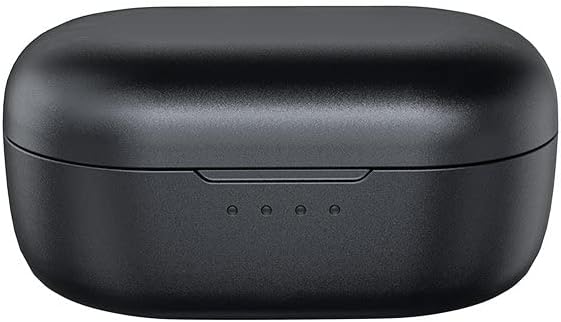
Image: The FiiO FW5 charging case, showing the closed lid and three LED indicator lights on the front, which display the charging status.
The LED indicators on the charging case will show the charging status. Once fully charged, the indicators will remain steady or turn off, depending on the model.
3.2 Selecting Eartips
The FiiO FW5 comes with various eartip sizes and types. Experiment with different sizes to find the best fit for your ears. A proper seal is crucial for optimal sound quality and comfort. Different eartip types (e.g., 'balanced' or 'HS18') may offer subtle differences in sound presentation and fit. Choose the pair that provides the most secure fit and best audio experience.
3.3 Emparellament amb un dispositiu Bluetooth
- Encès: Open the charging case. The earbuds will automatically power on and enter pairing mode. The indicator lights on the earbuds will flash, typically red and blue, to indicate pairing mode.
- Activa el Bluetooth: On your smartphone, tablet, or other Bluetooth device, enable Bluetooth.
- Seleccioneu el dispositiu: In the list of available Bluetooth devices, select "FiiO FW5".
- Confirmeu la connexió: Once connected, the earbud indicator lights will typically stop flashing or flash slowly. You will hear an audible confirmation.
If pairing fails, place the earbuds back into the case, close the lid, wait a few seconds, then reopen to re-enter pairing mode.

Image: FiiO FW5 earbuds and their open charging case positioned next to a laptop, illustrating a typical usage scenario for pairing and connectivity.
3.4 FiiO Control App Installation
For advanced customization and firmware updates, download the official FiiO Control app from your device's app store (iOS App Store or Google Play Store). This app allows for EQ adjustments, volume gain control, and other settings.
4. Instruccions de funcionament
4.1 Encès/Apagat
- Encès: Open the charging case, or press and hold the physical button on each earbud for approximately 2 seconds.
- Apagar: Place the earbuds back into the charging case and close the lid, or press and hold the physical button on each earbud for approximately 5 seconds.
4.2 Music Playback and Call Control
The FiiO FW5 features four physical buttons on each earbud for tactile control. Specific functions may be customized via the FiiO Control app.

Imatge: Un primer pla view of a single FiiO FW5 earbud, clearly showing the placement of its four physical control buttons for tactile operation.
Default Button Functions (may vary or be customizable):
- Premsa única: Reproduir/Pausar música, Respondre/Finalitzar trucada.
- Double Press (Left/Right): Previous Track / Next Track.
- Triple Press (Left/Right): Volume Down / Volume Up.
- Premsa llarga: Reject call, Activate voice assistant.
4.3 Control de volum
Volume can be adjusted using the physical buttons on the earbuds or through your connected device. The FiiO Control app also offers customizable volume gain settings to match personal preferences and optimize audio performance.

Image: A screenshot of the FiiO Control app interface on a smartphone, displaying various audio settings including channel balance, lowpass filter, headphone volume, and volume of tones, demonstrating independent volume control options.
4.4 Using the FiiO Control App
The FiiO Control app provides access to advanced features:
- Equalitzador (EQ): Adjust audio frequencies to tailor the sound to your preference.
- Volume Gain: Fine-tune the overall output volume level.
- Actualitzacions de firmware: Keep your earbuds updated with the latest software for improved performance and features.
- Personalització del botó: Reassign functions to the physical buttons.
5. Manteniment i cura
5.1 Neteja
- Regularly clean the eartips with a soft, dry cloth.
- Gently wipe the earbuds and charging case with a slightly damp tela. Eviteu utilitzar productes químics o materials abrasius.
- Assegura't que els contactes de càrrega dels auriculars i de la funda estiguin nets i lliures de residus per mantenir una càrrega correcta.
5.2 Resistència a l'aigua
The FiiO FW5 earbuds are rated IPX4 for splash resistance. This means they are protected against splashing water from any direction. They are suitable for use during exercise or in light rain, but should not be submerged in water or exposed to strong jets of water.
5.3 Emmagatzematge
Quan no els utilitzeu, guardeu els auriculars a la seva funda de càrrega per protegir-los i assegurar-vos que es mantinguin carregats. Guardeu la funda en un lloc fresc i sec, allunyat de la llum solar directa i de temperatures extremes.
6. Solució De Problemes
6.1 Earbuds Not Pairing or Connecting
- Re-seat Earbuds: Place both earbuds back into the charging case, close the lid, wait 5 seconds, then open the lid again to force them to re-enter pairing mode.
- Dispositiu Bluetooth: Ensure Bluetooth is enabled on your device and that the FW5 is selected.
- Oblida el dispositiu: On your device, 'forget' or 'unpair' the FiiO FW5, then attempt to pair again from scratch.
- Restableix els auriculars: Refer to the FiiO Control app or FiiO's official support for specific hard reset instructions if standard pairing fails repeatedly.
6.2 Low Volume Output
- Comprova el volum del dispositiu: Assegureu-vos que el volum del dispositiu connectat estigui alt.
- Check Earbud Volume: Adjust volume using the physical buttons on the earbuds.
- Aplicació de control FiiO: Open the FiiO Control app and check the 'Headphone Volume' and 'Volume of tones' settings. Adjust the volume gain if necessary.
- Eartip Seal: Ensure a proper seal with the eartips. A poor seal can significantly reduce perceived volume and bass response.
6.3 Intermittent Connection or Audio Dropouts
- Proximitat: Keep your connected device close to the earbuds (within 10 meters) and avoid obstacles that may interfere with the Bluetooth signal.
- Interferència: Allunyeu-vos d'altres dispositius sense fil o de camps electromagnètics forts.
- Actualització del firmware: Check the FiiO Control app for any available firmware updates, as these often address connectivity issues.
- Codec Issues: If using LHDC or aptX Adaptive, try switching to a different codec (if your device allows) to see if stability improves.
6.4 Battery Drains Quickly in Case
- Contactes de càrrega: Ensure the earbuds are properly seated in the charging case and that the charging contacts are clean. Corrosion or debris can prevent proper charging or cause parasitic drain.
- Case Lid: Ensure the charging case lid is fully closed when storing the earbuds.
- Firmware: Check for firmware updates via the FiiO Control app, as battery management improvements are often included in updates.
6.5 FiiO Control App Not Working/Freezing
- Actualització de l'aplicació: Ensure you have the latest version of the FiiO Control app installed.
- Reinicia l'aplicació: Tanca l'aplicació completament i torna-la a obrir.
- Reinicieu el dispositiu: Reinicieu el telèfon intel·ligent o la tauleta.
- Torneu a instal·lar l'aplicació: Uninstall and then reinstall the FiiO Control app.
7. Especificacions
| Característica | Especificació |
|---|---|
| Nom del model | FW5 |
| Tecnologia de connectivitat | Sense fil (Bluetooth 5.2) |
| Bluetooth Codecs Supported | LHDC, aptX Adaptive |
| Xip DAC | AK4332 |
| Xip Bluetooth | Qualcomm QCC5141 |
| Tipus de controlador d'àudio | 1 Dynamic Driver, 2 Knowles Balanced Armature Drivers |
| Mida del controlador dinàmic | 10 mm |
| Interval de freqüència | 20Hz-20kHz |
| Impedància | 32 ohms |
| Durada de la bateria dels auriculars | 7 hores |
| Carrying Case Battery Life (Additional) | 14 Hours (Total 21+ Hours) |
| Nivell de resistència a l'aigua | IPX4 (resistent a esquitxades) |
| Mètode de control | Botons físics |
| Dimensions del producte | 1.97 x 1.57 x 1.18 polzades |
| Pes de l'article | 10.9 unces |
| Color | Negre |

Imatge: Una imatge detallada view of the AK4332 DAC chip on a circuit board, emphasizing its role in delivering high-fidelity sound with a Signal-to-Noise Ratio (SNR) of ≥106dB.

Image: A close-up of the Qualcomm QCC5141 Bluetooth 5.2 chip on a circuit board, highlighting its contribution to better connection stability and Snapdragon Sound technology.

Image: An internal diagram illustrating the Knowles Balanced Armature Driver within the earbud, contributing to in-ear studio HiFi sound with textured bass, good dynamics, and soundstage.

Image: A detailed diagram of the oversized 10mm dynamic driver with N50 magnets, responsible for producing powerful and thumping sound.

Image: FiiO FW5 earbuds displayed with the Snapdragon Sound logo, indicating support for LHDC and aptX Adaptive audio codecs for high-quality wireless audio.
8. Garantia i Suport
FiiO products typically come with a limited warranty. For specific warranty terms and conditions, please refer to the warranty card included with your product or visit the official FiiO weblloc web. Conserveu el comprovant de compra per a reclamacions de garantia.
Atenció al client:
For technical assistance, troubleshooting, or warranty inquiries, please contact FiiO customer support through their official website or the FiiO Control app. Ensure you have your product model (FW5) and purchase details ready.


