1. Producte acabatview
This manual provides instructions for the TCL RC902N FMR1 Remote Control, designed for use with compatible TCL televisions. This remote features dedicated hotkeys for popular streaming services, offering convenient access to your favorite content.
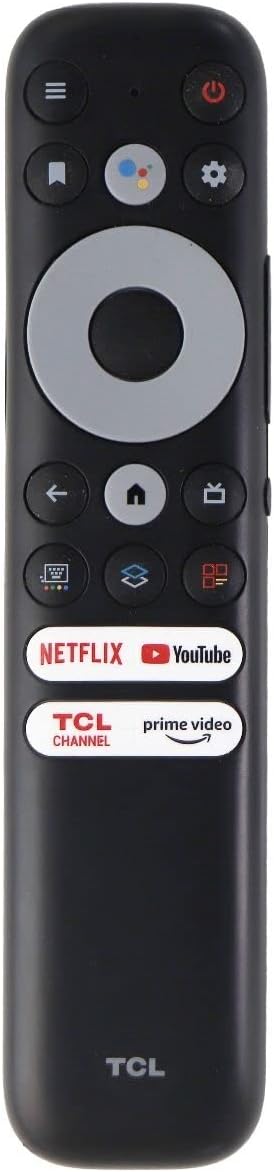
Figure 1: TCL RC902N FMR1 Remote Control
2. Configuració
2.1 Instal·lació de la bateria
The TCL RC902N FMR1 remote control requires two (2) AAA batteries (not included).
- Localitzeu el compartiment de la bateria a la part posterior del comandament a distància.
- Feu lliscar la tapa de la bateria cap avall per obrir-la.
- Introduïu dues piles AAA, assegurant-vos que els terminals positiu (+) i negatiu (-) s'alineïn correctament amb els indicadors de l'interior del compartiment.
- Feu lliscar la coberta de la bateria al seu lloc fins que faci un clic de manera segura.
Video 1: Demonstration of battery installation and basic remote functions for a similar TCL Google TV remote control. This video is provided by the seller, Excellen.Corp.
2.2 Emparellament inicial
This remote control is designed for immediate use with compatible TCL Google TVs. Typically, no programming is required. Simply insert the batteries, and the remote should automatically pair with your TV. If the remote does not respond, ensure there are no obstructions between the remote and the TV's infrared receiver.
3. Instruccions de funcionament
Familiaritzeu-vos amb els botons i les seves funcions:
| Botó | Funció |
|---|---|
| Poder (Ⓞ) | Encén o apaga el televisor. |
| Assistent de Google | Activa les ordres de veu per cercar contingut o controlar el televisor. |
| Configuració (⚙) | Accedeix al menú de configuració del televisor. |
| Navigation Pad (Up/Down/Left/Right) | Navega pels menús i el contingut. |
| OK | Confirma les seleccions. |
| Enrere (←) | Torna a la pantalla o menú anterior. |
| Casa (⌂) | Goes to the TV's home screen. |
| TV/Input | Switches between TV inputs (HDMI, AV, etc.). |
| Pujar/Bajar el volum (VOL +/-) | Ajusta el nivell de volum. |
| Canal amunt/avall (CH +/-) | Canvia els canals de televisió. |
| Silenciar (🔇) | Silencia o activa l'àudio del televisor. |
| Tecla d'accés directe de Netflix | Directly launches the Netflix application. |
| Tecla d'accés directe de YouTube | Directly launches the YouTube application. |
| Tecla d'accés directe de Prime Video | Directly launches the Prime Video application. |
| TCL Channel Hotkey | Directly launches the TCL Channel application. |
Vídeo 2: Acabatview of the TCL Google TV remote control, highlighting its lightweight design, ergonomic feel, and dedicated shortcut buttons for streaming services. This video is provided by the seller, YOSUN Direct.
4. Manteniment
4.1 Neteja
To clean the remote control, use a soft, dry cloth. Do not use liquid cleaners or abrasive materials, as these may damage the remote's surface or internal components.
4.2 Substitució de la bateria
Replace batteries when the remote's responsiveness decreases or it stops functioning. Always replace both batteries at the same time with new AAA batteries. Do not mix old and new batteries or different types of batteries.
5. Solució De Problemes
- El comandament a distància no respon:
- Comproveu si les piles estan inserides correctament i tenen prou càrrega. Substituïu-les si cal.
- Assegureu-vos que no hi hagi obstacles entre el comandament a distància i el sensor d'infrarojos del televisor.
- Try re-pairing the remote if your TV supports Bluetooth pairing for remotes (refer to your TV's user manual for specific instructions).
- Les tecles d'accés directe no funcionen:
- Assegureu-vos que el vostre televisor estigui connectat a Internet.
- Verify that the respective applications (Netflix, YouTube, Prime Video, TCL Channel) are installed and updated on your TV.
6. Especificacions
- Número de model: RC902N FMR1
- Marca: TCL
- Color: Negre
- Dispositius compatibles: TCL Televisions (specifically TCL Google TV models)
- Font d'alimentació: 2 piles AAA (no incloses)
- Característica especial: Ergonomic design, Dedicated streaming service hotkeys
7. Garantia i Suport
For warranty information, technical support, or further assistance, please refer to the documentation provided with your TCL television or visit the official TCL support weblloc. Conserveu el rebut de compra per a reclamacions de garantia.


