1. Producte acabatview
The SSK SC211 is an 11-in-1 USB-C docking station designed to expand the connectivity of your USB-C enabled laptop, tablet, or smartphone. It provides multiple ports for display output, data transfer, network connectivity, power delivery, and audio, transforming a single USB-C port into a comprehensive workstation solution.

Image: The SSK SC211 docking station, showcasing its compact design and the array of devices it can connect to, including HDMI cables, USB drives, SD/TF cards, and an Ethernet cable.
2. Característiques clau
- Connectivitat 11 en 1: Integrates 2x 4K HDMI, 1x VGA, 2x USB 3.0, 1x USB 2.0, 1x 100W PD charging, 1x 1000M Gigabit Ethernet RJ45, 1x SD Card slot, 1x TF Card slot, and 1x 3.5mm Audio/Mic port.
- Multiple Display Options: Supports dual 4K HDMI output and triple display configurations (2x HDMI + VGA) for Windows 10/11. Offers mirror mode (SST) and extend mode (MST).
- Vídeo d'alta resolució: Single HDMI 1 supports up to 4K@60Hz. Dual HDMI supports up to 4K@30Hz. When VGA is connected, each monitor supports up to 1080P@60Hz.
- Transferència ràpida de dades: Two USB 3.0 ports provide data transfer speeds up to 5Gbps. SD/TF card slots support up to 104MB/s.
- Gigabit Ethernet: RJ45 port offers stable and fast wired network connectivity at 10/100/1000Mbps.
- Subministrament d'energia: USB-C PD 3.0 port supports up to 100W input and 85W output for charging your host device.
- Connectivitat d'àudio: Integrated 3.5mm Audio/Mic port for headphones or speakers.

Imatge: Una imatge detallada view of the SSK docking station highlighting each port: Gigabit RJ45 Ethernet, VGA, HDMI 1 (4K@60Hz), HDMI 2 (4K@30Hz), USB 2.0 (for mouse & keyboard), PD3.0 (Max 100W power delivery), 3.5mm Headphone & Speaker, 2x USB 3.0 (5Gbps), and SD/TF Card slots (Up to 104MB/s).
3. Especificacions
| Número de model | SC211 |
| Dimensions del producte | 4.89 x 2.08 x 0.71 polzades |
| Pes de l'article | 4.2 unces |
| Color | Gris |
| Interfície del maquinari | Ethernet, HDMI, MicroSD, USB 2.0, USB 3.0, USB Type C, VGA |
| Característica especial | HDMI dual |
| Dispositius compatibles | Laptops (MacBook Pro, Dell XPS, Huawei MateBook X PRO, HP EVNY X360, Lenovo ThinkPad X1, Huawei P20/30, etc.) |
| Sistemes operatius | Windows, macOS, Android, iPadOS (Win7/XP/Linux may require driver for RJ45) |
| Lliurament d'energia | Up to 100W input, 85W output |
| Velocitat de dades USB 3.0 | Fins a 5 Gbps |
| Velocitat Ethernet | 10/100/1000 Mbps |
4. Guia de configuració
Before connecting the docking station, ensure your laptop's USB-C port supports video output ("Display Port Alternate Mode"), data transfer, and Power Delivery (PD) for full functionality. Not all USB-C ports support all these features.

Image: This diagram illustrates the types of USB-C ports and their capabilities. It shows that for triple monitor support, the laptop's USB-C port must support Thunderbolt 3, Data + DisplayPort, or Data + PD + DisplayPort functions. Ports that only support data transfer or power delivery will not enable video output.
- Connecteu l'alimentació (opcional però recomanat): If your laptop requires charging or you are connecting multiple power-intensive devices, connect your laptop's original USB-C power adapter to the docking station's PD 3.0 port. This ensures stable operation and charges your laptop.
- Connecta't al dispositiu amfitrió: Plug the integrated USB-C cable of the docking station into your laptop's compatible USB-C port.
- Connecta les pantalles:
- For single display: Connect an HDMI cable to either HDMI 1 or HDMI 2 port, or a VGA cable to the VGA port, then connect to your monitor.
- For dual displays: Connect two HDMI cables to HDMI 1 and HDMI 2 ports, then to your monitors.
- For triple displays (Windows only): Connect two HDMI cables to HDMI 1 and HDMI 2, and one VGA cable to the VGA port, then to your monitors.
- Connecteu els perifèrics: Plug in your USB devices (mouse, keyboard, USB drives) into the USB 3.0 or USB 2.0 ports. Insert SD or TF cards into their respective slots. Connect an Ethernet cable to the RJ45 port for wired network access.
- Connecta l'àudio: If using external headphones or speakers, plug them into the 3.5mm Audio/Mic port.
Note: Please provide power to the USB-C Docking Station first when connecting monitors or multiple high-power devices to ensure stable performance.
5. Instruccions de funcionament
5.1 Modes de visualització
L'estació d'acoblament admet diverses configuracions de pantalla segons el sistema operatiu.
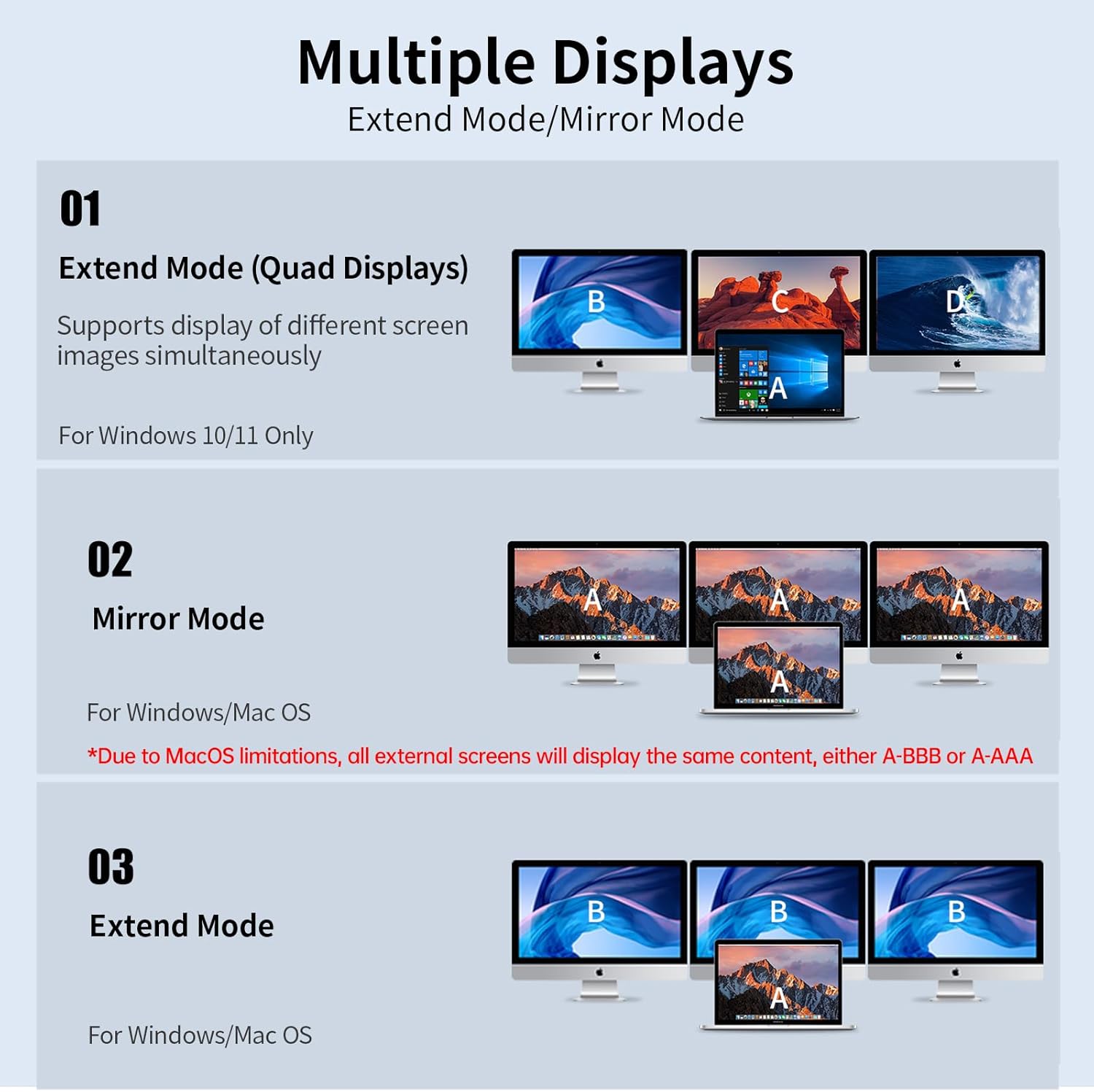
Image: This diagram illustrates the different display modes. For Windows, it shows Extend Mode (Quad Displays: A-BCD) and Mirror Mode (A-AAA). For macOS, it shows Mirror Mode (A-AAA or A-BBB) due to MST limitations, where all external monitors display the same content.
- Per a Windows 10/11:
- Extend Mode (A-BCD): Supports displaying different content on up to four screens simultaneously (laptop screen + 3 external monitors).
- Mirror Mode (A-AAA): All connected displays show the same content.
- Per a macOS:
- Due to macOS limitations (does not support MST - Multi-Stream Transport), the docking station only supports extending one monitor, and all external monitors will display the same screen content (A-AAA or A-BBB).
- You can achieve a mirrored display where all external monitors show the same content as your laptop, or an extended display where one external monitor extends your desktop and other external monitors mirror that extended display.
5.2 Configuració d'àudio
When using the 3.5mm Audio/Mic port:
- When HDMI is connected: The audio port can be directly plugged in and used.
- When using the headphone jack alone:
- Per a macOS: Go to Apple icon > System Preferences > Sound > Output > Select "USB Audio Device".
- Per a Windows: Click the sound icon on the bottom right of the desktop > Choose "USB Audio Device" as the sound output.
5.3 Transferència i càrrega de dades
- Ports USB 3.0: Use for high-speed data transfer with external hard drives, USB flash drives, etc. These ports also support BC1.2 fast charging for USB devices.
- Port USB 2.0: Ideal for connecting wireless mouse/keyboard receivers to avoid interference with USB 3.0 devices. Also supports USB 2.0 data transfer.
- Ranures per a targetes SD/TF: Insert memory cards for quick data access.
- PD 3.0 Charging Port: Connect your laptop's power adapter here to charge your laptop while using the docking station. This port is for power delivery only, not data transfer.

Image: The SSK docking station connected to a laptop, receiving 100W input power and providing 85W output to the laptop, demonstrating simultaneous data transfer and charging. Note that the wall charger and cable are not included.
6. Manteniment
- Keep the docking station in a dry environment, away from liquids and extreme temperatures.
- Netegeu el dispositiu amb un drap suau i sec. Eviteu utilitzar productes químics o materials abrasius.
- No intenteu desmuntar ni reparar el dispositiu vosaltres mateixos. Poseu-vos en contacte amb el servei d'atenció al client si sorgeixen problemes.
- Assegureu-vos que hi hagi una ventilació adequada al voltant del dispositiu durant el funcionament per evitar el sobreescalfament.
7. Solució De Problemes
If you encounter issues with your SSK docking station, please refer to the following common solutions:
- Sense sortida de pantalla:
- Ensure your laptop's USB-C port supports "Display Port Alternate Mode" (video output).
- Verify that the HDMI/VGA cables are securely connected to both the docking station and the monitor.
- Try connecting a power adapter to the docking station's PD port.
- Prova amb un altre monitor o cable si és possible.
- Reinicieu el vostre ordinador portàtil.
- External Monitors Display Same Content (macOS):
- This is a limitation of macOS, which does not support Multi-Stream Transport (MST) for multiple distinct external displays via a single hub. All external monitors will mirror each other or mirror the main display.
- No Network Connection (RJ45):
- Assegureu-vos que el cable Ethernet estigui ben connectat.
- Check your network settings on your computer.
- For Windows 7/XP/Linux, you may need to install a specific driver for the Gigabit RJ45 Ethernet port.
- Càrrega lenta o sense càrrega:
- Ensure your power adapter is connected to the docking station's PD port and is capable of providing sufficient wattage (up to 100W input, 85W output).
- Verifiqueu que el port USB-C del vostre portàtil sigui compatible amb Power Delivery.
- Dispositius USB no reconeguts:
- Assegureu-vos que l'estació d'acoblament estigui connectada correctament al portàtil.
- Try connecting the USB device to a different port on the docking station or directly to your laptop to isolate the issue.
- Some high-power USB devices may require the docking station to be powered via its PD port.
8. Compatibilitat
The SSK SC211 docking station is compatible with a wide range of devices and operating systems, provided the host device's USB-C port supports the necessary functions (DisplayPort Alternate Mode, Power Delivery, and Data Transfer).
- Portàtils: Compatible with MacBook Pro (2016, 2017, 2018), Dell XPS, Huawei MateBook X PRO (2019), HP ENVY X360, Lenovo ThinkPad X1, and similar models with a full-featured USB-C port.
- Smart Devices: Compatible with Huawei P20/30 and other smartphones/tablets that support video output via USB-C.
- Sistemes operatius: Works with Windows, macOS, Android, and iPadOS or higher operating systems. For Windows 7/XP/Linux, a driver may be required for the Gigabit RJ45 Ethernet port.
Important: The USB-C port of your laptop or phone must support DP (video) output for display functionality.
9. Garantia i Suport
For warranty information, please refer to the specific terms and conditions provided at the time of purchase or contact your retailer. SSK products are designed for quality and reliability.
If you encounter any issues or require technical assistance, please contact SSK customer support through their official channels or the retailer from whom you purchased the product. Please have your model number (SC211) and purchase details ready.
For more information about SSK products, visit the SSK Store on Amazon.


