1. Introducció
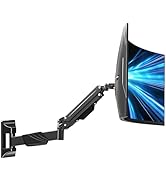
This manual provides detailed instructions for the installation, operation, and maintenance of your MOUNTUP MU2007 Gas Spring Monitor Wall Mount. Please read this manual thoroughly before installation to ensure correct setup and safe use. Retain this manual for future reference.
2. Informació de seguretat
- Capacitat de pes: Do not exceed the maximum weight capacity of 17.6 lbs (8 kg). Exceeding this limit may result in serious injury or product damage.
- Mida de la pantalla: This mount is designed for monitors between 17 and 32 inches.
- Tipus de paret: This mount is designed for installation on wood studs, concrete walls, or brick walls. NO MUNTEU EL PLACA DE GUIX SOLAMENT. Ensure the mounting surface can safely support the combined weight of the mount and your monitor.
- Compatibilitat VESA: Ensure your monitor has VESA mounting patterns of 75x75mm or 100x100mm. If your monitor has a different VESA pattern, a VESA adapter (not included) may be required.
- Instal·lació professional: Si no esteu segurs del procés d'instal·lació o de l'adequació de la vostra paret, consulteu un professional qualificat.
- Parts mòbils: The gas spring arm contains moving parts. Exercise caution during adjustment to avoid pinching or injury.
3. Contingut del paquet
Please verify that all components are present and undamaged before beginning installation. Refer to the included hardware bag for specific part identification.
Imatge: Explotat view of the monitor mount components, including the gas spring arm, wall plate, VESA plate, and various covers and fasteners.
4. Especificacions
| Model | MU2007 |
| Marca | MONTAGE |
| Compatibilitat amb la mida de la pantalla | 17 - 32 polzades |
| Capacitat de pes | 4.4 - 17.6 lliures (2 - 8 kg) |
| Compatibilitat VESA | 75x75mm, 100x100mm |
| Tipus de moviment | Tilt, Rotate, Swivel, Height Adjust, Full Motion |
| Angle d'inclinació | +90° / -45° |
| Rotació | 360° (Landscape/Portrait) |
| Giratòria | 180° at wall plate, 270° at arm joint |
| Ajust d'alçada | 10.6 polzades |
| Max Extension from Wall | 21 polzades |
| Min Retraction to Wall | 3 polzades |
| Material | Alumini, metall |
| Color | Negre |
5. Comprovació de compatibilitat
Before installation, confirm your monitor and wall meet the following criteria:
- Mida del monitor: Your monitor screen size should be between 17 and 32 inches.
- Pes del monitor: Your monitor must weigh between 4.4 lbs (2 kg) and 17.6 lbs (8 kg).
- Patró VESA: Check the back of your monitor for a 75x75mm or 100x100mm square hole pattern.
- Tipus de paret: The mount must be installed on a solid wood stud, concrete wall, or brick wall. Drywall alone is not sufficient.

Imatge: Visual guide for checking monitor size (17"-32"), load capacity (4.4-17.6 lbs), and VESA pattern (75x75mm/100x100mm).

Imatge: Illustration of compatible wall types: wood stud, concrete wall, and brick wall. A warning indicates not to use anchors on drywall or wood, implying direct mounting to studs or using appropriate anchors for masonry.
6. Configuració i instal·lació
Segueix aquests passos amb atenció per a una instal·lació segura.
6.1 Attaching the VESA Plate to Your Monitor
- Carefully place your monitor face down on a soft, clean surface to prevent scratches.
- Alineeu la placa VESA amb els forats de muntatge de la part posterior del monitor.
- Secure the VESA plate using the appropriate screws and washers provided in the hardware kit. Do not overtighten.
Imatge: The VESA mounting plate being secured to the back of a monitor with screws, indicating the initial step of preparing the monitor for attachment to the arm.
6.2 Muntatge de la placa de paret
Important: Use a stud finder to locate a wood stud, or ensure you have the correct masonry anchors for concrete/brick walls. A built-in level on the wall plate assists with alignment.
- Determine the desired height and position for your monitor.
- Hold the wall plate against the wall at the chosen location. Use the integrated bubble level to ensure it is perfectly horizontal.
- Marqueu els punts de perforació a través dels forats de la placa de paret.
- Drill pilot holes according to the instructions for your specific wall type (wood stud, concrete, or brick).
- Attach the wall plate securely to the wall using the provided lag bolts for wood studs or appropriate anchors and bolts for masonry.

Imatge: Un primer pla view of the wall mounting plate, highlighting the integrated bubble level for accurate horizontal alignment during installation.
6.3 Attaching the Monitor Arm to the Wall Plate
- Slide the monitor arm assembly onto the wall plate.
- Secure the arm to the wall plate using the designated fasteners.
6.4 Attaching the Monitor to the Arm
- With assistance, carefully lift the monitor (with the VESA plate attached) and slide it onto the VESA head of the arm.
- Secure the monitor to the arm using the thumb screw or other locking mechanism.
7. Instruccions d'ús (ajustos)
The MOUNTUP MU2007 offers a full range of motion for optimal viewcomoditat.
7.1 Gas Spring Adjustment (Monitor Weight)
The gas spring tension needs to be adjusted to match your monitor's weight for smooth movement and stable positioning. If the monitor rises too easily or drops, adjust the tension.
- Monitor Raises Up (too light): Turn the adjustment screw clockwise ("-" direction) to reduce tension for a lighter monitor.
- Monitor Drops Down (too heavy): Turn the adjustment screw counter-clockwise ("+" direction) to increase tension for a heavier monitor.
Nota: When adjusting gas spring tension, hold the arm in a horizontal position. The number of turns depends on the display's weight; it may take up to 17 turns to find the correct tension.
7.2 Tilt Angle Adjustment
Adjust the monitor's vertical angle for optimal viewing.
- Loosen the tilting bolt (turn to "-" direction).
- Adjust the monitor to your desired angle (+90° / -45°).
- Retighten the tilting bolt (turn to "+" direction) to secure the position.
Imatge: Detailed instructions for adjusting the gas spring tension (clockwise for lighter monitors, counter-clockwise for heavier monitors) and the tilt angle (loosen, adjust, retighten bolt).
7.3 Rotation (Landscape/Portrait)
The monitor can be rotated 360° to switch between landscape and portrait orientations.

Imatge: A monitor shown rotating 360 degrees, illustrating the ability to switch between landscape and portrait orientations.
7.4 Swivel and Extension
The arm allows for 180° swivel at the wall plate and 270° at the arm joint, providing flexible positioning. It can extend up to 21 inches from the wall and retract to a minimum of 3 inches when not in use, maximizing desktop space.

Imatge: A monitor arm swiveling and folding towards the wall, demonstrating how it can control desktop space by retracting to a minimum of 3 inches and extending up to 21 inches.
7.5 Ajust d'alçada
The gas spring mechanism allows for a smooth 10.6-inch vertical height adjustment, enabling ergonomic positioning for both seated and standing work.

Imatge: Un transparent view of the monitor arm highlighting the internal gas spring and demonstrating a 10.6-inch height adjustment range for smooth movement.
7.6 Gestió de cables
Route your cables through the integrated cable management channels on the arm to maintain a clean and organized workspace.

Imatge: A monitor arm with blue cables neatly routed along its underside, illustrating the integrated cable management feature designed to keep the workspace tidy.
8. Manteniment
- Neteja: Netegeu la muntura amb un drap suauamp drap. Eviteu productes de neteja o dissolvents abrasius.
- Comprovacions periòdiques: Periodically check all screws and bolts to ensure they remain tight and secure. Re-tighten if necessary.
- Molla de gas: The gas spring is designed for long-term use and generally requires no maintenance. If movement becomes stiff or loose, refer to the gas spring adjustment section.
9. Solució De Problemes
- Monitor does not stay in position (drifts up or down): This indicates incorrect gas spring tension. Refer to Section 7.1 "Gas Spring Adjustment" and adjust the tension screw until the monitor holds its position smoothly. Remember to hold the arm horizontally during adjustment.
- Monitor is difficult to move: The gas spring tension may be too high for your monitor's weight, or the pivot points might be too tight. Loosen the gas spring tension slightly (turn clockwise) or check for any overtightened bolts at the arm joints.
- El monitor tremola: Ensure all mounting bolts (wall plate, arm to wall plate, VESA plate to monitor, and monitor to arm) are securely tightened. Check that the wall mount is firmly attached to a suitable wall structure.
- Monitor cannot tilt: Ensure the tilt angle adjustment bolt (refer to Section 7.2) is sufficiently loosened before attempting to tilt the monitor.
10. Garantia i Suport
This MOUNTUP product is backed by a 3-year support period. If you encounter any issues during installation or use, or have any questions, please contact MOUNTUP customer service for assistance. Refer to your purchase documentation for contact details.


