Introducció
This manual provides detailed instructions for the FUNTELL Smart Motion Tracking Phone Holder, Model 02A04-5625. This device is designed to automatically track facial and body movements, offering 360-degree rotation for hands-free video recording, live streaming, and photography without requiring a dedicated application or Bluetooth connection.
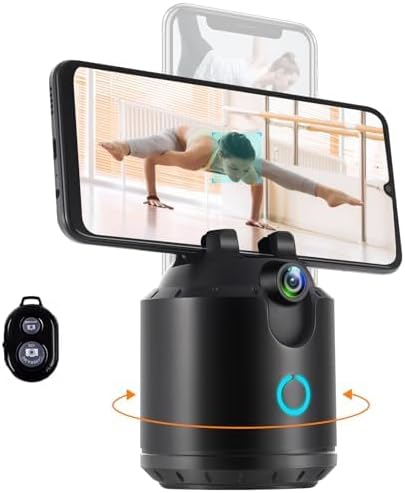
Image: The FUNTELL Smart Motion Tracking Phone Holder, a black cylindrical device with a phone clip on top, an AI camera, and a power button with a light indicator. A remote control is shown to the left.
Què hi ha a la caixa
- Face Tracking Holder
- Manual d'usuari
- Cable USB-C
- Control remot

Image: A visual representation of the package contents, showing the tracking holder, USB-C charging cable, and the user manual.
Producte acabatview
Familiarize yourself with the components of your Smart Motion Tracking Phone Holder:
- Phone Clip: Securely holds your smartphone or tablet.
- Phone Clip Control Knob: Adjusts the width of the phone clip for a secure fit.
- Càmera AI: The sensor responsible for facial and body tracking.
- Light Indicator/Power Switch: Controls power and indicates device status.
- Port USB-C: Per carregar el dispositiu.
- 1/4" Standard Thread: Located at the bottom for tripod mounting.

Image: A detailed diagram highlighting the Phone Clip Control Knob, Phone Clip, AI Camera, Light Indicator/Power Switch, and USB-C Port on the device. Dimensions are also shown.
Configuració
- Carregueu el dispositiu: Before first use, connect the provided USB-C cable to the USB-C port on the device and a power source to fully charge the internal 2800mAh battery. The light indicator will show charging status.
- Munta el teu telèfon: Adjust the Phone Clip Control Knob to widen the phone clip. Carefully insert your smartphone or tablet into the clip, ensuring it is securely held. The device accommodates phone thicknesses between 0.28-0.47 inches and supports devices with a load-bearing capacity of less than 1.1 lbs.
- Muntatge opcional de trípode: For increased stability or height, attach the device to a standard tripod using the 1/4" standard thread located on its base.
Instruccions de funcionament
Encès/Apagat
- Per encendre: Long press the Power Switch for 2 seconds. The light indicator will illuminate.
- Per apagar: Long press the Power Switch for 2 seconds. The light indicator will turn off.
Seguiment automàtic
The device features an AI camera that automatically tracks your face and body movements. No app or Bluetooth connection is required for this function.
Video: Demonstrates the FUNTELL Smart Motion Tracking Phone Holder's automatic face tracking and 360-degree rotation capabilities. It shows the device tracking a person's movement smoothly.
Control de gestos
Control tracking functions using simple hand gestures:
- Enable Tracking: Make an 'OK' gesture with your hand. The light indicator will change color to confirm.
- Pausa el seguiment: Open your palm towards the camera. The light indicator will change color to confirm.
- Pause Following in Vertical Mode: Make a 'thumbs up' gesture. The light indicator will change color to confirm.

Image: An illustration showing three hand gestures: 'OK' to enable tracking, open palm to pause tracking, and 'thumbs up' to pause following in vertical mode, each with a corresponding colored indicator.
Rotation and Angle Adjustment
- Rotació de 360°: The device automatically rotates 360 degrees horizontally to follow your movement.
- Vertical Tracking: The device also offers up to 20° upward and 20° downward tracking angles.
- Orientació de commutació: The phone clip allows for easy switching between horizontal and vertical phone orientations.

Image: Two panels showing a ballet dancer. The left panel illustrates the device tracking a dancer with a 20° downward tracking angle. The right panel shows the device tracking a dancer with a 20° upward tracking angle, demonstrating its vertical movement capabilities.
Manteniment
- Mantingueu el dispositiu net netejant-lo amb un drap suau i sec.
- Eviteu exposar el dispositiu a temperatures extremes, humitat o llum solar directa.
- No intenteu desmuntar ni reparar el dispositiu vosaltres mateixos. Poseu-vos en contacte amb el servei d'atenció al client si sorgeixen problemes.
- Guardeu el dispositiu en un lloc fresc i sec quan no l'utilitzeu.
Resolució de problemes
| Problema | Causa possible | Solució |
|---|---|---|
| El dispositiu no s'encén. | Bateria baixa. | Carregueu el dispositiu amb el cable USB-C proporcionat. |
| Tracking is inconsistent or stops. | Multiple faces/objects in view; rapid movement; insufficient lighting. | Ensure only the intended subject is in the camera's view. Maintain a steady pace. Ensure adequate lighting. |
| Phone does not fit securely in the clip. | Clip not adjusted correctly; phone/tablet too thick or heavy. | Adjust the Phone Clip Control Knob. Verify your device's dimensions and weight are within the specified limits (thickness 0.28-0.47in, weight < 1.1lbs). |
| El control gestual no respon. | Incorrect gesture; gesture performed too far from the camera. | Ensure gestures are performed clearly and within the recommended tracking range (1.64-9.84ft). |
Especificacions
- Dimensions del producte: 3.3 x 3.3 x 4.1 polzades
- Pes de l'article: 12 unces
- Número de model de l'article: 02A04-5625
- Bateria: 1 bateria de polímer de liti (inclosa), 2800 mAh
- Durada de la bateria: Over 6 hours of continuous use
- Tracking Rotation: 360 degrees (horizontal)
- Angle de seguiment vertical: 20 degrees upward, 20 degrees downward
- Phone Clip Thickness Range: 0.28 - 0.47 polzades
- Capacitat de càrrega: Menys d'1.1 lliures
- Dispositius compatibles: Telèfons mòbils
- UPC: 724190902035
- Fabricant: FUNTELL
Garantia i Suport
For warranty information or technical support, please refer to the contact details provided with your product packaging or visit the official FUNTELL weblloc. Conserveu el rebut de compra per a reclamacions de garantia.


