1. Introducció
This manual provides comprehensive instructions for the safe and efficient operation of your Walfront RF Signal Generator, Model Walfront493bt51fvu. This device is designed to generate radio frequency (RF) signals with audio modulation capabilities, covering a frequency range of 0.5MHz to 470MHz. Its compact design and robust construction make it suitable for various applications in aviation, wireless communication, automotive electronics, and manufacturing.
Please read this manual thoroughly before using the device to ensure proper setup, operation, and maintenance.
2. Informació de seguretat
Observeu les següents precaucions de seguretat per evitar lesions i danys al dispositiu:
- Assegureu-vos que la font d'alimentació voltage coincideix amb els requisits del dispositiu (12 volts).
- No utilitzeu el dispositiu en mullat o damp condicions.
- Eviteu exposar el dispositiu a temperatures extremes o a la llum solar directa.
- No intenteu obrir ni modificar el dispositiu. Envieu totes les tasques de manteniment a personal qualificat.
- Disconnect power before cleaning or when the device is not in use.
- Manipuleu el dispositiu amb cura per evitar danys físics.
3. Producte acabatview
The Walfront RF Signal Generator features a user-friendly interface with a clear display and tactile controls. Its durable ABS casing ensures longevity and resistance to environmental factors.
3.1. Disposició del panell frontal

Figura 1: Davant view of the Walfront RF Signal Generator, showing the display, keypad, RF output, and power button.

Figura 2: Primer pla view of the front panel, highlighting the LCD display, numeric keypad (0-9, F1-F4), RF OUT BNC connector, and the red power button.
- Botó d'encesa: Red button on the left for turning the device on/off.
- Connector de sortida RF: BNC connector for RF signal output.
- Pantalla LCD: Shows current frequency, modulation status, and other operational parameters.
- Teclat numèric (0-9): S'utilitza per introduir valors de freqüència.
- Tecles de funció (F1-F4): Specific functions for modulation, frequency steps, or presets (refer to display for exact function).
- Arrow Keys (∧, ∨): Per ajustar valors o navegar pels menús.
3.2. Lateral View
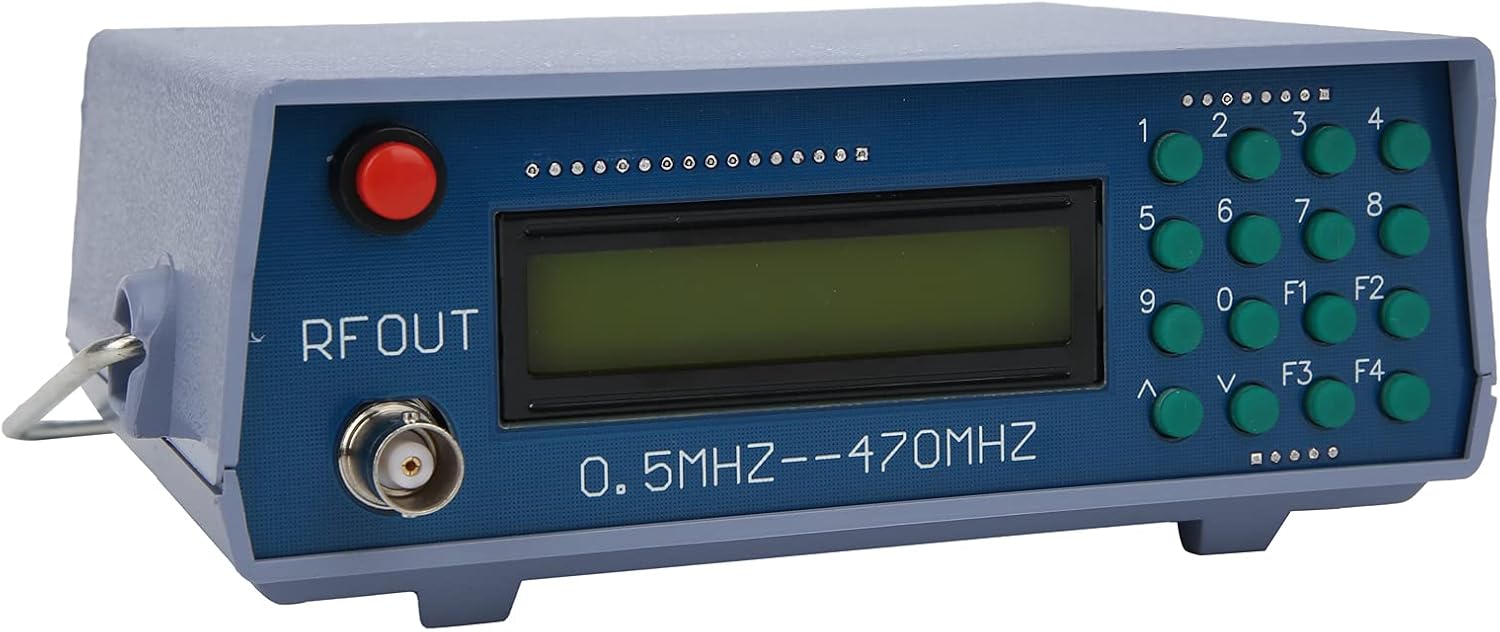
Figura 3: En angle view of the device, illustrating its compact form factor and side panel design.

Figura 4: lateral view of the RF signal generator, showing the ventilation slots and overall casinestructura g.
4. Configuració
- Desembalatge: Carefully remove the RF Signal Generator from its packaging. Inspect for any signs of damage.
- Connexió d'alimentació: Connect a 12V DC power adapter (not included) to the power input port on the rear or side of the device. Ensure the adapter's polarity is correct.
- Connexió de sortida: Connect a BNC cable (not included) to the "RF OUT" connector on the front panel. Connect the other end of the cable to your receiving device (e.g., spectrum analyzer, radio receiver).
- Encès: Press the red power button on the front panel to turn on the device. The LCD display should illuminate.
5. Instruccions de funcionament
This section outlines basic operation. Specific functions of F1-F4 keys may vary based on firmware version; observe the display for context.
- Freqüència de configuració:
- Use the numeric keypad (0-9) to enter the desired frequency. The display will show the entered digits.
- Press a function key (e.g., F1, F2) or an arrow key (∧, ∨) to confirm the entry or select the frequency unit (MHz, kHz).
- The device supports frequencies from 0.5MHz to 470MHz.
- Freqüència d'ajust:
- Use the ∧ and ∨ arrow keys to fine-tune the frequency in small increments.
- Some function keys (F1-F4) might allow for larger step adjustments or direct frequency presets.
- Audio Modulation:
- The device supports audio modulation. Look for a function key (e.g., F3 or F4) that activates or adjusts modulation settings.
- The display will indicate the modulation status (e.g., AM, FM, or audio tone frequency).
- The internal audio modulation frequency is 800Hz.
- Apagar: Press the red power button again to turn off the device.
6. Manteniment
- Neteja: Feu servir un drap suau i sec per netejar l'exterior del dispositiu. No utilitzeu netejadors líquids ni dissolvents.
- Emmagatzematge: Guardeu el dispositiu en un lloc fresc i sec, allunyat de la llum solar directa i de temperatures extremes.
- Inspecció: Periodically check cables and connectors for wear or damage.
7. Solució De Problemes
| Problema | Causa possible | Solució |
|---|---|---|
| El dispositiu no s'encén. | No power, incorrect adapter, faulty power button. | Check power adapter connection and voltage. Ensure the power outlet is functional. |
| No hi ha sortida de senyal RF. | Incorrect frequency setting, faulty BNC cable, receiving device issue. | Verify frequency setting on the display. Check BNC cable for proper connection and integrity. Ensure the receiving device is correctly configured. |
| La pantalla està en blanc o il·legible. | Problema d'alimentació, fallada interna. | Cycle power. If the problem persists, contact customer support. |
8. Especificacions
| Marca | Walfront |
| Model | Walfront493bt51fvu |
| Número de part | Walfront493bt51fvu |
| Interval de freqüència | 0.5 MHz - 470 MHz |
| Audio Modulation Frequency | 800 Hz |
| Voltage | 12 Volts |
| CasinMaterial de g | ABS |
| Dimensions del paquet | 20 x 14.3 x 10.7 cm |
| Pes | 350 g |
| Piles incloses | No |
| Funciona amb piles | No |
| ASIN | B0BPSCC6ND |
9. Garantia i Suport
Walfront products are manufactured to high-quality standards. For warranty information, technical support, or service inquiries, please refer to the documentation included with your purchase or contact your retailer. Keep your purchase receipt as proof of purchase.
Per obtenir més ajuda, podeu visitar la botiga Walfront a Amazon: Botiga Walfront
