Manual d'usuari de l'extensor HDMI 4K sobre Ethernet OREI UHD-EX230PRO-KVM amb funcionalitat KVM
Brand: OREI | Model: UHD-EX230PRO-KVM
Introducció
The OREI UHD-EX230PRO-KVM is a high-performance HDMI over Ethernet extender designed to transmit 4K@60Hz video signals, along with USB KVM functionality, over a single Cat6/7 LAN cable. This manual provides detailed instructions for the proper installation, operation, and maintenance of your device, ensuring optimal performance and longevity.
Característiques clau
4K@60Hz HDMI Extension: Transmits 4K@60Hz video signals up to 70 meters (230 feet) over a single Cat6/7 LAN cable, ensuring lossless, low-latency, and lag-free transmission.
HDMI 2.0b & HDCP 2.2 Compliant: Supports various resolutions including 4K@60Hz, 4K@30Hz, 1080p, and is compatible with HDR, HDR10, HDR10+, Dolby Vision, and HLG.
USB KVM Extension: Allows remote control of a PC using a keyboard and mouse connected to the receiver unit.
HDMI Loop-Out: The transmitter unit features an HDMI loop-out port for connecting a local display, maintaining full HDCP compliance.
Sortida d'àudio estèreo de 3.5 mm: Extract audio to analog speakers or headphones at the receiver end.
Pass-Through EDID: Ensures seamless resolution compatibility between the source and display devices.
Power Over Cable (POC): Requires only one power adapter (included) to power both the transmitter and receiver units, simplifying installation.
Què hi ha a la caixa
1x HDMI Sender Unit
1x HDMI Receiver Unit
1x adaptador de corrent
1x USB-A to USB-B Cable (1.5 meters)
1 x manual d'instruccions
Note: HDMI cables are not included and must be purchased separately.
Producte acabatview
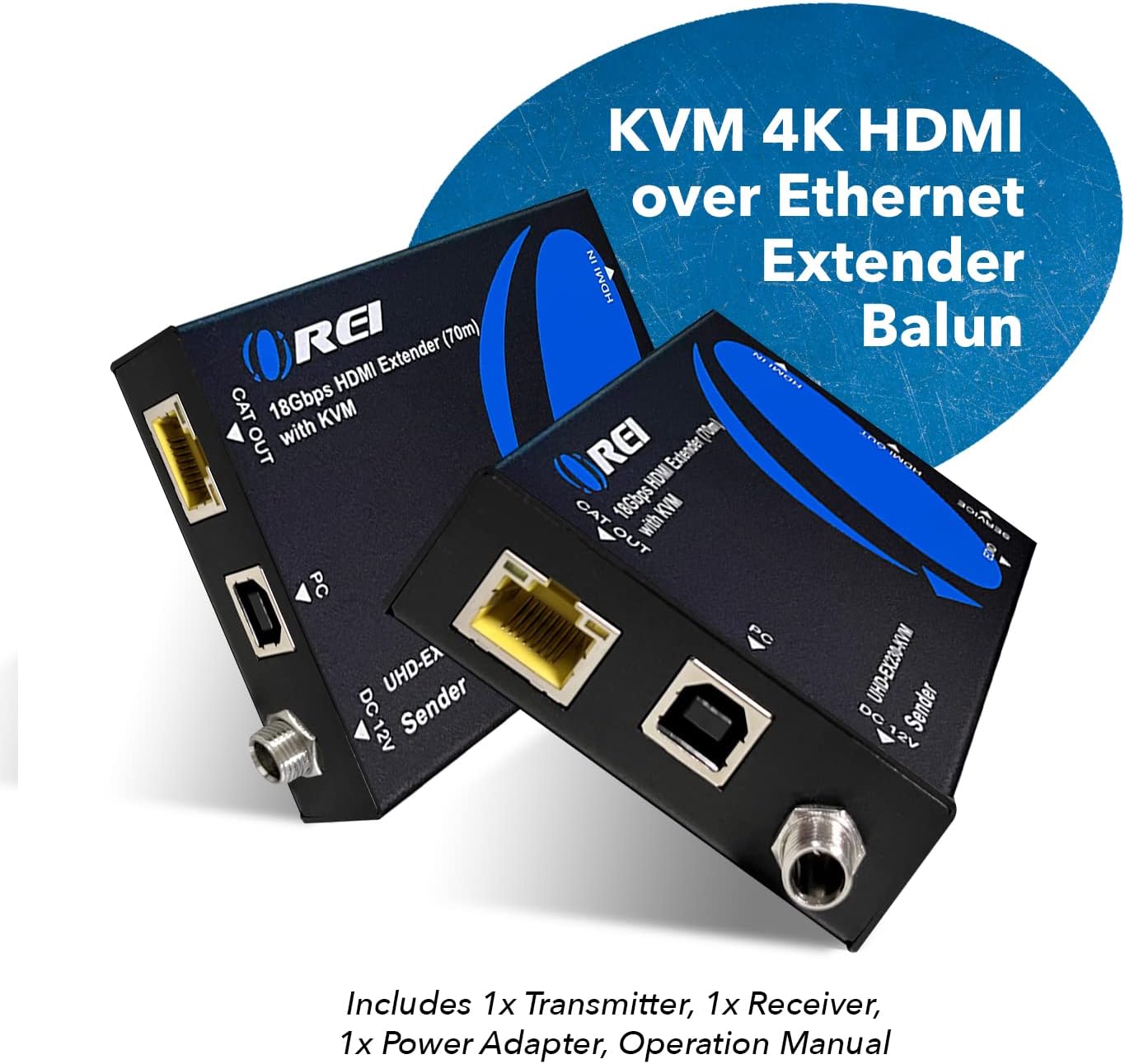
Figure 1: OREI UHD-EX230PRO-KVM Sender and Receiver Units. The sender unit (left) and receiver unit (right) are compact black metal enclosures with blue OREI branding. They feature various ports for HDMI, USB, Ethernet, and power connections.
Figure 2: OREI UHD-EX230PRO-KVM with included accessories. This image displays the sender and receiver units along with the power adapter, USB cable, and instruction manual, highlighting the complete package.
Sender Unit (Transmitter)
Entrada HDMI: Connects to your HDMI source device (e.g., PC, gaming console, Blu-ray player).
HDMI Out (Loop-Out): Connects to a local display for monitoring the source signal.
CAT Out: Connects to the receiver unit via a Cat6/7 Ethernet cable.
PC (USB-B): Connects to the USB port of your PC for KVM functionality.
CC 12V: Port d'entrada d'alimentació.
Servei: Micro USB port for firmware updates.
EDID Switches: DIP switches to adjust EDID settings for optimal display compatibility.
Unitat receptora
CAT In: Connects to the sender unit via a Cat6/7 Ethernet cable.
Sortida HDMI: Connects to your remote display.
USB-A (KVM): Two USB-A ports for connecting a keyboard and mouse.
Sortida L/R: 3.5mm stereo audio output for external speakers or headphones.
CC 12V: Power input port (can be powered via POC from sender).
Servei: Micro USB port for firmware updates.
Instruccions de configuració
Follow these steps to set up your OREI UHD-EX230PRO-KVM extender:
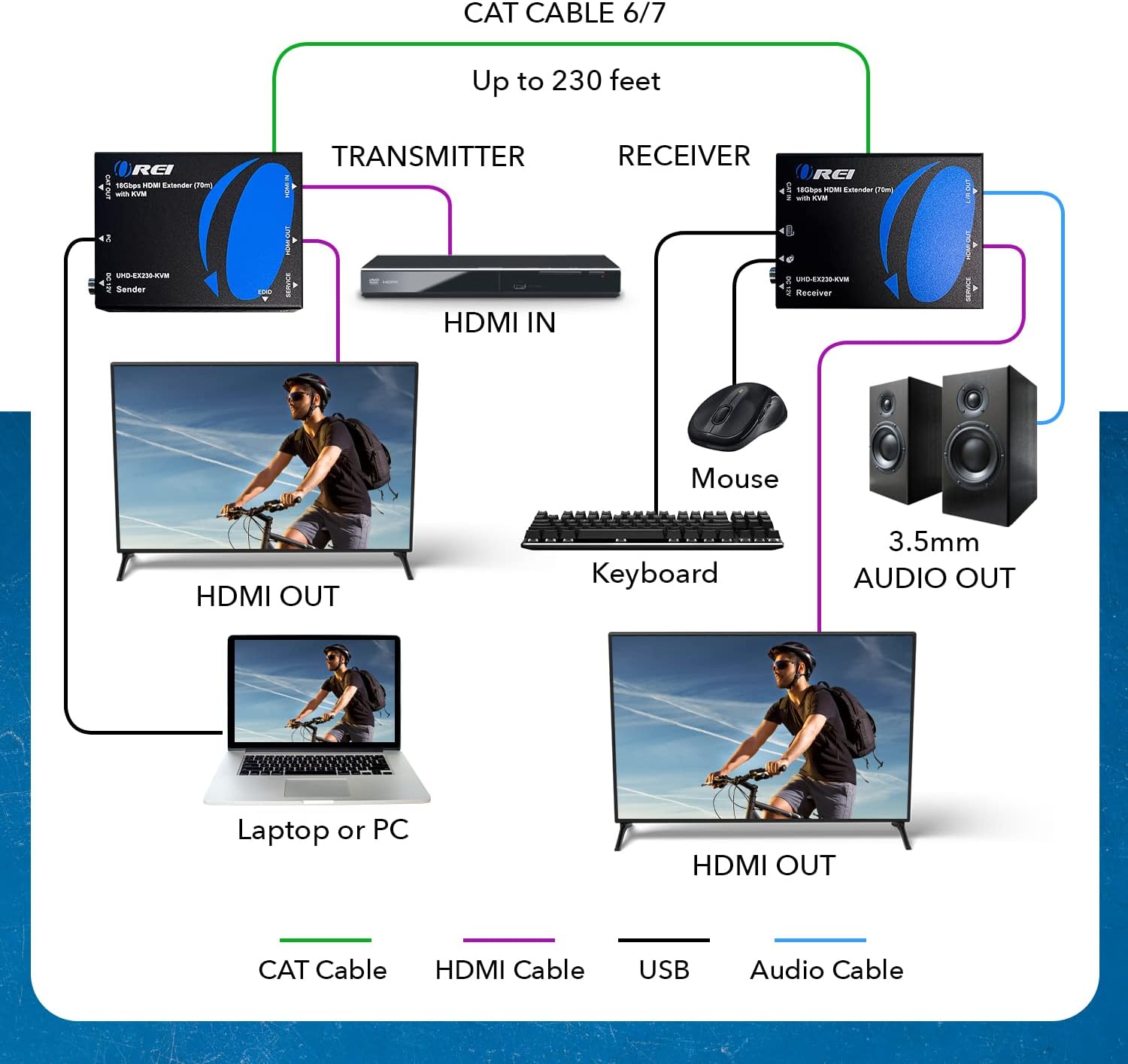
Connect HDMI Source to Sender: Use an HDMI cable to connect your HDMI source device (e.g., PC, DVD/Blu-ray player, gaming console) to the Entrada HDMI port on the sender unit.
(Optional) Connect Local Display: If you wish to monitor the source signal locally, connect an HDMI cable from the HDMI Out (Loop-Out) port on the sender unit to your local display.
Connect PC for KVM (Sender): Use the included USB-A to USB-B cable to connect the PC port (USB-B) on the sender unit to a USB port on your computer.
Connect Sender to Receiver: Use a single high-quality Cat6 or Cat7 Ethernet cable (up to 70 meters / 230 feet) to connect the CAT fora port on the sender unit to the CAT En port on the receiver unit.
Connect Remote Display to Receiver: Use an HDMI cable to connect your remote display to the Sortida HDMI port on the receiver unit.
Connect KVM Peripherals (Receiver): Connect your USB keyboard and USB mouse to the USB-A (KVM) ports on the receiver unit.
(Optional) Connect Audio Output (Receiver): If desired, connect external speakers or headphones to the L/R Fora (3.5mm stereo audio) port on the receiver unit.
Aplicar potència: Connect the included 12V DC power adapter to either the DC 12V port on the sender unit or the receiver unit. Due to Power Over Cable (POC) functionality, only one power adapter is required for the entire system.
Figure 3: OREI UHD-EX230PRO-KVM Connection Diagram. This diagram illustrates the connections between the transmitter, receiver, HDMI source, local display, remote display, keyboard, mouse, and audio output.
Figure 4: Easy Plug & Play Setup. A visual representation of the simple connections required for the OREI UHD-EX230PRO-KVM, showing a desktop PC connected to the sender, and a remote display with keyboard, mouse, and speakers connected to the receiver.
Instruccions de funcionament
Funcionament bàsic
Once all connections are made and power is supplied, the extender units will automatically establish a connection. The video and audio from your HDMI source will be transmitted to the remote display. The HDMI loop-out on the sender unit will simultaneously display the content on the local monitor.
Funcionalitat de KVM
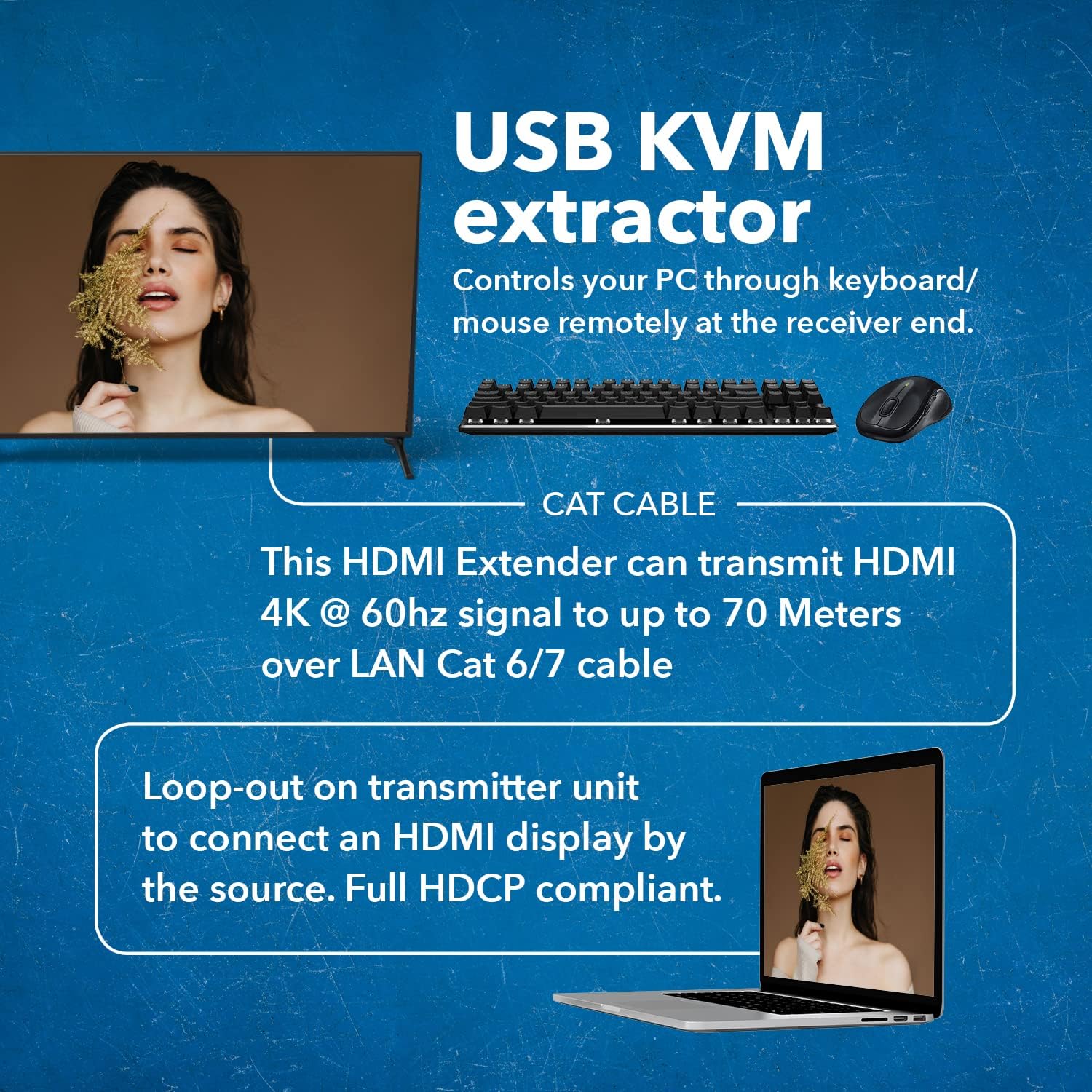
To utilize the KVM feature, ensure your PC is connected to the sender unit's PC port via the USB cable. Connect your keyboard and mouse to the USB-A (KVM) ports on the receiver unit. You can now control your PC remotely from the location of your receiver unit.
Figure 5: USB KVM Extractor Feature. This image highlights the KVM functionality, showing a keyboard and mouse connected to the receiver unit for remote PC control.
Extracció d'àudio
The receiver unit can extract the stereo audio from the HDMI signal. Connect your analog speakers or headphones to the L/R Fora (3.5mm) port on the receiver unit to enjoy the extracted audio.
Figure 6: 3.5mm Stereo Audio Out. A user enjoying audio through headphones connected to the receiver unit, demonstrating the audio extraction feature.
Gestió EDID
The sender unit features EDID DIP switches. Refer to the detailed instructions in the included manual for proper configuration of these switches to ensure optimal resolution and display compatibility with your specific setup.
Video 1: OREI Direct's overview of the 4K HDMI over Ethernet Extender with KVM PC Control. This video demonstrates the product's features and setup, including KVM functionality.
Especificacions tècniques
Marca
OREI
Nom del model
EX-230PRO-KVM
Tipus de connector
HDMI, USB Type A
Tipus de cable
Ethernet (Cat 6/7 recommended)
Dispositius compatibles
DVD/Blu-ray Player, Gaming Console, Laptop, Projector, Television
Figure 7: OREI UHD-EX230PRO-KVM Dimensions. This image provides a visual representation of the compact size and dimensions of the extender units.
Resolució de problemes
Sense imatge/senyal:
Ensure all HDMI and Ethernet cables are securely connected.
Verify that the power adapter is correctly connected and providing power to one of the units.
Check the resolution settings of your source device and display. Try adjusting the EDID switches on the sender unit if necessary.
Test with shorter or different Cat6/7 cables to rule out cable issues.
KVM (Keyboard/Mouse) Not Working:
Ensure the USB-A to USB-B cable is connected from your PC to the sender unit.
Verify that the keyboard and mouse are connected to the correct USB-A ports on the receiver unit.
Try connecting the keyboard and mouse directly to the PC to confirm they are functional.
Some specialized keyboards/mice may not be fully compatible. Try a standard keyboard/mouse.
Problemes d'àudio:
Check the audio settings on your source device.
Ensure your speakers/headphones are properly connected to the 3.5mm audio output on the receiver.
Verify the volume levels on both your source and audio output devices.
Garantia i Suport
The OREI UHD-EX230PRO-KVM is backed by a 1 any de garantia completa. For technical assistance or warranty claims, please contact OREI customer support. Our expert team is available to provide lifetime local support for your product.
Per obtenir més ajuda, visiteu el OREI Store on Amazon o consulteu la informació de contacte que trobareu a l'embalatge del producte.
Documents relacionats - UHD-EX230PRO-KVM
Extensor HDMI OREI UHD-EX230-KVM de 18 Gbps (70 m) amb manual d'usuari de KVM Manual d'usuari de l'OREI UHD-EX230-KVM, un extensor HDMI de 18 Gbps amb funcionalitat KVM, que admet una resolució 4K a 60 Hz de fins a 70 metres sobre un únic cable CAT6/6a. Les característiques inclouen còpia EDID, POC i pas a través de KVM USB per al control remot.
Manual d'usuari de l'extensor HDMI OREI UHD-EXB350EAU-K 4K HDBaseT 3.0 Comprehensive user manual for the OREI UHD-EXB350EAU-K, a 4K HDBaseT 3.0 HDMI Extender supporting Loop-out, USB KVM, eARC, and LAN up to 400ft over Cat6. Features include detailed specifications, operation controls, and application examples.
OREI X4UH-KVM: Manual d'usuari de l'extensor HDMI 4K i AV sobre IP User manual for the OREI X4UH-KVM, a versatile 4K HDMI extender and AV-over-IP solution with KVM support, featuring long-distance transmission, HDCP 2.2 compliance, and flexible control options for professional AV environments.
Manual d'usuari de l'extensor divisor HDMI 1x8 OREI ipcolor 4K HDR Cat6 de més de 70 metres Aquest manual d'usuari proporciona informació detallada sobre l'extensor divisor HDMI 1x8 OREI ipcolor 4K HDR, incloent-hi les característiques, les especificacions, la configuració de les funcions i els diagrames de connexió. Admet transmissió de latència zero, resolució de fins a 4K a 60 Hz i distàncies de transmissió de fins a 70 metres sobre cables Cat6/6A/7.